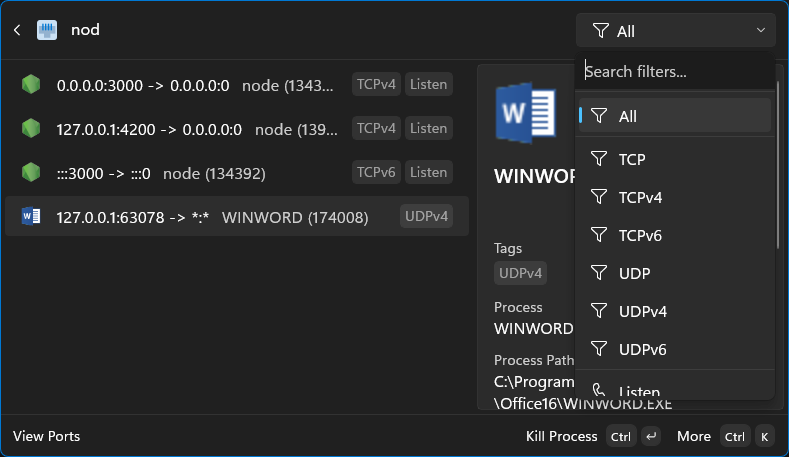
PortForCommandPalette is a command palette extension designed to monitor active network connections on Windows. It offers users real-time insights into their system's network activity through several key features.
Key Features:
Port Monitoring: Lists all active TCP and UDP ports, including IPv4 and IPv6 connections.
Intelligent Polling: Automatically refreshes when visible and pauses to conserve resources when unfocused or hidden.
Process Correlation: Maps network connections to their owning processes, displaying process name and file path.
Optimized Performance: Uses efficient P/Invoke calls and caching for fast, responsive operation.
Advanced Search: Features hybrid search (fuzzy matching for names, substring for addresses/ports) with customizable filters.
Audience & Benefit:
Ideal for users who want to gain insight into their system's network activity, including system administrators and developers. The extension allows efficient management of connections and immediate action when needed.
PortForCommandPalette can be installed via winget, offering a seamless integration experience without the need for additional downloads or links.
This extension provides a professional and benefit-focused tool for managing network connections effectively on Windows systems.
README
Port for Command Palette
Overview
This project provides a command palette extension for monitoring active network connections on Windows.
Features
Port Monitoring: Lists all active TCP and UDP ports (IPv4 and IPv6).
Intelligent Polling: Automatically refreshes connection status when the page is visible and pauses when unfocused or hidden to conserve system resources.
Process Correlation: Automatically maps network connections to their owning processes, including process name and file path.
Optimized for Performance: Designed to remain fast and responsive, with efficient P/Invoke calls, process name caching, and list item caching.
Advanced Search:
Hybrid Search: Uses fuzzy matching for process names and precise substring matching for IP addresses and ports.
Customizable Filters: Choose exactly which fields to search (Process Name, Local/Remote Address, Local/Remote Port) via settings.
Secondary Actions: Access additional commands for each connection:
Kill Process: Terminate the process associated with a specific port.
Open File Location: Opens the location of the process executable in File Explorer.
Refresh: Manually reloads the list of active ports.
This extension utilizes native Windows APIs to discover active network endpoints:
IP Helper API: Uses GetExtendedTcpTable and GetExtendedUdpTable from iphlpapi.dll to retrieve the current state of the network stack.
Stable Identifiers: Generates unique IDs based on the Protocol, Local Address, and Local Port. This ensures that pinning works consistently across process restarts or even if a different application starts on the same port.
Process Enumeration: Resolves Process IDs (PIDs) to human-readable names and file paths, with an internal cache to minimize overhead.
The results are presented as a dynamic list in the Command Palette, allowing for instant filtering and management of your system's network activity.
For more detailed technical information about the project's architecture and components, please see the Project Guide.
Changelog
1.1.0.0
Search: Implemented hybrid search (fuzzy for names, substring for addresses/ports) for better accuracy.
Settings: Added toggles to enable/disable searching on specific fields (Process Name, Ports, Addresses).
Performance: Added intelligent polling that starts/stops based on page visibility.
Performance: Optimized process name resolution with caching to reduce CPU usage.