Use this command to install Pinny Notes with WinGet:
winget install --id=63BeetleSmurf.PinnyNotes -e
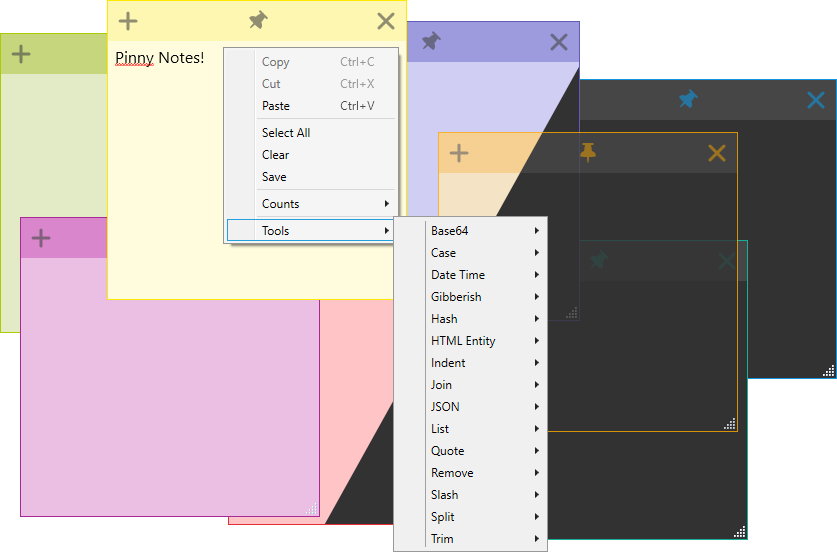
Pinny Notes is a sticky note application designed to allow users to keep notes always visible by pinning them above other windows. This versatile tool provides a simple yet effective way to manage notes while ensuring they remain accessible at all times.
Key Features:
Always on Top: Pin notes to ensure they stay visible and accessible, even when other applications are in use.
Auto Save: Notes are automatically saved, eliminating the need for manual saving.
Block Minimizing: Prevent notes from being minimized, ensuring they remain visible even with shortcuts like Show Desktop.
Color Customization: Choose from multiple colors or have new notes cycle through them automatically for better organization and visual appeal.
Dark Mode: Enjoy a dark theme with color-matched accents to reduce eye strain in low-light conditions.
Transparency Adjustments: Make notes semi-transparent so content behind them can still be seen, offering flexibility in how you use the application.
Audience & Benefit:
Ideal for users who need quick and constant access to notes without distractions. Pinny Notes helps maintain productivity by keeping important information front and center while supporting customization for personal preference. It can be installed via winget for easy setup on Windows systems.
README
Pinny Notes
📢 About
Pinny Notes is a versatile sticky note application that lets you "pin" notes, keeping them always on top of other windows. It also offers a variety of handy tools accessible via right-click menus.
🚀 Features
Pin / Always on Top: Keep notes visible above all other windows.
Auto Save: Automatically saves notes.
Block Minimizing: Prevent notes from being minimized, even with the Show Desktop button.
Colours: Choose from multiple colours or have new notes cycle through them automatically.
Dark Mode: Dark theme with colour-matched accents.
Transparency: Make notes semi-transparent so content behind them can still be seen.
Start Position: Set where on the screen your notes will open.
Advanced Copy/Paste Actions
Copy/Paste Trim: Automatically trim whitespace when copying or pasting.
Middle Click Paste: Quickly paste clipboard contents with a middle-click.
Copy on Click: Hold Ctrl and click to copy selected text.
Auto Copy: Automatically copy text when highlighted.
No Selection Copy Behaviour: Choose whether to copy the current line, full note, or nothing when no text is selected.
Advanced Selection:
Triple-click: Select current line.
Quadruple-click: Select the full line ignoring wrapping.
Indent Text: Indent selected text by pressing the tab key.
Auto Indent: Indent new lines to match the previous line.
Ends with New Line: Ensures notes always end with a newline.
Auto Scroll: Automatically scroll to keep the last line visible, making it easy when pasting text.
Spell Checking: Integrated spell checker.
Counts Menu: View line, word, and character counts for selected or full text.
Tray Icon: Easily bring all notes to the front or launch new notes from the system tray.
Note Visibility: Show or hide note windows from the Taskbar and Task Switcher (Alt+Tab and Win+Tab)
Lock Text: Make a note read only preventing the text from being edited until unlocked.
🛠️ Tools
Base64: Encode/decode Base64 text.
Bracket: Add/remove parentheses, square or curly brackets.
Case: Convert to lower, upper, or proper case.
Colour: Convert RGB to and from HEX values.
DateTime: Get current or convert a dat eto a sortable format or the week number of the year.
Gibberish: Generate gibberish words, sentences, paragraphs, articles, and names.
GUID: Generate GUID/UUID's.
Hash: Generate MD5, SHA1, SHA256/384/512 hashes.
HTML Entities: Encode/decode HTML entities.
Indent: Indent all lines using 2/4 spaces or tabs.
Join: Join multiple lines using commas, spaces, or tabs.
JSON: Prettify JSON data.
List: Add numbering or bullets (dash), sort lines, or remove list markers.
Quote: Add or remove single, double, or backtick quotes.
Remove: Strip whitespace, slashes, or repeated text.
Slash: Toggle or remove forward/back slashes.
Split: Split text by commas, tabs, spaces, or selected patterns.
Trim: Remove line-leading/trailing whitespace or blank lines.
Download the latest .zip file from the Releases page.
Extract it and run Pinny Notes.exe.
> ⚠️ Linux Support Notice
>
> A Linux version has been requested, but one is not planned. Pinny Notes is built using WPF, which is Windows-only. Even with a cross-platform framework, modern Linux desktops using Wayland do not allow applications to reliably set window positions or enforce “always on top” behaviour, both of which are core features of Pinny Notes.
❤️ Support Development
Pinny Notes is developed in my spare time. If you find it helpful, please consider donating or sponsoring;