AgentClash
Open-source AI-agent evaluation for real tasks. AgentClash helps teams find where agents break, replay the evidence, score the outcome, and turn failures into regression gates before release.
Website | Docs | Quickstart | Challenge Packs | CI Gates | Changelog


Community: Website · Discussions · @AgentClashDev
AgentClash is built for teams shipping agents, not leaderboard demos. It runs agents against the same workload with the same tools and constraints, then preserves the transcript, artifacts, replay, scorecard, and failure taxonomy that explain why an agent passed or failed.

Two words you'll see everywhere:
- Challenge pack. A YAML file that describes a task and how to score it — prompt, tools, sandbox, input cases, and validators.
- Replay. The step-by-step recording of what an agent did during a run — every model call, tool call, sandbox command, and artifact.
Try in 60 seconds
No clone, no local backend — run the CLI straight from npm against the hosted API:
npx agentclash@latest auth login --device
npx agentclash@latest link
npx agentclash@latest doctor
Released binaries default to the hosted API (https://api.agentclash.dev). Once a
workspace has a challenge pack and a deployment, start a real eval:
npx agentclash@latest eval start --follow
Prefer the browser? Use the interactive terminal at
agentclash.dev/try — see docs/deployment/try-cli.md.
Why AgentClash
- Apples-to-apples by construction. Candidates share one workload, toolset,
sandbox, and budget, so the difference you measure is the agent — not the setup.
- Evidence, not just a number. Each run preserves the transcript, model and
tool calls, sandbox commands, artifacts, replay, scorecard, and failure taxonomy.
- Regression gates, not one-off scores. Promote escaped failures into permanent
checks and fail CI when an agent regresses.
- Real agents in real sandboxes. Run Claude Code, Codex, and other harnesses as
first-class candidates.
- Open source and self-hostable. MIT-licensed, and it runs locally with zero API keys.
Start Here
Quickstart
Install the CLI and connect a workspace:
npm i -g agentclash

export AGENTCLASH_API_URL="https://api.agentclash.dev"
agentclash auth login --device
agentclash link
agentclash doctor
Released npm binaries default to the hosted API. Keep the AGENTCLASH_API_URL export when you want to be explicit or switch between hosted and self-hosted environments.
If the workspace already has challenge packs and deployments, start an eval:
agentclash eval start --follow
agentclash eval scorecard
If the workspace is empty, scaffold and publish a pack first:
agentclash challenge-pack init support-eval.yaml
agentclash challenge-pack validate support-eval.yaml
agentclash challenge-pack publish support-eval.yaml
agentclash eval start --pack support-eval --follow
Or start from a ready-made pack in examples/challenge-packs/ (12 included):
agentclash challenge-pack validate examples/challenge-packs/fibonacci-e2e-showcase.yaml
For a specific completed run, use the run-first scorecard command:
agentclash eval scorecard --agent
agentclash run scorecard is lower-level and expects a run-agent ID. Use agentclash run agents when you need that ID directly.
What You Can Evaluate
- Challenge packs package prompts, tools, sandboxes, input sets, validators, judges, expected artifacts, and scoring rules. Start with the challenge pack reference.
- Replay and scorecards preserve the full trajectory: model calls, tool calls, sandbox commands, artifacts, verdicts, latency, cost, and failure evidence. See interpreting results.
- Regression suites promote escaped failures into permanent checks so the same mistake is tested before future releases.
- Datasets import or curate pinned examples, run real agent evals, record baselines, sync regression suites, and gate CI. See datasets overview.
- Multi-turn packs support scripted, LLM-driven, and human user simulators with takeover commands for operator input. See multi-turn packs.
- Security evals test prompt injection, secret hygiene, and sandbox or vault boundaries without copying real secrets into docs. See security evaluation.
- Agent harnesses run external coding agents such as Claude Code, Codex, OpenClaw, and Hermes as first-class eval candidates in sandboxes.
CI And Release Gates
AgentClash can compare a candidate run against a baseline and fail CI when the candidate regresses.
agentclash ci init .agentclash/ci.yaml
agentclash ci validate .agentclash/ci.yaml --remote
agentclash ci run \
  --manifest .agentclash/ci.yaml \
  --json \
  --artifact-dir agentclash-artifacts
Use the bundled GitHub Action when you want PR comments and uploaded artifacts:
- id: agentclash
  uses: agentclash/agentclash/.github/actions/agentclash-ci@main
  with:
    manifest: .agentclash/ci.yaml
    token: ${{ secrets.AGENTCLASH_TOKEN }}
    workspace: ${{ secrets.AGENTCLASH_WORKSPACE }}
AGENTCLASH_TOKEN is the automation token used by CI. AGENTCLASH_WORKSPACE is the workspace ID that should own the run and artifacts. For local CLI sessions, agentclash link can save the workspace; CI should pass both values explicitly through repository or organization secrets.
API URL resolution order is:
--api-url > AGENTCLASH_API_URL > saved user config > default
Manifest gates, dataset gates, and release-gate policies are covered in CI/CD agent gates and dataset CI gates.
Agent Skills
AgentClash ships Agent Skills that teach coding agents how to use the CLI, read scorecards, author packs, and gate releases.
Install first-class integration skills with the CLI:
agentclash integration claude install
agentclash integration codex install
agentclash integration cursor install
agentclash integration claude doctor
Supported CLI integration hosts are claude, codex, cursor, openclaw, hermes, and opencode. GitHub CLI skill bundles for additional hosts are documented in Use with AI tools.
Local Development
AgentClash is a monorepo:
backend/ - Go API server and Temporal worker.cli/ - Go CLI module published through the agentclash npm package.web/ - Next.js marketing, app, and docs site.
Run CLI checks from cli/:
cd cli
go build ./...
go vet ./...
go test -short -race -count=1 ./...
For the full stack, start with self-host, local API development, and the repo-specific guidance in AGENTS.md.
Contributing
New contributors are welcome — and most contributions don't need the backend.
Docs and web work need only Node + pnpm; CLI work needs only Go against the hosted
API. See CONTRIBUTING.md for the tiered setup, or
open it in Codespaces for a
ready-to-code environment.
Looking for a first task? Check the
good first issue
label.
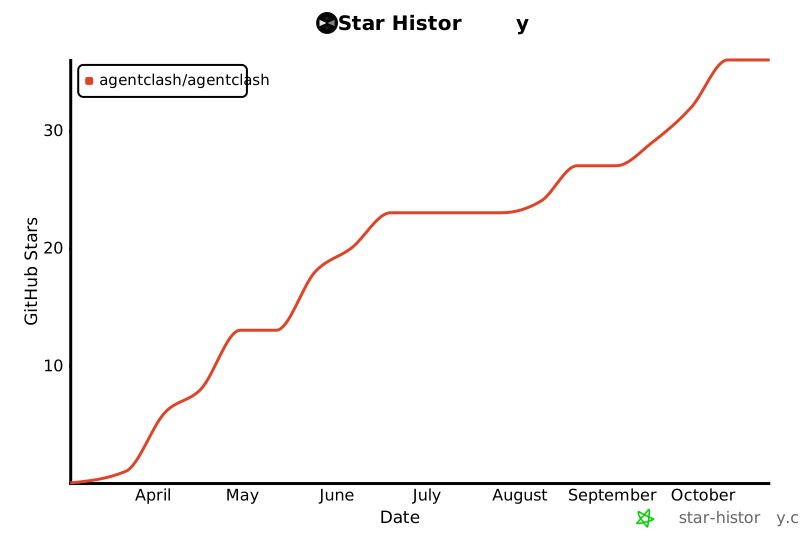
Star AgentClash
If AgentClash is useful to you, please ⭐ the repo — it helps other teams find it.
Contributors
Thanks to everyone who has contributed! ✨ See the
contributors graph
for the full list.
Project
AgentClash is released under the MIT License.