DingTalk Workspace CLI (dws)
dws — DingTalk Workspace on the command line, built for humans and AI agents.





中文版 · English · Reference · Changelog
> [!IMPORTANT]
> Co-creation Phase: This project accesses DingTalk enterprise data and requires enterprise admin authorization. Join the DingTalk DWS co-creation group for support and updates. See Getting Started below.
>
> 
Table of Contents
Why dws?
- For humans —
--help for usage, --dry-run to preview requests, -f table/json/raw for output formats.
- For AI agents — structured JSON responses + built-in Agent Skills, ready out of the box.
- For enterprise admins — zero-trust architecture: OAuth device-flow auth + domain allowlisting + least-privilege scoping. Not a single byte can bypass authentication and audit.
Installation
macOS / Linux:
curl -fsSL https://raw.githubusercontent.com/DingTalk-Real-AI/dingtalk-workspace-cli/main/scripts/install.sh | sh
> Linux binaries are linked against glibc (baseline 2.17). musl-based distributions such as Alpine are not supported; the installer detects them and stops instead of installing a binary that cannot start.
Windows (PowerShell):
irm https://raw.githubusercontent.com/DingTalk-Real-AI/dingtalk-workspace-cli/main/scripts/install.ps1 | iex
Skill mode: mono vs multi
The installer ships skills in one of two layouts. CLI commands (dws aitable ..., dws calendar ...) are identical in both modes — only the agent-side skill layout differs.
| Mode | What gets installed | Best for |
|---|
| multi (default) | Per-product skills (dingtalk-aitable, dingtalk-calendar, dingtalk-chat, ...) | Single-product tasks; smaller context per call |
| mono (legacy) | One dws skill covering all products | Cross-product workflows; single entry point |
> Installs and upgrades default to multi. mono remains available via DWS_SKILL_MODE=mono or dws skill setup --mode mono. File issues if you hit problems.
How to pick:
- Quick install (one-liner above): non-interactive, installs
multi.
- TTY install (download then run):
curl -O .../install.sh && bash install.sh — prompts 1) multi 2) mono (default 1).
- Override via env:
curl -fsSL ... | DWS_SKILL_MODE=mono sh.
- Switch later:
dws skill setup --mode mono (or --mode multi) — review the listed paths and confirm interactively.
Other install methods
npm (requires Node.js (npm/npx)):
npm install -g dingtalk-workspace-cli
Install the latest beta:
npm install -g dingtalk-workspace-cli@beta
Homebrew (macOS / Linux):
brew tap DingTalk-Real-AI/dingtalk-workspace-cli https://github.com/DingTalk-Real-AI/dingtalk-workspace-cli.git
brew install dingtalk-workspace-cli
> The Formula lives in this repository, so the first tap command must include the explicit repository URL. Afterwards, use brew upgrade dingtalk-workspace-cli normally.
Install the keg-only Homebrew beta without replacing the stable Formula:
brew install dingtalk-workspace-cli-beta
$(brew --prefix dingtalk-workspace-cli-beta)/bin/dws version
To make the beta dws the default for the current shell, prepend $(brew --prefix dingtalk-workspace-cli-beta)/bin to PATH.
Pre-built binary: download from GitHub Releases.
> macOS users: If you see "cannot be opened because Apple cannot check it for malicious software", run:
> bash > xattr -d com.apple.quarantine /path/to/dws >
Build from source:
git clone https://github.com/DingTalk-Real-AI/dingtalk-workspace-cli.git
cd dingtalk-workspace-cli
go build -o dws ./cmd       # build to current directory
cp dws ~/.local/bin/         # install to PATH
Static endpoint data is generated from the Wukong baseline and committed in this
repository under internal/syncdata, so source builds do not require a sibling
data checkout.
> Requires Go 1.26+. On supported macOS, Linux, and Windows amd64/arm64 hosts,
> the default CGO build includes the SafeChat backend without a build tag and
> therefore requires a working C compiler. Set CGO_ENABLED=0 only when a stub
> build is intentional. Use make package with Docker to build all six release
> targets through the repository's pinned cross-compilation toolchain.
OpenHarmony build
The repository supports an openharmony/arm64 build with a Go 1.26.7
OpenHarmony toolchain. Every beta and stable release builds, self-signs,
verifies, and publishes dws-openharmony-arm64.tar.gz alongside the six
platform archives, and the binary has been validated on a HarmonyOS PC.
OHOS_GO=/path/to/openharmony-go \
  DWS_PACKAGE_VERSION=1.2.3 \
  ./scripts/dev/build-openharmony.sh

# Or create a self-signed package archive (dws-openharmony-arm64.tar.gz):
OHOS_GO=/path/to/openharmony-go \
  DWS_PACKAGE_VERSION=1.2.3 \
  ./scripts/dev/package-openharmony.sh
The build is CGO_ENABLED=0 and therefore keeps SafeChat unavailable. Runtime
native payloads are also unsupported on OpenHarmony. The script verifies the
resulting static AArch64 ELF and its Go build metadata; see
docs/openharmony.md for the complete boundary.
China mirror
For users in mainland China, the following channels avoid GitHub network issues. By default (without setting these environment variables) the installer pulls from GitHub.
1. Install script + pre-built binary (Gitee mirror):
Repository mirror: https://gitee.com/DingTalk-Real-AI/dingtalk-workspace-cli
curl -fsSL https://gitee.com/DingTalk-Real-AI/dingtalk-workspace-cli/raw/main/scripts/install.sh | DWS_GITEE_REPO=DingTalk-Real-AI/dingtalk-workspace-cli sh
> With DWS_GITEE_REPO set, the installer resolves the latest version and every release asset (binary, checksums, skills) from the Gitee API instead of GitHub. If it is unset, installation defaults to GitHub.
2. npm package (npmmirror mirror):
npm install -g dingtalk-workspace-cli --registry=https://registry.npmmirror.com
> npmmirror automatically syncs public packages from the public npm registry, so this works directly in China.
3. Skills only (Gitee mirror):
curl -fsSL https://gitee.com/DingTalk-Real-AI/dingtalk-workspace-cli/raw/main/scripts/install-skills.sh | DWS_GITEE_REPO=DingTalk-Real-AI/dingtalk-workspace-cli sh
> With DWS_GITEE_REPO set, install-skills.sh resolves the version and skills package from Gitee; it also auto-falls back to the Gitee mirror when GitHub is unreachable.
Upgrade
> Requires v1.0.7 or later. For earlier versions, please re-run the install script to upgrade.
DWS 默认通过 npm Registry 查询发行版本。官方开源版独立二进制从同版本 GitHub Release 下载当前平台归档和技能包,校验后自更新,无需安装 npm;npm、pnpm 和 Homebrew 安装交由对应包管理器升级。详见版本来源与升级方式。
dws upgrade                    # interactive upgrade to latest version
dws upgrade --check            # check for new versions without installing
dws upgrade --list             # list stable release versions
dws upgrade --beta             # upgrade to the latest beta pre-release
dws upgrade --check --beta     # check the beta track without installing
dws upgrade --list --beta      # list beta pre-release versions
dws upgrade --version v1.0.7   # upgrade to a specific version
dws upgrade --version v1.0.8-beta.1  # upgrade to a specific beta version
dws upgrade --rollback         # rollback to the previous version
dws upgrade -y                 # skip confirmation prompt
dws upgrade 默认选择正式渠道;--beta 选择 npm 的 beta 渠道。显式配置的 GitHub 升级来源仍使用原有协议。
auth status、version 和 --version 也会显示版本检查结果;未知命令或参数报错时,发现新版会提示升级。检查不会自动安装软件,详见版本检查与升级提示。
Six-channel post-release verification
Maintainers and release validators can run the release-quality smoke checks for curl, PowerShell, npm stable, npm beta, Homebrew, and dws upgrade:
git clone https://github.com/DingTalk-Real-AI/dingtalk-workspace-cli.git /tmp/dws-verify
cd /tmp/dws-verify/verify
bash verify-all-channels.sh
The verifier uses isolated directories and does not replace the dws on the current PATH. It reports PASS, FAIL, and SKIP; a platform skip is not a pass and must be covered on the matching host. See verify/README.md for the platform matrix.
How it works
独立二进制的升级分为准备和替换两阶段:
- 准备 — 官方开源版下载同版本的当前平台归档和技能包,强制验证大小、SHA256 及新二进制版本。自定义 Registry 保留完整 npm 包及完整性校验。验证失败时不替换现有安装。
- Apply — only after all preparations succeed, the binary is replaced and skills are flattened into the canonical
~/.agents/skills root. Agents classified by the pinned compatibility registry as supporting the universal root read it directly; other detected Agents receive links to the canonical copy, with a direct-copy fallback when links are unavailable. Older DWS-managed agent-specific copies are backed up and retired so the same Skill is not discovered twice.
独立二进制升级保留自动备份和 dws upgrade --rollback。包管理器安装的回退由对应管理器处理;npm/pnpm 安装不支持 --skip-skills,因为发布包的安装脚本会更新技能。Homebrew 捆绑技能,使用 dws skill setup 安装到 Agent 目录。
| Flag | Description |
|---|
--check | Check for updates without installing |
--list | List available stable release versions with changelogs |
--beta | Use the beta pre-release track for upgrade, --check, or --list |
--version | Upgrade to a specific version (e.g. v1.0.7 or v1.0.8-beta.1) |
--rollback | Rollback to the previous backed-up version |
--force | Force reinstall even if already on the latest version |
--skip-skills | Skip skill package update |
-y | Skip confirmation prompt |
Getting Started
dws auth login            # browser opens automatically
dws auth login --device   # for headless environments (Docker, SSH, CI)
Select your organization and authorize. That's it.
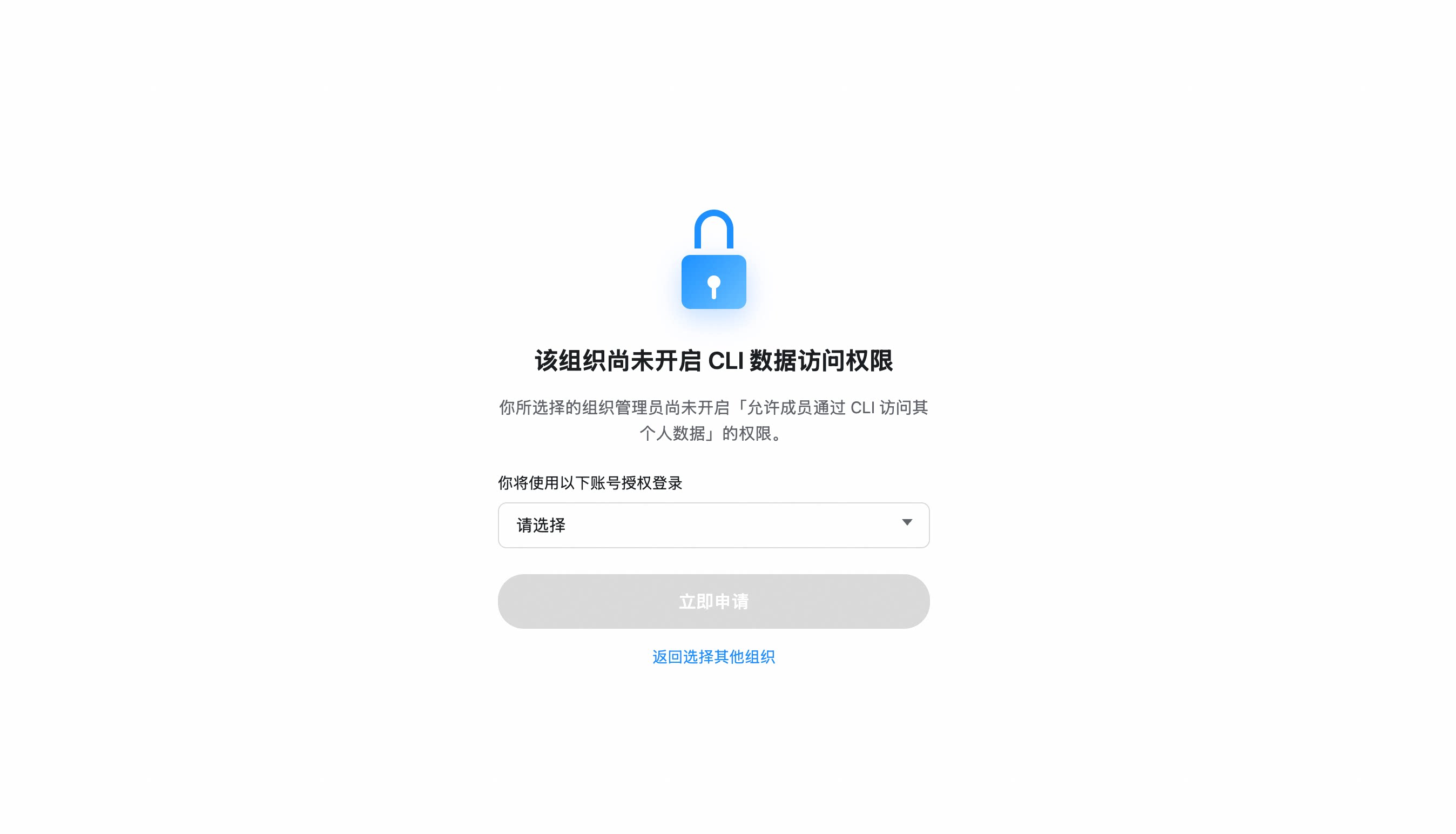
> If your organization hasn't enabled CLI access, you'll be prompted to send an access request to your admin. Once approved, re-run dws auth login.
Organization hasn't enabled CLI access?
- After selecting your organization, click "Apply Now" to notify the admin
- The admin receives a request card and can approve with one click
- Once approved, re-run
dws auth login
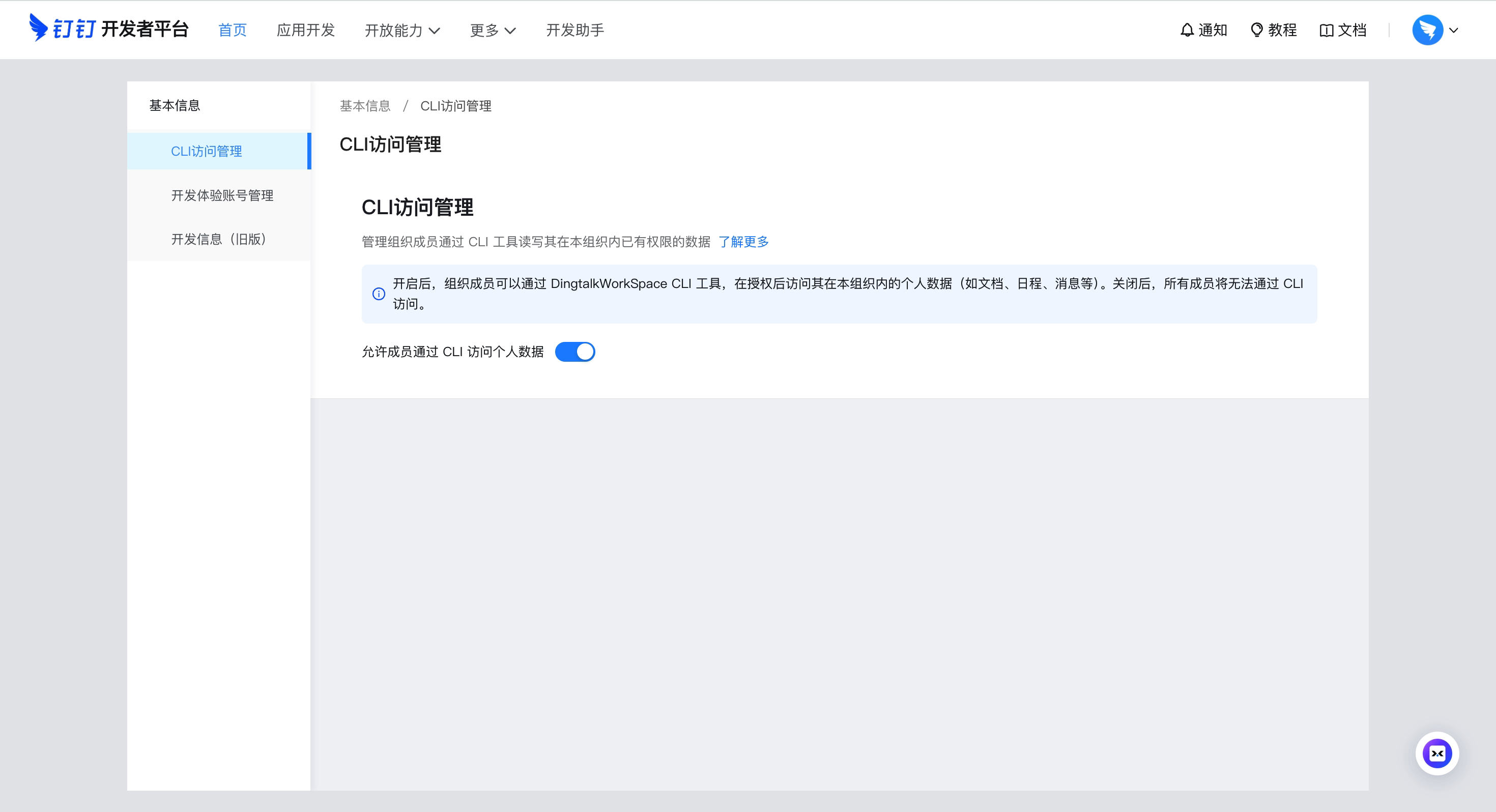
Admin: Enable CLI access for your organization
Go to Developer Platform → "CLI Access Management" → Enable.
Custom App mode (CI/CD, ISV integration)
For enterprise-managed scenarios, create your own DingTalk app:
- Open Platform Console → Create App
- Security Settings → Add redirect URLs:
http://127.0.0.1,https://login.dingtalk.com
- Publish the app
- Login:
dws auth login --client-id --client-secret
Credentials are securely persisted after first login (Keychain). Subsequent runs auto-refresh tokens.
Multiple organizations (profiles)
dws can stay logged in to several DingTalk accounts at once, including multiple accounts in the same organization. A profile is uniquely identified by corpId:userId; the current profile decides which identity a command runs as.
Business commands automatically check and refresh local OAuth credentials as needed;
there is no need to run auth status before each request. auth status retains
refresh, migration and repair behavior and may wait for the authentication lock.
For concurrent polling, use dws auth status --readonly --format json (optionally with
--profile): it reads a local snapshot without the authentication lock, network
validation, refresh, migration or credential writes. System Keychain reads can
still wait. Both modes use the same output fields. A read-only result with a
non-empty reason is inconclusive and must not be treated as a confirmed logout;
local_state_requires_repair signals migration/repair and local_state_unreadable
signals a failed local read. Use auth status without --readonly with the same
profile for refresh or repair. Read-only mode never reports a refresh and may
report an expired access token that normal mode would refresh.
Concurrent updates may yield an older snapshot or an inconclusive result.
In both modes, authenticated is true when either the access or refresh
credential is valid; token_valid separately describes access-token usability.
dws auth login                              # add or refresh one account
dws profile list                            # list every logged-in account
dws profile switch           # persistently switch; use - to toggle back
dws profile switch ":"  # friendly input; names must be unique
dws --profile  contact user search --query "..."        # use that org's explicitly recorded current account
dws --profile  contact user search --query "..." # use one exact account without changing the default
Selectors support corpId:userId, corpId:userName, corpName:userId, and corpName:userName. Friendly names are input aliases only; use the stable profile value returned by profile list for automation. Duplicate organization or account names fail with explicit corpId:userId candidates. If an organization has multiple accounts but no recorded current account, --profile fails instead of choosing the first or most recently used account.
currentProfile, previousProfile, and per-organization defaults are stored as exact identities. primaryProfile remains in JSON only for compatibility and is not used for selection. profile list reads status and expiry from each real identity Token without refreshing it. auth logout --profile removes all local accounts in that organization; an exact selector or local profile name removes one account.
Cross-org reads are orchestrated by the agent rather than a built-in --all-orgs: list profiles, group by corpId, and use the unique isOrgCurrent=true account for each organization. If a multi-account organization has no default, ask the user to choose an account first. Writes default to the current account — confirm both organization and account before cross-org writes.
On macOS, transient or unclassified Keychain read failures block a new OAuth login rather than risking a mixed Keychain/file-DEK state. A confirmed missing DEK or ciphertext/DEK mismatch is preserved through authorization and replaced only for the slots targeted by the fresh login. If normal terminal commands can still read the login while a sandbox using DWS_DISABLE_KEYCHAIN=1 cannot, migrate the legacy and profile auth entries without exposing tokens:
env -u DWS_DISABLE_KEYCHAIN dws auth migrate-keychain --to file-dek --dry-run --format json
env -u DWS_DISABLE_KEYCHAIN dws auth migrate-keychain --to file-dek --yes --format json
DWS_DISABLE_KEYCHAIN=1 dws auth status --format json
The migration validates every selected auth ciphertext before writing, ignores unrelated application secrets, and can be rerun after an interrupted commit. If validation identifies genuinely damaged ciphertext, remove only the affected account with dws auth logout --profile , or all accounts in one organization with --profile , then log in again. Use dws auth reset only when you intend to discard every local profile.
Migrate auth between Linux sandboxes
Copying only ~/.dws/app.json does not carry the refresh token; access tokens expire after ~2 hours. Use the official export/import flow:
# Sandbox A (already logged in)
dws auth export -o /tmp/dws-auth.tar.gz
# Or for copy/paste: dws auth export --base64 -o /tmp/dws-auth.b64

# Sandbox B
dws auth import -i /tmp/dws-auth.tar.gz
# Or: dws auth import -i /tmp/dws-auth.b64 --base64
dws auth status   # confirm "Refresh Token: valid"
The bundle includes the encrypted keychain under ~/.local/share/dws-cli (with auth-token.enc and dek) plus required ~/.dws config files.
Windows export and import are intentionally rejected before credentials or
bundles are read: Windows stores credentials as DPAPI-protected HKCU Registry
values, and the current file-DEK bundle has no safe DPAPI-to-portable conversion.
Quick Start
dws contact user search --query "engineering"      # search contacts
dws calendar event list                            # list today's calendar events
dws doc search --query "quarterly"                 # search DingTalk Docs
dws whiteboard +query --node "" --view summary --format json  # inspect a whiteboard
dws minutes list mine                              # list AI meeting notes I created
dws drive list                                     # list DingTalk drive files
dws todo task create --title "Quarterly report" --executors ""   # create a todo (replace )
dws todo task list --dry-run                       # preview without executing
> Full command list: docs/command-index.md — all commands with descriptions and when-to-use guidance.
Whiteboards
Use dws whiteboard for standalone whiteboards and whiteboards embedded in documents: query content, create / update with OpenNodes, preview changes with +diff, render local SVG previews, and manage personal / team templates or use public templates.
dws whiteboard --help
dws whiteboard render --source @whiteboard.json --output ./whiteboard-preview.svg --format json
dws whiteboard +diff --help
dws whiteboard template personal list --format json
dws whiteboard template team list --template-workspace "" --page-all --format json
dws whiteboard template public list --query "retrospective" --format json
whiteboard.json is an OpenNodes source file. SVG rendering is a local preview; review its fidelity and warnings, then confirm the current preview before creating the whiteboard. Use +diff to inspect the proposed update before +update. For template save / create commands, --dry-run performs an optional server-side preflight without saving a template or creating a whiteboard.
See the whiteboard reference, Diff guide, and SVG preview guide.
Using with Agents
dws is designed as an AI-native CLI. Complete Installation and Getting Started first, then install Agent Skills:
npx skills add DingTalk-Real-AI/dingtalk-workspace-cli -g
The installer first shows the plan — which skills, which target directories, and how existing same-named skills will be handled — and asks for confirmation before writing anything. dws skill setup remains the power-user / China / upgrade path. See Agent Skills.
Agent Invocation Patterns
# Use --yes to skip confirmation prompts (required for agents)
dws todo task create --title "Review PR" --executors "" --yes

# Use --dry-run to preview operations (safe execution)
dws contact user search --query "engineering" --dry-run

# Use --jq to extract precisely (save tokens)
dws contact user get-self --jq '.result[0].orgEmployeeModel | {name: .orgUserName, dept: .depts[0].deptName, userId}'
Command Help and Schema
Use Cobra help and Schema for different parts of the command contract:
dws --help is the source of truth for whether a command exists and which flags the binary accepts.dws schema "" --compact is the normative Agent view for command selection, CLI parameters and constraints, risk, and confirmation; use a full leaf with a narrow --jq projection for mapping or provenance audits.- If Help and Schema disagree, treat it as contract drift: pass only flags accepted by Cobra and use the more conservative safety semantics.
- Schema describes commands; it does not read or search DingTalk business data. Execute the real product command after discovery.
# Confirm that the command exists and inspect accepted flags
dws aitable record query --help

# Discover within a product, then inspect the selected leaf contract
dws schema aitable --compact
dws schema "aitable record query" --compact

# Execute the real business query
dws aitable record query --base-id BASE_ID --table-id TABLE_ID --limit 10
dws schema --all exports the complete contract for tooling, CI, audits, and compatibility baselines. Agents should query progressively with --compact; its positive field allowlist prevents new full/audit fields from silently expanding Agent context.
Agent Skills
npx skills add DingTalk-Real-AI/dingtalk-workspace-cli -g
This discovers skills/multi/dingtalk-*/SKILL.md (catalog layout, three levels under skills/, the depth npx skills add already walks) and installs dingtalk-calendar, dingtalk-chat, … into the agent directories vercel-labs/skills already knows: project .agents/skills/ by default, user-global .agents/skills with -g, plus links into ~/.cursor/skills, ~/.claude/skills, and the other registered homes.
Without -y, the installer lists the skills, target directories, and existing same-named content handling for confirmation before it writes. Keep that prompt for interactive and first-time global installs. -y exists for automation only: add it after the user has explicitly confirmed the install targets and overwrite behavior — this path does not maintain dws skill setup's ownership, backup, or mono↔multi mutual-exclusion cleanup state, so a skipped prompt can replace user files without consent.
The all-in-one mono skill (skills/mono, frontmatter name dws) is marked metadata.internal: true, so it is not a default installable skill. Agents therefore do not double-route between dws and the per-product skills.
dws skill setup remains the power-user / China / upgrade path. It still owns Gitee fallback, upgrade-time skill refresh, ownership in ~/.dws/skills-state.json, and mono↔multi mutual-exclusion cleanup.
The repo ships two source trees:
skills/multi/ — per-product skills (dingtalk-aitable/, dingtalk-calendar/, dingtalk-chat/, ...), each with its own SKILL.md. Default for both npx skills add and dws skill setup.skills/mono/ — single-skill layout (one SKILL.md + references/products/), legacy. Hidden from npx skills add. Still installed by dws skill setup --mode mono and the curl / zip installers.
Leaf safety/parameters/selection prose for Schema generation come from ProductDecl / ContractFinal declarations in Go. The former internal/cli/schema_hints/ HintFile tree is fully retired and must not reappear.
After installing, AI tools like Claude Code / Cursor can operate DingTalk directly through natural language.
> China users: npx skills add clones from GitHub. Prefer dws skill setup or prefix DWS_GITEE_REPO on install-skills.sh — see China mirror.
Power-user / China / upgrade: dws skill setup
# Interactive: prompts for mode + target agents
dws skill setup

# Preview the exact directories that mono setup would back up and replace
dws skill setup --mode mono --target all --dry-run

# Run interactively and confirm the listed directories
dws skill setup --mode mono --target all

# Preview, then install multi skills to a single agent home with interactive confirmation
dws skill setup --mode multi --target cursor --dry-run
dws skill setup --mode multi --target cursor

# Point at a local source (an extracted dws-skills.zip root, its multi/ directory, or a source checkout), preview first
DWS_SKILL_SOURCE=/absolute/path/to/extracted-dws-skills dws skill setup --mode multi --dry-run
DWS_SKILL_SOURCE=/absolute/path/to/extracted-dws-skills dws skill setup --mode multi
| Flag | Values | Description |
|---|
--mode | mono | multi | Skill layout; defaults to interactive prompt |
--target | all | claude | cursor | codex | zcode | opencode | qoder | Where to install; all covers every detected agent home, including ZCode at ~/.zcode/skills |
--source | path | Local source directory (overrides bundled skills); accepts a mode directory, an extracted dws-skills.zip root, or a source checkout containing skills/ |
--yes | — | Scripting-only: skip the confirmation prompt. Removals are still backed up to ~/.dws/skill-backups/ first |
> The setup command can remove the opposite-mode layout (dws/ for multi, DWS-managed multi Skills for mono) and stale managed Skills not in the bundle. DWS records ownership, installer version, source, and content digest centrally in ~/.dws/skills-state.json (or $DWS_CONFIG_DIR/skills-state.json). Exact official names shipped before the centralized state remain a frozen migration list. A dingtalk-* prefix alone never authorizes cleanup, so other same-prefix market/user Skills are preserved. Every removal is previewed before confirmation and preserved under ~/.dws/skill-backups//; a directory that cannot be backed up is never removed. In a non-interactive shell, first run --dry-run and inspect its output; only then may the caller explicitly choose the scripting-only confirmation bypass.
After a multi setup or upgrade, DWS stores the official bundle snapshot and centralized ownership metadata in ~/.dws/skills-state.json (or $DWS_CONFIG_DIR/skills-state.json). Every upgrade installs and overwrites the complete bundled Skill set from that release. Deleting or excluding a bundled Skill is not sticky: the next upgrade restores it. dws upgrade --force additionally allows reinstalling the current CLI version when no newer version is available.
Env vars: DWS_SKILL_MODE=mono|multi (also honored by install.sh / install.ps1), DWS_SKILL_SOURCE=.
What's included (mono layout):
| Component | Path | Description |
|---|
| Master Skill | skills/mono/SKILL.md | Intent routing, decision tree, safety rules, error handling |
| Product references | skills/mono/references/products/*.md | Per-product command reference (aitable, chat, calendar, etc.) |
| Intent guide | skills/mono/references/intent-guide.md | Disambiguation for confusing scenarios (e.g. report vs todo) |
| Global reference | skills/mono/references/global-reference.md | Auth, output formats, global flags |
| Error codes | skills/mono/references/error-codes.md | Error codes + debugging workflows |
| Ready-made scripts | skills/mono/scripts/*.py | 13 batch operation scripts (see below) |
Ready-made scripts — 13 Python scripts for common multi-step workflows
| Script | Description |
|---|
calendar_schedule_meeting.py | Create event + add participants + find & book available meeting room |
calendar_free_slot_finder.py | Find common free slots across multiple people, recommend best meeting time |
calendar_today_agenda.py | View today/tomorrow/this week's schedule |
import_records.py | Batch import records from CSV/JSON into AITable |
bulk_add_fields.py | Batch add fields to an AITable data table |
upload_attachment.py | Upload attachment to AITable attachment field |
todo_batch_create.py | Batch create todos from JSON (with priority, due date, executors) |
todo_daily_summary.py | Summarize today/this week's incomplete todos |
todo_overdue_check.py | Scan overdue todos and output overdue list |
contact_dept_members.py | Search department by name and list all members |
attendance_my_record.py | View my attendance records for today/this week/specific date |
attendance_team_shift.py | Query team shift schedules and attendance statistics |
report_inbox_today.py | View today's received reports with details |
ISV Integration: Author your own Agent Skills and orchestrate them with dws skills for cross-product workflows: ISV Skill → dws Skill → DingTalk Open Platform API (enforced auth + full audit).
Features
Personal Event Subscription — real-time DingTalk messages for event-driven agents
dws event consume subscribes as the currently logged-in user over a managed Stream WebSocket and emits each event as one NDJSON line on stdout. The 28-event public catalog covers scoped and all one-to-one/group messages, specified senders, read/recall/reaction events, group lifecycle events, seven OA approval task/instance events, one VoIP invitation event, three Todo task lifecycle events, and the interactive-card callback event.
The default ndjson, json, and pretty output preserves the transport envelope (type, event_type, string data, and headers) for existing scripts; compact retains its existing processor. Add --flatten to emit the stable top-level business fields used by Agent workflows. --format controls JSON serialization; --flatten controls the data structure and cannot be combined with -f raw or --debug-raw-events.
> Prerequisite: run dws auth login. Personal identity is resolved from the OAuth token and cannot be supplied through command-line identity flags.
For an event-focused installation, use the official convenience installer:
curl -fsSL https://raw.githubusercontent.com/DingTalk-Real-AI/dingtalk-workspace-cli/main/scripts/install-event.sh | sh

# Or install the standalone multi skill from an existing dws installation
dws skill setup --mode multi -s event
# Inspect the public personal event catalog and schema
dws event list
dws event schema user_im_message_receive_o2o --flatten
dws event list --category oa
dws event schema user_oa_approval_task_created --flatten
dws event list --category card
dws event schema user_card_action_triggered --flatten
dws event list --category todo
dws event schema user_todo_task_create --flatten

# Listen for messages that mention the current user
dws event +listen-im --kind at-me -f ndjson

# Listen for messages from a specified sender
dws event +listen-im --kind sender --user  -f ndjson

# Listen by openDingtalkId (external contact, bot, or cross-organization identity)
dws event +listen-im --kind sender --open-dingtalk-id  -f ndjson

# Listen for messages in a specified group
dws event +listen-im --kind group --chat-id  -f ndjson

# Listen for all one-to-one or all group messages
dws event +listen-im --kind all-direct -f ndjson
dws event +listen-im --kind all-group -f ndjson

# Listen for a specified group's title changes, member changes, or disband event
dws event consume user_im_group_updated --group  --flatten -f ndjson
dws event consume user_im_group_member_added --group  --flatten -f ndjson
dws event consume user_im_group_member_exited --group  --flatten -f ndjson
dws event consume user_im_group_disbanded --group  --flatten -f ndjson

# Listen for messages, reads, and recalls from the same sender in one process
dws event +listen-im --kind sender --user  \
  --events message,read,recall -f ndjson

# Listen for all seven public OA approval events in one process
dws event consume \
  user_oa_approval_task_created \
  user_oa_approval_task_finished \
  user_oa_approval_task_redirected \
  user_oa_approval_instance_started \
  user_oa_approval_instance_cc \
  user_oa_approval_instance_terminated \
  user_oa_approval_instance_finished \
  --flatten -f ndjson

# Listen for Todo create/update/delete events where the current user is an executor
dws event consume \
  user_todo_task_create \
  user_todo_task_update \
  user_todo_task_delete \
  --role-types executor \
  --flatten -f ndjson

# Listen for interactive-card callbacks; the schema documents reviewed fields while preserving extensions
dws event consume user_card_action_triggered --flatten -f ndjson

# Inspect local consumers and cancel a subscription
dws event status
dws event stop
The structured interactive-card context is at payload.body.actionData.context. Join questions[].id to answers[question_id], then resolve IDs in selected through the same question's options[].id; an empty selected is a valid no-selection state. JSON strings in body.context are compatibility fallbacks, and every payload level continues to preserve unknown fields.
For one-to-one and specified-sender events, use exactly one target identity: --user for an internal userId, or --open-dingtalk-id for an openDingtalkId. The CLI does not infer or convert between these identity types.
| Feature | Details |
|---|
| Managed lifecycle | consume creates or reuses the personal subscription; stop cancels it and cleans local state |
| Shared connection | Consumers for the same user share one local bus and cloud connection |
| Multi-event process | One consume process can listen for compatible events for the same target while retaining one subscription per event |
| Subscription isolation | Normal consumers match both event type and subscribe_id |
| Agent-friendly output | Stream events are written to stdout as NDJSON; status and diagnostics use stderr |
| Observability | status shows remote subscriptions, the personal bus, and local consumers |
| Cross-platform | Unix Socket on macOS/Linux, Windows Named Pipe on Windows |
See skills/multi/dingtalk-event/SKILL.md for the Agent workflow and supported event parameters.
Raw API Access — call App Token-capable server-side DingTalk OpenAPIs directly
dws api lets you call server-side DingTalk OpenAPIs that support an internal-app App Token, without an SDK. Tokens are automatically acquired and refreshed.
> Prerequisite: Provide one complete custom-app Client ID/Client Secret pair through one-shot flags, environment variables, or app config saved by a successful login (see Custom App mode). MCP default-credential login alone does not support Raw API calls.
Client ID and Client Secret are resolved only as one complete pair, in this order: complete --client-id/--client-secret > complete DWS_CLIENT_ID/DWS_CLIENT_SECRET > complete app config. A half-configured source fails explicitly and is never combined with another source. Flags/env used directly by dws api are one-shot and do not persist the App Secret; flags/env used by a successful dws auth login are persisted as that exact pair for OAuth refresh and later Raw API calls. The acquired App Token is cached under app-token:; the hidden --token accepts a temporary caller-supplied App Token and neither persists nor refreshes it.
Client Secrets use the canonical Keychain slot appsecret:, distinct from OAuth User Tokens and App Tokens. Existing plaintext app config and historical client-secret: entries are migrated automatically. If the old and new slots disagree, DWS fails closed and asks for a new login instead of guessing.
# Login (first time only)
dws auth login --client-id  --client-secret

# Or use one environment pair; a complete env pair overrides app config atomically
export DWS_CLIENT_ID=
export DWS_CLIENT_SECRET=

# === api.dingtalk.com ===

# List all enterprise apps
dws api GET /v1.0/microApp/allApps

# Search users (POST + JSON body)
dws api POST /v1.0/contact/users/search \
  --data '{"queryWord":"engineering","offset":0,"size":10}'

# === oapi.dingtalk.com ===

# Get user details (use --base-url to specify domain)
dws api POST /topapi/v2/user/get \
  --base-url https://oapi.dingtalk.com \
  --data '{"userid":""}'

# Or use the full URL directly
dws api POST https://oapi.dingtalk.com/topapi/v2/user/get \
  --data '{"userid":""}'

# === General ===
dws api GET /v1.0/microApp/allApps --dry-run             # preview request
dws api GET /v1.0/microApp/allApps --jq '.appList | length'  # jq filtering

# Read a JSON body from a file (--params also accepts @file; use - for stdin)
dws api POST https://oapi.dingtalk.com/topapi/v2/department/listsubid \
  --data @department-request.json --dry-run

# Stream one multipart file; top-level --data fields become text form fields; review a dry-run first
dws api POST https://oapi.dingtalk.com/media/upload \
  --data '{"type":"image"}' --file media=./demo.png --dry-run
| Feature | Details |
|---|
| Dual-form auto-detection | Automatically selects api.dingtalk.com (header auth) or oapi.dingtalk.com (query-param auth) based on URL |
| Automatic token management | App-level accessToken is fetched on first call, cached while valid, auto-refreshed on expiry |
| Domain allowlist | Only api.dingtalk.com and oapi.dingtalk.com permitted — prevents token leakage |
| Auto-pagination | --page-all iterates all pages. --page-limit caps the maximum (default 10, set to 0 for unlimited, hard cap at 500 to prevent infinite loops) |
| Secure transport | HTTPS/443 and same-origin HTTPS redirects only; bounded JSON/error reads and streamed atomic binary downloads |
| Agent discovery | When product commands do not cover an API, the bundled misc/mono Skill follows https://open.dingtalk.com/llms.txt to the official endpoint docs; raw api remains excluded from Agent Schema |
dws api automatically uses only an internal-app App Token. It does not read OAuth User Tokens and does not expose --as user / --user. Prefer an existing DWS product command; use this escape hatch only for an uncovered internal-app server OpenAPI. Review a dry-run and confirm before create, update, delete, revoke, or send operations.
Smart Input Correction — auto-corrects common AI model parameter mistakes
Built-in pipeline engine that normalizes flag names, splits sticky arguments, and fuzzy-matches typos:
# Naming convention auto-conversion (camelCase / snake_case / UPPER -> kebab-case)
dws aitable record query --baseId BASE_ID --tableId TABLE_ID         # auto-corrected to --base-id --table-id

# Sticky argument splitting
dws contact user search --query "engineering" --timeout30           # auto-split to --timeout 30

# Fuzzy flag name matching
dws aitable record query --base-id BASE_ID --tabel-id TABLE_ID       # --tabel-id -> --table-id

# Value normalization (boolean / number / date / enum)
# "yes" -> true, "1,000" -> 1000, "2024/03/29" -> "2024-03-29", "ACTIVE" -> "active"
| Agent Output | dws Auto-Corrects To |
|---|
--userId | --user-id |
--limit100 | --limit 100 |
--tabel-id | --table-id |
--USER-ID | --user-id |
--user_name | --user-name |
jq Filtering & Field Selection — fine-grained output control to reduce token consumption
# Built-in jq expressions
dws aitable record query --base-id BASE_ID --table-id TABLE_ID --jq '.invocation.params'
dws schema "dev app create" --jq '.parameters'

# Return only specific fields
dws aitable record query --base-id BASE_ID --table-id TABLE_ID --fields invocation,response
Schema Introspection — Agent command discovery and execution contracts
dws schema aitable --compact                            # discover product commands
dws schema "aitable record query" --compact             # view the selected Agent leaf contract
dws schema "aitable record query" --jq '[.parameters | to_entries[] | select(.value.required)]' # view required fields
dws schema --all                                        # full export for CI/audit/baselines
Pipe & File Input — read flag values from files or stdin
# Read message body from a file
dws chat message send-by-bot --robot-code BOT_CODE --group GROUP_ID \
  --title "Weekly Report" --text @report.md

# Pipe content via stdin
cat report.md | dws chat message send-by-bot --robot-code BOT_CODE --group GROUP_ID \
  --title "Weekly Report"

# Read from stdin explicitly
dws chat message send-by-bot --robot-code BOT_CODE --group GROUP_ID \
  --title "Weekly Report" --text @-
> Note: @ is treated as the @ file-injection prefix only when the next character is an ASCII path-shaped character (A-Z / a-z / 0-9 / . / / / ~ / _ / -), or @- for stdin. Chat-bot payloads like --text "@所有人 周报" or --text "@张三 看一下" pass through unchanged, so literal mentions reach the API as-is.
DingTalk bot — connect a robot to your local AI
dws dev connect bridges a DingTalk robot to a local AI CLI (Claude Code / Codex / opencode / Qoder / Gemini / Pi, or any tool via --agent-cmd): @-mention the bot in a chat and it answers using your local agent, keeping per-conversation multi-turn memory.
dws dev connect --channel auto --unified-app-id
> --unified-app-id resolves clientSecret at runtime via dev app credentials get,
> so the secret never appears in argv (ps / journald / shell history). The
> legacy --robot-client-id --robot-client-secret still works but
> the CLI will warn you.
In-chat session commands (send the bare command as the whole message — no agent turn, no tokens):
| Command | Effect |
|---|
/new (aliases /start, /reset) | Start a fresh session; the previous one is left intact (resumable where the agent supports it) |
/clear | Wipe the current session — disposed through the agent's real session op (opencode issues DELETE /session/:id); channels whose agent exposes no delete primitive fall back to a reset |
See docs/robot-quickstart.md for the full 4-step walkthrough (install → create robot → connect → add to a group).
Key Services
| Service | Command | Capabilities |
|---|
| Contact | contact | Look up users, departments, labels, roster profiles and dismissals; create enterprises and enterprise accounts; invite employees |
| Chat / IM | chat (im) | Send / reply / search messages, group & member management, bot & webhook messaging, reactions, recall |
| Calendar | calendar | Events CRUD, attendees, meeting rooms, free/busy & time suggestions |
| Todo | todo | Create / list / update / complete tasks and comments |
| Approval | oa | Approve / reject / revoke / transfer; query pending / initiated / CC instances and forms |
| Attendance | attendance | Clock-in records, shifts, summaries, group rules (read-only) |
| Ding | ding | Send / recall DING messages |
| Report | report | Create / submit logs, inbox & outbox, templates, statistics |
| AI Tables | aitable | Bases / tables / records / fields / views, permissions & roles, automation, charts & dashboards, import / export |
| Doc | doc | Search / read / write docs, block-level editing, comments, permissions, media, up / download |
| Whiteboard | whiteboard | Standalone / embedded whiteboards: query, create / update, Diff, local SVG previews, personal / team templates |
| Drive | drive | List / search / download, folders, upload, copy / move / rename, permissions |
| Minutes | minutes | AI meeting notes: list, summary / keywords / transcription / todos, mind map, speakers, tags |
| Mail | mail | Mailboxes, KQL search, read / send, drafts, folders, templates, contacts |
| Sheet | sheet | Online spreadsheets: worksheet & range read / write, filters, conditional format, images, CSV |
| Wiki | wiki | Knowledge bases: spaces, members, node tree, docs & files |
| DevDoc | devdoc | Search the Open Platform docs and diagnose API errors |
| AI Search | aisearch | Enterprise people search by name / dept / role / duty / supervisor / phone / job-number |
| Live | live | List my live streams |
| Raw API | api | Call App Token-capable server-side DingTalk OpenAPIs directly, with managed app-level token |
> Full command listing with usage scenarios: docs/command-index.md. Run dws --help for the top-level tree, or dws --help for any service's subcommands.
> Note on chat bot: bot capabilities (send-by-bot / recall-by-bot / add-bot / send-by-webhook / bot search) are merged into the relevant chat subtrees (e.g. dws chat message send-by-bot, dws chat group members add-bot) so the agent-facing command surface stays flat and discoverable. There is no longer a separate top-level bot product.
Coming soon
conference (video meetings)- Multi-skill mode (default) — per-product skills under
skills/multi/; installs and upgrades default to it, dws skill setup --mode mono switches back after interactive confirmation
Security by Design
dws treats security as a first-class architectural concern, not an afterthought. Credentials never touch disk, tokens never leave trusted domains, permissions never exceed grants, operations never escape audit — every API call must pass through DingTalk Open Platform's authentication and audit chain, no exceptions.
For Developers
| Mechanism | Details |
|---|
| Encrypted token storage | PBKDF2 + AES-256-GCM encryption, keyed by device physical MAC address; cross-platform Keychain/DPAPI integration provides additional protection — tokens cannot be decrypted on another machine |
| Input security | Path traversal protection (symlink resolution + working directory containment), CRLF injection blocking, Unicode visual spoofing filtering — prevents AI Agents from being tricked by malicious instructions |
| Domain allowlist | DWS_TRUSTED_DOMAINS defaults to *.dingtalk.com; bearer tokens are never sent to non-allowlisted domains |
| HTTPS enforced | All requests require TLS; HTTP only permitted for loopback during development |
| Dry-run preview | --dry-run shows call parameters without executing, preventing accidental mutations |
| Zero credential persistence | Client ID / Secret used in memory only — never written to config files or logs |
For Enterprise Admins
| Mechanism | Details |
|---|
| OAuth device-flow auth | Users must authenticate through an admin-authorized DingTalk application |
| Least-privilege scoping | CLI can only invoke APIs granted to the application — no privilege escalation |
| Allowlist gating | Admin confirmation required during co-creation phase; self-service approval planned |
| Full-chain audit | Every data read/write passes through the DingTalk Open Platform API — enterprise admins can trace complete call logs in real time; no anomalous operation can hide |
For ISVs
| Mechanism | Details |
|---|
| Tenant data isolation | Operates under authorized app identity; cross-tenant access is impossible |
| Skill sandbox | Agent Skills are Markdown documents (SKILL.md) — prompt descriptions only, no arbitrary code execution |
| Zero blind spots | Every API call during ISV–dws skill orchestration is forced through DingTalk Open Platform authentication — full call chain is traceable with no bypass path |
> Found a vulnerability? Report via GitHub Security Advisories. See SECURITY.md.
Reference & Docs
- International DingTalk (
.io) guide — international login, domestic/international profile switching, isolated testing, and troubleshooting
- Command Index — every runtime command with description and when-to-use guidance
- Reference — environment variables, exit codes, output formats, shell completion
- Architecture — static endpoint pipeline, command surface, transport layer
- Open Platform App Command Routing — yulan dev app command design, MCP overlay, permission flow, and Agent routing
- Changelog — release history and migration notes
Contributing
See CONTRIBUTING.md for build instructions, testing, and development workflow.
License
Apache-2.0