YASB GUI
> Project Discontinued: Development and maintenance of YASB GUI have stopped due to lack of time. This app is outdated and no longer supported. Please refer to the official YASB documentation for configuring your status bar instead.
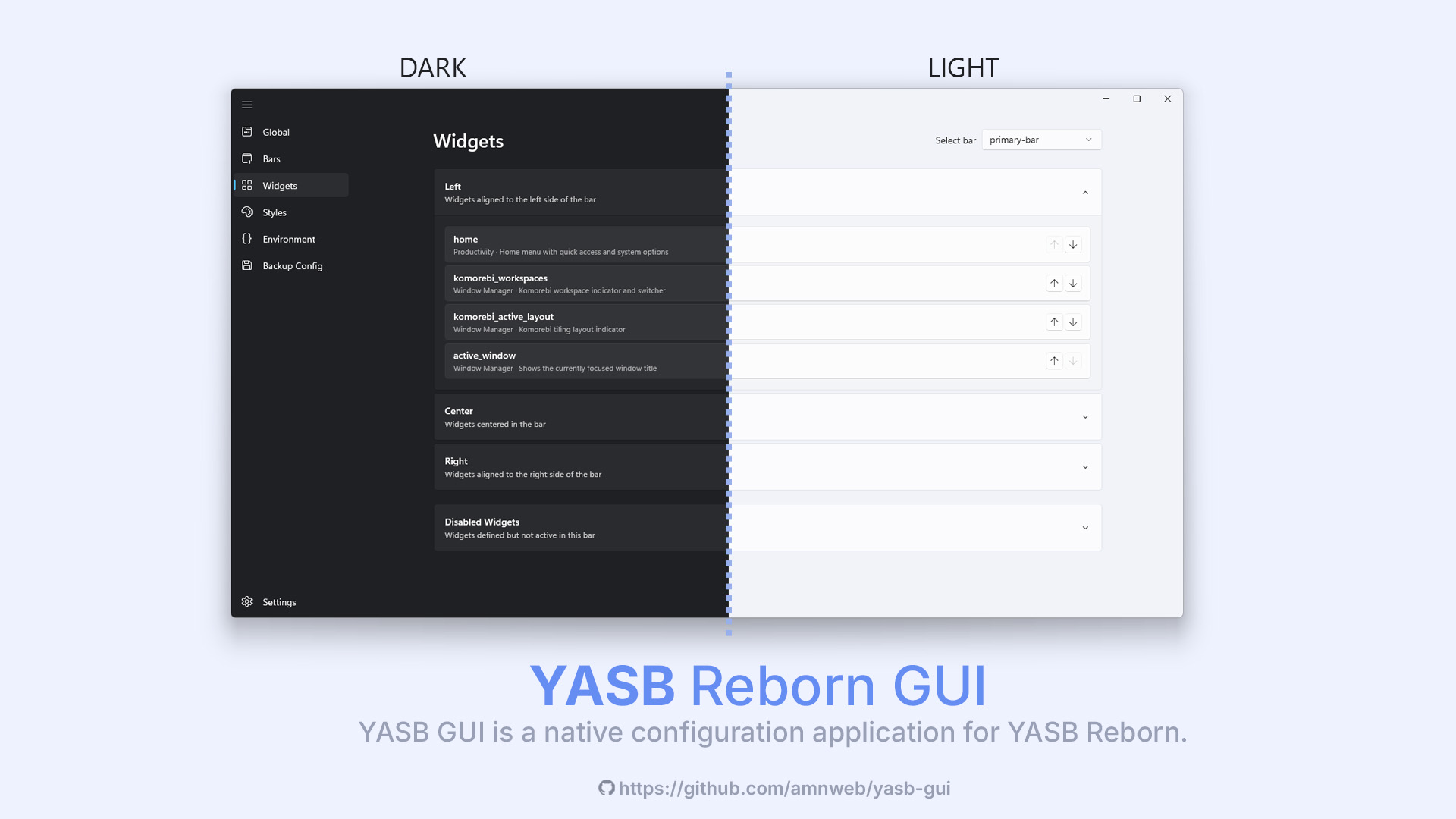
YASB GUI is a native configuration application for YASB Reborn (Yet Another Status Bar). Built with WinUI 3, it provides a modern interface for managing your status bar configuration without manually editing YAML files.
> Note: This application is currently in beta. Some features may be incomplete or subject to change. Please report any issues on the GitHub Issues page.
Why a separate repository?
- YASB GUI is maintained separately from YASB for several reasons:
- Built with WinUI 3, which requires Windows App SDK dependencies not needed by YASB itself
- Keeps YASB lightweight and focused on its core functionality without GUI framework bloat
- Allows independent development cycles and easier maintenance for both projects
- Users who prefer manual YAML editing don't need to install unnecessary GUI dependencies





Features
Visual Configuration Editor
- Edit bars, widgets, and global settings through an intuitive interface
- Monaco-based code editor with YAML syntax highlighting and validation
- Real-time schema validation for configuration files
Widget Management
- Add, remove, and configure widgets with a visual editor
- Support for all YASB widget types
- Widget-specific settings panels
Styles Editor
- Built-in CSS editor for customizing your status bar appearance
- Syntax highlighting and auto-completion
Environment Variables
- Manage environment variables used by YASB
- Easy key-value editing interface
Application Settings
- Light, Dark, and System theme support
- Multiple backdrop options: Mica, Mica Alt, and Acrylic
- Multi-language support
Safety Features
- Export configuration as ZIP backup
- Unsaved changes detection with confirmation dialogs
- Configuration validation before save
System Requirements
| Component | Requirement |
|---|
| Operating System | Windows 10 (Build 17763+) or Windows 11 |
| Runtime | Windows App SDK Runtime |
| WebView | Microsoft Edge WebView2 Runtime (included with Windows 10/11) |
Installation
Download the latest release from the Releases page.
- Go to Widgets → Add Widget.
- Pick the widget from the built-in list.
- In the Options editor, paste only the options block from the docs-not the outer
widgets: list. Real example (Weather widget) with nested options and indentation kept:
label: "{icon} {temp}"
label_alt: "{location}: Min {min_temp}, Max {max_temp}"
api_key: "YOUR_API_KEY"
show_alerts: true
tooltip: true
update_interval: 600
hide_decimal: true
units: metric
menu:
  blur: true
  round_corners: true
  round_corners_type: normal
  border_color: system
  alignment: center
  direction: down
  offset_top: 6
  offset_left: 0
icons:
  sunnyDay: "\ue30d"
  clearNight: "\ue32b"
  cloudyDay: "\ue312"
  cloudyNight: "\ue311"
  rainyDay: "\ue318"
  rainyNight: "\ue318"
  snowyIcy: "\ue31a"
  default: "\ue137"
callbacks:
  on_left: toggle_menu
- Save the widget, then hit Apply so YASB reloads the updated config.
> Tips
>
> Copy only the options section from the docs and paste it into the Options editor; the widget type is already set by your selection.
>
> If indentation looks off, right-click in the editor and choose Fix indentation from the context menu.
Configuration
The application reads and writes YASB configuration from:
~/.config/yasb/config.yaml~/.config/yasb/styles.css
To use a custom location, set the YASB_CONFIG_HOME environment variable.
Contributing Translations
YASB GUI supports multiple languages. Translation files are located in app/core/locales/.
To add a new language:
- Copy
en.json and rename it using the language code (e.g., fr.json for French)
- Update
_language_name and _language_code at the top of the file
- Translate all string values while keeping the keys unchanged
- Do not modify placeholders (e.g.,
{variable}) within the strings
- Do not chnage the JSON structure
- Submit a pull request
Building from Source
Development Setup
git clone https://github.com/amnweb/yasb-gui.git
cd yasb-gui
pip install -e .
python app/main.py
Building Executable
pip install .[build]
python app/scripts/build.py build
The executable will be created in the dist/ directory.
Building MSIX Package
After building the executable, you can create an MSIX package:
python app/scripts/build_msix.py
The MSIX will be created in the msix/ directory.
Options:
--arch x64|aarch64 - Target architecture (default: x64)--output - Output directory for MSIX
Local Development (Unsigned MSIX)
For local testing without code signing, register the package in development mode:
# Register the package (runs from extracted layout, not the .msix file)
Add-AppxPackage -Path "msix/layout/AppxManifest.xml" -Register

# Launch the app
Start-Process "shell:AppsFolder\YASB.GUI_wbnnev551gwxy!App"

# Uninstall when done
Get-AppxPackage -Name "YASB.GUI" | Remove-AppxPackage
Local Signing (Optional)
To test with a signed MSIX locally, create a self-signed certificate:
# Create a self-signed certificate (run once)
$cert = New-SelfSignedCertificate -Type Custom -Subject "CN=YourName" `
  -KeyUsage DigitalSignature -FriendlyName "YASB GUI Dev" `
  -CertStoreLocation "Cert:\CurrentUser\My" `
  -TextExtension @("2.5.29.37={text}1.3.6.1.5.5.7.3.3")

# Export to PFX (set a password)
$pwd = ConvertTo-SecureString -String "YourPassword" -Force -AsPlainText
Export-PfxCertificate -Cert $cert -FilePath "dev-cert.pfx" -Password $pwd

# Trust the certificate (required to install signed packages)
Import-Certificate -FilePath (Export-Certificate -Cert $cert -FilePath "dev-cert.cer") `
  -CertStoreLocation "Cert:\LocalMachine\TrustedPeople"

# Sign the MSIX
& "C:\Program Files (x86)\Windows Kits\10\bin\10.0.22621.0\x64\signtool.exe" sign `
  /fd SHA256 /a /f "dev-cert.pfx" /p "YourPassword" "msix\yasb-gui-0.0.2-x64.msix"

# Install the signed MSIX
Add-AppxPackage -Path "msix\yasb-gui-0.0.2-x64.msix"
> Note: Update the Publisher in build_msix.py to match your certificate's CN if signing locally.
Support the Project
If you find YASB GUI useful, consider supporting its development:


Your support helps maintain and improve the project.