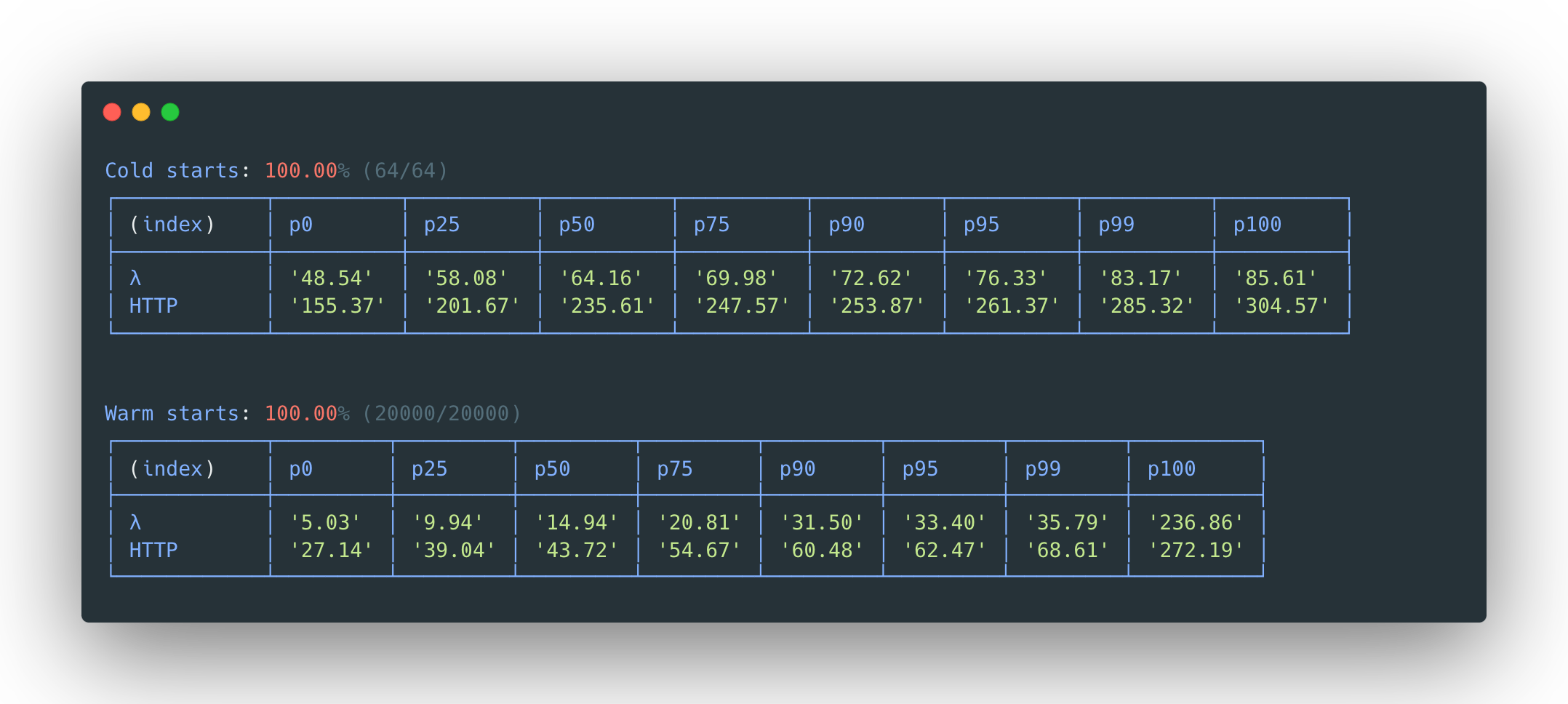
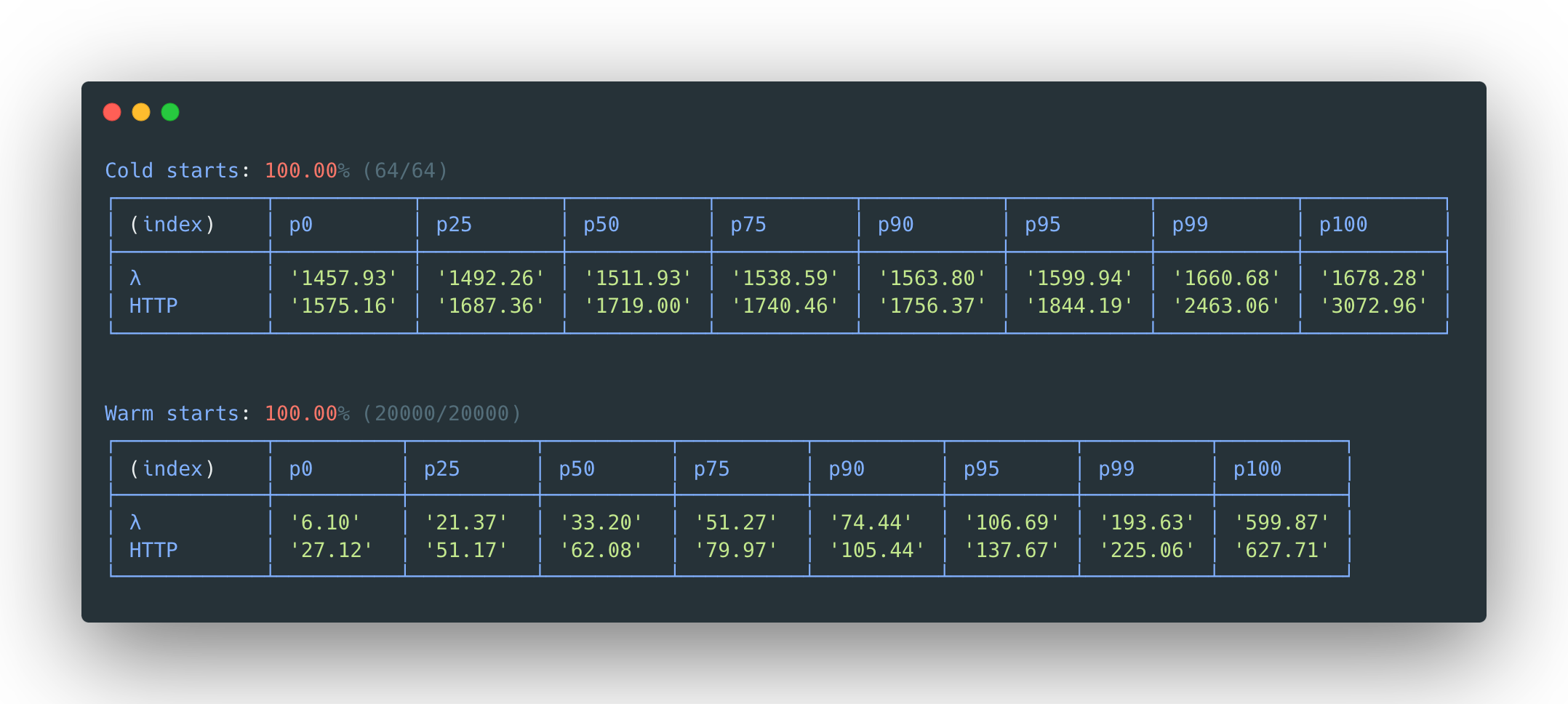
LLRT (Low Latency Runtime) is an experimental JavaScript runtime designed to address the growing demand for fast and efficient Serverless applications. Built in Rust and utilizing QuickJS as its JavaScript engine, LLRT focuses on delivering high performance with low latency, making it ideal for environments where speed and efficiency are critical.
Key Features:
High Performance: LLRT offers significantly faster startup times compared to traditional runtimes, achieving over 10x improvements in cold start scenarios.
Cost Efficiency: By reducing runtime overhead, LLRT can lower overall costs by up to 2x when running on AWS Lambda.
Lightweight Architecture: Designed with minimal resource usage, LLRT ensures efficient memory utilization while maintaining robust performance.
Web Platform Compatibility: Supports standardized web APIs and JavaScript features, aligning with modern browser standards.
Audience & Benefit:
Ideal for developers building performance-critical serverless applications on AWS Lambda. LLRT enables faster execution times and reduced operational costs, making it a powerful tool for optimizing resource usage in cloud environments.
README
LLRT (Low Latency Runtime) is a lightweight JavaScript runtime designed to address the growing demand for fast and efficient Serverless applications. LLRT offers up to over 10x faster startup and up to 2x overall lower cost compared to other JavaScript runtimes running on AWS Lambda
It's built in Rust, utilizing QuickJS as JavaScript engine, ensuring efficient memory usage and swift startup.
> [!WARNING]
> LLRT is an experimental package. It is subject to change and intended only for evaluation purposes.
> [!IMPORTANT]
> Even though LLRT supports ES2023 it's NOT a drop in replacement for Node.js. Consult Compatibility matrix and API for more details.
> All dependencies should be bundled for a browser platform and mark included @aws-sdk packages as external.
Testing & ensuring compatibility
The best way to ensure your code is compatible with LLRT is to write tests and execute them using the built-in test runner. The test runner currently supports Jest/Chai assertions. There are three main types of tests you can create:
Unit Tests
Useful for validating specific modules and functions in isolation
Allow focused testing of individual components
End-to-End (E2E) Tests
Validate overall compatibility with AWS SDK and WinterTC compliance
Test the integration between all components
Confirm expected behavior from end-user perspective
For more information about the E2E Tests and how to run them, see here.
Web Platform Tests (WPT)
Useful for validating LLRT’s behavior against standardized browser APIs and runtime expectations
Ensure compatibility with web standards and cross-runtime environments
Help verify alignment with WinterTC and broader JavaScript ecosystem
For setup instructions and how to run WPT in LLRT, see here.
Test runner
Test runner uses a lightweight Jest-like API and supports Jest/Chai assertions. For examples on how to implement tests for LLRT see the /tests folder of this repository.
To run tests, execute the llrt test command. LLRT scans the current directory and sub-directories for files that ends with *.test.js or *.test.mjs. You can also provide a specific test directory to scan by using the llrt test -d option.
The test runner also has support for filters. Using filters is as simple as adding additional command line arguments, i.e: llrt test crypto will only run tests that match the filename containing crypto.
Compatibility matrix
> [!NOTE]
> LLRT only support a fraction of the Node.js APIs. It is NOT a drop in replacement for Node.js, nor will it ever be. Below is a high level overview of partially supported APIs and modules. For more details consult the API documentation
⚠️ = partially supported in LLRT⏱ = planned partial support* = Not native** = The module.registerHooks() API allows you to emulate some functionality. See also example/register-hooks.
Using node_modules (dependencies) with LLRT
Since LLRT is meant for performance critical application it's not recommended to deploy node_modules without bundling, minification and tree-shaking.
LLRT can work with any bundler of your choice. Below are some configurations for popular bundlers:
> [!WARNING]
> LLRT implements native modules that are largely compatible with the following external packages.
> By implementing the following conversions in the bundler's alias function, your application may be faster, but we recommend that you test thoroughly as they are not fully compatible.
LLRT includes many AWS SDK clients and utils as part of the runtime, built into the executable. These SDK Clients have been specifically fine-tuned to offer best performance while not compromising on compatibility. LLRT replaces some JavaScript dependencies used by the AWS SDK by native ones such as Hash calculations and XML parsing.
V3 SDK packages not included in the list below have to be bundled with your source code. For an example on how to use a non-included SDK, see this example build script (buildExternalSdkFunction)
LLRT supports the following three bundles by default. Bundle types and suffixes are as follows.
Bundle Type
Suffix
Purpose of Use
no-sdk
*-no-sdk
Suitable for workloads that do not use @aws-sdk.
std-sdk
(none)
Suitable for workloads that utilize the major @aws-sdk.
full-sdk
*-full-sdk
Suitable for workloads that utilize any @aws-sdk.
The relationship between the supported packages for each bundle type is as follows.
Analytics
no-sdk
std-sdk
full-sdk
@aws-sdk/client-athena
✔︎
@aws-sdk/client-firehose
✔︎
@aws-sdk/client-glue
✔︎
@aws-sdk/client-kinesis
✔︎
@aws-sdk/client-opensearch
✔︎
@aws-sdk/client-opensearchserverless
✔︎
Application integration
no-sdk
std-sdk
full-sdk
@aws-sdk/client-eventbridge
✔︎
✔︎
@aws-sdk/client-scheduler
✔︎
@aws-sdk/client-sfn
✔︎
✔︎
@aws-sdk/client-sns
✔︎
✔︎
@aws-sdk/client-sqs
✔︎
✔︎
Business applications
no-sdk
std-sdk
full-sdk
@aws-sdk/client-ses
✔︎
✔︎
@aws-sdk/client-sesv2
✔︎
Compute services
no-sdk
std-sdk
full-sdk
@aws-sdk/client-auto-scaling
✔︎
@aws-sdk/client-batch
✔︎
@aws-sdk/client-ec2
✔︎
@aws-sdk/client-lambda
✔︎
Containers
no-sdk
std-sdk
full-sdk
@aws-sdk/client-ecr
✔︎
@aws-sdk/client-ecs
✔︎
@aws-sdk/client-eks
✔︎
@aws-sdk/client-servicediscovery
✔︎
Databases
no-sdk
std-sdk
full-sdk
@aws-sdk/client-dynamodb
✔︎
✔︎
@aws-sdk/client-dynamodb-streams
✔︎
@aws-sdk/client-elasticache
✔︎
@aws-sdk/client-rds
✔︎
@aws-sdk/client-rds-data
✔︎
Developer tools
no-sdk
std-sdk
full-sdk
@aws-sdk/client-xray
✔︎
✔︎
Front-end web and mobile services
no-sdk
std-sdk
full-sdk
@aws-sdk/client-amplify
✔︎
@aws-sdk/client-appsync
✔︎
@aws-sdk/client-location
✔︎
Machine Learning (ML) and Artificial Intelligence (AI)
no-sdk
std-sdk
full-sdk
@aws-sdk/client-bedrock
✔︎
@aws-sdk/client-bedrock-runtime
✔︎
@aws-sdk/client-bedrock-agent
✔︎
@aws-sdk/client-bedrock-agent-runtime
✔︎
@aws-sdk/client-polly
✔︎
@aws-sdk/client-rekognition
✔︎
@aws-sdk/client-textract
✔︎
@aws-sdk/client-translate
✔︎
Management and governance
no-sdk
std-sdk
full-sdk
@aws-sdk/client-appconfig
✔︎
@aws-sdk/client-appconfigdata
✔︎
@aws-sdk/client-cloudformation
✔︎
@aws-sdk/client-cloudwatch
✔︎
@aws-sdk/client-cloudwatch-events
✔︎
✔︎
@aws-sdk/client-cloudwatch-logs
✔︎
✔︎
@aws-sdk/client-service-catalog
✔︎
@aws-sdk/client-ssm
✔︎
✔︎
Media
no-sdk
std-sdk
full-sdk
@aws-sdk/client-mediaconvert
✔︎
Networking and content delivery
no-sdk
std-sdk
full-sdk
@aws-sdk/client-api-gateway
✔︎
@aws-sdk/client-apigatewayv2
✔︎
@aws-sdk/client-elastic-load-balancing-v2
✔︎
Security, identity, and compliance
no-sdk
std-sdk
full-sdk
@aws-sdk/client-acm
✔︎
@aws-sdk/client-cognito-identity
✔︎
✔︎
@aws-sdk/client-cognito-identity-provider
✔︎
✔︎
@aws-sdk/client-iam
✔︎
@aws-sdk/client-kms
✔︎
✔︎
@aws-sdk/client-secrets-manager
✔︎
✔︎
@aws-sdk/client-sso
✔︎
@aws-sdk/client-sso-admin
✔︎
@aws-sdk/client-sso-oidc
✔︎
@aws-sdk/client-sts
✔︎
✔︎
@aws-sdk/client-verifiedpermissions
✔︎
Storage
no-sdk
std-sdk
full-sdk
@aws-sdk/client-efs
✔︎
@aws-sdk/client-s3
✔︎
✔︎
Other bundled packages
no-sdk
std-sdk
full-sdk
@aws-crypto
✔︎
✔︎
@aws-sdk/credential-providers
✔︎
✔︎
@aws-sdk/lib-dynamodb
✔︎
✔︎
@aws-sdk/lib-storage
✔︎
✔︎
@aws-sdk/s3-presigned-post
✔︎
✔︎
@aws-sdk/s3-request-presigner
✔︎
✔︎
@aws-sdk/util-dynamodb
✔︎
✔︎
@aws-sdk/util-user-agent-browser
✔︎
✔︎
@smithy
✔︎
✔︎
> [!TIP]
> LLRT now supports streaming SDK responses (since version 0.9). You can consume response bodies as streams or use the convenience methods:
>
> javascript > const response = await client.send(command); > > // Option 1: Stream the response body > for await (const chunk of response.Body) { > // process chunk > } > > // Option 2: Collect as string or bytes > const str = await response.Body.transformToString(); > // or > const bytes = await response.Body.transformToByteArray(); >
Running TypeScript with LLRT
Same principle as dependencies applies when using TypeScript. TypeScript must be bundled and transpiled into ES2023 JavaScript.
> [!NOTE]
> LLRT will not support running TypeScript without transpilation. This is by design for performance reasons. Transpiling requires CPU and memory that adds latency and cost during execution. This can be avoided if done ahead of time during deployment.
Rationale
What justifies the introduction of another JavaScript runtime in light of existing options such as Node.js, Bun & Deno?
Node.js, Bun, and Deno represent highly proficient JavaScript runtimes. However, they are designed with general-purpose applications in mind. These runtimes were not specifically tailored for the demands of a Serverless environment, characterized by short-lived runtime instances. They each depend on a (Just-In-Time compiler (JIT) for dynamic code compilation and optimization during execution. While JIT compilation offers substantial long-term performance advantages, it carries a computational and memory overhead.
In contrast, LLRT distinguishes itself by not incorporating a JIT compiler, a strategic decision that yields two significant advantages:
A) JIT compilation is a notably sophisticated technological component, introducing increased system complexity and contributing substantially to the runtime's overall size.
B) Without the JIT overhead, LLRT conserves both CPU and memory resources that can be more efficiently allocated to code execution tasks, thereby reducing application startup times.
Limitations
There are many cases where LLRT shows notable performance drawbacks compared with JIT-powered runtimes, such as large data processing, Monte Carlo simulations or performing tasks with hundreds of thousands or millions of iterations. LLRT is most effective when applied to smaller Serverless functions dedicated to tasks such as data transformation, real time processing, AWS service integrations, authorization, validation etc. It is designed to complement existing components rather than serve as a comprehensive replacement for everything. Notably, given its supported APIs are based on Node.js specification, transitioning back to alternative solutions requires minimal code adjustments.
Install generate libs and setup rust targets & toolchains
make stdlib && make libs
> [!NOTE]
> If these commands exit with an error that says can't cd to zstd/lib,
> you've not cloned this repository recursively. Run git submodule update --init to download the submodules and run the commands above again.
Build binaries for Lambda (Per bundle type and architecture desired)
# for arm64, use
make llrt-lambda-arm64.zip
make llrt-lambda-arm64-no-sdk.zip
make llrt-lambda-arm64-full-sdk.zip
# or for x86-64, use
make llrt-lambda-x64.zip
make llrt-lambda-x64-no-sdk.zip
make llrt-lambda-x64-full-sdk.zip
Build binaries for Container (Per bundle type and architecture desired)
# for arm64, use
make llrt-container-arm64
make llrt-container-arm64-no-sdk
make llrt-container-arm64-full-sdk
# or for x86-64, use
make llrt-container-x64
make llrt-container-x64-no-sdk
make llrt-container-x64-full-sdk
Optionally build for your local machine (Mac or Linux)
make release
make release-no-sdk
make release-full-sdk
You should now have a llrt-lambda-arm64*.zip or llrt-lambda-x64*.zip. You can manually upload this as a Lambda layer or use it via your Infrastructure-as-code pipeline
Crypto and TLS Backend Options
LLRT supports multiple cryptographic backends for both the crypto module and TLS connections. These can be configured via Cargo features.
Crypto Provider Features
Feature
Description
crypto-rust (default)
Pure Rust crypto using RustCrypto crates
crypto-ring
Ring-only crypto (limited algorithm support)
crypto-ring-rust
Ring for hashing/HMAC, RustCrypto for everything else
crypto-graviola
Graviola-only crypto (limited algorithm support)
crypto-graviola-rust
Graviola for hashing/HMAC/AES-GCM, RustCrypto for everything else
crypto-openssl
OpenSSL-based crypto
TLS Backend Features
Feature
Description
tls-ring (default)
rustls with ring crypto
tls-aws-lc
rustls with AWS-LC crypto (optimized for AWS)
tls-graviola
rustls with graviola crypto
tls-openssl
OpenSSL for TLS
Building with Different Backends
# Default (crypto-rust + tls-ring)
cargo build --release

# Using AWS-LC for TLS
cargo build --release --no-default-features --features "macro,tls-aws-lc"

# Using OpenSSL for both crypto and TLS
cargo build --release --no-default-features --features "macro,crypto-openssl,tls-openssl"

# Using Graviola for both crypto and TLS
cargo build --release --no-default-features --features "macro,crypto-graviola-rust,tls-graviola"
Running Lambda emulator
Please note that in order to run the example you will need:
Valid AWS credentials via a ~/.aws/credentials or via environment variables.
When using asynchronous hooks, the hooking function inside QuickJS is activated. This is disabled by default as there is concern that it may have a significant impact on performance.
By setting this environment variable to 1, the asynchronous hook function can be enabled, allowing you to track asynchronous processing using the async_hooks module.
LLRT_EXTRA_CA_CERTS=file
Load extra certificate authorities from a PEM encoded file
LLRT_GC_THRESHOLD_MB=value
Set a memory threshold in MB for garbage collection. Default threshold is 20MB
LLRT_HTTP_VERSION=value
Extends the HTTP request version. By default, only HTTP/1.1 is enabled. Specifying '2' will enable HTTP/1.1 and HTTP/2.
LLRT_LOG=[target][=][level][,...]
Filter the log output by target module, level, or both (using =). Log levels are case-insensitive and will also enable any higher priority logs.
Log levels in descending priority order:
Error
Warn | Warning
Info
Debug
Trace
Example filters:
warn will enable all warning and error logs
llrt_core::vm=trace will enable all logs in the llrt_core::vm module
warn,llrt_core::vm=trace will enable all logs in the llrt_core::vm module and all warning and error logs in other modules
LLRT_NET_ALLOW="host[ ...]"
Space-delimited list of hosts or socket paths which should be allowed for network connections. Network connections will be denied for any host or socket path missing from this list. Set an empty list to deny all connections
LLRT_NET_DENY="host[ ...]"
Space-delimited list of hosts or socket paths which should be denied for network connections
LLRT_NET_POOL_IDLE_TIMEOUT=value
Set a timeout in seconds for idle sockets being kept-alive. Default timeout is 15 seconds
LLRT_PLATFORM=value
Used to explicitly specify a preferred platform for the Node.js package resolver. The default is browser. If node is specified, "node" takes precedence in the search path. If a value other than browser or node is specified, it will behave as if "browser" was specified.
LLRT_REGISTER_HOOKS=file
If you want to enable a hooking mechanism that is mostly compatible with Node.js's module.registerHooks(), specify the js file name in this environment variable.
We provide a concrete example in example/register-hooks.
> [!NOTE]
> This environment variable is only effective when running on AWS Lambda.
> When using the LLRT CLI, hook files must be specified using the --import option instead of this environment variable.
LLRT_SDK_CONNECTION_WARMUP=1
Initializes TLS connections in parallel during function init which significantly reduces cold starts due. Enabled by default, can be disabled with value 0 or false
LLRT_TLS_VERSION=value
Set the TLS version to be used for network connections. By default only TLS 1.2 is enabled. TLS 1.3 can also be enabled by setting this variable to 1.3
Benchmark Methodology
Although Init Duration reported by Lambda is commonly used to understand cold start impact on overall request latency, this metric does not include the time needed to copy code into the Lambda sandbox.
The technical definition of Init Duration (source):
> For the first request served, the amount of time it took the runtime to load the function and run code outside of the handler method.
Measuring round-trip request duration provides a more complete picture of user facing cold-start latency.
Lambda invocation results (λ-labeled row) report the sum total of Init Duration + Function Duration.