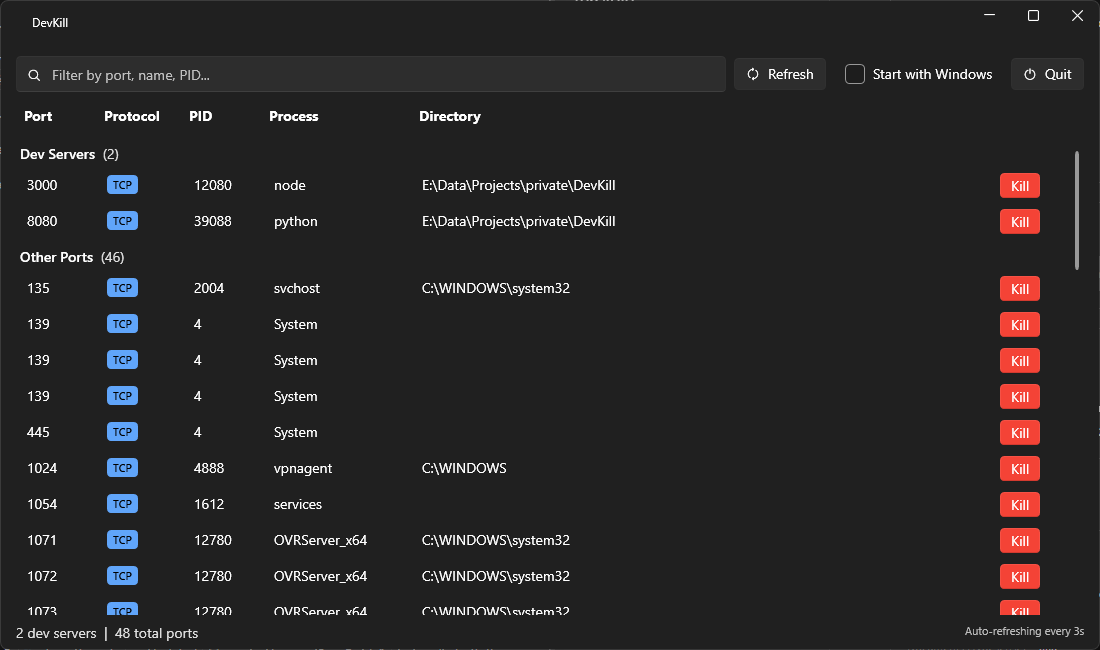
DevKill is a Windows utility designed to identify and terminate processes listening on ports using native Windows APIs. This tool is particularly useful for developers who encounter orphaned or zombie dev servers (such as Node.js, .NET, Python, PHP, Vite, and others) that block specific ports.
Key Features:
Auto-discovers processes占用端口 via native Windows APIs without relying on external tools like netstat.
Smart grouping of known dev server processes (e.g., Node, dotnet, Python, PHP) under a "Dev Servers" category for easier identification.
Bulk kill functionality to select and terminate multiple processes simultaneously.
System tray integration with a quick-kill context menu for seamless operation.
CLI mode for instant port freeing without opening the GUI (e.g., devkill 3000).
Auto-refresh feature that updates every 3 seconds to reflect changes in active processes.
Audience & Benefit:
Ideal for developers and IT professionals who frequently encounter orphaned dev servers blocking critical ports. DevKill streamlines the process of identifying and terminating these processes, saving time and reducing conflicts caused by occupied ports.
Installable via winget (use winget install AndyBochmann.DevKill), DevKill is a lightweight yet powerful tool built with WPF on .NET 10, featuring a modern dark Fluent UI.
README
DevKill
A Windows utility that finds and kills orphaned dev server processes hogging your ports.
Developers accumulate zombie dev servers — Node, .NET, Python, PHP, Vite, and others — that occupy ports and cause conflicts. DevKill auto-discovers these processes, shows them in a modern dark UI, and lets you kill them individually or in bulk.
Features
Auto-discovers listening ports via native Windows APIs (no netstat parsing)
Smart grouping — known dev server processes (Node, dotnet, Python, PHP, etc.) are surfaced in a "Dev Servers" group
Bulk kill — select multiple processes and kill them all at once
System tray — minimizes to tray with quick-kill context menu
CLI mode — run devkill 3000 to instantly free a port without opening the GUI
Auto-refresh — polls every 3 seconds for changes
Search/filter — filter by port number, process name, or PID
Start with Windows — optional auto-start via registry
Screenshots
Requirements
Windows 10/11
.NET 10 Runtime
Administrator privileges (required to enumerate and kill all processes)
Installation
winget
winget install AndyBochmann.DevKill
Build from source
git clone https://github.com/andybochmann/DevKill.git
cd DevKill
dotnet build src/DevKill
Run
# GUI mode (launches with UAC prompt)
dotnet run --project src/DevKill

# CLI mode — kill process on port 3000
devkill 3000

# CLI mode — kill processes on multiple ports
devkill 3000 5000 8080

# Start minimized to tray
devkill --minimized