Install Hangar using Winget - wingetCollections
Go back Packages Hangar Use this command to install Hangar:
winget install --id=AnssolLabs.Hangar -e Copy WinGet command to clipboard Hangar is a single-binary Windows app that gives you Apache, Nginx, MySQL, PostgreSQL, multiple PHP versions, Node, Mailpit, mkcert SSL, a built-in DNS server for *.test domains, and a Model Context Protocol (MCP) server. An open-source alternative to XAMPP, WAMP, and Laragon.
Hangar is the first PHP and database stack manager with first-class AI tool integration: connect Claude Code, Cursor, Windsurf, or any MCP-capable agent and let it manage services, run SQL, audit schemas, and toggle SSL on your behalf.
Features include one-click service management, multi-version PHP switchable per project, auto-generated vhosts, local HTTPS via embedded mkcert, a built-in DNS server, a server-side database auditor that emits runnable SQL migration files, and a unified launcher for phpMyAdmin, HeidiSQL, DBeaver, VS Code, PocketBase, and Mailpit.
README
Why Hangar?
XAMPP and WAMP are old. Laragon is closed-source. Docker is heavy. Hangar is a single-binary Windows app that gives you Apache, Nginx, MySQL, PostgreSQL, multiple PHP versions, Node, Mailpit, mkcert SSL, a built-in DNS server for *.test domains, and a Model Context Protocol server — behind a small Wails-native UI you can drive in two clicks.
It is also the first PHP and database stack manager with first-class AI tool integration: connect Claude Code, Cursor, Windsurf, or any MCP-capable agent and let it manage services, run SQL, audit schemas, and toggle SSL on your behalf.
Download
> Build from source? See Development below.
> macOS / Linux? On the roadmap — please open a discussion if you'd contribute.
Features
One-click service management
Start, stop, restart Apache, Nginx, MySQL, PostgreSQL, Mailpit from the UI or the MCP.
Live status, port, uptime, PID for every service.
Auto-restart on config changes; non-blocking start so the UI stays responsive while heavy services (Postgres, MySQL init) come up.
1.0.0
Copy WinGet command to clipboard
Crash-safe: services keep running if you minimise Hangar to the tray.
Multi-version PHP — switchable per project
Bundled installer downloads PHP 7.3, 8.1, 8.2, 8.3, 8.4, 8.5 from windows.php.net.
Global or per-project version pin via dropdown.
Auto-generated php.ini with sensible defaults + Composer-compatible extension list (mbstring, openssl, pdo_mysql, pdo_pgsql, curl, zip, intl, fileinfo, gd, exif, sodium).
Adds active PHP to the system PATH so terminals see it instantly.
Project manager with auto vhosts
Auto-detects Laravel, WordPress, Symfony, generic PHP, static, Node, PocketBase projects.
Generates Apache and Nginx vhosts from templates the moment you add a project — no httpd.conf editing.
Auto-adds *.test entries to your hosts file (UAC-aware).
Per-vhost log files (_access.log, _error.log, and SSL variants).
Built-in scanner picks up existing project folders on first launch.
Local HTTPS via mkcert
One-click "Enable SSL" per project — installs the mkcert local CA, generates a cert, regenerates the vhost, reloads the web server.
Works in Chrome/Edge/Firefox with no certificate warnings.
Toggle through the UI lock icon or via MCP (set_project_ssl).
Built-in DNS server and hosts manager
Lightweight DNS resolver answers *.test queries with 127.0.0.1.
Falls back to system DNS for everything else — your internet keeps working.
Optional: write to the Windows hosts file as a backup so resolution survives Hangar being closed.
Database tooling
HeidiSQL 12.17 portable bundled — launches with a pre-filled session for each running database, no manual setup.phpMyAdmin as a managed project — auto-vhosted at http://phpmyadmin.test when you click "Open".DBeaver CE and VS Code installable from the Packages page.Ad-hoc SQL runner from the UI and the MCP (run_sql tool).
Server-side schema auditor — runs ~30 deterministic rules (orphan FKs, money-as-float, plaintext secrets, missing indexes, multi-tenancy gaps, PCI/PHI violations) and emits a runnable .sql migration file you can psql -f.
MCP server — AI tools as first-class clients Hangar exposes a JSON-RPC 2.0 + SSE MCP server on 127.0.0.1:3742 from app launch. Drop it into any compatible agent:
{
  "mcpServers": {
    "hangar": {
      "url": "http://127.0.0.1:3742/sse"
    }
  }
}
Tool What it does list_servicesAll service states + ports start_service / stop_service / restart_serviceService control switch_phpChange PHP globally or per-project list_projects / create_projectProject CRUD with vhost generation get_logsTail any service log list_site_logs / get_site_logsPer-vhost access/error/ssl logs set_project_sslEnable/disable HTTPS for a project run_sqlAd-hoc SQL against MySQL/Postgres inspect_databaseServer-side schema audit → emits .sql fix file get_connection_stringConnection string for any DB
Package manager
Built-in registry for PHP, MySQL, PostgreSQL, Apache, Nginx, Node, Go, phpMyAdmin, HeidiSQL, DBeaver, VS Code, PocketBase, Composer, Mailpit .
Live download with progress (MB done / total / MB·s / ETA).
Add by URL for anything not in the registry — paste a zip URL, name it, install it.One-time bootstrap wizard installs a sensible default bundle on first launch (PHP 8.3 + MySQL + the basics).
Installed launcher
Dedicated Installed page lists everything you have on disk grouped by category (Tools / Databases / PHP / Web Servers / Node / Go).
One-click launch per tool — opens the exe, opens the web URL (phpMyAdmin), starts the service (Mailpit), or opens HeidiSQL's session manager.
"Open Folder" button reveals the install dir in Explorer.
External terminal integration
Per-project "Open in Terminal" launches Windows Terminal (or cmd.exe fallback) with the project's PHP, Composer, Node, and Go on PATH.
No more set PATH=... rituals before running composer install.
System tray and single-instance lock
Closes to the tray when services are running so MySQL/Postgres don't get killed mid-write.
Single-instance lock — relaunching Hangar focuses the existing window instead of starting a duplicate that fights over the config DB.Quit cleanly from the tray menu.
Operational niceties
Embedded BoltDB config store at %LOCALAPPDATA%\Hangar\data\hangar.db — no registry pollution.
Per-service config editor in the UI (Apache httpd.conf, MySQL my.ini, Postgres postgresql.conf).
Reservable ports (default Apache 80, Nginx 8080, MySQL 3306, Postgres 5432, MCP 3742, DNS 53).
Clear startup error when another Hangar instance is already running.
Quick start
Download the latest installer and run it.First-run wizard offers to install a default bundle (PHP 8.3 + MySQL + Apache + mailpit). Accept it.Open Hangar → Servers tab → Start whichever services you need.Add a project : Projects tab → "+ Add Project" → point at your folder. Hangar auto-detects the framework, generates the vhost, adds the hosts entry. Visit http://.test immediately.(Optional) Enable HTTPS : click the lock icon next to the project. mkcert installs its root CA on first use; subsequent enables are instant.(Optional) Wire up your AI agent — see MCP setup below.
MCP setup
Claude Code {
"mcpServers": {
"hangar": { "url": "http://127.0.0.1:3742/sse" }
}
}
Cursor / Windsurf / Claude Desktop Same config under their respective mcp.json or settings UI — point at http://127.0.0.1:3742/sse.
Verify it's working The MCP server starts automatically when Hangar launches. Confirm with:
curl http://127.0.0.1:3742/health
# {"server":"hangar","status":"ok","version":"1.0.0"}
Screenshots
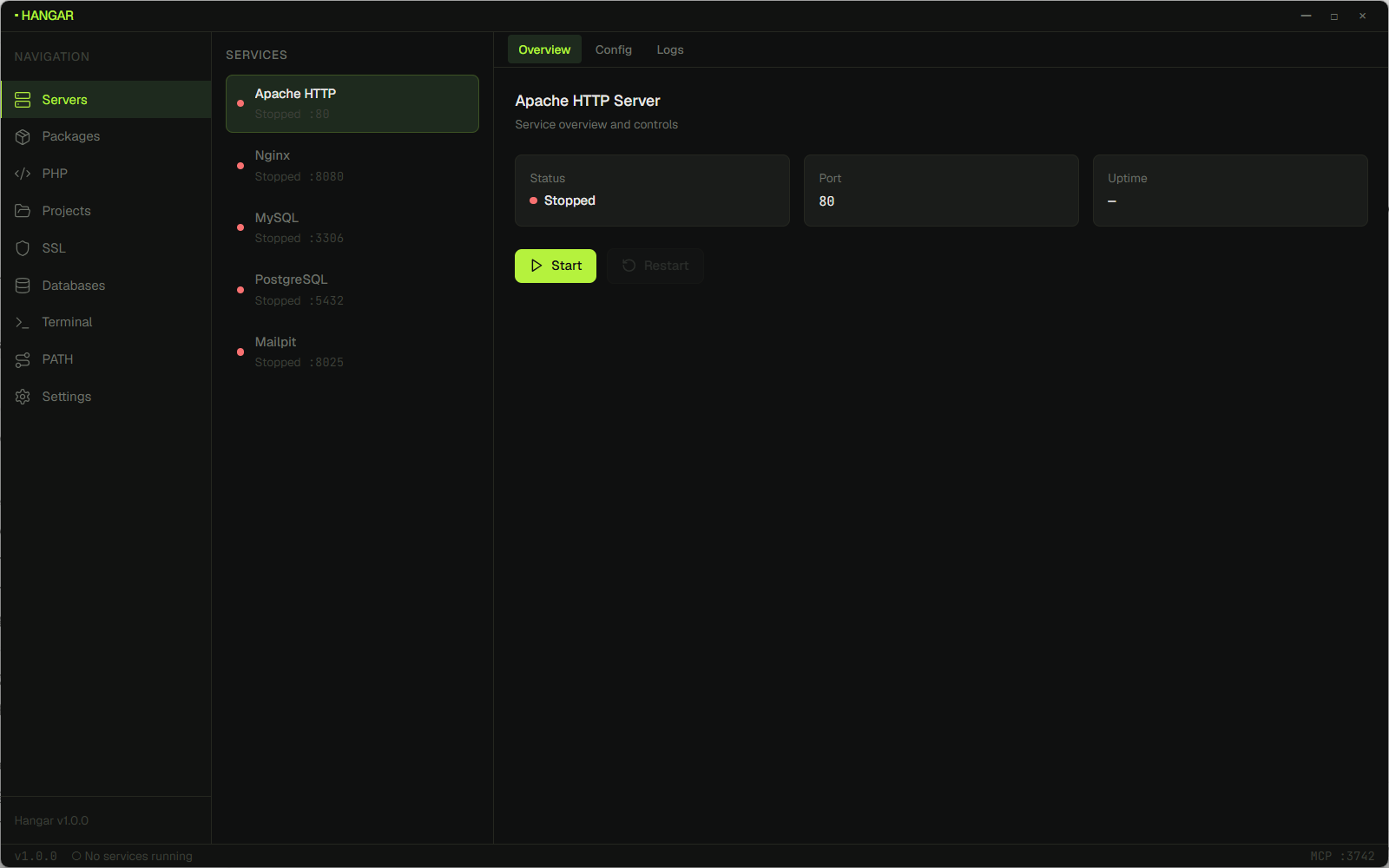
Service manager One-click start, stop, restart for Apache, Nginx, MySQL, PostgreSQL, and Mailpit, with live status, port, and uptime.
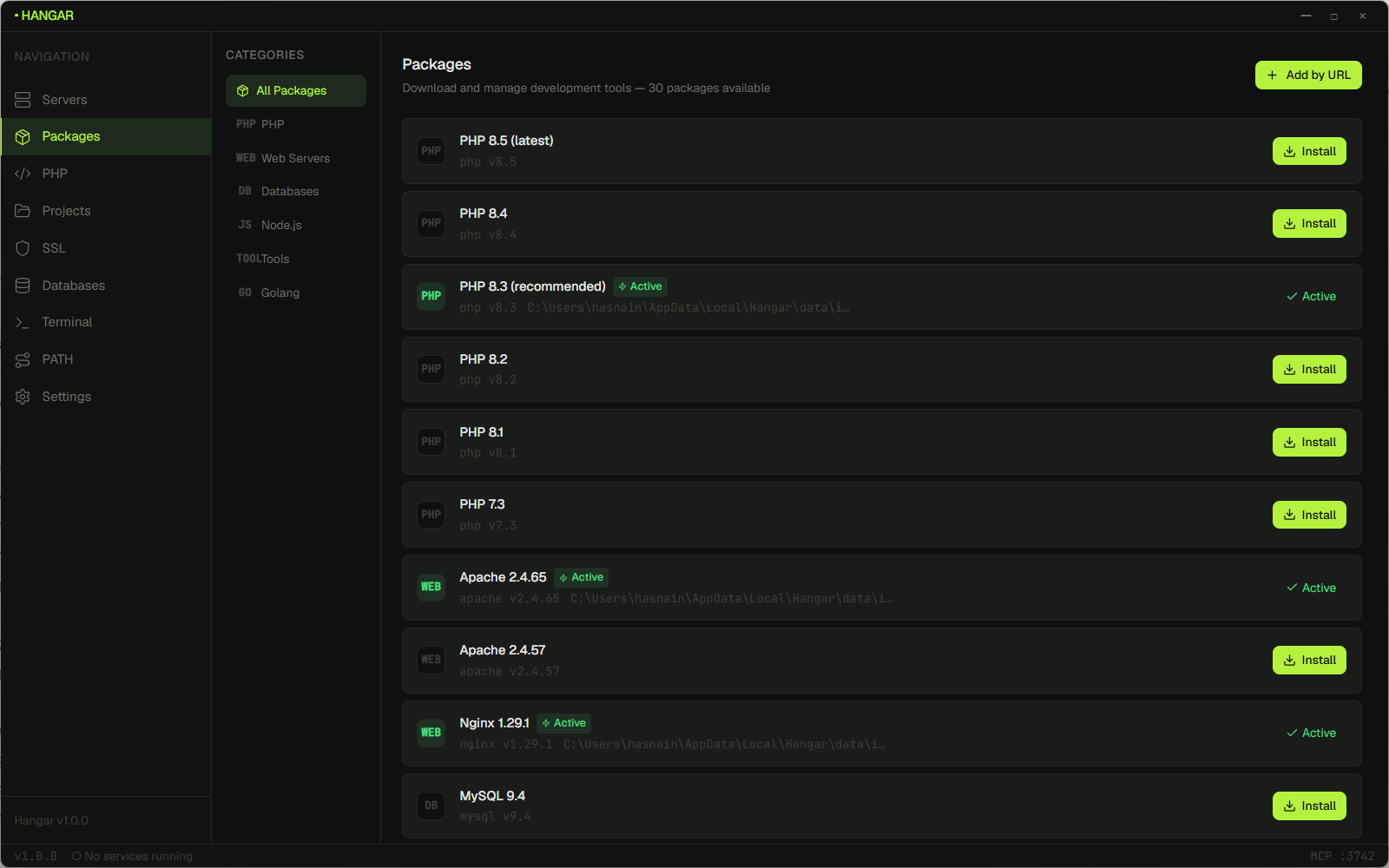
Package manager Install and update PHP runtimes, databases, web servers, and tools from the built-in registry. Add anything else by URL.
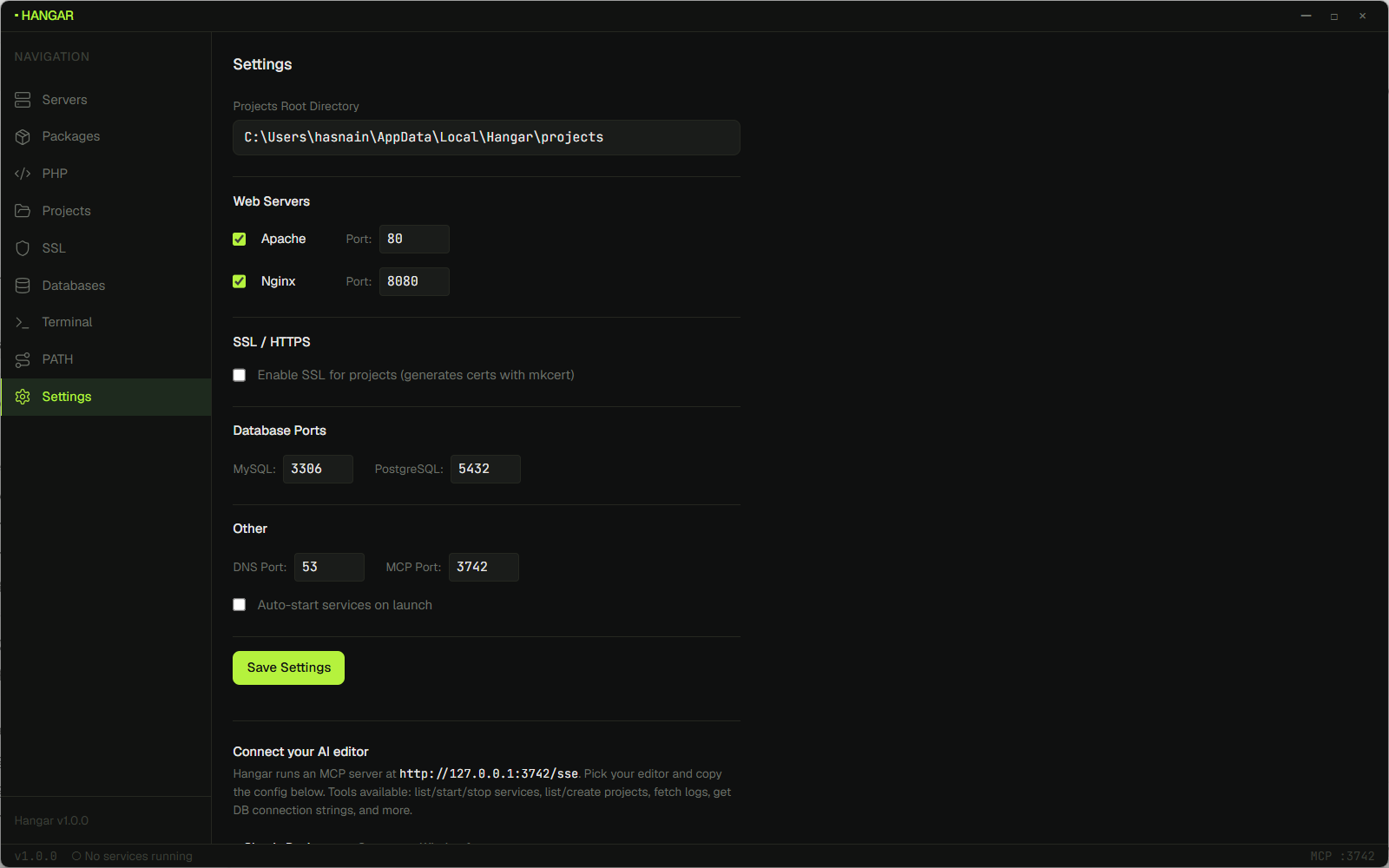
Settings + MCP integration Tune ports, toggle SSL, set the projects root, and copy the MCP endpoint configuration into your AI editor.
Tech stack
Development
Prerequisites
Run in dev mode git clone https://github.com/Anssol-Labs/hangar.git
cd hangar
cd frontend && npm install && cd ..
wails dev
Build a production installer wails build -nsis
# → build/bin/Hangar-Setup.exe
Project layout hangar/
├── main.go # Wails entry + single-instance lock + tray bootstrap
├── app/
│ ├── app.go # Main App struct + Wails-bound methods
│ ├── config/ # bbolt config store, platform paths, defaults
│ ├── services/ # Service interface + manager
│ │ ├── apache · nginx # Web servers with vhost generation
│ │ ├── mysql · postgresql # DB engines with init + run loop
│ │ └── mailpit # Dev mail catcher
│ ├── php/ # Multi-version PHP, ini editor, ext registry
│ ├── projects/ # Project model, framework detector, vhost linker
│ ├── ssl/ # mkcert wrapper
│ ├── dns/ # *.test DNS resolver + hosts file manager
│ ├── mcp/ # JSON-RPC 2.0 + SSE MCP server, 14 tools
│ ├── dbinspect/ # Schema introspection + 30-rule audit engine
│ ├── packages/ # Package registry, downloader, install manager
│ ├── bootstrap/ # First-run wizard backend
│ ├── tray/ # System tray icon + menu
│ ├── heidisql/ # HeidiSQL portable_settings.txt launcher
│ ├── syspath/ # Windows PATH editor
│ ├── downloader/ # Generic downloader with progress + integrity
│ └── logs/ # In-memory log ring + tail reader
├── frontend/ # React + Vite + TailwindCSS
│ └── src/components/
│ ├── layout/ # Sidebar, TopBar, StatusBar
│ ├── dashboard/ # ServiceCard, ServiceControls
│ ├── packages/ # Package install UI
│ ├── installed/ # Installed launcher page
│ ├── projects/ # Project CRUD + SSL toggle
│ ├── php/ # PHP version picker
│ ├── ssl/ # mkcert manager
│ ├── databases/ # DB browser + query runner
│ ├── terminal/ # In-app terminal
│ ├── services/ # Log viewer + config editor
│ ├── settings/ # App settings + MCP setup card
│ ├── onboarding/ # First-run wizard
│ └── syspath/ # PATH editor UI
└── build/
├── windows/installer/ # NSIS scripts
├── windows/icon.ico # Multi-resolution app icon
└── appicon.png
Contributing Pull requests are welcome. Please read CONTRIBUTING.md for the workflow, coding standards, and the PR checklist.
Easy wins currently on the roadmap:
Linux and macOS ports
More framework detectors (Strapi, Astro, Hono, …)
Dedicated Node version manager UI
Promote mailpit to a first-class service like Apache and MySQL
list_databases and backup_database MCP toolsCode-signing the installer so SmartScreen stops warning on first install
Real PTY in the in-app terminal (currently shells out to Windows Terminal)
Open an issue or discussion before large changes so we can sync on direction.
Security If you find a security issue, please follow the disclosure process in SECURITY.md . Do not open a public issue for vulnerabilities.
License This means you are free to use, modify, and distribute Hangar, but any distributed modifications must remain GPLv3 and the source must be made available to recipients.
Maintainers