ext4-win-driver is a userspace driver designed to enable Windows systems to mount and interact with ext4-formatted volumes, bridging the gap between Linux filesystems and Windows environments.
Key Features:
Auto-Mounting: Automatically mounts ext4-formatted SD cards or USB sticks upon connection, assigning a free drive letter in the active console session.
Right-Click Mounting: Offers a "Mount as ext4" context menu option for .img files, facilitating offline inspection of disk images.
Command-Line Interface (CLI): Provides tools to browse and interact with ext4 volumes without mounting, supporting operations like info, ls, stat, cat, tree, parts, and audit.
Read/Write Support: Defaults to read-write mode but allows switching to read-only for safe inspection via CLI or context menu options.
Integration with WinFsp: Bundles the necessary components through a single installer, simplifying setup and ensuring seamless functionality.
Audience & Benefit:
Ideal for developers, system administrators, and Linux enthusiasts who require reliable access to ext4-formatted volumes on Windows. It enables efficient file operations, system administration tasks, and troubleshooting without the need for additional software or complex configurations. The tool's robust partition parsing capabilities and support for various disk types make it a versatile solution for handling Linux filesystems within a Windows environment.
README
ext4-win-driver
Overview
This project provides Windows-first userspace tooling for ext4 volumes, built on the fs-ext4 Rust library.
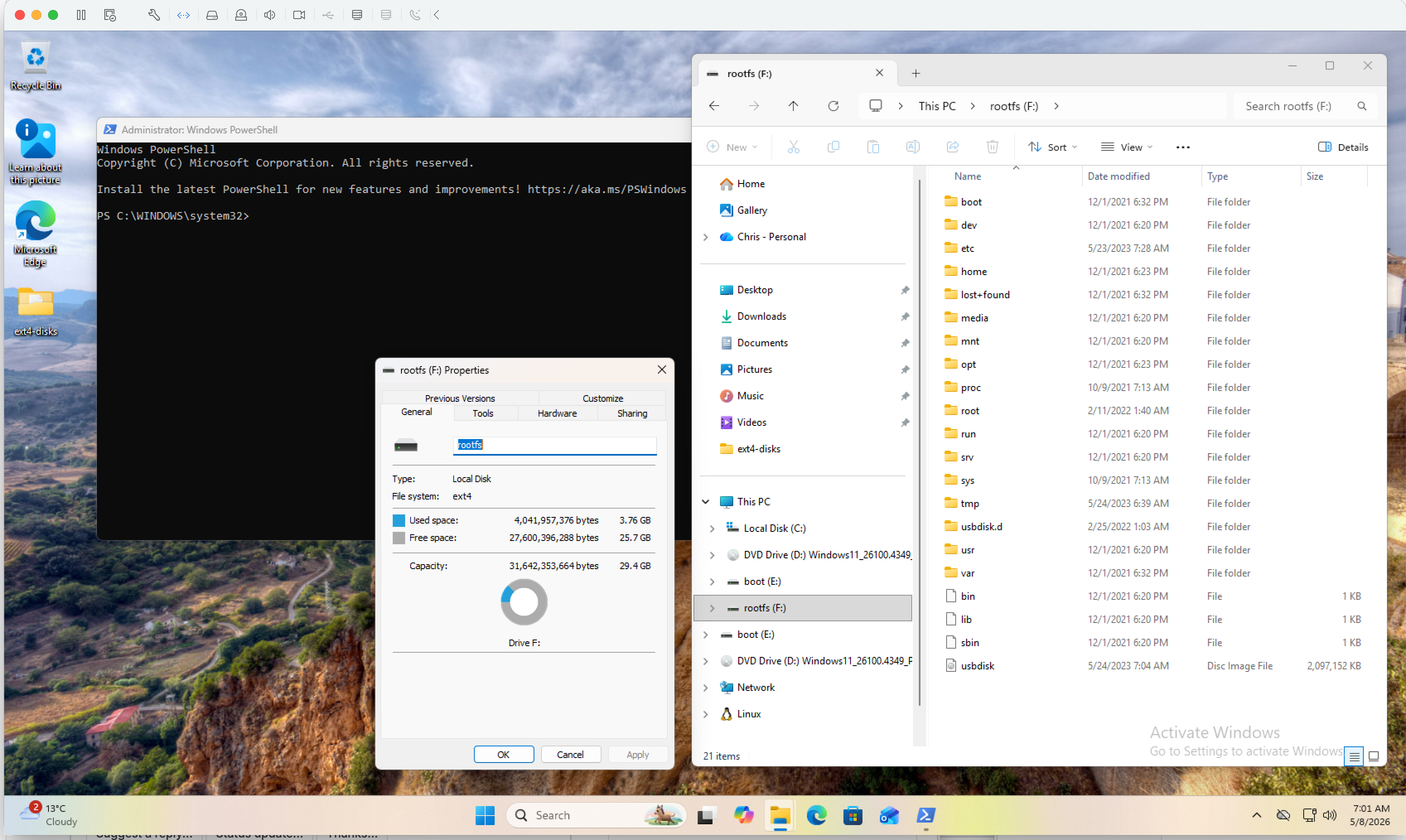
A Raspberry Pi root-filesystem SD card plugged into a Windows 11 ARM64
host, auto-mounted on F: by the ExtFsWatcher service and browsable in
Explorer the moment it appeared.
Scope:
Auto-mount service -- plug an ext4 SD card or USB stick into Windows
and the ExtFsWatcher service mounts it on a free drive letter in the
active console session. Detach and it unmounts cleanly.
Right-click verb -- "Mount as ext4" on .img files in Explorer for
offline disk images.
CLI browser -- open an ext4 image or raw device; list/stat/read
files without mounting. Cross-platform (macOS/Linux work too -- handy
for testing).
Setup.exe -- bundles WinFsp via a Burn bootstrapper, so end users
only run one installer.
The fs-ext4 library lives at ../rust-fs-ext4/
(a sibling checkout of christhomas/rust-fs-ext4,
pinned in chores.yml) and is path-depended; this crate is the distribution unit.
The Windows-driver scaffolding (SCM service, disk-arrival watcher,
WinFsp.Launcher integration, partition-table walker, raw-device I/O,
installer + CI templates) lives in
winfsp-fs-skeleton,
checked out as a sibling at ../winfsp-fs-skeleton/.
ext4-win-driver is the first consumer of that skeleton -- it was
extracted from this project once the auto-mount path was working
end-to-end. See The skeleton split below for the
boundary.
--part N mounts a partition slice via the C ABI's callback mount
Win32 raw-device support (\\.\X:, \\.\PhysicalDriveN,
\\?\STORAGE#Disk#...) with sector-aligned reads for 4Kn /
advanced-format drives
WinFsp read-only mount -- verified on Windows 11 ARM64 with
both VHD smoke tests and a real Raspberry Pi SD card
WinFsp read-write mount (default; --ro for read-only) --
create/pwrite/truncate/rename/unlink/rmdir/mkdir/utimens wired
through the C ABI. Streaming positional writes land in fs-ext4
via pwrite, so large-file workloads no longer round-trip the
whole file.
ExtFsWatcher SCM service -- subscribes to disk-class
arrivals (GUID_DEVINTERFACE_DISK), walks the partition table
directly, probes each partition for the ext4 superblock magic,
and asks WinFsp.Launcher to spawn a per-partition mount in the
active console session
Right-click .img -> Mount as ext4 verb registered under
HKCR\SystemFileAssociations\.img
MSI + Burn bundle that auto-installs WinFsp if missing
(chained via the official WinFsp redistributable MSI)
x64 + arm64 Setup.exe built per release tag by GH Actions
(.github/workflows/release.yml) and attached to the release.
Code-signing certificate -- the per-year cost isn't justified for an
unsponsored side project. Setup.exe will continue to trip SmartScreen
on first download until that changes.
Install (end users)
Download ext4-win-driver---Setup.exe (arch is x64 or
arm64) from
Releases,
run it, accept the GPL-3 prompt. The installer:
chains the WinFsp MSI if WinFsp isn't already installed,
drops ext4.exe and Mount-Ext4.ps1 into C:\Program Files\ext4-win-driver\,
registers ExtFsWatcher as an automatic Windows service and starts it,
registers the ext4-mount service-class with WinFsp.Launcher,
registers the "Mount as ext4" right-click verb on .img files.
Setup.exe /quiet works for unattended installs. SCCM/Intune deploys
should push the bare MSI separately, after pushing WinFsp.
Usage
Plug in an ext4 SD card or USB stick: nothing else needed. The service
picks it up, finds the ext4 partition(s), and mounts each on a free drive
letter (E: upward).
CLI (works on any host):
ext4 info   <img />                        # volume label, sizes, features
ext4 ls     <img /> [path]                 # directory listing
ext4 stat   <img />
ext4 cat    <img />
ext4 tree   <img />
ext4 parts  <img />                        # MBR/GPT partition table
ext4 audit  <img />                        # link-count + dirent integrity scan
ext4 ls      --part 1 /    # browse partition 1
Manual WinFsp mount (Windows + mount feature):
ext4 mount <img /> --drive X:                       # read-write (default)
ext4 mount <img /> --drive X: --ro                  # read-only
ext4 mount  --drive X: --part 1     # mount partition 1
Then browse X: in Explorer, or Get-ChildItem X:\, etc. Ctrl-C to unmount.
Toggling read-only / read-write
The default for every mount path is read-write. Pass --ro per-mount,
or use one of the system-wide knobs below:
Auto-mount service. The WinFsp.Launcher CommandLine for the
ext4-mount service-class lives at
HKLM\SOFTWARE\WOW6432Node\WinFsp\Services\ext4-mount\CommandLine
(32-bit registry view). Default: mount %2 --drive %1 --part %3.
Append --ro there to force every auto-mount read-only.
Right-click verb. The shortcut runs
Mount-Ext4.ps1 which takes a
-ReadOnly switch. Edit
HKCR\SystemFileAssociations\.img\shell\MountAsExt4\command to add
-ReadOnly to the script invocation if you want the verb itself to
default to RO.
Per-mount via PowerShell. Run Mount-Ext4.ps1 -ImagePath disk.img -ReadOnly for one-off RO mounts.
The legacy --rw flag is still accepted (silently) so existing scripts
and harness.toml configs that pre-date the flip don't break.
Watch mode (foreground variant of the service, useful for dev / debugging):
ext4 watch # foreground; logs each arrival
The skeleton split
After v0.1.0 was working end-to-end, the platform plumbing was
extracted into its own crate (winfsp-fs-skeleton)
so the same scaffolding can host future filesystem drivers (qcow2,
ntfs, ...) without copy-paste. The boundary:
The release profile statically links the C runtime via
.cargo/config.toml so the binary has no
libunwind.dll import -- required for the SCM session-0 launch path
where the LocalSystem PATH doesn't reach the LLVM-MinGW runtime dir.
panic = "abort" is set in Cargo.toml for the same release profile.
WinFsp build prerequisites
WinFsp 2.1+ installed on the build/run machine
(winfsp.dev -> MSI, or winget install WinFsp.WinFsp).
A forked
winfsp-rs is checked
out as a sibling at ../winfsp-rs/, pinned to a commit
from the gnullvm-support branch (path-depended; the upstream PR is pending).
The fork also requires:
Produces dist\ext4-win-driver--arm64.msi and
dist\ext4-win-driver--arm64-Setup.exe. The script PE-sniffs
-ExePath to catch arch mismatches before WiX does. See
installer/README.md for the longer walkthrough
(WiX 7 install, WinFsp redist pin, etc).
After cloning, check out the siblings at their pinned refs:
chore siblings          # clone or move each sibling to its pin; refuses to touch a dirty one
chore siblings:check    # report where each sibling is, changing nothing
CI does not run chore (there is no Windows build of it); the workflows read
the same *_URL / *_REF values out of chores.yml and clone the siblings
directly.
Run the test matrix (Mac -> SSH -> Windows VM -> diag pull):
bash ../fs-windows-test-harness/scripts/run-tests.sh                 # full matrix
bash ../fs-windows-test-harness/scripts/run-tests.sh basic-ro-list   # one scenario
bash ../fs-windows-test-harness/scripts/run-tests.sh --help          # all flags
On the very first run, the script prompts for VM details (user, IP,
SSH key, workdir, image dir) and writes .test-env; subsequent runs
skip straight to ship + run + diag-pull. Use --reset to wipe
.test-env and re-prompt (e.g. after VM IP change).
To move to a new harness release, edit HARNESS_REF in chores.yml to the
new tag, then re-run chore siblings to check it out locally. That one line
is the whole bump: CI picks the new ref up from the same file.
License
GPL-3.0 -- inherited from the WinFsp Rust bindings. The CLI alone (without
the mount feature) doesn't link winfsp and could be relicensed if split
out, but the single-license declaration keeps the distribution unit simple.