Arroxy is a free, open-source desktop application designed to download YouTube videos, Shorts, music, channels, playlists, and content from over 2000 supported sites in high-quality formats. It supports resolutions up to 4K HDR at 60 fps, as well as audio-only options like MP3, AAC, Opus, and WAV.
Key Features:
High-Quality Downloads: Supports 4K UHD (2160p), 1440p, 1080p60, HDR, and high frame rates.
Privacy-Focused: Local processing only; no login or tracking required.
Cross-Platform Support: Runs on Windows, macOS, and Linux.
Subtitle & SponsorBlock Integration: Adds subtitles in SRT, VTT, or ASS formats and skips sponsor content.
Multi-Download Queue: Manages multiple downloads simultaneously with a user-friendly interface.
Audience & Benefit:
Ideal for content creators, educators, researchers, and anyone seeking to save YouTube videos offline without ads or tracking. Arroxy streamlines the process of downloading high-quality media locally, ensuring privacy and efficiency. It can be installed via winget, making it accessible across supported platforms.
README
Arroxy — Free Open-Source YouTube (+ 2000 sites) Downloader for Windows, macOS & Linux
Download videos, Shorts, music, channels, podcasts, or audio tracks from YouTube and 2000+ supported sites — up to 4K HDR at 60 fps, or as MP3 / AAC / Opus. Runs locally on Windows, macOS, and Linux. No ads, no bloat, no upsells.
If Arroxy saves you time, a ⭐ helps others find it.
> What is Arroxy? Arroxy is a free, open-source desktop GUI that downloads videos, audio, playlists, and subtitles from YouTube and 2000+ other yt-dlp-supported sites. It runs on Windows 10/11, macOS 11+ (Intel + Apple Silicon), and Linux (AppImage, Flatpak, tar.gz). MIT licensed. No account, no ads, no usage limits. Distributed via Winget, Scoop, Homebrew Cask, Flatpak, AppImage, and direct download.
>
> Last updated: 2026-06-17.
Arroxy is open-source and MIT-licensed. The Windows and macOS builds are not code-signed — Apple Developer ID and Windows EV code-signing certificates each cost hundreds of dollars per year, which an indie project pays out of pocket. Without those signatures, Windows SmartScreen and macOS Gatekeeper will warn you on first launch. The warnings mean your OS doesn't recognize the publisher — they don't mean Arroxy is malware.
Three ways to verify Arroxy yourself, in increasing rigor:
Run a third-party scan. Upload the file to VirusTotal.
Windows first launch
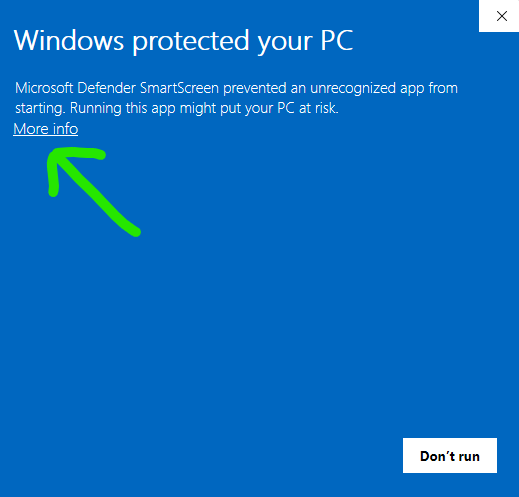
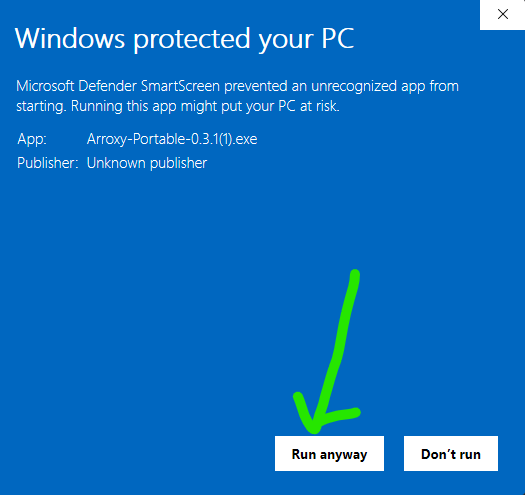
On first launch you may see "Windows protected your PC" or "Unknown publisher." This applies to both Arroxy-win-x64-Setup.exe and Arroxy-win-x64-Portable.exe. Arroxy is free and open-source and the Windows builds are not code-signed with a paid certificate, which is why SmartScreen flags them. It does not automatically mean Arroxy is unsafe. To continue:
Click More info.
Click Run anyway.
If Windows Defender flags or removes the file
Defender heuristics sometimes flag unsigned NSIS installers and Electron portables as suspicious. If Defender quarantines Arroxy-win-x64-Setup.exe or Arroxy-win-x64-Portable.exe, restore it from Windows Security → Virus & threat protection → Protection history, then add the Arroxy executable as an allowed item under Manage settings → Add or remove exclusions. As with SmartScreen, the trigger is the missing publisher signature, not detected malware.
> Only download Arroxy from the official GitHub Releases page. If you got the file from another website or someone sent it to you, delete it and download a fresh copy from the official source. The source code is public, so you can inspect it or build Arroxy yourself if you prefer.
macOS first launch
Arroxy is not yet code-signed for macOS, so Gatekeeper will block the first launch. The exact path to allow it depends on your macOS version — Sequoia 15 tightened the old right-click → Open bypass.
macOS Sequoia 15 and later (current)
On Sequoia 15 and newer, right-click → Open no longer bypasses Gatekeeper for many quarantined apps. Use the System Settings panel instead:
Drag Arroxy.app from the mounted DMG into /Applications.
Double-click Arroxy. The block dialog appears — click Done (don't click Move to Trash).
Open System Settings → Privacy & Security and scroll to the Security section. You'll see "Arroxy was blocked to protect your Mac" (or a near-identical message).
Click Open Anyway, confirm with your password or Touch ID, then re-launch Arroxy from /Applications.
macOS Sonoma 14 and earlier
Drag Arroxy.app from the mounted DMG into /Applications.
Right-click (or Control-click) Arroxy.app in /Applications and choose Open.
The warning dialog now has an Open button — click it and confirm. Arroxy opens normally and the warning never appears again.
"App is damaged" or persistent Gatekeeper block — Terminal fix
If macOS says "Arroxy is damaged and can't be opened", or none of the steps above clear the block, the quarantine attribute on the DMG is the cause (some browsers and macOS's own translocation behavior set it). Strip it from the installed app:
Apple Silicon vs Intel: on an M-series Mac (M1 / M2 / M3 / M4), download the arm64 DMG. On Intel Macs, download the x64 DMG. Running the wrong build still works via Rosetta but is noticeably slower.
> macOS builds are produced via CI on Apple Silicon and Intel runners. If you hit issues, please open an issue — feedback from macOS users actively shapes the macOS testing cycle.
Linux first launch
AppImages run directly — no installation. You just need to mark the file as executable.
File manager: right-click the .AppImage → Properties → Permissions → enable Allow executing file as program, then double-click.
Optional desktop integration: install AppImageLauncher once, and any AppImage you double-click gets registered into your launcher menu automatically — no manual .desktop file needed.
Flatpak (sandboxed alternative): download Arroxy-linux-x64.flatpak from the same release page.
flatpak install --user Arroxy-linux-x64.flatpak
flatpak run io.github.antonio_orionus.Arroxy
Verify your download (SHA256)
Every release publishes a SHA256SUMS file alongside the binaries. To check that your download wasn't corrupted or tampered with in transit, hash your file locally and match the line in SHA256SUMS. Open the latest release page → Assets → download SHA256SUMS.
Want a third-party malware scan? Upload the file at VirusTotal. A handful of generic-heuristic flags from minor engines is normal for unsigned Electron apps; widespread detections from major engines would be a real concern.
Install via package manager
Already use a package manager? You can skip the manual download path.
Audio — export audio-only as MP3, M4A/AAC, Opus, or WAV. In interactive downloads, pick the source's native surround/Dolby tracks (AC-3, E-AC-3, 5.1, DRC) when available, or set a global Prefer surround / Dolby default
Quick presets: Best quality · Balanced · Small file
Privacy & control
100% local processing — downloads go straight from YouTube to your disk
Open source — every line auditable, MIT licensed
Files saved straight to the folder you choose
Workflow
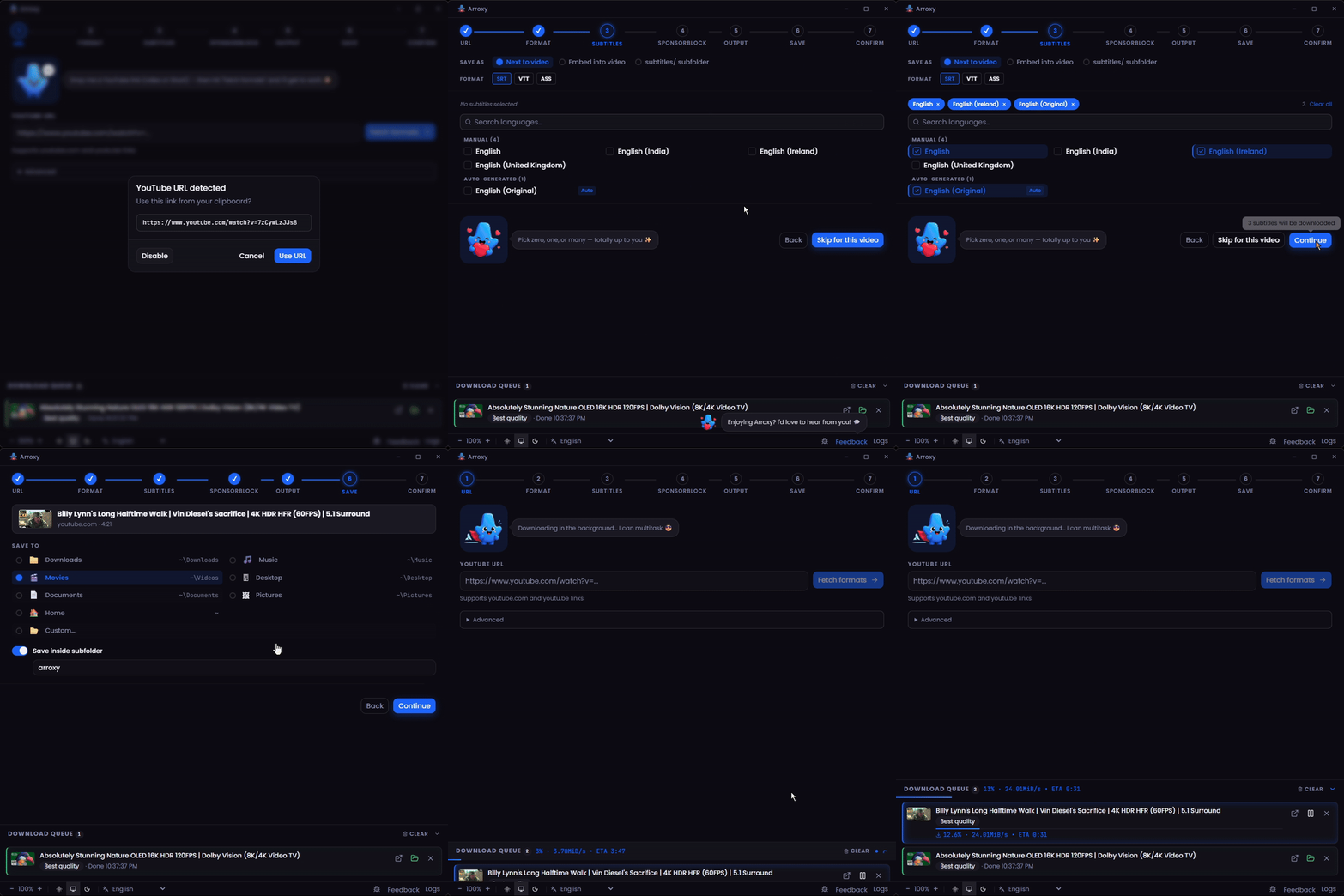
Flexible start modes — choose a guided single download, playlist/channel picker, bulk URL paste, or Quick Download with saved defaults
Central download queue — every single, playlist, bulk, or quick job lands in one place for progress, pause, resume, cancel, retry, and priority control
Clipboard watch — copy a YouTube link and Arroxy auto-fills the URL when you refocus the app (toggle in Advanced settings)
Tray mode — closing the window keeps downloads running in the background
21 languages — auto-detects system locale, switchable any time
Playlist sync — re-scan a playlist against a local folder to skip already-downloaded videos; generates an .m3u playlist file updated as each video downloads
Speed and pacing controls — cap download bandwidth, add request delays, and tune fragment threads with presets (Off · Balanced · Careful · Custom)
Subtitles & post-processing
Subtitles in SRT, VTT, or ASS — manual or auto-generated, in any available language
Save next to the video, embed into .mkv, or organize into a Subtitles/ subfolder
SponsorBlock — skip or chapter-mark sponsors, intros, outros, self-promos
Embedded metadata — title, upload date, channel, description, thumbnail, and chapter markers written into the file
YouTube + 2000 sites
YouTube, in full — Videos, Shorts, Channels, Playlists, YouTube Music, and Podcasts handled as first-class sources
2000+ other sites via yt-dlp — Vimeo, Twitch, Twitter/X, TikTok, SoundCloud, Bandcamp, Bilibili, BBC iPlayer, archive.org, and many more
Audio-only and subtitles work across every supported site, not just YouTube
If a site changes, yt-dlp ships fixes weekly and Arroxy auto-updates the binary on launch
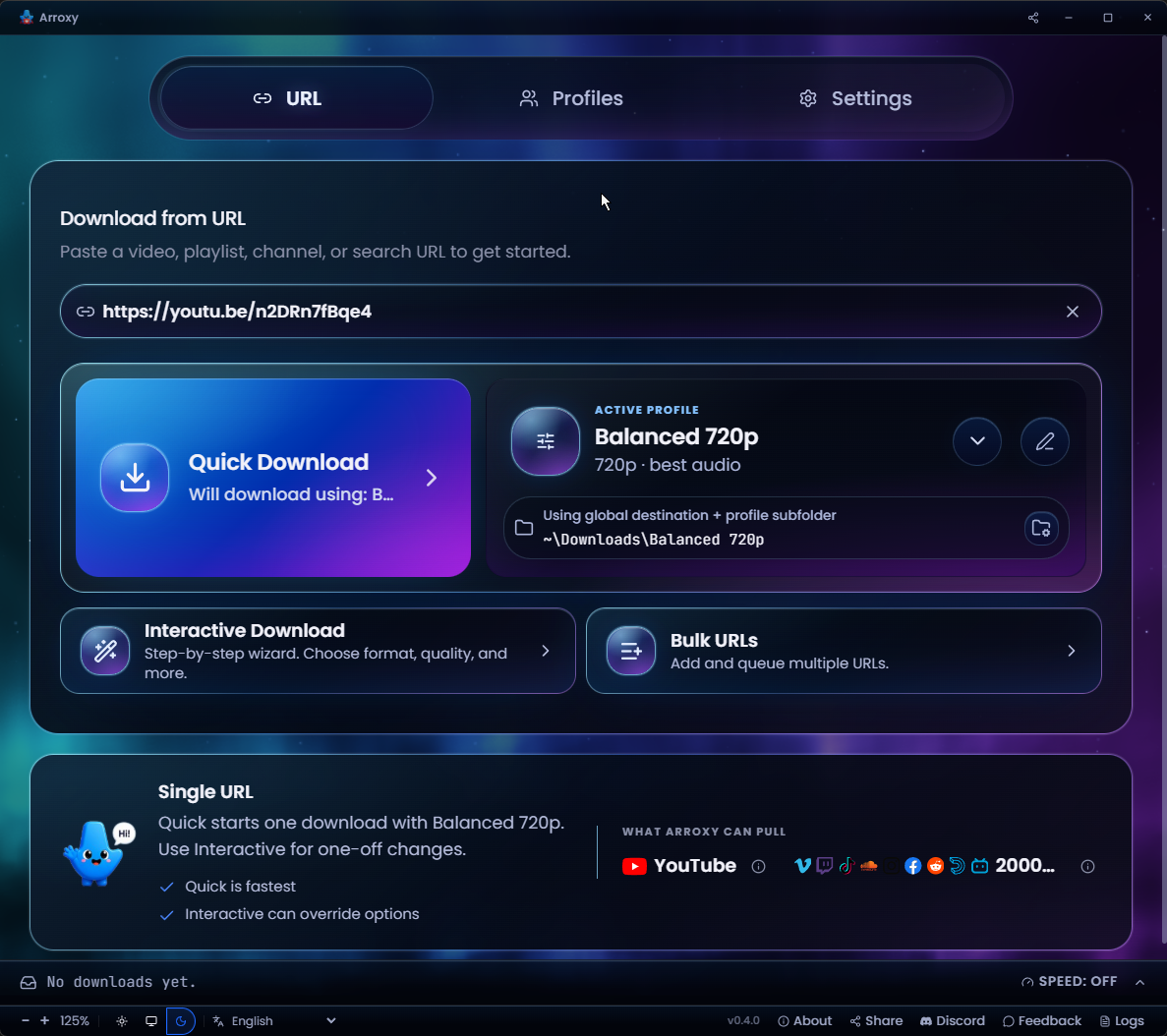
Quick Download homePaste a URL and pull it instantly with your active profile
Reusable download profilesSave format, quality, and output presets — reuse per download
Multi-language audio tracksPick the exact audio language a video ships
Surround / Dolby audio5.1 and Dolby tracks detected and preserved
Bulk URL modePaste a list, auto-dedupe, queue them all at once
Parallel download queueSeveral downloads at once with live progress
Privacy
Downloads are fetched directly via yt-dlp from YouTube to the folder you pick — nothing routed through a third-party server. Watch history, download history, URLs, and file contents stay on your device.
Arroxy sends anonymous, aggregate telemetry via OpenPanel — just enough for an indie project to understand launches, OS, app versions, and crashes. No URLs, video titles, file paths, account info, fingerprinting, or personal data. The per-install ID is random and not tied to your identity. You can opt out in Settings.
FAQ
Is it really free?
Yes — MIT licensed, no premium tier, no feature gating.
What video qualities can I download?
Anything YouTube serves: 4K UHD (2160p), 1440p, 1080p, 720p, 480p, 360p, plus audio-only. 60 fps, 120 fps, and HDR streams are preserved as-is.
Can I extract just the audio as MP3?
Yes. Pick audio-only in the format menu and choose MP3, M4A/AAC, Opus, or WAV.
Do I need a YouTube account or cookies?
By default, no — Arroxy works without a YouTube account, login, or cookie export. Optional cookie support is available in Advanced settings (Cookies source: file or browser) for content that requires authentication, such as age-restricted or members-only videos. It is off by default. If you enable it, yt-dlp's wiki notes that cookie-based automation can flag a Google account; a throwaway account is the safer choice in that case.
Will it keep working when YouTube changes something?
yt-dlp is updated automatically on launch, and Arroxy ships fixes promptly when YouTube changes something. If you ever do hit an issue, optional cookie support is available in Advanced settings as a fallback.
What languages is Arroxy available in?
Twenty-one, out of the box: English, Español (Spanish), Deutsch (German), Français (French), 日本語 (Japanese), 中文 (Chinese), Русский (Russian), Українська (Ukrainian), हिन्दी (Hindi), Afaan Oromoo, Kiswahili, O'zbekcha (Uzbek), Tiếng Việt (Vietnamese), አማርኛ (Amharic), العربية (Arabic), اردو (Urdu), پښتو (Pashto), বাংলা (Bengali), မြန်မာဘာသာ (Burmese), Ελληνικά (Greek), and Српски (Serbian). Arroxy auto-detects your operating system's language on first launch and you can switch at any time from the language picker in the toolbar. Runtime locale JSON lives in src/shared/i18n/locales/, and translator-facing PO catalogs live in i18n/locales/ — open a PR on GitHub to contribute.
Do I need to install anything else?
No. yt-dlp is downloaded automatically on first launch and cached on your machine; ffmpeg and ffprobe ship with the app. After that, no extra setup is needed.
Can I download playlists or whole channels?
Yes — both. Paste a playlist URL or a channel URL (e.g. youtube.com/@handle, /channel/UC…, /c/Name, /user/Old); choose how many entries to scan, then queue the whole list or pick specific videos. Date-range filters are coming soon.
macOS says "the app is damaged" — what do I do?
That's macOS Gatekeeper blocking an unsigned app, not actual damage. See "App is damaged" — Terminal fix for the one-line xattr command that clears it.
Is downloading YouTube videos legal?
For personal, private use it is generally accepted in most jurisdictions. You are responsible for complying with YouTube's Terms of Service and your local copyright laws.
Roadmap
Still planned — roughly in priority order:
Feature
Description
Playlist & channel filters
Date-range filters when enumerating a playlist or channel
YouTube audio track preferences
Set an app-wide spoken-language track preference, with per-profile overrides when YouTube offers multiple audio tracks
In-app browser sign-in
Open browser windows inside Arroxy so you can sign in and use site cookies without exporting them manually
One-click video download
Start a video download in one click from a detected or pasted URL using your active profile
Stronger retry recovery
A new retry path for downloads interrupted by unreliable or problematic internet connections
Full download manager drawer
Turn the queue drawer into a fuller manager, including changing destination folders for queued items
Scheduled downloads
Start a queue at a set time (overnight runs)
Clip trimming
Download only a segment by start/end time
Have a feature in mind? Open a request — community input shapes priority.
Built with
Stack
Electron — cross-platform desktop shell
React 19 + TypeScript — UI
Tailwind CSS v4 — styling
Zustand — state management
yt-dlp + ffmpeg — download and mux engine (yt-dlp fetched at runtime; ffmpeg/ffprobe bundled at build time)
Recommended: install mise, then run mise install in the checkout. Without mise, manually activate Node.js from .node-version and Bun from package.json before bun run bootstrap.
Windows
powershell -c "irm bun.sh/install.ps1 | iex"
Visual Studio Build Tools and Python may be needed for native rebuilds.
curl -fsSL https://bun.sh/install | bash

# Build + Electron runtime deps
sudo apt install -y build-essential python3 tar libgtk-3-0 libnss3 libasound2t64

# E2E tests only (Electron needs a display)
sudo apt install -y xvfb
Clone & run
git clone https://github.com/antonio-orionus/Arroxy
cd Arroxy
mise install           # recommended; skip if you manually activated the pinned tools
bun run bootstrap
bun run doctor
bun run dev            # Electron app against the Vite renderer
Build a distributable
bun run build        # typecheck + compile
bun run dist         # package for current OS
bun run dist:win     # package Windows targets when run on a supported host
> bun run bootstrap installs dependencies, rebuilds Electron app dependencies, verifies Electron, prepares embedded ffmpeg/ffprobe for development, and installs Playwright Chromium. yt-dlp is managed at runtime in your app data folder; ffmpeg and ffprobe are bundled with every Arroxy release.
Troubleshooting
App won't open / no window appears
The Arroxy process starts but no window shows up. Most often this is a GPU driver hang during startup. Try, in order:
1. Check the log. It records startup, GPU info, and any crash. Path:
Platform
Path
Windows
%APPDATA%\Arroxy\logs\main.log
macOS
~/Library/Logs/Arroxy/main.log
Linux
~/.config/Arroxy/logs/main.log
2. Launch with hardware acceleration disabled. Open a terminal / Command Prompt and run the executable with a flag:
# Windows (Portable) — PowerShell, run from the folder containing the exe
.\Arroxy-win-x64-Portable.exe --disable-gpu

# Windows (Portable) — Command Prompt (cmd.exe), from the same folder
Arroxy-win-x64-Portable.exe --disable-gpu

# Windows (Installed) — works in both PowerShell and cmd.exe
"%LOCALAPPDATA%\Programs\Arroxy\Arroxy.exe" --disable-gpu

# macOS
/Applications/Arroxy.app/Contents/MacOS/Arroxy --disable-gpu

# Linux (AppImage)
./Arroxy-linux-x64.AppImage --disable-gpu
If that works, the GPU/driver is the cause. Make the change permanent (next step).
3. Persist the flag via argv.json. Create the file at:
Platform
Path
Windows
%APPDATA%\Arroxy\argv.json
macOS
~/Library/Application Support/Arroxy/argv.json
Linux
~/.config/Arroxy/argv.json
With contents:
{ "disable-hardware-acceleration": true }
Arroxy reads this before opening any window, so it works even when the window never appeared.
4. Other flags worth trying (combine if needed): --disable-software-rasterizer, --disable-gpu-sandbox, --in-process-gpu.
5. Stale window position. If the window may be opening off-screen (multi-monitor change since last run), delete \window-state.json and relaunch.
6. Still stuck? Open an issue with: OS version, the contents of main.log, and any output from running with --enable-logging --v=1.
Terms of use
Arroxy is a tool for personal, private use only. You are solely responsible for ensuring your downloads comply with YouTube's Terms of Service and the copyright laws of your jurisdiction. Do not use Arroxy to download, reproduce, or distribute content you do not have the right to use. The developers are not liable for any misuse.
















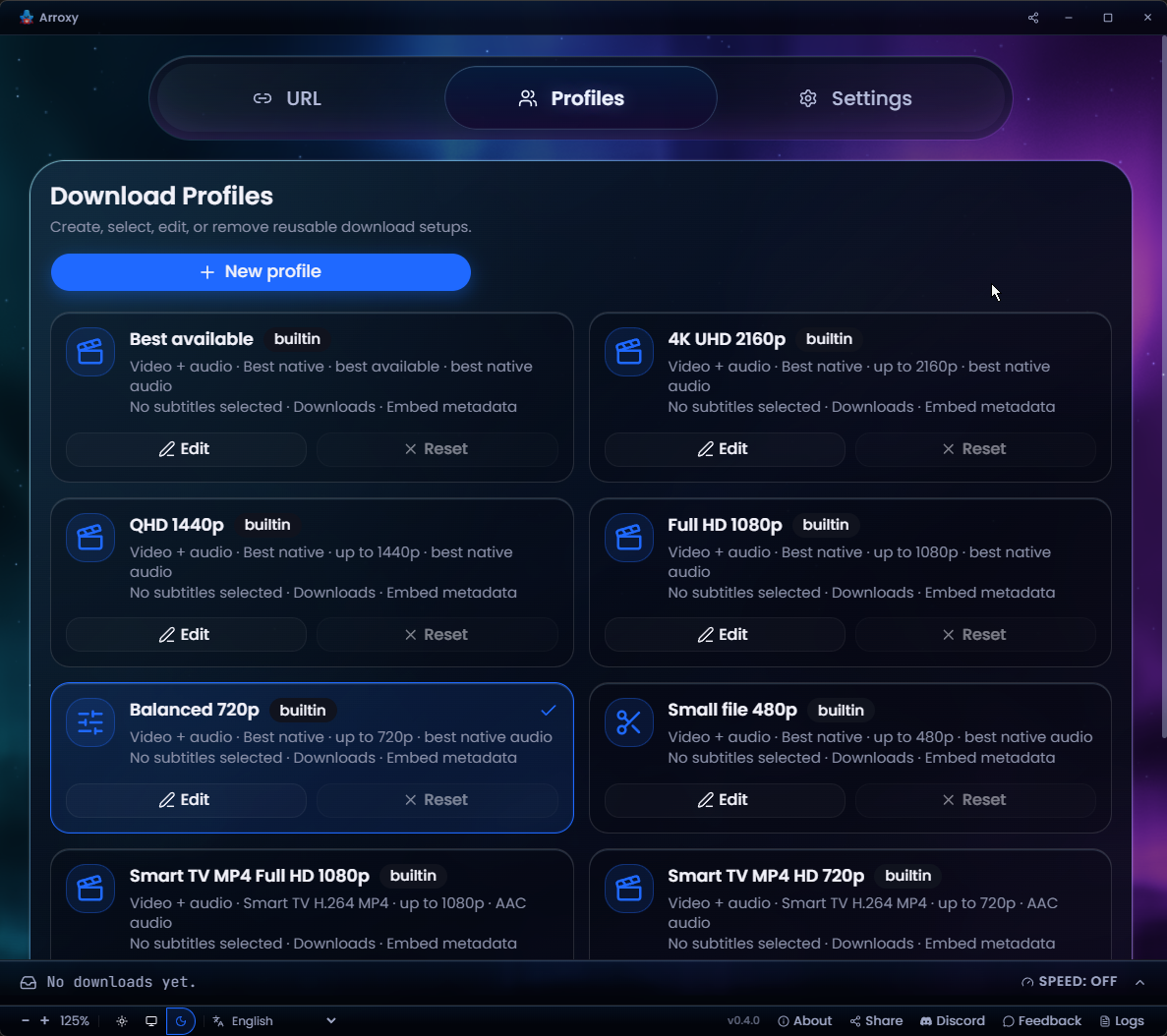 Reusable download profilesSave format, quality, and output presets — reuse per download
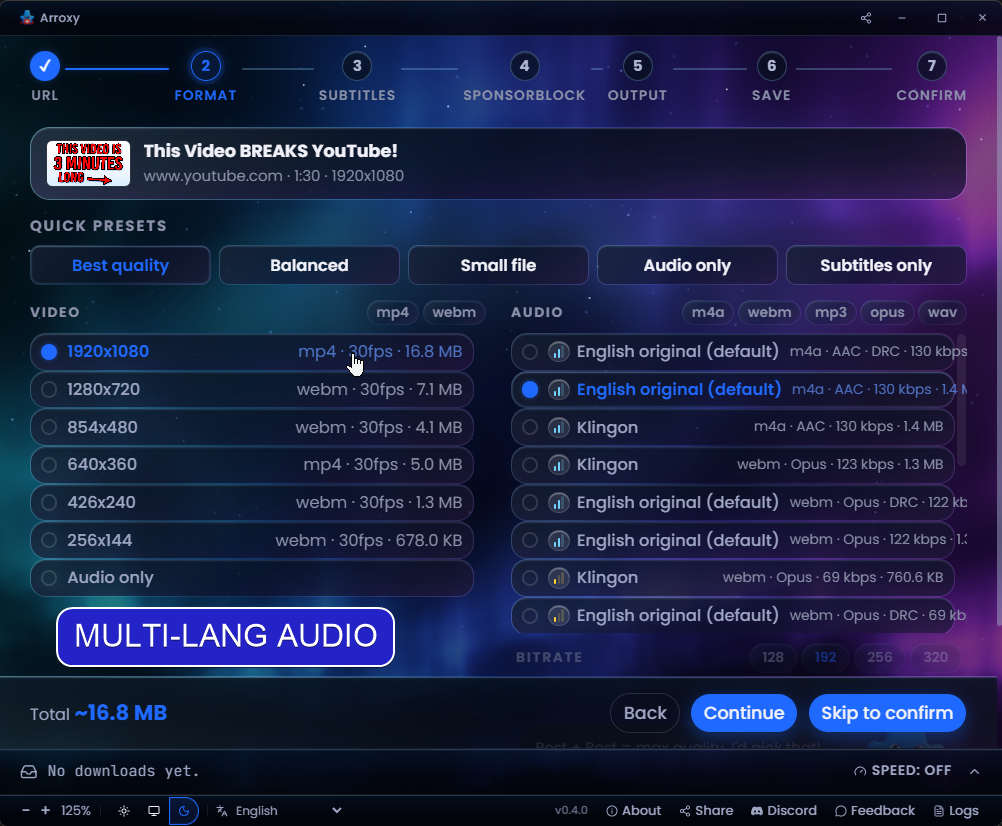 Multi-language audio tracksPick the exact audio language a video ships
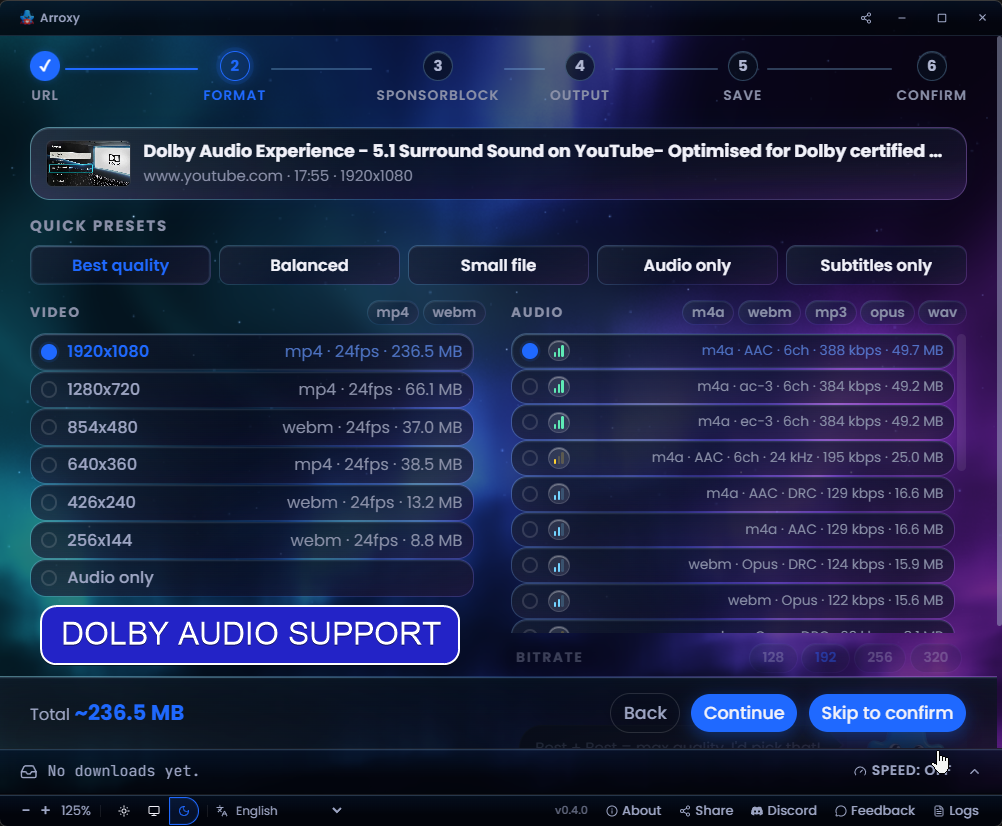 Surround / Dolby audio5.1 and Dolby tracks detected and preserved
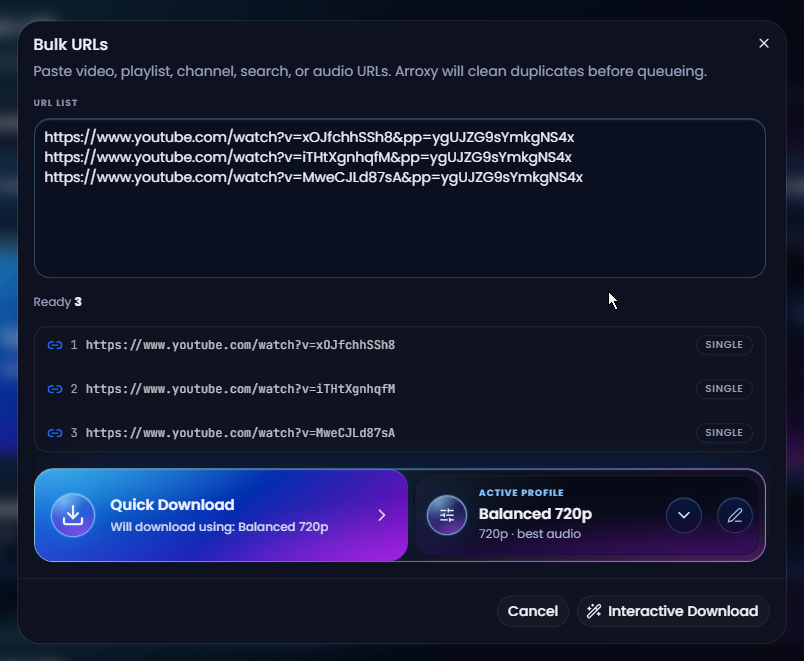 Bulk URL modePaste a list, auto-dedupe, queue them all at once
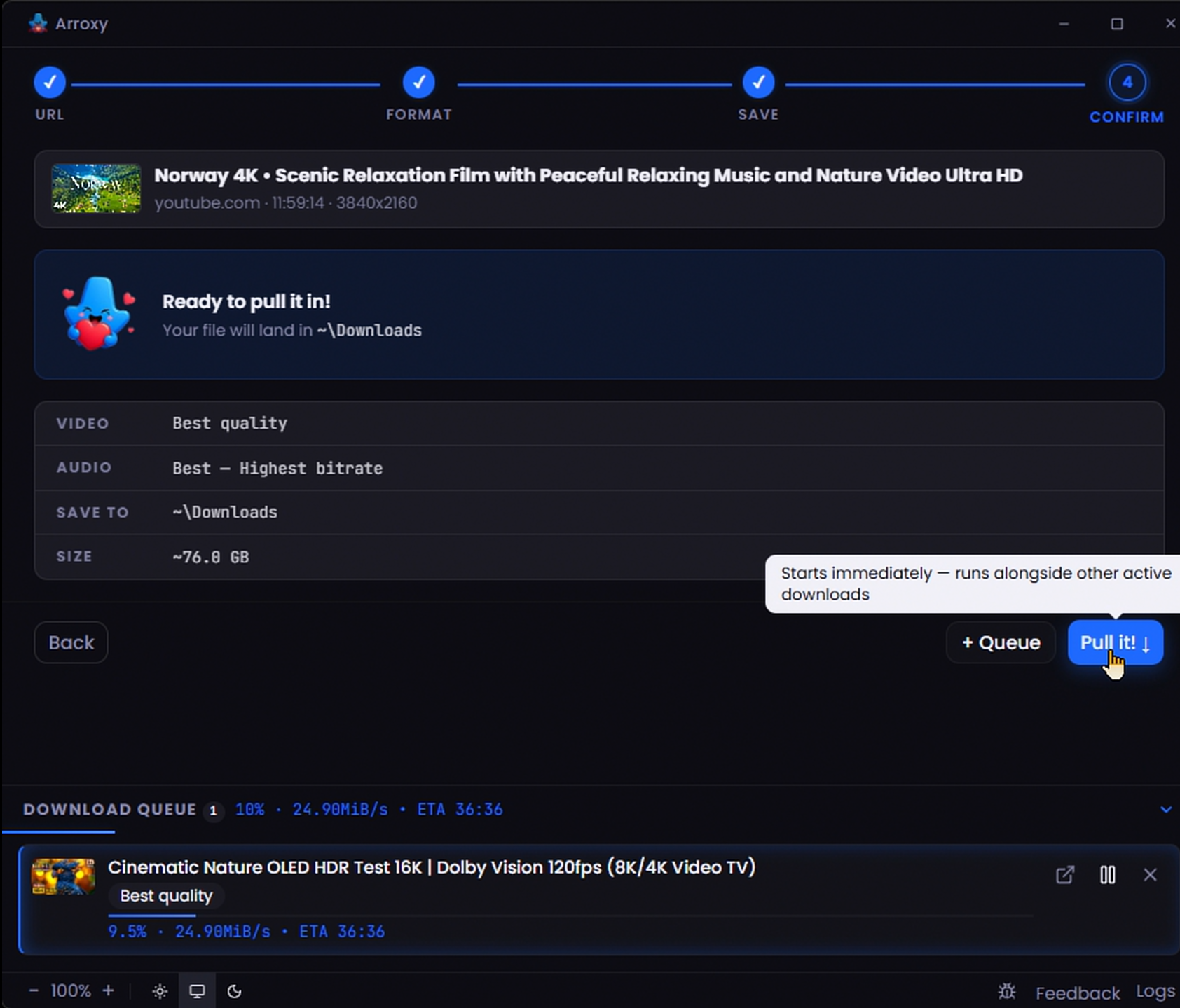 Parallel download queueSeveral downloads at once with live progress