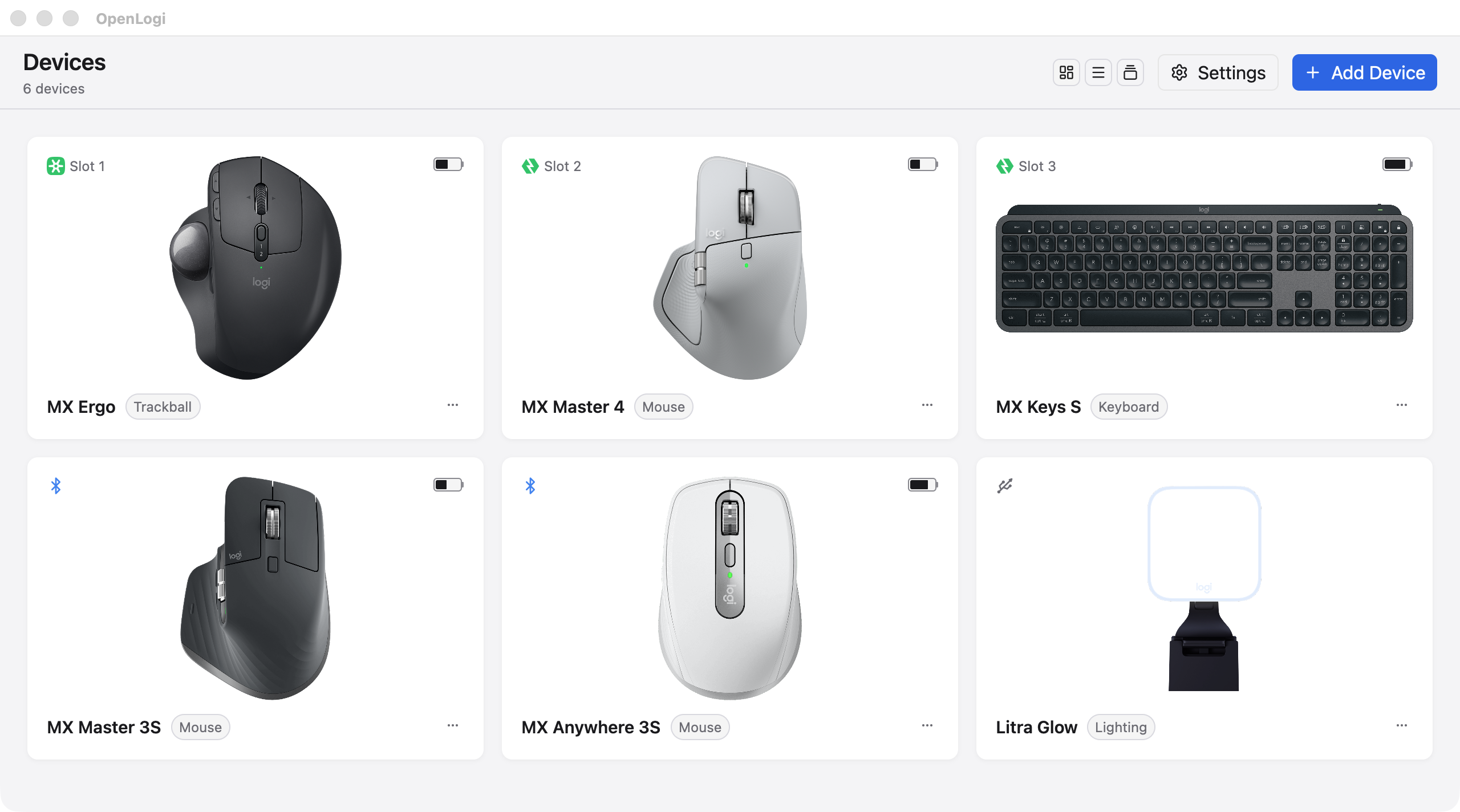
OpenLogi is a native, open-source desktop application designed to optimize Logitech HID++ devices, offering advanced features such as button remapping, DPI control, SmartShift support, and battery monitoring. Built with Rust, OpenLogi provides a lightweight, local-first alternative to Logitech Options+, running seamlessly on macOS, Linux, and Windows.
Key Features:
Button Remapping: Configure custom actions for buttons, including long-press and hold-to-release functionality.
Per-Application Profiles: Automatically switch profiles based on the active application for tailored device settings.
Battery Status Monitoring: Track charge levels and status of Logitech devices connected via Bolt, Unifying, or Bluetooth.
Gesture Support: Assign gestures to compatible buttons and customize their behavior.
DPI and SmartShift Control: Adjust sensitivity and configure mode-toggle settings for enhanced customization.
RGB Lighting Configuration: Set static colors or manage lighting profiles for supported keyboards.
Target Audience and Benefits:
Ideal for users seeking a reliable, open-source tool to maximize the potential of Logitech peripherals. OpenLogi offers a local-first experience with no account requirements, ensuring privacy and simplicity. Cross-platform compatibility and scriptable CLI commands make it an excellent choice for both casual users and power-users looking for deep customization.
Available via Winget for easy installation and deployment using the winget command line.
README
> [!WARNING]
> OpenLogi is under active development and not yet stable — features and config may still change. Give the repo a Star ⭐ and Watch 👀 it to get notified when a new release lands.
OpenLogi
⚡️ A native, local-first alternative to Logitech Options+, written in Rust 🦀Unlock the full capabilities of Logitech mice, keyboards, and webcams over HID++ and UVC
> Fed up with Options+? Try OpenLogi.
Runs on macOS, Linux, and Windows.
Beyond Options+
Things OpenLogi does that Options+ won't:
Stay light. Native Rust + GPUI.
Run on Linux. Linux is a first-class platform in OpenLogi.
Gestures on supported buttons. Assign gesture actions to supported controls — or turn gestures off entirely.
Plain-text config. Everything is one TOML file you can sync between machines however you like.
Script it. A real CLI alongside the GUI: a JSON automation API for DPI, SmartShift, Fn-lock, and report rate, plus hardware diagnostics.
Features
Devices
Logi Bolt and Unifying receivers, Bluetooth, and wired connections, with battery level and charge state
Low-battery notices at the bottom of the screen, once per discharge, with no OS notification permission
An on-screen indicator when a keyboard turns Caps Lock on or off, plus Num Lock and Scroll Lock on Windows and Linux
  <img src="https://assets.openlogi.org/screenshots/macos/light/cards/easy-switch.png" width="400" alt="Easy-Switch card listing three paired computers" />
  <b>Easy-Switch</b>See which computer is paired on each channel, with its OS and connectionRename a channel on devices that allow it
Buttons and actions
    <img src="https://assets.openlogi.org/screenshots/macos/light/cards/buttons.png" width="400" alt="Button mapping for an MX Master 4, with the gesture button inspector open" />
    <b>Remap any button</b>A built-in action catalog, custom shortcuts, typed text, or multi-step workflowsSeparate tap and hold actions, and hold-to-talk chords that release with the buttonGestures on Middle Click, Back/Forward, DPI/ModeShift, the gesture button, and the haptic panel


    <img src="https://assets.openlogi.org/screenshots/macos/light/cards/actions-ring.png" width="400" alt="Actions Ring editor with eight slots around the cursor" />
    <b>Actions Ring</b>Eight actions in a ring around the cursorIts own layout per application


    <img src="https://assets.openlogi.org/screenshots/macos/light/cards/keys.png" width="400" alt="MX Keys S with three keys bound to Launchpad, Lock Screen, and Screenshot" />
    <b>Keyboard keys</b>Bind media, emoji, screenshot, and other dedicated keys like mouse buttonsRestore one key to its device default, or reset the whole row
Per-application profiles switch with the focused app. An [apps] alias lets one profile follow an application across platforms.
Pointer and scrolling
    <img src="https://assets.openlogi.org/screenshots/macos/light/cards/dpi.png" width="400" alt="Pointer tuning card with a DPI slider" />
    <b>Pointer</b>DPI presets with cycle and set-preset actionsPointer speed and report ratePrecision Mode: one button switches the mouse to its slowest speed and back


    <img src="https://assets.openlogi.org/screenshots/macos/light/cards/smartshift.png" width="400" alt="SmartShift card with wheel mode, sensitivity, and scrolling force" />
    <b>SmartShift</b>Wheel mode and sensitivityScrolling force on SmartShift Enhanced miceA permanent-ratchet switch


    <img src="https://assets.openlogi.org/screenshots/macos/light/cards/scrolling.png" width="820" alt="Scrolling card with inversion, wheel resolution, and smooth wheel" /><b>Scrolling</b>Scroll inversion per device, natively or in softwareWheel resolution and smooth wheel scrollingHold Back or Forward and roll the wheel to scroll sideways on mice without a thumb wheel
Keyboard and lighting
    <img src="https://assets.openlogi.org/screenshots/macos/light/cards/keys-backlight.png" width="400" alt="Keys and Backlight cards for an MX Keys S" />
    <b>Keyboard</b>Fn Lock, and multi-platform keyboards that stay on the host OS layoutBacklight level, automatic brightness, battery saving, and how long the keys stay litThe backlight level shown on screen as it changesStatic RGB on supported keyboards


    <img src="https://assets.openlogi.org/screenshots/macos/light/cards/litra.png" width="400" alt="Litra Glow lighting panel with brightness and color temperature" />
    <b>Litra lights</b>Power, brightness, and color temperatureTurns on with the camera if you wantKeeps a change made on the light itself
Webcams
Any Logitech UVC webcam (Brio, StreamCam, the C920 series, …), plug and play
Live preview that holds the camera only while you watch; leave it and the LED goes off
Zoom, pan, tilt, focus, exposure, white balance, and every other UVC control, written to the hardware so Meet, Zoom, and OBS see the change
Built-in Default / Streaming / Video call profiles plus your own snapshots, kept per camera
Feature coverage depends on what each device reports; the app shows only the controls a device supports.