Use this command to install SearchMate with WinGet:
winget install --id=ArashShalchian.SearchMate -e
SearchMate: Fast File Search App for Windows
Primary Purpose:
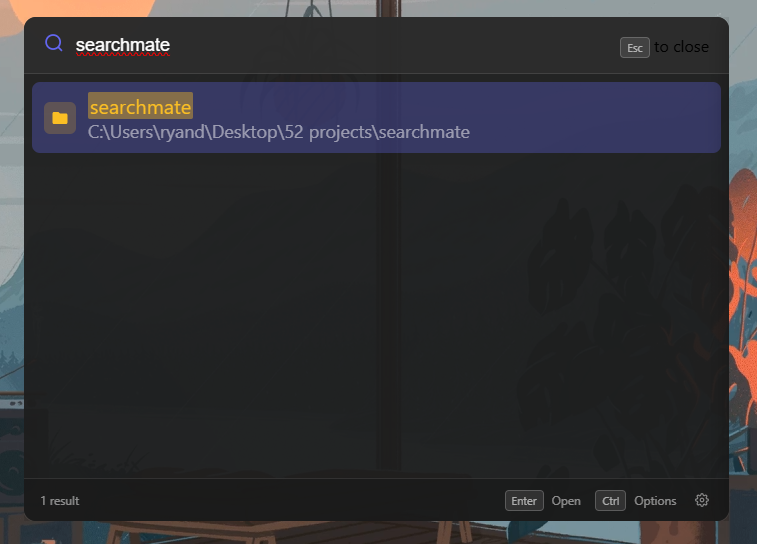
SearchMate is a fast file search application designed to help Windows users quickly locate files using a global hotkey. It streamlines the process of finding files by enabling instant searches from anywhere on your system.
Key Features:
Instant Search Results: Quickly find files with real-time results as you type.
Customizable Global Hotkey: Activate SearchMate with a configurable shortcut, such as Ctrl+Space.
Smart Ranking: Enhances search efficiency with exact matches and fuzzy matching capabilities.
File Preview: Supports previewing text files, images, and folder contents for immediate insights.
Quick Actions: Use keyboard shortcuts to open files, folders, VS Code, or terminal directly from the app.
Customization Options: Tailor your experience with adjustable settings like search paths, themes, opacity, and more.
Portable Version: Available as a single executable file for easy portability without installation.
Audience & Benefit:
Ideal for developers, power users, and anyone seeking efficient file management on Windows. SearchMate saves time by providing instant access to files and simplifying navigation. It can be installed via winget for quick setup, making it accessible to all users.
README
SearchMate
A fast, lightweight file search app for Windows. Find files instantly with a global hotkey.
Features
Instant Search - Type and see results immediately
Global Hotkey - Press Ctrl+Space from anywhere to open
Smart Ranking - Exact matches, prefixes, and fuzzy matching
File Preview - Preview text files, images, and folder contents
Quick Actions - Open files, folders, VS Code, or terminal with keyboard shortcuts
Customizable - Configure search paths, themes, opacity, and more
Portable Option - Single .exe, no installation required