DeckCraft builds presentations and slide shows: an open-source, clean-room reimplementation of Microsoft PowerPoint, rebuilt in pure Rust. Build decks with themes, layouts, shapes, pictures, tables, charts, transitions and animations, open and save PowerPoint files, and present them full screen. Every button is also a command that the CLI and AI agents, through MCP, can drive.
What works today
- Make decks: slide masters and eleven layouts with placeholders that inherit position and formatting, eight original themes, sections, notes, comments, headers and footers, custom slide sizes.
- Draw: 150+ preset shapes with adjust handles, connectors that stay glued to shapes, freeform, curve and scribble tools, merge shapes, gradient, picture and pattern fills, outlines with dashes and arrowheads, shadows, glow, soft edges and reflections.
- Write: in-place text editing with full font and paragraph formatting, bullets and numbering, columns, autofit, vertical text, fields and hyperlinks.
- Add content: pictures with crop and corrections, tables with styles, charts, SmartArt basics, audio and video.
- Present: transitions including Morph, entrance, emphasis, exit and motion-path animations, by-paragraph builds, full-screen slide show, presenter view, pen and rehearse timings.
- Exchange files: open and save PowerPoint .pptx, export PDF with slides, notes pages and handouts, PNG/JPEG and outlines; AutoRecover keeps unsaved work.
- Automate: 200+ commands with undo, scriptable from the CLI, a JSON control channel and an MCP server for AI agents.
README
DeckCraft
Presentations and slide shows; an open-source, modern presentation and slide designer, built in pure Rust.
Build decks with themes, layouts, shapes, pictures, tables, charts, transitions and animations,
open and save .pptx presentation files, and present them full screen. Native on macOS, Windows, Linux
and FreeBSD, and in the browser. Every button is also a command that the CLI and AI agents
(through MCP) can drive.
> [!NOTE]
> ArtCraft is a community of artists from all walks of life. Painters, photographers,
> filmmakers, illustrators, designers, animators, hobbyists, and people who picked up a pencil
> last week. If you make things, you're one of us. Come say hi on Discord.
DeckCraft is in alpha, heading for beta (see the roadmap).
Today it can:
Make decks: slide masters and eleven layouts with placeholders that inherit position and
formatting, eight original themes with colour and font schemes, sections, notes, comments,
headers and footers, custom slide sizes.
Draw: 150+ preset shapes with adjust handles, connectors that stay glued to shapes, freeform,
curve and scribble tools, merge shapes (union, combine, fragment, intersect, subtract), gradient,
picture and pattern fills, outlines with dashes and arrowheads, shadows, glow, soft edges and
reflections.
Write: in-place text editing with full font and paragraph formatting, bullets and numbering,
columns, autofit, vertical text, fields and hyperlinks.
Add content: pictures with crop and corrections, tables with styles, charts, SmartArt basics,
audio and video (MP3, AAC, FLAC, ALAC, Ogg, Opus, WAV, AIFF; H.264, HEVC, VP9, AV1).
Present: transitions (including Morph), entrance/emphasis/exit and motion-path animations,
by-paragraph builds, full-screen slide show, presenter view, pen, rehearse timings, media playback.
Exchange files: open and save .pptx presentations, export PDF (slides, notes pages, handouts
with selectable text), PNG/JPEG, an animated GIF of the deck and outlines. Unsaved work is kept by AutoRecover.
Automate: 200+ commands with undo, all scriptable from the CLI, a JSON control channel and an
MCP server for AI agents.
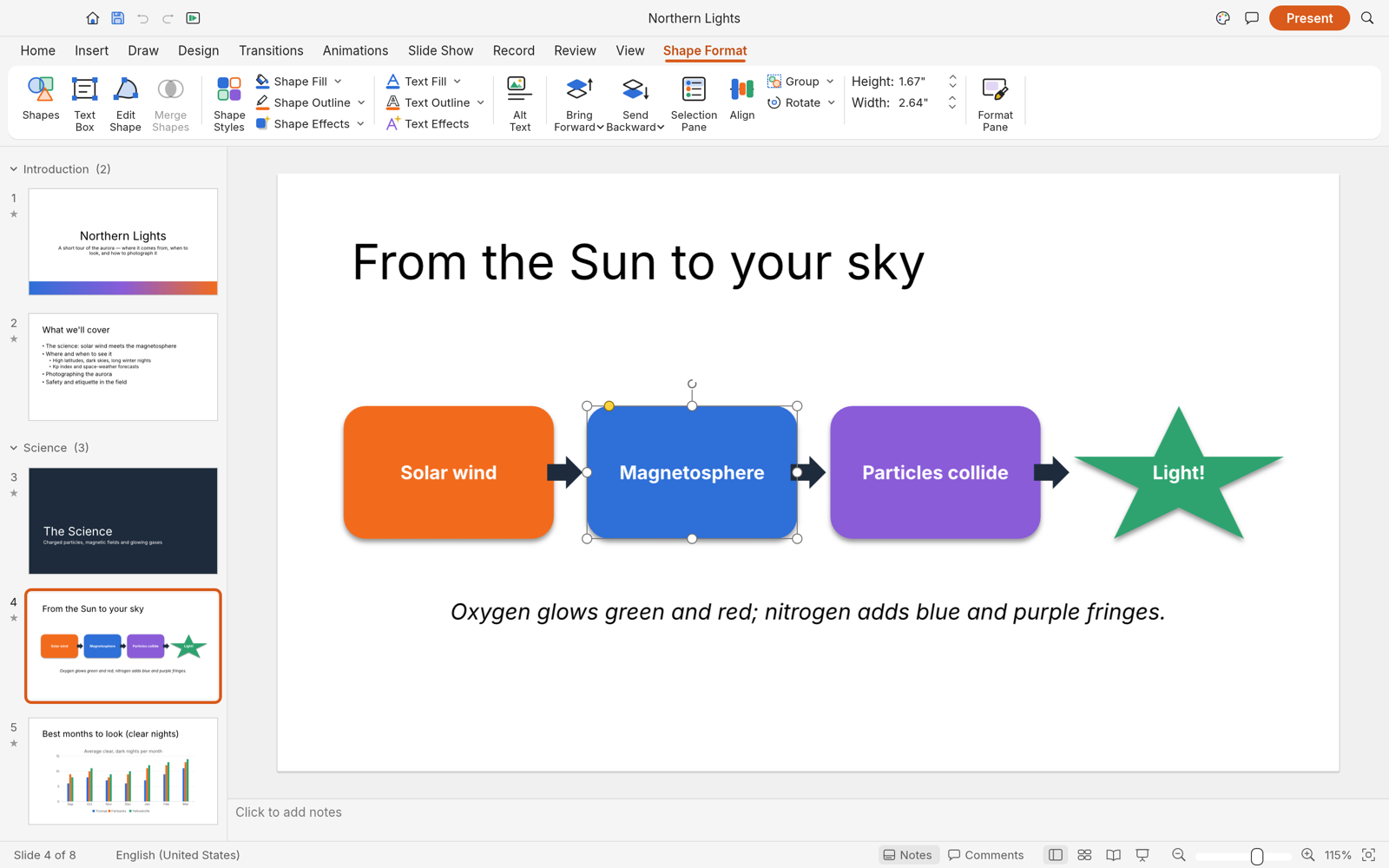
Shape Format contextual tab and selection handles
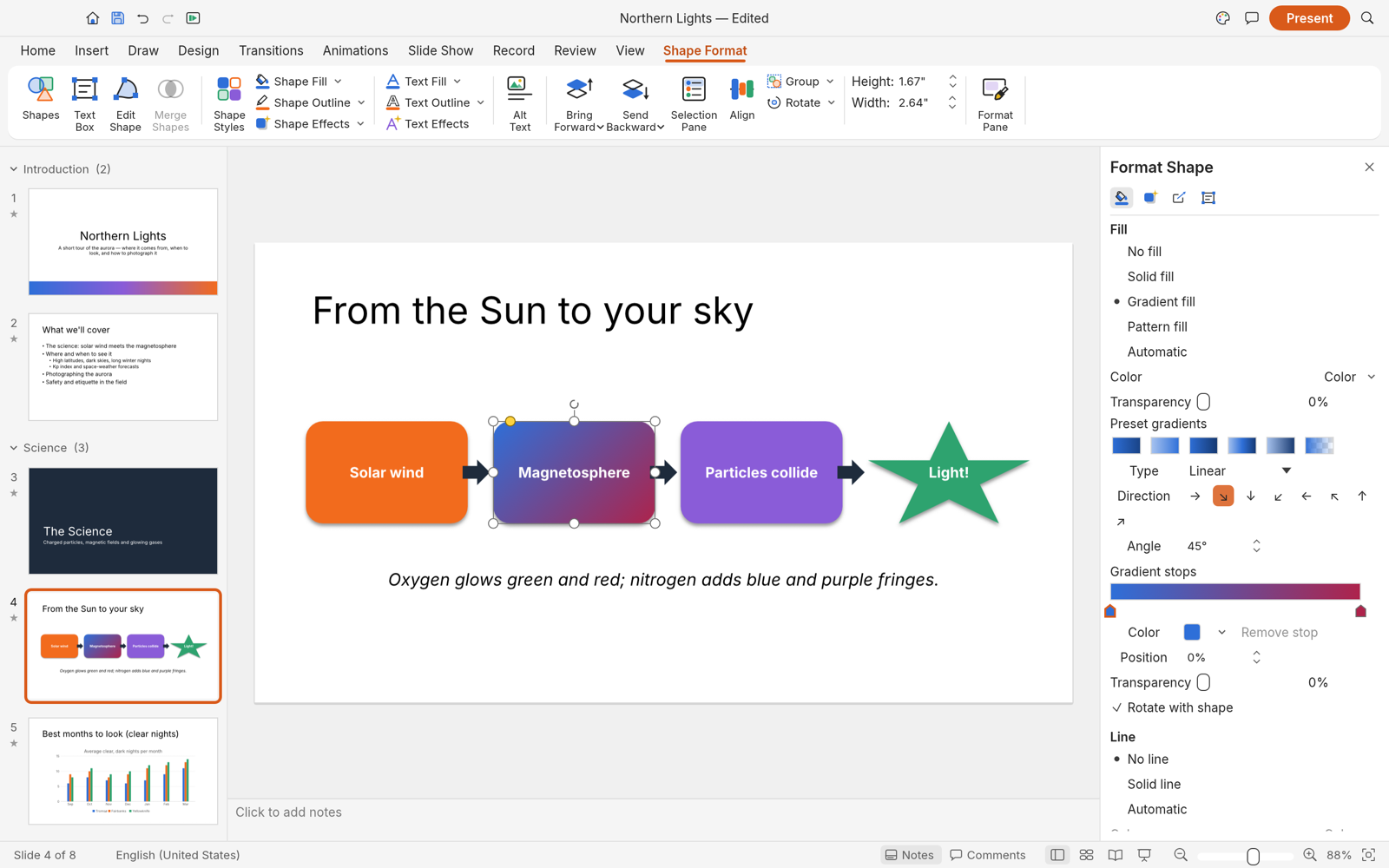
Format Shape pane: gradient type, direction and stops
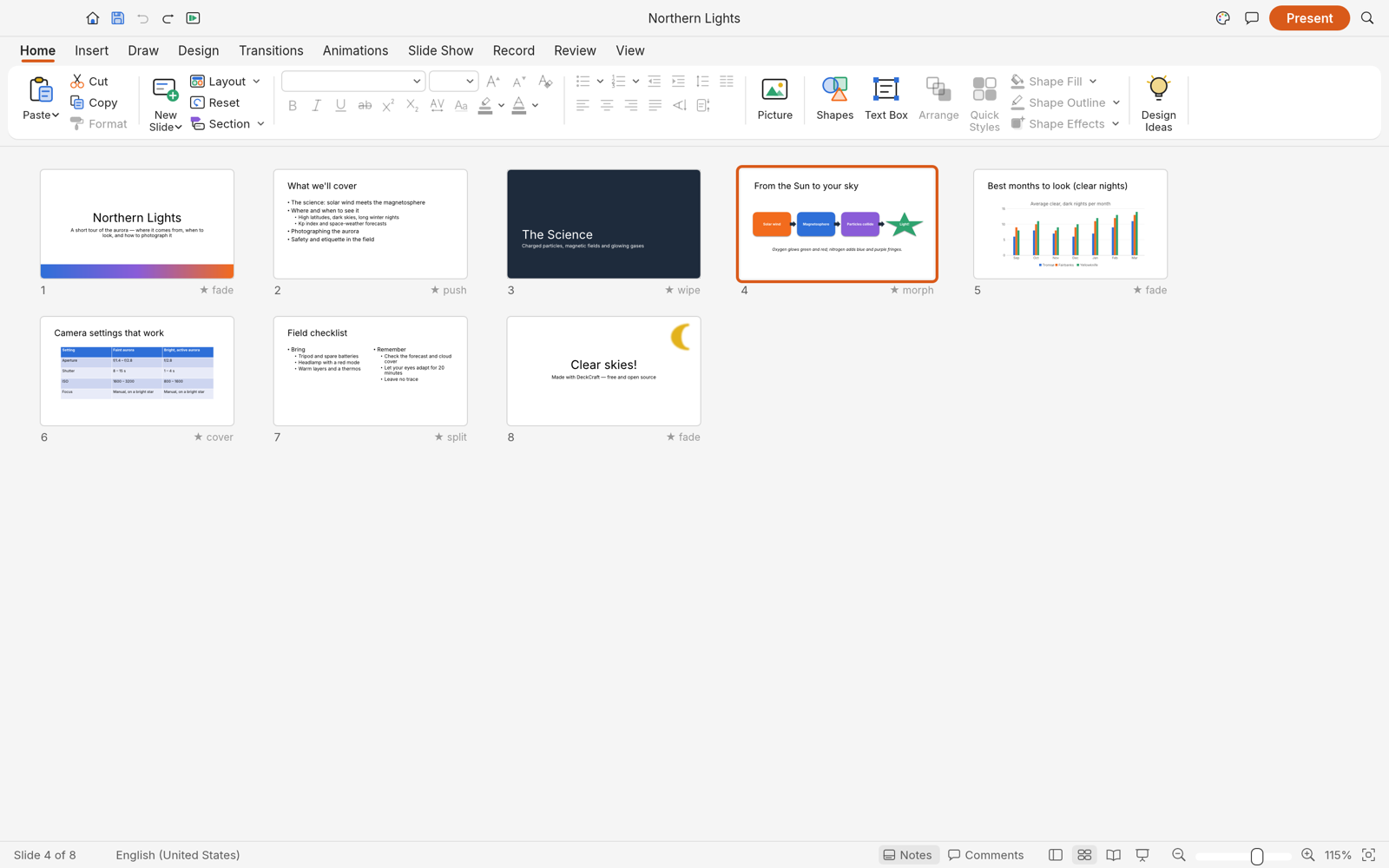
Slide Sorter with each slide's transition
Dark mode, with a native chart
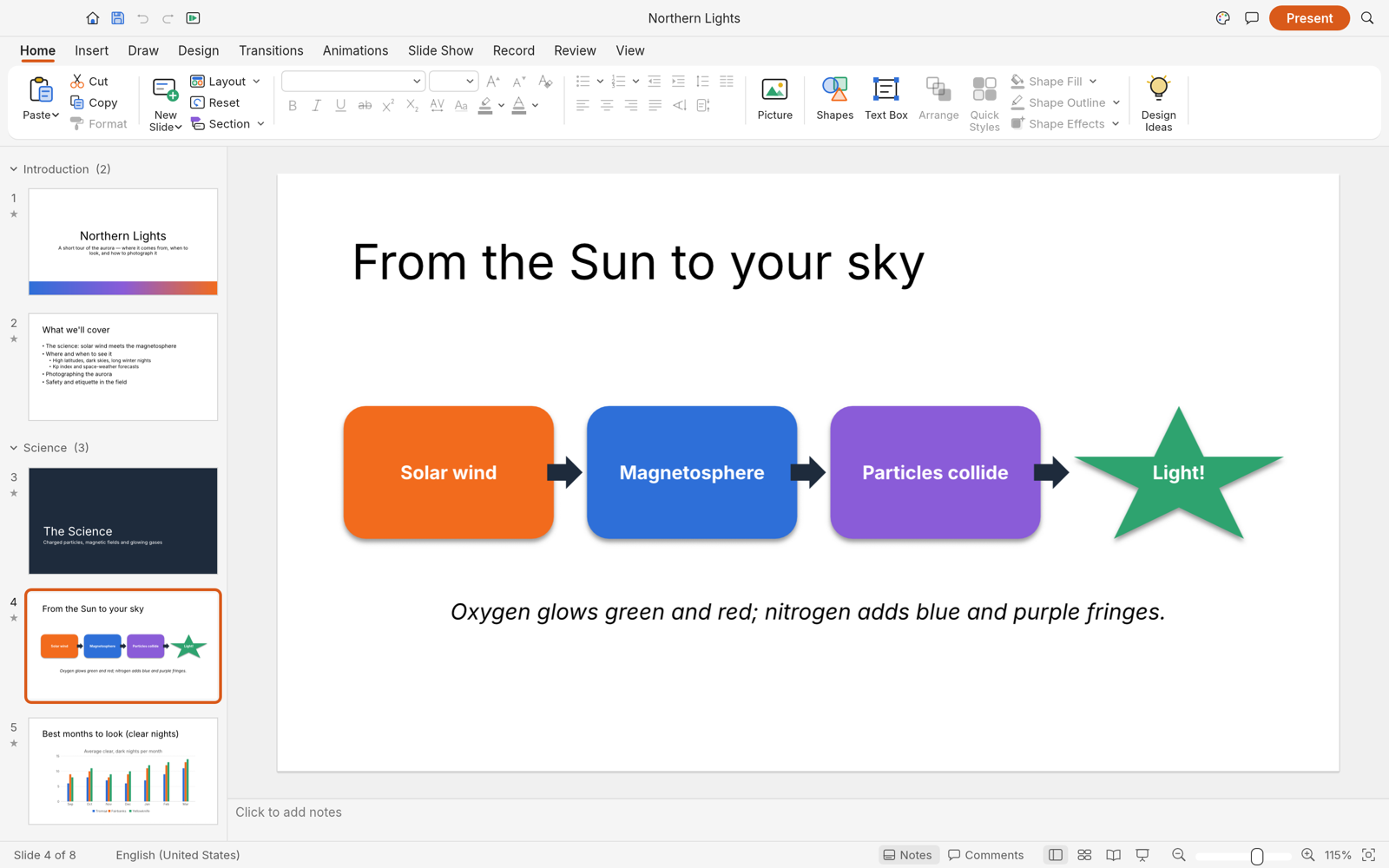
The built-in sample deck, rendered by deckcraft-cli render --sample --all
Getting started
PDF export uses the shared craft-pdf writer with import features disabled. See
crates/pdf/README.md for the dependency and validation requirements.
git clone https://github.com/storytold/deckcraft
cd deckcraft
cargo run --release -p deckcraft-cli -- render --sample --all --scale 1 out/
On Linux, the build also needs the ALSA headers for slide-show sound: alsa-lib-devel on Fedora,
libasound2-dev on Debian and Ubuntu, alsa-lib on Arch. Without them it stops at alsa-sys.
Fonts come from craft-fonts: clone it next to this repo
(../craft-fonts) and local builds pick it up automatically; without it DeckCraft uses your system
fonts.
Each GitHub release has ready-made builds, on Linux as
an AppImage, a .deb, an .rpm and a tarball. On Gentoo, the community ::snakebyte
overlay packages the Linux release as
app-office/deckcraft-bin (not maintained by the DeckCraft team):
The desktop app writes its log records to standard error and to logs/deckcraft.log in the
settings directory, beside ui.json and prefs.json (Linux ~/.config/deckcraft/logs/, or
$XDG_CONFIG_HOME/deckcraft/logs/; macOS ~/Library/Application Support/DeckCraft/logs/; Windows
%APPDATA%\DeckCraft\logs\). A start from a desktop menu or the Dock has no terminal, so this file
is what to attach to a bug report: the crash guard's panic report, a failed crash-recovery save,
Parts skipped on import and audio output problems land there. Each launch moves the
previous log to deckcraft.1.log (and that one to deckcraft.2.log), so the log of a run that
crashed survives the next start. The file stops growing at 16 MiB. --version writes no file.
Variable
Effect
RUST_LOG
Log levels for standard error and the log file. Default: info for DeckCraft's own crates, warn for everything else. env_logger-style directives replace that, e.g. RUST_LOG=debug, RUST_LOG=warn,deckcraft_pptx=trace or RUST_LOG=info,wgpu_core=warn; a directive ending in * covers every target starting with it (deckcraft*=debug).
The logger is apps/deckcraft/src/logging.rs; the realtime audio callback does not log. The web
app logs to the browser console instead.
Agents, CLI and MCP
Every action in DeckCraft is a command with a stable id, so people, scripts and AI agents use the
same verbs:
deckcraft-cli commands format.          # list commands
deckcraft-cli run --sample --cmd 'slide.new={"layout":"titleOnly","title":"Hello"}' --save hello.deckcraft
deckcraft-cli mcp                       # MCP server over stdio (headless)
deckcraft-cli mcp --connect 7990        # drive the running app (deckcraft --control 7990)
deckcraft-cli mcp --automation-read-root DIR --automation-write-root DIR   # confine the headless agent to folders
Roadmap
DeckCraft is in alpha. It covers 84% of the features tracked in docs/target-app-parity.md by breadth (92% of the core
ones, measured) and is about 55% ready for real work across all tracked capabilities (estimated).
See ROADMAP.md for the stage, numbers by dimension and what's next,
docs/target-app-parity.md for the full assessment,
docs/gaps.md for every known shortfall and
docs/parity-checklist.md for the feature-by-feature checklist.
Downloads
Download DeckCraft from GitHub: the latest release has every build listed below, and all releases has earlier versions and their notes. `` in the file names is the version number, and SHA256SUMS.txt lists a checksum for every file.
Windows
Build
Installer
Portable
x64 (64-bit Intel/AMD)
deckcraft--windows-x64.msi
deckcraft--windows-x64-portable.zip
arm64 (Snapdragon and other ARM PCs)
deckcraft--windows-arm64.msi
deckcraft--windows-arm64-portable.zip
x86 (32-bit)
deckcraft--windows-x86.msi
deckcraft--windows-x86-portable.zip
Installers and executables are code-signed.
If the app doesn't open on Windows: the desktop app initializes only DirectX 12 by default.
Letting wgpu also create an OpenGL instance can crash some graphics drivers (AMD's
atio6axx.dll) before the window appears, so the app would flash in Task Manager and quit.
WGPU_BACKEND overrides the default for troubleshooting (for example dx12 or vulkan). In
PowerShell, from the folder containing the executable:
$env:WGPU_BACKEND = "vulkan"
& .\deckcraft.exe
Remove-Item Env:WGPU_BACKEND                     # restore the default for later launches
An explicit gl override can bring the driver crash back on affected systems. The macOS, Linux
and web backend defaults are unchanged.
DirectX 12 shaders are compiled with FXC, which is part of Windows, so no dxcompiler.dll or
dxil.dll is needed ("Parent device is lost" at start, #153). $env:WGPU_DX12_COMPILER = "dxc"
(or "auto") selects wgpu's DXC handling again for troubleshooting.
macOS
Build
File
Notes
App, universal (Apple silicon + Intel)
deckcraft--macos-universal.dmg
Signed and notarized
Command-line tool, universal
deckcraft-cli--macos-universal.zip
Signed and notarized
Linux
Format
x86_64
aarch64 (ARM64)
Notes
AppImage
deckcraft--linux-x86_64.AppImage
deckcraft--linux-aarch64.AppImage
Runs anywhere; updates itself with AppImageUpdate (.zsync files)
Flatpak
deckcraft--linux-x86_64.flatpak
deckcraft--linux-aarch64.flatpak
Sandboxed; flatpak install --user
Debian/Ubuntu
deckcraft--linux-x86_64.deb
deckcraft--linux-aarch64.deb
Fedora/RHEL/openSUSE
deckcraft--linux-x86_64.rpm
deckcraft--linux-aarch64.rpm
Tarball
deckcraft--linux-x86_64.tar.gz
deckcraft--linux-aarch64.tar.gz
Unpack anywhere
RISC-V 64 (riscv64): deckcraft--linux-riscv64.tar.gz, a tarball only (cross-compiled; needs glibc 2.39+, e.g. Ubuntu 24.04+).
Runtime libraries. The window-system, GPU and file-dialog libraries DeckCraft needs are opened
when the app starts (dlopen through x11-dl, xkbcommon-dl, ash, glutin and rfd) instead
of being linked in, so ldd shows none of them: an install that satisfies the linked dependencies
can still fail at start-up with a loader error and no hint of what to install. Only
libasound.so.2 (slide-show sound) is a hard link-time dependency, and only of the deckcraft
GUI — deckcraft-cli uses neither sound nor a display. The .deb and .rpm declare the set in
packaging/linux/nfpm.yaml; a tarball install or a musl system has to provide it itself:
Alpine Linux v3.22 names above; Void's musl variant uses the same /lib/ld-musl-x86_64.so.1
loader and the same libraries as libX11 libXcursor libXrandr libXi libxkbcommon xkeyboard-config wayland alsa-lib vulkan-loader mesa xdg-desktop-portal. There is no musl build among the release
artifacts yet — this is what a build from source on musl needs at run time, and what a future musl
artifact will need (#954).
mesa-vulkan-swrast is the software Vulkan driver: it runs anywhere, VMs and containers
included. On a real GPU install your vendor's driver instead (mesa-vulkan-intel,
mesa-vulkan-ati, mesa-vulkan-nouveau, …).
Without Vulkan the app falls back to CPU rendering through Mesa's GL drivers. It works, but
slowly — a driver limit, not a DeckCraft bug.
xdg-desktop-portal (with xdg-desktop-portal-gtk or -kde; -wlr has no file chooser, so
on wlroots compositors install zenity) is what the Open and Save dialogs talk to; xkeyboard-config holds the XKB keyboard data libxkbcommon reads.
fontconfig and freetype are not needed: DeckCraft reads /usr/share/fonts itself and embeds its
presentation fonts.
Building from source on musl also needs build-base pkgconf alsa-lib-dev (alsa-lib-dev is the
ALSA headers).
FreeBSD
Build
File
x86_64
deckcraft--freebsd-x86_64.tar.gz
Web (WebAssembly)
Build
File
Notes
Static site
deckcraft-web-.zip
Runs in a modern browser; host it on any static server
The Crafting Apps
DeckCraft is one of the Crafting Apps: free, open-source creative tools from the
ArtCraft team, each written from scratch in Rust and each able to
stand on its own.
App
What it's for
Code
Learn more
PhotoCraft
Image editing: layers, masks, type and real PSD files
And ArtCraft itself, our AI image and video studio for artists who want real control.
Come make things with us
Our Discord is where artists of every kind hang out: people who paint, shoot, draw, cut film,
set type, and people still figuring out what they like to make. Share what you're working on,
ask for help, tell us what's broken, or tell us what you wish these tools could do.
Whatever your medium and however long you've been at it, you're welcome here.
DeckCraft is dual-licensed under MIT or Apache-2.0, at your option.
Copyright (c) 2026 ArtCraft Team and the DeckCraft contributors. Required notices are in NOTICE.
Bundled fonts, icons, images and other assets keep their own open licenses; each one is listed
with its author, source and license in ATTRIBUTION.md.
DeckCraft's themes, layouts, shape geometry, icons and sample decks are original work, drawn or
generated in code; no proprietary artwork, fonts, themes or templates are used.
The ArtCraft name, wordmark and logos in docs/brand/ are trademarks of the
ArtCraft Team and are not covered by this license. They may be used only unmodified, and only as
part of this repository and DeckCraft, under docs/brand/LICENSE-brand.txt.
Forks and modified versions must remove them.









 Shape Format contextual tab and selection handles
 Format Shape pane: gradient type, direction and stops
 Slide Sorter with each slide's transition
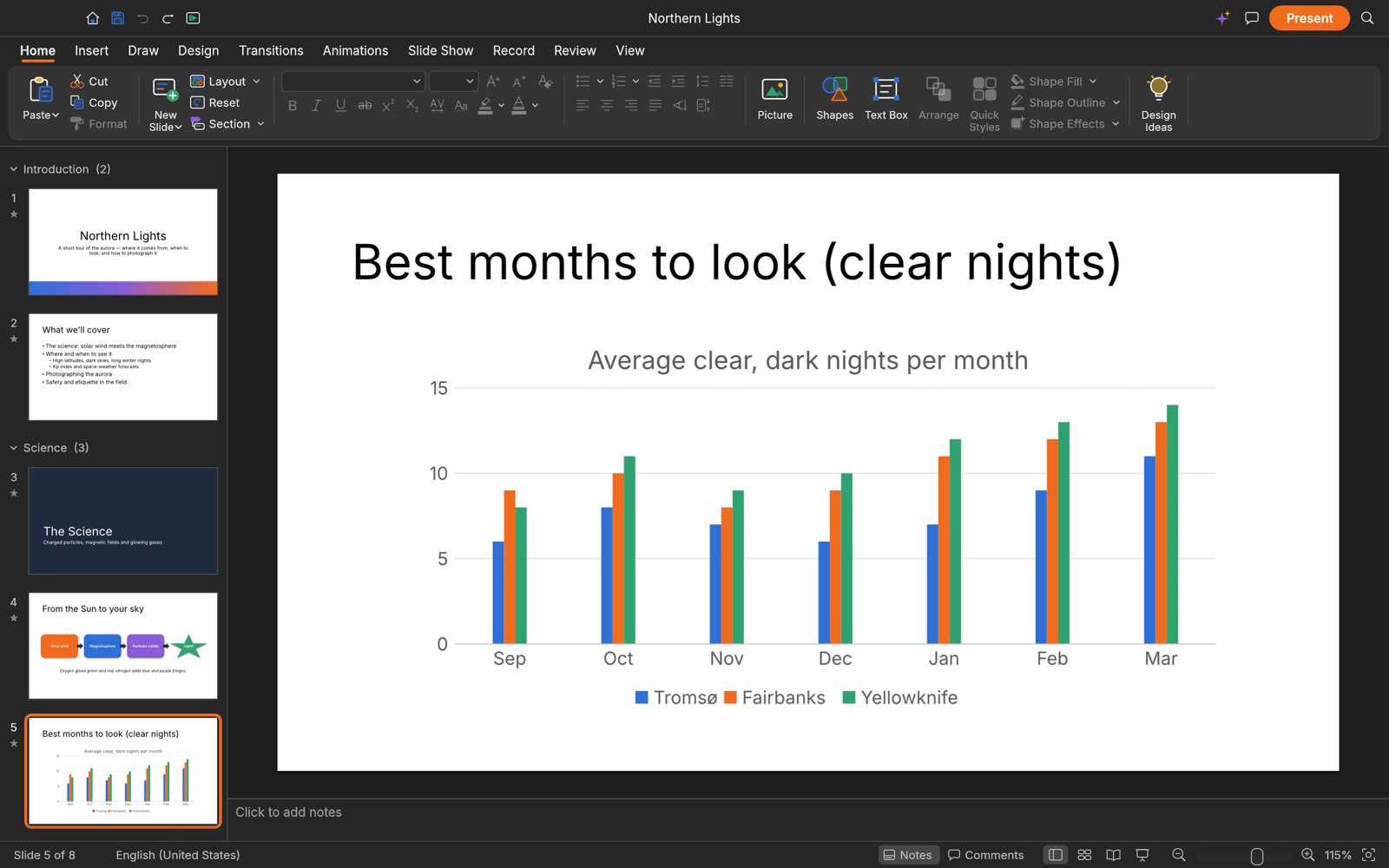 Dark mode, with a native chart
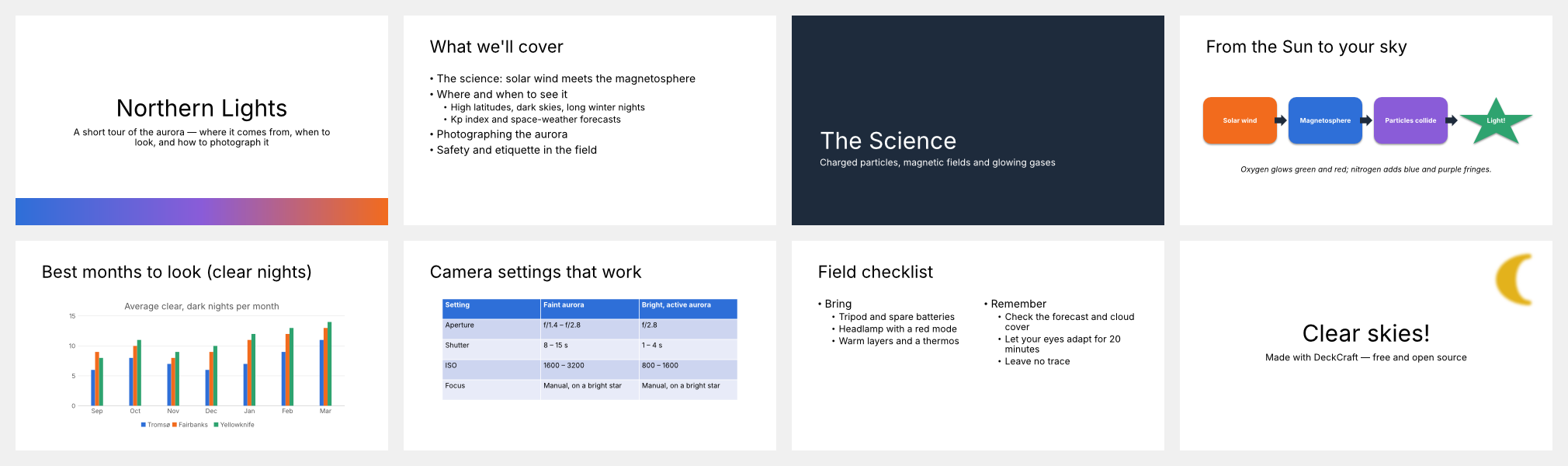 The built-in sample deck, rendered by deckcraft-cli render --sample --all