WordCraft is an open-source, clean-room reimplementation of Microsoft Word, rebuilt in pure Rust. It opens and saves .docx (OOXML), plus .odt, .rtf, .html, .md and .txt, and exports PDF with real, selectable text, links and bookmarks. Native egui on the GPU with no Electron and no Tauri, one codebase for macOS, Windows, Linux, BSD and the web.
- Familiar: Word's ribbon tabs, groups, shortcuts and behaviour, a live Styles gallery, regex find and replace, and spelling and grammar as you type.
- Writing and formatting: fast typing with IME, smart quotes, AutoCorrect, list autoformat, fonts, character and paragraph formatting, styles, themes and style sets.
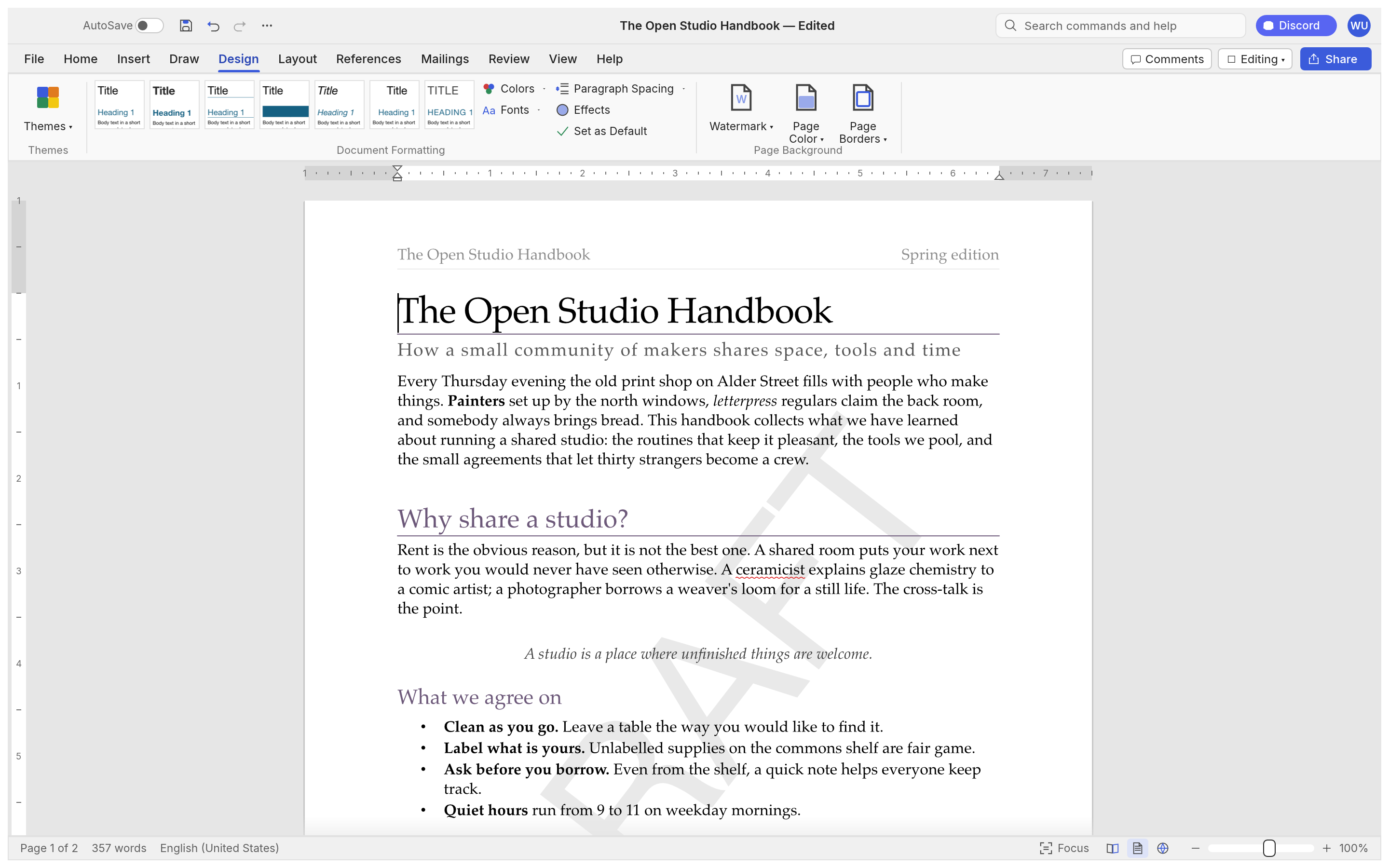
- Pages: margins, orientation, size, columns, page, column and section breaks, headers and footers, page numbers, watermarks, page borders, line numbers, drop caps and automatic hyphenation.
- Tables and objects: tables with styles, merged and split cells, formulas and repeating header rows; pictures, shapes and text boxes with floating positions and text wrapping.
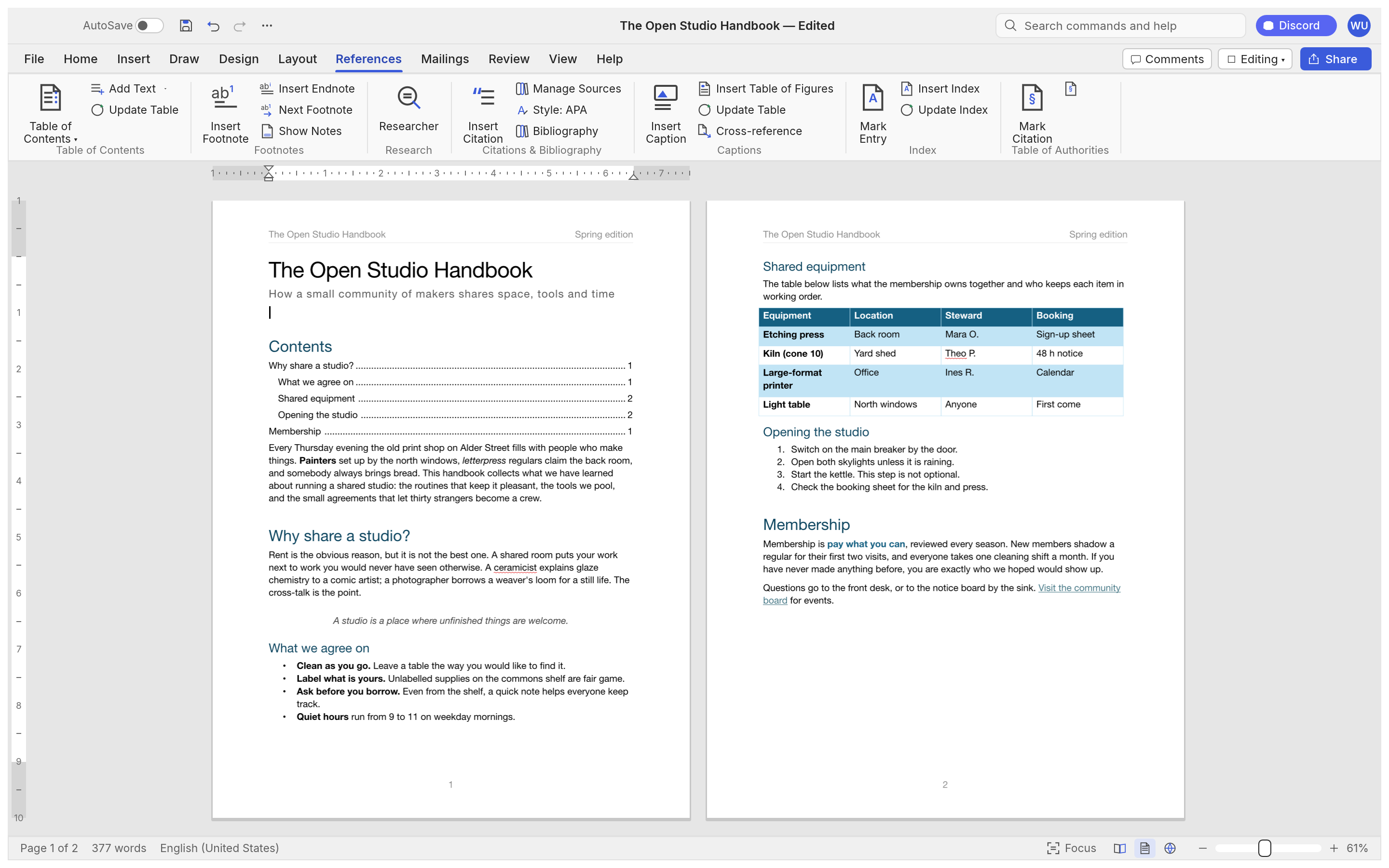
- References: tables of contents, footnotes and endnotes, citations and a bibliography in APA, MLA, Chicago or IEEE, captions, cross-references and an index.
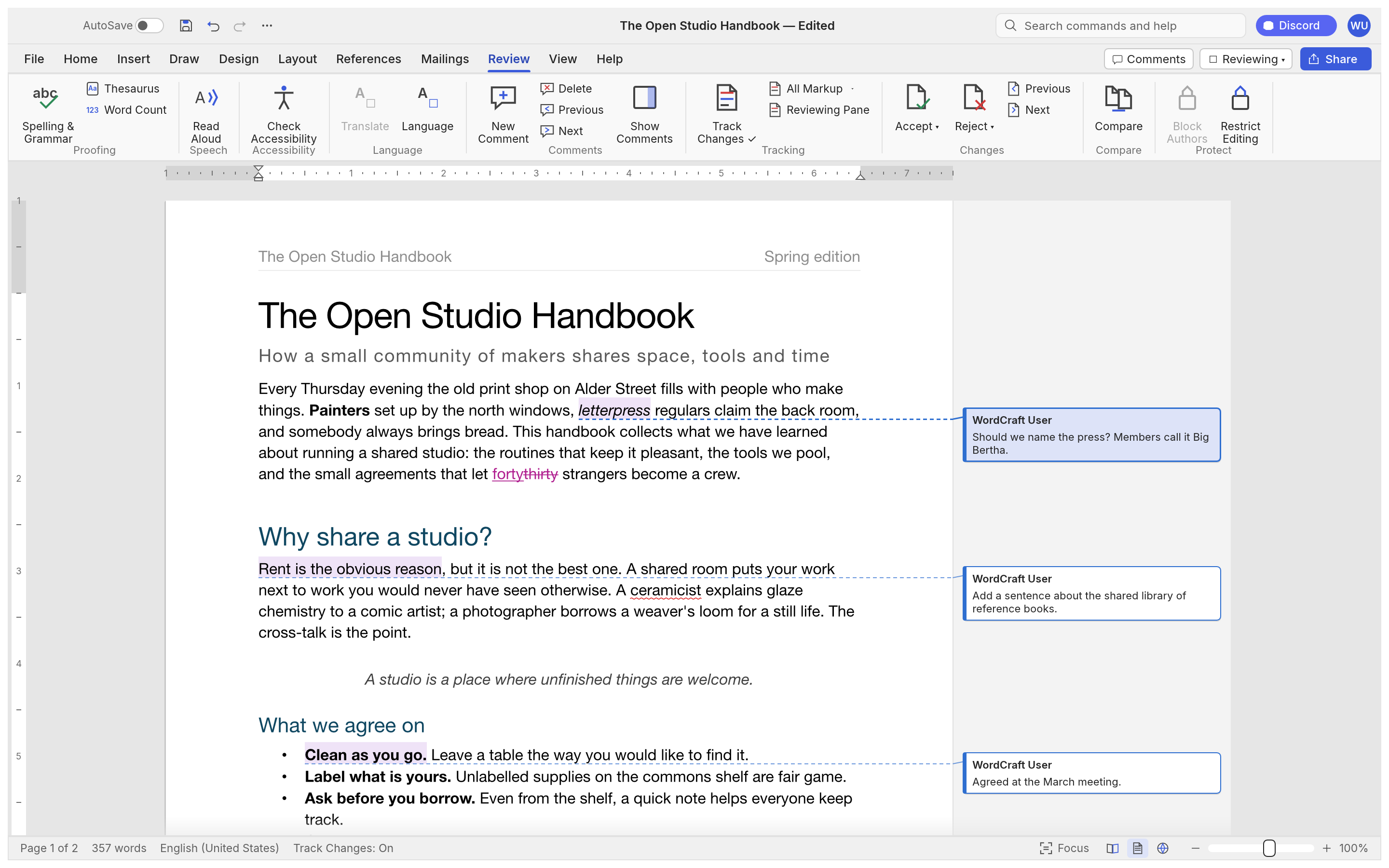
- Review: track changes, margin comment balloons, accept and reject, compare documents, restrict editing, an accessibility checker, thesaurus and word count.
- Mailings: mail merge from CSV with merge fields, address blocks and greeting lines, envelopes and labels.
- Built for agents: 389 commands drive the ribbon, shortcuts, command search, the CLI, a JSON control channel and an MCP server. Everything works offline, and the interface ships in English, 简体中文, 繁體中文 and 日本語.
README
WordCraft
Writing and document design; an open-source, modern word processor, built in pure Rust.
A fast, open-source word processor with a familiar workflow: the ribbon, styles,
tables, track changes, references and mail merge. It reads and writes .docx, runs natively on
macOS, Windows, Linux and BSD, and in the browser via WebAssembly.
By the ArtCraft team.
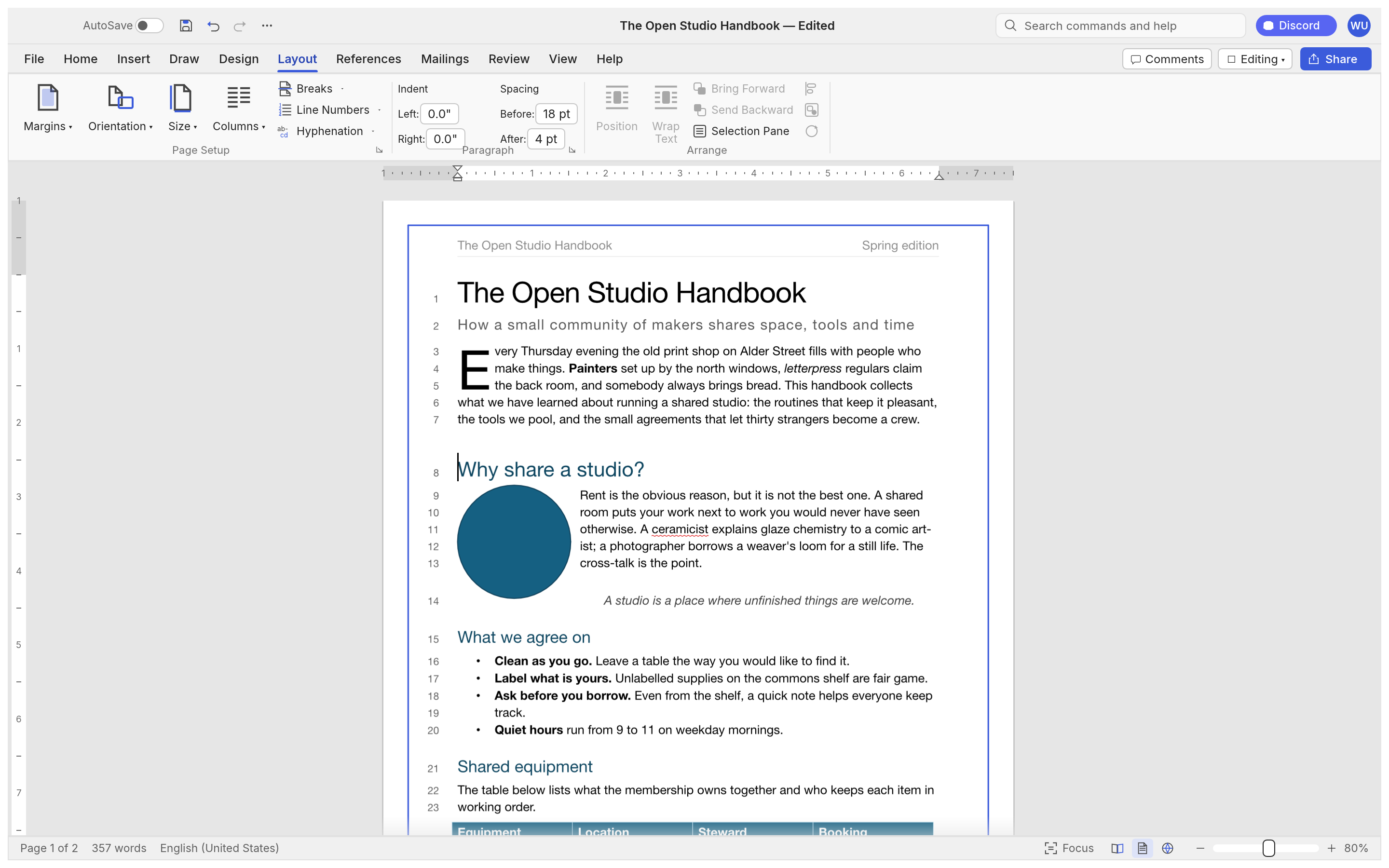
The Open Studio Handbook, WordCraft's built-in sample: the ribbon, live Styles gallery, rulers and the Navigation pane.
> [!NOTE]
> ArtCraft is a community of artists from all walks of life. Painters, photographers,
> filmmakers, illustrators, designers, animators, hobbyists, and people who picked up a pencil
> last week. If you make things, you're one of us. Come say hi on Discord.
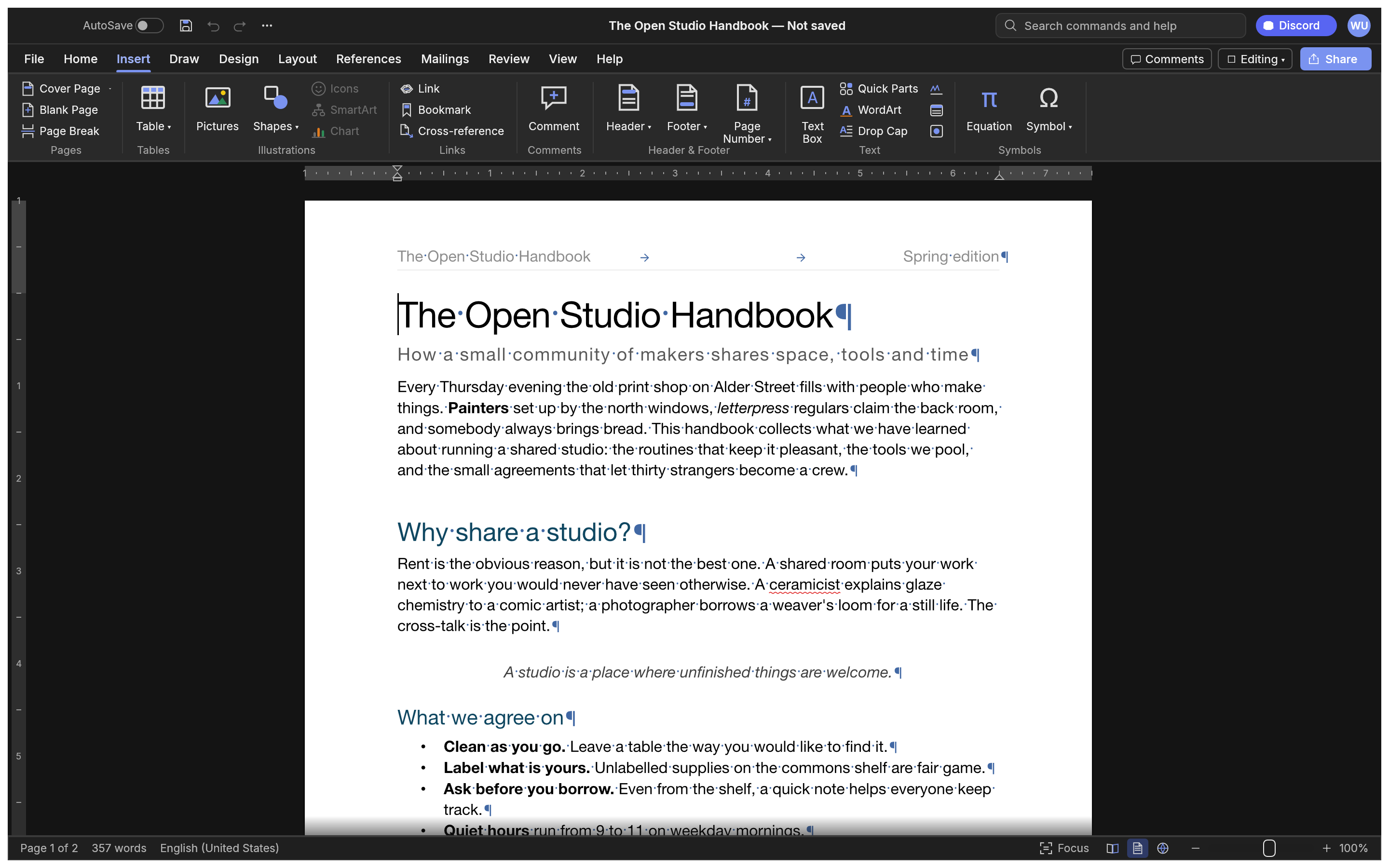
Dark mode with formatting marks, and the Insert tab: tables, pictures, shapes, links, headers, footers, fields and symbols.
Layout. Drop caps, text wrapping around pictures and shapes, automatic hyphenation, line numbers and page borders.
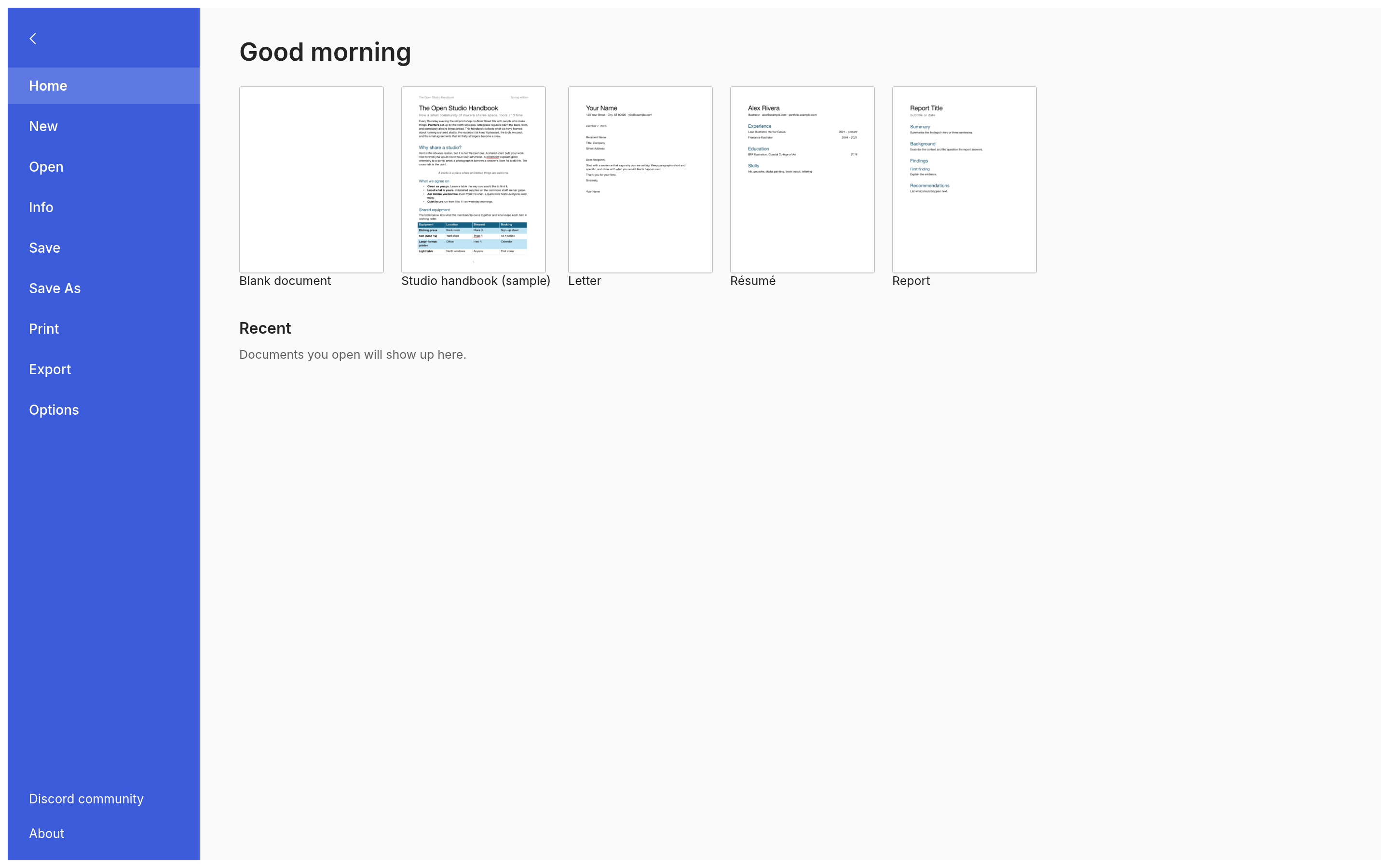
File. Start from a template, open recent documents, edit properties, export to PDF and other formats.
Why WordCraft
Familiar. Ribbon tabs, groups, shortcuts and behaviour: Enter continues a list,
Tab demotes it, Ctrl/⌘+B bolds the word under the caret, the Styles gallery previews styles live,
F4 repeats, F7 checks spelling, F8 extends the selection.
Your files. Opens and saves .docx (OOXML), and also .odt, .rtf, .html, .md, .tex (LaTeX), .txt; opens legacy 97-2003 .doc; exports PDF
with real, selectable text, links and bookmarks.
Fast. Paragraph layout is cached, so typing in a 188-page document re-lays it out in about
1.4 ms; pages render on demand.
Everywhere. One Rust codebase for macOS, Windows, Linux, BSD and the web. No Electron, no
Tauri: native egui on the GPU.
Built for agents. Every action is a command with an id. The same 422 commands drive the
ribbon, keyboard shortcuts, the command search, a command-line tool, a JSON control channel and
an MCP server.
Private. Spelling, grammar and everything else work offline.
Open. MIT OR Apache-2.0. Clean-room: built from public specifications and observation, with
every asset original or openly licensed.
What works today
Area
Highlights
Writing
Fast typing with IME, smart quotes, AutoCorrect, list autoformat (* , 1. ), dashes; word, sentence, paragraph selection; drag-select; clipboard with formatting; undo/redo; find and replace with regex
Formatting
Fonts, sizes, bold/italic/underline styles, strike, sub/superscript, caps, highlight, colours, character spacing, Format Painter, Change Case, Clear Formatting
Paragraphs
Alignment, indents (draggable on the ruler), spacing, line spacing, tabs with leaders, borders, shading, keep with next, widow/orphan control
Bullets, numbering, multilevel, restart, set value, custom formats
Tables
Insert by grid, merge/split, styles with banded rows, borders, shading, header rows repeated across pages, rows that split across pages, sort, formulas, text ↔ table
Pages
Margins, orientation, size, columns, page/column/section breaks, headers and footers (first page, odd/even), page numbers, watermark, page borders, line numbers, vertical alignment, drop caps, automatic hyphenation
Objects
Pictures (resize, crop, recolour, brightness/contrast, transparency, background removal, picture styles, rotate), shapes, text boxes, floating position with text wrapping (square, top and bottom, behind or in front of text)
References
Table of contents, footnotes and endnotes, citations and bibliography (APA, MLA, Chicago, IEEE), captions, table of figures, cross-references, index, table of authorities
Review
Spelling and grammar with suggestions (English and Polish, by each run's language), thesaurus, word count, comments in margin balloons or a pane, track changes, accept/reject, compare documents, restrict editing, accessibility checker, document inspector
Mailings
Mail merge from CSV, merge fields, address block, greeting line, rules, preview, finish to a document; envelopes and labels
View
Print layout, web layout, draft, read mode, focus, zoom, one/multiple pages, page width, Navigation pane, rulers, gridlines, dark mode; interface in English, 简体中文, 繁體中文, 日本語, Português (Brasil), Español, Українська, Српски / Srpski, Eesti, Türkçe, Русский, Italiano, Deutsch, Polski, Čeština, Magyar, Français, Български, Tiếng Việt, 한국어, Svenska, Hrvatski, Nederlands, Dansk, Română, العربية (mirrored) or Slovenščina (follows the system language by default)
git clone https://github.com/storytold/wordcraft
cd wordcraft
cargo run --release -p wordcraft -- --sample        # the desktop app with the sample document
cargo run --release -p wordcraft -- report.docx     # open a document
The interface translations and the spelling and hyphenation data come from
craft-i18n, an optional build input. To build with them,
check it out at the commit in craft-i18n.rev and point CRAFT_I18N_DIR at it (an absolute
path); without it WordCraft builds with an English interface, English spelling falls back to an
installed Hunspell English or craft-proof's built-in word list, and only Bulgarian, Turkish and
Russian hyphenate (by rule):
wordcraft-cli convert report.docx report.pdf        # docx, pdf, odt, rtf, html, md, tex, txt, png
wordcraft-cli convert report.docx report.pdf --strict   # exit 3, no file, if a character or picture would be left out
wordcraft-cli text report.docx                      # plain text
wordcraft-cli inspect report.docx                   # structure as JSON
wordcraft-cli run --template sample \
  --cmd 'select.text={"text":"Membership"}' --cmd format.bold --save out.docx
wordcraft-cli run --script job.json                 # the same from a file: commands, then save to docx and pdf
convert --strict (a .pdf or .png output only) and render --strict (a PNG of one page) refuse a silently incomplete render: they exit 3
and write nothing if the output would draw a character no font has (an empty box) or leave out a
picture. Exit codes are 0 (written), 1 (unreadable input, usage error, or --strict with another
output type, checked before the input is read) and 3 (strict refusal). On exit 3, stderr has one
wordcraft-cli: strict: … line per kind, then one JSON line:
wordcraft-cli convert in.docx out.pdf --strict
# wordcraft-cli: strict: 1 character cannot be drawn: U+2D30 (×3)
# wordcraft-cli: strict: 1 picture(s) left out: word/media/image2.bin (header2.xml): unsupported format
# {"schema":1,"strict":"failed","missing_glyphs":[{"cp":"U+2D30","count":3}],"missing_pictures":[{"part":"word/media/image2.bin","source_part":"word/header2.xml","reason":"unsupported_format"}],"truncated":false,"total_missing_glyphs":1,"total_missing_pictures":1,"glyphs_truncated":false,"pictures_truncated":false}
The JSON line (schema 1, also what file.strictReport returns) has schema, strict
("passed" or "failed"), missing_glyphs (entries {"cp", "count"}, sorted by code point),
missing_pictures (entries {"part", "source_part", "reason"}: the picture's part or target, the
story part it sits in such as word/header2.xml, and a reason code; source_part is also
background (the page picture), body, header, footer, footnote, endnote, comment or
text box where the part name is not known (a document not opened from a DOCX), or a chunk path such as
word/afchunk1.docx > word/header1.xml for a picture inside an embedded DOCX chunk), truncated, the two totals
total_missing_glyphs and total_missing_pictures, and glyphs_truncated and
pictures_truncated for each list. The reason codes are missing_part, external_target,
link_only, undecodable and unsupported_format; the stderr lines use plain words for them. When a list is cut, the stderr line gives the total
(300 characters cannot be drawn (first 256 listed)).
Each list stops at 256 entries separately; truncated is true when either was cut, and the totals
count every distinct character and picture found, those past the cap included. Only characters the output draws count (not hidden text, or deleted text
without --markup), and a character a fallback font draws is fine. Text inside a WMF or EMF picture counts too, shaped in the font the picture names with no fallback. A Private Use Area character
fails only if no installed font maps it. The result depends on the fonts installed on the host
(see #5624 for a fixed font set). An external picture target is never fetched: it is reported, not
loaded. Pictures dropped when a DOCX is opened (a missing part, an external target, or a link only picture with no embedded copy) are reported for DOCX input only. They have no page, so a PNG of any page is also refused for a missing or external picture anywhere in the document, unused headers included. render --strict checks only the page it
writes (--page; --scale doesn't matter), prints nothing on stdout when it refuses, and reports the
same way. The engine takes strict: true on file.save, file.saveAs, file.exportPdf and
file.exportPng, and file.strictReport {markup?, page?} returns the report without writing.
Web: cd apps/wordcraft-web && trunk serve, then open .
For agents: CLI and MCP
WordCraft was designed to be driven by people and by AI agents.
claude mcp add wordcraft -- wordcraft-cli mcp                  # headless documents
# confine the agent to folders: wordcraft-cli mcp --automation-read-root DIR --automation-write-root DIR
wordcraft --control 7981 &                                     # or drive the running app…
claude mcp add wordcraft-app -- wordcraft-cli mcp --connect 127.0.0.1:7981
Tools include list_commands, execute, batch, type_text, select_text, inspect_document,
render_page, save_document, and, with a running app, screenshot, click and key. Agents
can check their work through inspect_document without screenshots. See docs/mcp.md
and the control protocol. Macros record any sequence of commands and
play it back (tools.recordMacro, tools.macros).
Logs
The desktop app writes its log records to standard error and to logs/wordcraft.log next to its
preferences: on Linux $XDG_CONFIG_HOME/wordcraft/logs/ (by default ~/.config/wordcraft/logs/),
on macOS ~/Library/Application Support/WordCraft/logs/, on Windows %APPDATA%\WordCraft\logs\.
A start from a desktop menu or the Dock has no terminal, so this file is what to attach to a bug
report: unreadable parts of a .docx, pictures or fonts a PDF export had to leave out and panics the
command guard recovered from land there. Each launch moves the previous log to wordcraft.1.log
(and that one to wordcraft.2.log), so the log of a run that crashed survives the next start; a
log stops growing at 16 MiB. --version writes no file, and runs with WORDCRAFT_NO_PREFS (agents'
test runs) log to standard error only. Document text is never logged; a panic message leaves out
the text it quotes.
By default WordCraft's own crates log at info and everything else at warn. RUST_LOG replaces
that with env_logger-style directives, for example RUST_LOG=debug,
RUST_LOG=warn,wordcraft_docx=trace or RUST_LOG=info,wgpu_core=warn; a directive ending in *
covers every target starting with it (wordcraft*=debug). The logger is
apps/wordcraft/src/logging.rs.
Architecture
Layer
Crate
Job
L0
wordcraft-geom
units and measurements
L1
wordcraft-doc, wordcraft-fonts, wordcraft-proof (craft-proof from craft-libs)
document model and editing; fonts and shaping; spelling, grammar, hyphenation (data: craft-i18n language-data/, CRAFT_I18N_DIR)
cargo xtask ci runs formatting, clippy, ~800 tests, the asset-attribution check, the layering
check and the wasm build. Contributor and agent instructions: AGENTS.md.
Roadmap
WordCraft is in alpha. It has commands for 97% of the ribbon and menu features in its feature catalog
(docs/parity-checklist.md) today; counting
depth, file fidelity, stability and the rest, we estimate it is about 60% ready for real work,
about 55% for a typical professional's weekly work and about 63% for everyday essentials. Beta
needs testing against real-world .docx files, keeping charts and SmartArt through a round trip,
closer pagination fidelity, a stability sweep and native printing. Details and estimates:
ROADMAP.md and where we fall short.
Downloads
Download WordCraft from GitHub: the latest release has every build listed below, and all releases has earlier versions and their notes. `` in the file names is the version number, and SHA256SUMS.txt lists a checksum for every file.
Windows
Build
Installer
Portable
x64 (64-bit Intel/AMD)
wordcraft--windows-x64.msi
wordcraft--windows-x64-portable.zip
arm64 (Snapdragon and other ARM PCs)
wordcraft--windows-arm64.msi
wordcraft--windows-arm64-portable.zip
x86 (32-bit)
wordcraft--windows-x86.msi
wordcraft--windows-x86-portable.zip
The installer is one dual-scope package. By default it installs for your account only,
into %LOCALAPPDATA%\Programs\ArtCraft\WordCraft, and needs no administrator rights; choosing
"Everyone on this computer" on the first page installs into C:\Program Files\ArtCraft\WordCraft (Program Files (x86) for the 32-bit build)
and asks for an administrator. Install only one copy: a copy for another scope is refused, so
uninstall first to change who WordCraft is installed for. Installers and executables are code-signed.
If the app doesn't open on Windows: the desktop app initializes only DirectX 12 by default.
Letting wgpu also create an OpenGL instance can crash some graphics drivers (AMD's
atio6axx.dll) before the window appears, so the app would flash in Task Manager and quit.
WGPU_BACKEND overrides the default for troubleshooting (for example dx12 or vulkan). In
PowerShell, from the folder containing the executable:
$env:WGPU_BACKEND = "vulkan"
& .\wordcraft.exe
Remove-Item Env:WGPU_BACKEND                     # restore the default for later launches
An explicit gl override can bring the driver crash back on affected systems. The macOS, Linux
and web backend defaults are unchanged.
The 32-bit build uses OpenGL even when a DirectX 12 graphics card is present. On 32-bit
Windows, creating a DirectX 12 graphics pipeline fails immediately and the app exits before the
window appears. WGPU_BACKEND=vulkan (or dx12) still overrides that.
If the app quits right after its window appears with "Parent device is lost" in the log:
WordCraft compiles DirectX 12 shaders with FXC, the compiler built into Windows, so it needs no
dxcompiler.dll/dxil.dll and ignores any copy another program put on PATH (#603).
WGPU_DX12_COMPILER (fxc, dxc, auto) overrides this; with dxc, a matching
dxcompiler.dllanddxil.dll must sit next to wordcraft.exe. WGPU_BACKEND = "vulkan"
also avoids DirectX 12 altogether.
If the app is slow on an older Windows PC: when DirectX 12 finds no graphics card with a
driver for it (for example Intel 4th-generation graphics on Windows 11), it only offers the built-in
software renderer, which draws every frame on the processor. WordCraft normally uses OpenGL instead,
without setting anything. If OpenGL has no usable adapter, it can use DirectX 12's WARP software
adapter. The log file records the choice (lines starting with
graphics:). WGPU_BACKEND still overrides it, e.g. $env:WGPU_BACKEND = "gl" or "dx12".
macOS
Build
File
Notes
App, universal (Apple silicon + Intel)
wordcraft--macos-universal.dmg
Signed and notarized
Command-line tool, universal
wordcraft-cli--macos-universal.zip
Signed and notarized
Linux
Format
x86_64
aarch64 (ARM64)
Notes
AppImage
wordcraft--linux-x86_64.AppImage
wordcraft--linux-aarch64.AppImage
Runs anywhere; updates itself with AppImageUpdate (.zsync files)
Flatpak
wordcraft--linux-x86_64.flatpak
wordcraft--linux-aarch64.flatpak
Sandboxed; flatpak install --user
Debian/Ubuntu
wordcraft--linux-x86_64.deb
wordcraft--linux-aarch64.deb
Fedora/RHEL/openSUSE
wordcraft--linux-x86_64.rpm
wordcraft--linux-aarch64.rpm
Tarball
wordcraft--linux-x86_64.tar.gz
wordcraft--linux-aarch64.tar.gz
Unpack anywhere
RISC-V (riscv64): wordcraft--linux-riscv64.tar.gz, a tarball cross-compiled for glibc 2.39+
(Ubuntu 24.04, Debian 13 and newer).
Read Aloud (Review › Read Aloud) speaks through a speech program installed on the system: it
tries espeak-ng, then espeak, and when neither is installed it talks to Speech Dispatcher.
The .rpm package recommends espeak-ng; the .deb recommends espeak-ng or
speech-dispatcher, so the package manager installs one of the two by default. With the
AppImage or the tarball, install one yourself if neither is there (sudo apt install espeak-ng,
sudo dnf install espeak-ng, sudo pacman -S espeak-ng). The Flatpak doesn't speak yet: it has
no audio access and doesn't include espeak-ng, espeak or Speech Dispatcher.
Wayland: on a Wayland desktop the app runs through XWayland when it is available, because
winit (the windowing library) supports dragging files into the window only on X11. To use the
native Wayland backend instead (for example for sharper text with fractional scaling, at the cost
of file drag-and-drop), choose File › Options › Advanced › Linux display server › Wayland; it
applies the next time WordCraft starts, and X11 (XWayland) or Automatic switches back. The
WORDCRAFT_WAYLAND environment variable overrides the setting: 1 for native Wayland, 0 for
XWayland:
WORDCRAFT_WAYLAND=1 wordcraft
Arch Linux (AUR). Community members maintain three AUR packages; the project doesn't publish
to the AUR itself. Install one of them:
Runs in a modern browser; host it on any static server
The Crafting Apps
WordCraft is one of the Crafting Apps: free, open-source creative tools from the
ArtCraft team, each written from scratch in Rust and each able to
stand on its own.
App
What it's for
Code
Learn more
PhotoCraft
Image editing: layers, masks, type and real PSD files
And ArtCraft itself, our AI image and video studio for artists who want real control.
Come make things with us
Our Discord is where artists of every kind hang out: people who paint, shoot, draw, cut film,
set type, and people still figuring out what they like to make. Share what you're working on,
ask for help, tell us what's broken, or tell us what you wish these tools could do.
Whatever your medium and however long you've been at it, you're welcome here.
WordCraft is dual-licensed under MIT or Apache-2.0, at your option.
Copyright (c) 2026 ArtCraft Team and the WordCraft contributors. Required notices are in NOTICE.
Bundled fonts, icons, images and other assets keep their own open licenses; each one is listed
with its author, source and license in ATTRIBUTION.md.
The English spelling dictionary and hyphenation come from Grady Ward's public-domain Moby
Hyphenator II word list. Polish spelling reads the Hunspell pl_PL dictionary installed on the system (not bundled), as
do Russian, Portuguese, Czech, Italian, Croatian and Turkish spelling (how to install them:
docs/spelling-dictionaries.md), and
Polish hyphenation the TeX patterns by Hanna Kołodziejska, Bogusław Jackowski and Marek Ryćko (MIT
option). The sample documents and templates are original text written for WordCraft.
The ArtCraft name, wordmark and logos in docs/brand/ are trademarks of the
ArtCraft Team and are not covered by this license. They may be used only unmodified, and only as
part of this repository and WordCraft, under docs/brand/LICENSE-brand.txt.
Forks and modified versions must remove them.









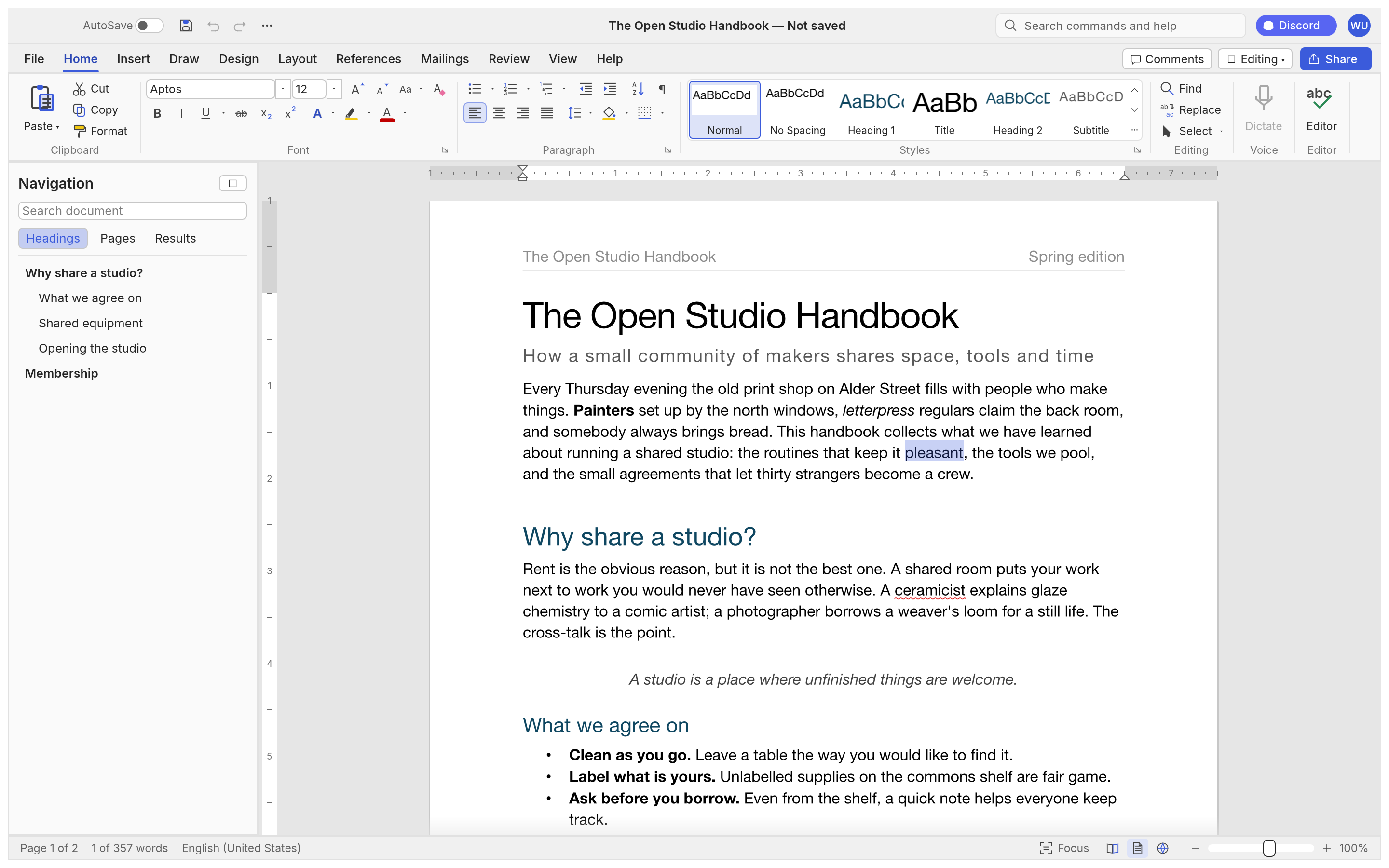 The Open Studio Handbook, WordCraft's built-in sample: the ribbon, live Styles gallery, rulers and the Navigation pane.