Token Dashboard
See exactly where your Claude Code tokens go. A local desktop app that turns the JSONL transcripts in ~/.claude/projects/ into per-prompt cost analytics, tool and file heatmaps, subagent attribution, cache analytics, and a tips engine that flags expensive patterns before your next bill does.
100% local · no telemetry · no login · MIT · Windows / macOS / Linux · ~7 MB installer.
> New in v5 — Live. The dashboard now folds in Praetorium: a live command post for your Claude Code sessions (Console / Cockpit / Explorer), reachable from the Live tab and detachable into its own window. The analytics tabs stay exactly as they were — passive and read-only, they only ever read the transcripts Claude already wrote. The Live tab is the one place the app can launch claude for you, and it only ever does so on an explicit, user-initiated action — never automatically.







Install
Pre-built installers ship for every release tag —
latest release.
Windows (.msi)
winget (recommended once published):
winget install Arylmera.TokenDashboard
Scoop (from the dedicated bucket):
scoop bucket add token-dashboard https://github.com/Arylmera/scoop-token-dashboard
scoop install token-dashboard
Direct MSI:
curl.exe -L -o token-dashboard.msi https://github.com/Arylmera/Token-Dashboard/releases/latest/download/Token.Dashboard_x64_en-US.msi
msiexec /i token-dashboard.msi
Installs to %LOCALAPPDATA%\Programs\Token Dashboard\ with Start Menu
shortcuts. SmartScreen will warn about an unrecognized publisher on
first launch — click More info → Run anyway. The bundle is unsigned
for now.
macOS (Apple Silicon)
Homebrew tap:
brew tap Arylmera/token-dashboard
brew install --cask token-dashboard
One-line installer:
curl -fsSL https://raw.githubusercontent.com/Arylmera/Token-Dashboard/main/scripts/install.sh | bash
What it does: downloads the latest *.dmg from the GitHub releases API,
copies Token Dashboard.app to /Applications, runs codesign --force --deep --sign - to fix the Team-ID dyld mismatch that otherwise breaks
unsigned bundles on macOS 14+, and launches the app. Source:
scripts/install.sh.
> ⚠️ The script is unsigned plain text. Open the URL in your browser
> first if you'd rather review the commands before piping them to bash.
Manual alternative — drag Token Dashboard.app from the .dmg to
/Applications, then:
codesign --force --deep --sign - "/Applications/Token Dashboard.app"
open -a "Token Dashboard"
Linux (.AppImage / .deb)
# AppImage — runs anywhere
curl -L -o token-dashboard.AppImage https://github.com/Arylmera/Token-Dashboard/releases/latest/download/token-dashboard_amd64.AppImage
chmod +x token-dashboard.AppImage
./token-dashboard.AppImage

# Debian / Ubuntu
curl -L -o token-dashboard.deb https://github.com/Arylmera/Token-Dashboard/releases/latest/download/token-dashboard_amd64.deb
sudo dpkg -i token-dashboard.deb
> Single binary, ~5–10 MB installer. No Python, no Node, no Chromium —
> Tauri 2 + WebView2 / WebKit on the system side.
What you get
| Tab | What it answers |
|---|
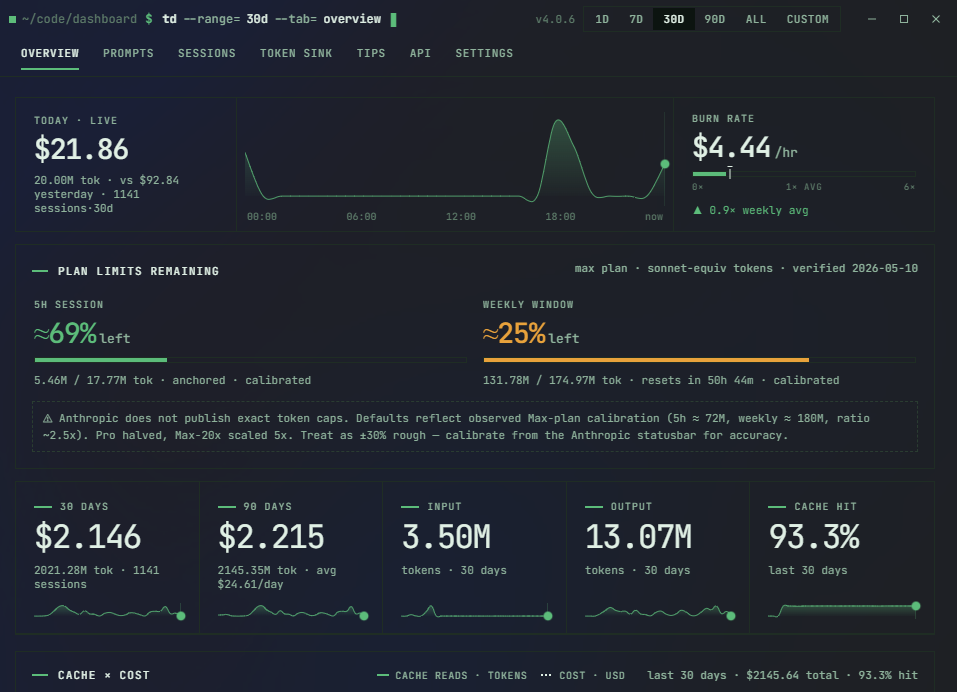
| Overview | Top-line totals, cost per day, stacked input / output / cache breakdown, daily budget burn. |
| Prompts | Your most expensive user prompts, joined to the assistant turn that followed — find the question that cost $4 in cache misses. |
| Sessions | Recent sessions with cost, model, tags, and per-turn drill-down. |
| Projects | Per-project aggregation with worktree-fold so a parent repo doesn't fragment into N rows. |
| Skills | Invocation counts and per-call context cost from ~/.claude/skills/. See which skills earn their token budget. |
| Tips | Rule-based suggestions: low cache hit rate, repeated file reads, Opus-on-tiny-turns, retry storms, oversized tool results. |
| Settings | Plan, budget caps, badge metric, glass mode, source attachment, pricing overrides. |
Privacy
Fully offline. The one optional network call is the Sync limits
button in Settings: it hits the Anthropic Messages API with a key you
save to read rate-limit headers, and stays disabled until you save a
key. Everything else — scanning, parsing, pricing, the SSE feed, the
tips engine — runs against local files only.
Developer documentation
Building from source, architecture, configuration, and contribution
notes live in docs/DEVELOPMENT.md.
License
MIT.