PC Tweaker — Windows Tuning, Privacy and Maintenance
For Windows 10/11 users who want to inspect settings before changing them. Review each control, keep a change history and restore supported settings from their recorded previous state.
Product and free download · Official releases · Verify the publisher signature

Tune Windows with the changes in plain sight.Gaming, privacy and maintenance controls, with restore tools for supported settings.








Download Free for Windows · Microsoft Store · Chocolatey · Website · Support · Release notes
What's new · Features · What changes · Free and Pro · Code signing · Build from source
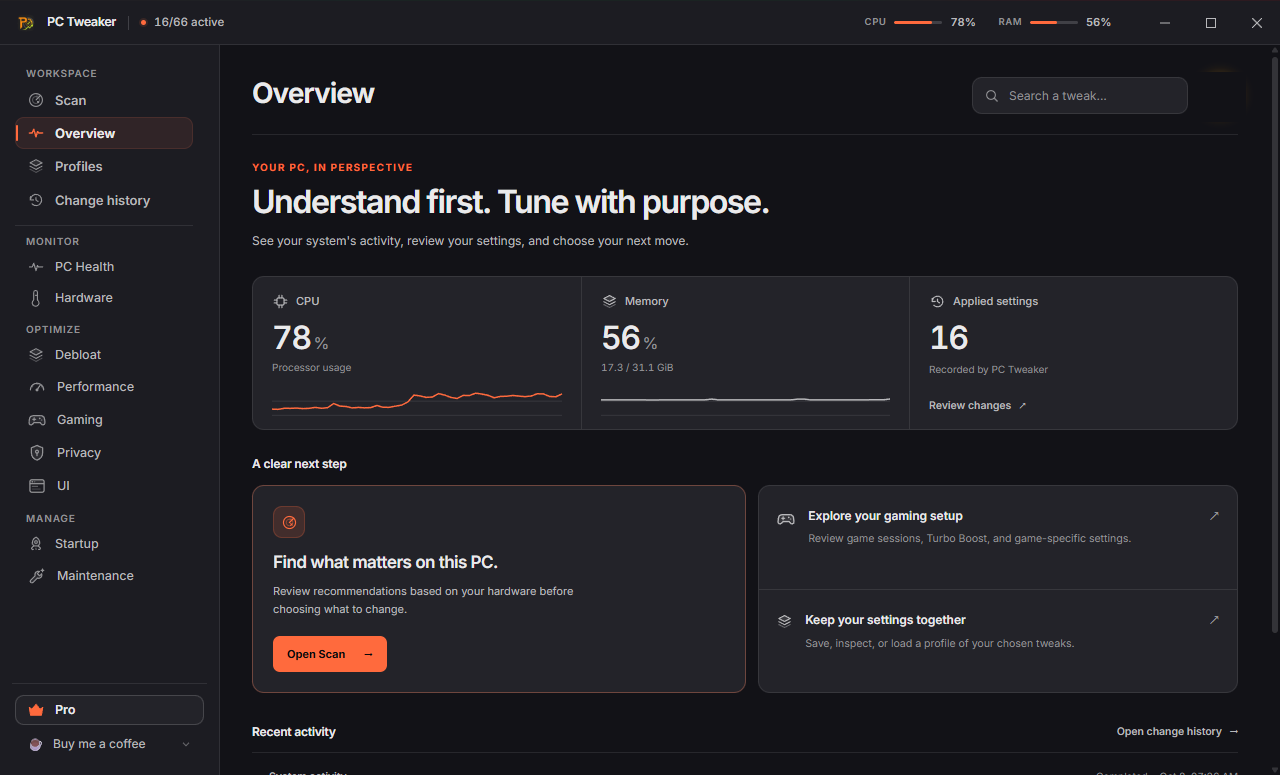
Start with one task: review a setting, read its trade-offs, apply it if appropriate, and use its restore control when supported. Free includes core tools without an account. See what changes on your system before tuning.


Help fund the next release with a one-off coffee tip. No account required, no subscription.
Safe download via Winget
Download an installer from an official channel above, or use Windows Package Manager:
winget install --id AurelioAvila.PCTweaker --exact
To check for a package update:
winget upgrade --id AurelioAvila.PCTweaker --exact
Package catalogs can lag behind a release. Check the release version before installing. Windows 10/11 x64 is the current binary target; individual features depend on the Windows build, edition, drivers and available hardware. App compatibility does not extend Microsoft's support lifecycle for your operating system.
| Application | Use it for | Official page |
|---|
| PC Tweaker | Review Windows settings, collect DPC/ISR diagnostics and inspect supported process-placement controls. | PC Tweaker |
| PC Tweaker Uninstaller | Review an uninstall command and removal risk, then inspect leftovers and the removal receipt. | Uninstaller |
| Tweaky Driver | Review a driver package and its source before deciding whether to install it. | Tweaky Driver |
These are separate applications with their own licences. PC Tweaker Lifetime includes 12 months of Uninstaller Pro from the first Uninstaller sign-in with the same account; other offers and renewals are described on each product’s page.
Diagnose before changing a setting
Closing and reopening PC Tweaker
Closing the window keeps PC Tweaker running in the Windows notification area. Click its icon to reopen it, or right-click and choose Exit PC Tweaker to quit. To make closing the window quit instead, clear Keep running in the background in the icon's menu. Windows may place the icon in its hidden-icons panel.
What's new in 1.18
- Every value before it is written. Each control has a "What this changes, exactly" panel with the value as it is now and as it will be set. If an application fails partway, the values already written are restored at once.
- Windows AI controls. The catalog has 81 controls, 46 Free and 35 Pro, including Click to Do, the Windows AI Fabric service and the AI features in Microsoft Edge, Paint and Notepad.
- A measured Before & After. PC Health runs each timed test at least 7 times and reports a difference only when the two series are clearly apart.
- Change history by session. Registry values before and after each change, with undo for one change, a whole session or everything still in effect, plus filters and export.
- Re-apply after Windows updates. A check at sign-in lists only the tweaks a cumulative update put back, one checkbox each. Nothing is re-applied on its own.
- 1.18.2. Pro keeps working when the PC's clock runs behind, account errors appear in the app's language, and the account menu shows the plan each product has.
- 1.18.3. Change your password and email from the account menu, account emails in the app's language, and nothing undone under a running game when Pro ends.
- 1.18.4. Updates are checked on dl.pctweaker.app as well as GitHub, and the change preview reads correctly when a control sets a single value.
- 1.18.5. Clarifies startup, menu, hover, background-app, update-sharing and window-display controls in all six languages. Settings and restoration behavior are unchanged.
- 1.18.6. Administrator changes to scheduled tasks with spaces in their path work, the Game Sessions list survives an interrupted save, and the administrator helper loads Windows libraries from System32 only.
- 1.18.7. Time limits on every Windows tool and on the administrator helper, power plan restores that survive a deleted plan, a polite Explorer restart, and changes that follow the signed-in user when another administrator approves UAC.
- 1.18.8. The notification-area menu and the first-close notice follow the language chosen in the app.
- 1.18.14. Routine maintenance update.
- 1.18.13. The 3-day free trial in the title bar on every screen, with the days left while it runs, and on the scan's Pro recommendations; the whole menu fits short windows in every language.
- 1.18.12. The 3-day free trial is easy to find on Plans & pricing, lower plans read "Included in your plan", and a copied licence file no longer unlocks Pro on another PC.
- 1.18.11. Routine maintenance; the version Invite a friend will need.
- 1.18.10. Routine maintenance; gets the app ready for Invite a friend, coming soon.
- 1.18.9. Routine maintenance; the account menu names each plan Free, Pro or Lifetime, and text fields show a single focus ring.
See the changelog for every release.
What you can do
| Area | Controls and tools |
|---|
| Gaming | Game Sessions with optional core steering, supported gaming settings, hardware scheduling options, X3D placement controls and a before/after network check |
| Performance | Power configuration, startup controls and foreground scheduling settings |
| Hardware | Available sensor readings, a DPC/ISR latency trace that names the responsible driver, supported thermal profiles and driver updates through Windows Update |
| Debloat | Optional Windows apps removed for the current account only, verified by publisher, with removal history and reinstall links |
| Privacy | Supported Windows advertising, tracking and diagnostic settings; optional password breach lookup |
| Maintenance | Integrity checks, guided repair, storage analysis and cleanup with operation-specific recovery limits |
| Interface | File extensions, taskbar options, appearance and supported Windows preferences |
Read the effect and trade-offs before applying a setting. A disabled tweak is not evidence of a fault, and a higher configuration score is not a measured performance gain.
Ready-to-use profiles
Gaming, Study and Work are included in Free. Open Profiles, review or customize the selection, then apply the pending tweaks with one click. Each template explains its tradeoffs; optional settings start unchecked. Profiles add the selected settings without undoing other tweaks. Restore individual changes from their category. Results depend on your hardware and workload; no FPS gain is promised.
Native power controls
The catalog contains 81 controls: 46 Free and 35 Pro. The five power-policy controls change only mains-power policy in the selected Windows plan. They record the original plan and value before writing, verify the result, and leave battery policy unchanged.
| Control | Access | Purpose and limits |
|---|
| CPU energy-performance preference | Free | Favors performance on systems with autonomous CPPC support; power use and heat can increase. |
| USB selective-suspend diagnosis | Free | Investigates wake or disconnect problems. Windows recommends leaving selective suspend enabled normally; restore after testing. |
| PCIe link power management | Pro | Disables ASPM for troubleshooting devices affected by link transitions; idle power use can increase. |
| Short-thread scheduling preference | Pro | Prefers performant cores on CPUs with multiple efficiency classes; does not impose fixed affinity. |
| Long-thread scheduling preference | Pro | Prefers performant cores for longer work on compatible hybrid CPUs; other cores remain available. |
These controls use Windows power APIs. Unsupported hybrid settings are refused before a system write. No FPS, DPC-latency or micro-stutter improvement is claimed without a workload-specific measurement.
Restoration writes the previous effective AC value back to the original plan. If that value was inherited, it becomes an explicit plan value after restoration; later changes to Windows defaults will not automatically replace it. PC Tweaker does not change protected registry permissions or reset unrelated plan settings to remove that override.
What changes on your system
PC Tweaker can change registry values, power settings, services, startup entries and selected network settings. Other tools interact with files, Windows repair utilities, drivers or supported hardware controls. Administrator access is requested for operations that require it.
| Operation | Recovery scope |
|---|
| Supported setting tweaks | Previous values are stored for individual restore and Restore All. Check each operation's result. |
| Cleanup sent to the Recycle Bin | Recoverable while the files remain in the bin. This does not free their occupied space until emptied. |
| Third-party cache cleanup | Deletes selected caches permanently. Applications may need to rebuild them; shader rebuilding can cause temporary stutter. |
| Selective cookie cleanup | Copies the database before changing it; restore follows the cleaner's instructions. |
| DISM/SFC, driver updates and hardware controls | Separate recovery procedures and limits; these are not covered by a universal registry rollback guarantee. |
Restore All is not a Windows system image or a recovery guarantee. Keep normal backups for data you cannot replace. Settings that reduce security, including disabling Memory Integrity/VBS, have material trade-offs; inspect the disclosure before considering them.
There is no universal FPS, micro-stutter or DPC-latency improvement. Results depend on the workload and starting configuration. A settings count or health score is not a benchmark.
The following compact benchmark register distinguishes measured results from missing evidence:
| Test | Metric | Verified comparative result |
|---|
| Repeatable game replay | Mean FPS, 1% low, p99 frame time, stutter-event count | Not yet established by a reproducible result package linked here |
| CPU benchmark | Repeated single- and multi-thread scores | Not established |
| DirectX graphics benchmark | Graphics score, frame-time distribution | Not established |
| Driver latency trace | DPC/ISR durations and module attribution | Not established |
| App overhead | CPU time, working set, wakeups, baseline versus monitoring | Not established |
The website has previously displayed a 330-to-551 FPS comparison. Its drawn frame-time traces are schematic; they are not raw capture data. Treat any individual demonstration as specific to its setup until the full test conditions and repeat runs are available.
For useful comparisons, keep the game build, scene, settings, drivers, power source and capture method fixed. Warm caches, alternate baseline/tuned runs, retain all valid runs and publish raw data. Separate security-reducing configurations from normal recommendations. Report regressions and unchanged results alongside gains.
Free and Pro
Free does not require an account. It includes core tweaks, scans, supported restore tools, hardware monitoring and selected maintenance tools. Pro adds advanced tools, guided repair, additional cleanup options and Game Sessions.
| Current plan | Price |
|---|
| Monthly | €7.99 per month |
| Annual | €59.99 per year |
| Lifetime | €99 once |
Annual billing is approximately 37% below twelve monthly payments. Check the app and checkout for current offers, taxes and renewal terms. Existing lifetime purchases retain the access promised when purchased. Payments use Stripe Checkout; the app does not handle card details. Pro is linked to the purchasing account; the app refreshes its license when you return from checkout while online.
Download integrity and code signing
Version-specific signing inventory and verification guide
Verify the release you download. The latest release is the download entry point; the version-specific inventory above records signing evidence. For an official Windows build, verify a valid Authenticode signature identifying Aurelio Avila and a trusted timestamp on the exact application and installer. A verification recorded for an older release does not establish the status of a newer file.
Windows Authenticode and Tauri update signatures have different roles. Authenticode identifies the Windows publisher and detects changes after signing. Tauri's update signature verifies update packages.
Older releases, including v1.8.0, may be unsigned. Their .sig update files do not establish Windows Authenticode signing. Check the exact version and the file's Digital Signatures tab.
To inspect a downloaded installer in PowerShell:
Get-AuthenticodeSignature -LiteralPath .\PCTweaker-Setup.exe |
    Select-Object Status, StatusMessage, SignerCertificate, TimeStamperCertificate
Get-FileHash -LiteralPath .\PCTweaker-Setup.exe -Algorithm SHA256
A valid signature does not guarantee the absence of SmartScreen prompts. Microsoft evaluates file and publisher reputation separately. See Microsoft's SmartScreen guidance. Use an official distribution channel and verify the publisher when prompted.
Reviews and distribution
120,000+ total downloads estimated across the Microsoft Store, WinGet and dozens of download sites, as of October 2026. Most of that total is the Microsoft Store, which publishes no public figure; the live GitHub badge covers GitHub release assets only, a small share of it.
User ratings checked October 7, 2026. Existing feedback remains available at its original source:
- Softpedia: user rating 5.0/5 from 92 votes; editorial review 4.5/5.
- MajorGeeks: user rating 5/5 from 129 votes; listing and reader reviews.
The GitHub download badge counts release-asset requests, including assets used for updates. It does not count unique people, unique installations or every distribution channel. Third-party listings may describe older releases; this repository's LICENSE is the authoritative source for licensing terms.
Build from source
Prerequisites: Node.js 22 as used by CI, npm, stable Rust installed with rustup, Windows Visual Studio Build Tools with Desktop development with C++, a Windows SDK, and Microsoft Edge WebView2. See Tauri's platform prerequisites.
git clone https://github.com/AurelioAvila/pc-tweaker-app.git
cd pc-tweaker-app
npm ci
npm run tauri dev
Run the frontend and translation checks:
npm run build
npm run lint
npm run format:check
npm run check:i18n
npm run check:i18n-quality
npm run check:native-policy
Run the complete Rust suite and full check in a disposable Windows VM with a snapshot. The Free/Pro policy tests now avoid the Windows tweak adapters. Other existing tests still exercise real file operations and protected-path guards; these are not a replacement for an isolated integration environment. A temporary journal directory alone does not isolate Windows. The focused license, IPC, rollback-store and game-session tests use signed fixtures, a mock runtime, temporary stores or fake operations.
Inside the disposable VM:
npm run check
Build installers:
npm run tauri build
Artifacts are written under src-tauri/target/release/bundle/. A development build does not acquire an official publisher identity or update-signing key. Release signing is configured separately; follow RELEASING.md, treating Authenticode and update signing as separate verification steps. Never distribute a verification build as an official signed release.
The account and payment backend is in backend/:
cd backend
npm ci
npm test
Backend integration tests need a separate configured test environment. Production smoke scripts can create external state and are not part of an ordinary local source check.
The website is in site/: run npm ci and npm run build from that directory to produce its prerendered pages.
Report a problem
Use support or email support@pctweaker.app for billing or private diagnostics. For a reproducible software bug, open a GitHub issue with the app version, Windows build, hardware, selected tweak, steps, expected behavior and actual outcome. Remove tokens, email addresses, license files and private paths from public attachments.
Source availability and license
Tauri 2 and Rust · React and TypeScript · Express, PostgreSQL and Stripe.
PC Tweaker is source-available under a proprietary license. Public source access does not make it an OSI-approved open-source project or grant unrestricted redistribution rights. See LICENSE, PRIVACY.md and TERMS.md.
Created and maintained by Aurelio Avila.
Lifetime includes everything in Pro, plus exclusive access to selected future tweaks, priority support, saved-profile comparison and portable tuning reports. Future exclusive tweaks will arrive in upcoming releases.
PC Tweaker Lifetime includes Uninstaller Pro for 12 months from the first sign-in to Uninstaller with the same account, including existing Lifetime owners. No automatic renewal. Standalone Uninstaller licenses remain separate.