bkt – Bitbucket CLI
Bitbucket Cloud & Data Center workflows for developers, coding agents, and automation-first teams.





bkt is a stand-alone Bitbucket command-line interface that targets Bitbucket Data Center and Bitbucket Cloud. It mirrors the ergonomics of gh and delivers a consistent JSON/YAML contract for automation.
This project (github.com/avivsinai/bitbucket-cli, binary bkt) is unrelated to the Rust bkt subprocess-caching tool and to the Bitbucket Enterprise CLI and other same-named bitbucket-cli packages.
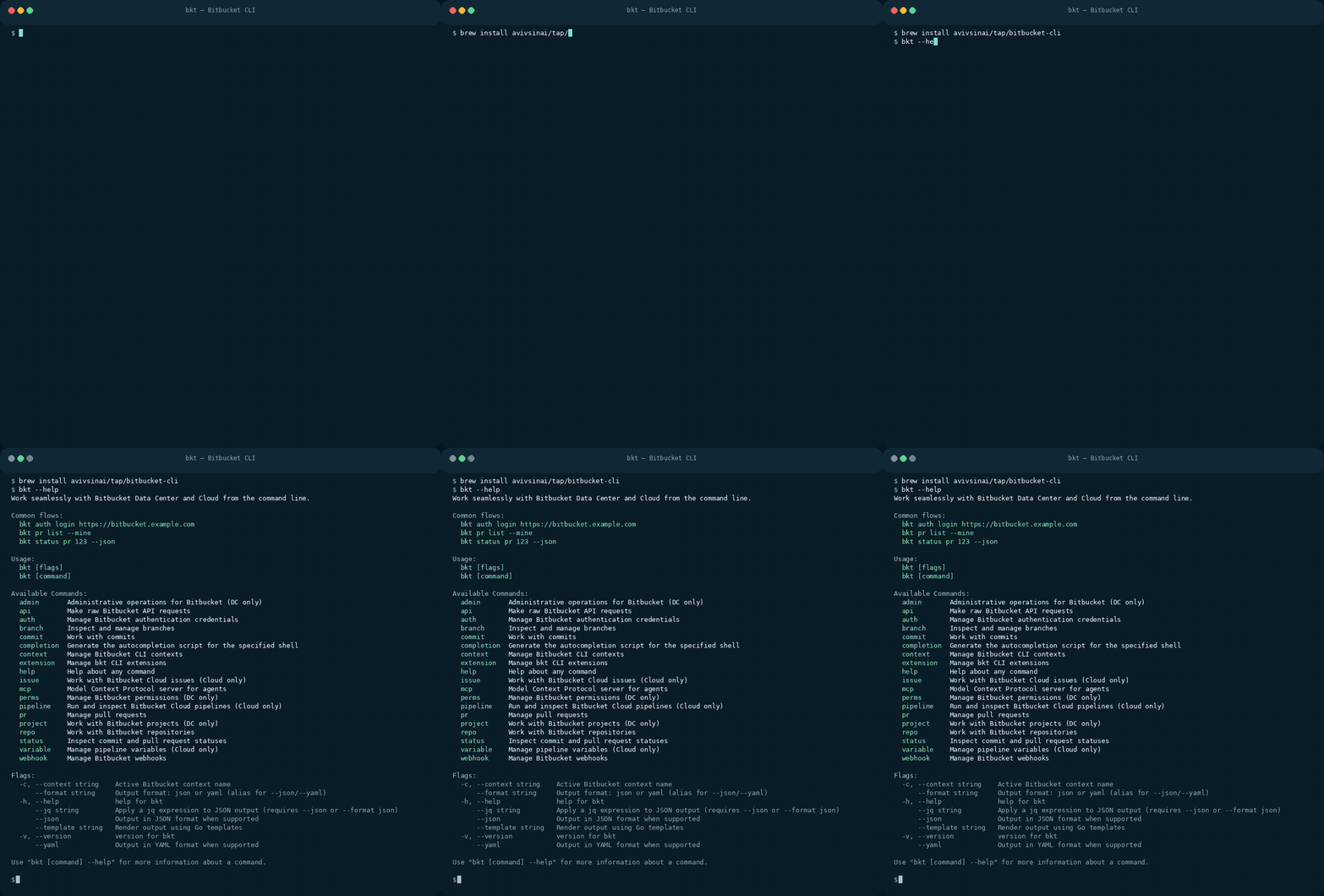
brew install bitbucket-cli
bkt --help
Recorded from a real bkt --help run — no Bitbucket login or token required. Other installers: WinGet, Scoop, Nix, Go, binaries.
Built for AI & automation: Drop bkt into Claude Code, Codex and other coding agents, or shell scripts and they inherit structured output, predictable flags, and safe defaults—no glue code required.
Installation
Homebrew (macOS/Linux)
bkt is in Homebrew core:
brew install bitbucket-cli
The core formula is built from source without bkt's OAuth client, so Bitbucket Cloud browser login (bkt auth login --kind cloud --web) needs BKT_OAUTH_CLIENT_ID and BKT_OAUTH_CLIENT_SECRET (see Binary Downloads). API-token login (--web-token) and Data Center login work as is. For the official binary with Cloud OAuth built in, use the tap:
brew install avivsinai/tap/bitbucket-cli
Both install the same bkt command, so install only one of them.
WinGet (Windows)
winget install AvivSinai.Bitbucket-CLI
Scoop (Windows)
scoop bucket add avivsinai https://github.com/avivsinai/scoop-bucket
scoop install bitbucket-cli
Go Install
go install github.com/avivsinai/bitbucket-cli/cmd/bkt@latest
This installs bkt to $GOPATH/bin (or $HOME/go/bin by default). Ensure the directory is in your $PATH.
Nix (NixOS / nix-darwin / Linux / macOS)
Run the latest master without installing:
nix run github:avivsinai/bitbucket-cli -- --version
Install into your user profile:
nix profile install github:avivsinai/bitbucket-cli
Pin to a specific tag or commit by appending a ref (e.g. github:avivsinai/bitbucket-cli/v1.2.3).
Don't have Nix yet? See nixos.asia/en/install for a quick setup guide (installs Nix with flakes enabled out of the box).
Binary Downloads
Download pre-built binaries for your platform from the releases page.
The .tar.gz and .zip release archives also include skills/bkt/, so the CLI and canonical skill files stay in sync when you install from a release artifact.
Official binaries support Bitbucket Cloud OAuth (bkt auth login --kind cloud --web) out of the box. Source and Nix builds can use the same flow by setting BKT_OAUTH_CLIENT_ID and BKT_OAUTH_CLIENT_SECRET in the environment. API-token login via --web-token works without that extra setup.
Bitbucket Pipelines
bkt supports fully config-free headless use via environment variables. Set BKT_TOKEN and BKT_HOST as secured repository variables — no prior bkt auth login or bkt context create step required.
pipelines:
  default:
    - step:
        name: Open PR
        script:
          - export BKT_VERSION="0.26.0"  # pin to a released version
          - curl -sL "https://github.com/avivsinai/bitbucket-cli/releases/download/v${BKT_VERSION}/bkt_${BKT_VERSION}_linux_x86_64.tar.gz" | tar xz -C /tmp && install /tmp/bkt /usr/local/bin/
          - bkt pr create --title "Auto PR" --source "$BITBUCKET_BRANCH"
Environment Variables
All bkt behaviour can be configured via environment variables, which is especially useful in containers and CI/CD pipelines.
| Variable | Description |
|---|
BKT_TOKEN | Authentication token. Bypasses keyring storage entirely. |
BKT_HOST | Bitbucket server base URL (e.g. https://bitbucket.example.com). Required alongside BKT_TOKEN for config-free use. bitbucket.org is auto-detected as Cloud. |
BKT_USERNAME | Username for basic authentication in headless mode. Required for Cloud basic auth; not required for bearer auth. |
BKT_AUTH_METHOD | Authentication method: basic or bearer. DC defaults to bearer when BKT_USERNAME is absent; Cloud defaults to basic. Use bearer for Cloud repository, project, or workspace access tokens. |
BKT_PROJECT | Default Data Center project key (headless mode). |
BKT_WORKSPACE | Default Bitbucket Cloud workspace (headless mode). |
BKT_REPO | Default repository slug (headless mode). |
BKT_CONFIG_DIR | Override the config file directory (default: $XDG_CONFIG_HOME/bkt). |
BKT_HTTP_DEBUG | Set to 1 to log HTTP request URLs and response status codes. |
BKT_ALLOW_INSECURE_STORE | Set to 1 to use encrypted file fallback when no OS keychain is available. |
BKT_KEYRING_COLLECTION | Secret Service collection name override (Linux only). Defaults to the bkt collection; set it to your provider's default collection name to reuse an already-unlocked wallet. |
Minimal headless example (Data Center):
export BKT_HOST=https://bitbucket.example.com
export BKT_TOKEN=my-personal-access-token
export BKT_PROJECT=MYPROJ
export BKT_REPO=my-service

bkt pr list
bkt pr create --title "Automated PR" --source feature/my-branch
Minimal headless example (Bitbucket Cloud):
# User API token — basic auth
export BKT_HOST=https://bitbucket.org
export BKT_TOKEN=my-api-token
export BKT_USERNAME=me@example.com
export BKT_WORKSPACE=my-workspace
export BKT_REPO=my-repo

bkt pr list

# Repository, project, or workspace access token — bearer auth
export BKT_TOKEN=my-resource-access-token
export BKT_AUTH_METHOD=bearer
unset BKT_USERNAME

bkt pr list
Resource access tokens are not associated with a user. Commands that require
authenticated-user identity, such as cross-repository bkt pr list --mine,
still require user API-token or OAuth credentials.
From Source
git clone https://github.com/avivsinai/bitbucket-cli.git
cd bitbucket-cli
make build   # produces ./bin/bkt
./bin/bkt --help
Claude Code / Codex Skill
Install the bkt skill to give Claude Code or Codex CLI native Bitbucket knowledge:
Via skills (Recommended)
Using Vercel's skills CLI:
npx skills add avivsinai/bitbucket-cli -g -y
Via skild registry
npx skild install @avivsinai/bkt -t claude -y
Via Skills Marketplace
> Known Issue: Claude Code uses SSH to clone marketplace repos, which fails without SSH keys configured. See issue #14485. Use the skills or skild methods instead.
/plugin marketplace add avivsinai/skills-marketplace
/plugin install bkt@avivsinai-marketplace
Manual install
git clone https://github.com/avivsinai/bitbucket-cli.git
cp -r bitbucket-cli/skills/bkt ~/.claude/skills/
Getting started
After installation, verify it works:
bkt --help
1. Authenticate against Bitbucket Data Center or Cloud
Bitbucket Data Center
# Guided flow: opens browser to create a Personal Access Token
bkt auth login https://bitbucket.mycorp.example --web-token

# Or provide credentials directly
bkt auth login https://bitbucket.mycorp.example --username alice --token
Create a Personal Access Token (PAT) in Bitbucket Data Center:
- Go to Profile picture → Manage account → Personal access tokens
- Click Create a token
- Grant permissions: Repository Read, Repository Write, Project Read
- Copy the token (you won't see it again)
Bitbucket Cloud
# Browser OAuth flow for Bitbucket Cloud
bkt auth login https://bitbucket.org --kind cloud --web

# Or provide credentials directly
bkt auth login https://bitbucket.org --kind cloud --username  --token
Create an API token with scopes for Bitbucket Cloud:
- Go to Atlassian Account Settings
- Click Create and manage API tokens → Create API token with scopes
- Name your token and set an expiry date
- Select "Bitbucket" as the application (required!)
- Grant scopes:
- Account: Read (
read:user:bitbucket) — Required for authentication
- Repositories: Read, Write — For repo commands
- Pull requests: Read, Write — For PR commands
- Issues: Read, Write — For issue commands (optional)
- Click Create and copy the token immediately
> Warning: General Atlassian API tokens won't work. You must select "Bitbucket" as the application when creating the token.
> Note: Use your Atlassian account email as the username (not your Bitbucket username).
Legacy: App passwords (deprecated)
App passwords are deprecated. New app passwords cannot be created since September 2025, and existing ones will stop working June 2026. If you have an existing app password:
bkt auth login https://bitbucket.org --kind cloud --username --token
Note: For app passwords, use your Bitbucket username (not email).
Credential storage
Access tokens are stored in your OS keychain (Keychain Access on macOS, Windows Credential Manager, or
Secret Service/KWallet on Linux) while host metadata lives in
$XDG_CONFIG_HOME/bkt/config.yml. Pass --allow-insecure-store (or set
BKT_ALLOW_INSECURE_STORE=1) to permit the encrypted file backend on systems
without a native keychain.
If your keyring requires an interactive unlock prompt, you can increase the keyring timeout via
BKT_KEYRING_TIMEOUT (for example BKT_KEYRING_TIMEOUT=2m).
On Linux, if your keyring prompts for a passphrase on every invocation, check whether your
Secret Service provider creates a separate wallet per collection. bkt stores credentials in a
collection named bkt by default, and some providers (for example KWallet) materialize that as
its own encrypted wallet rather than using the session's default, already-unlocked one. Setting
BKT_KEYRING_COLLECTION to your provider's default collection name (for example
BKT_KEYRING_COLLECTION=kdewallet on KDE) makes bkt share that default wallet instead.
Distributors can bake the name in via -ldflags -X github.com/avivsinai/bitbucket-cli/internal/secret.defaultKeyringCollection= so it does not depend on an
environment variable reaching every shell and GUI-launched process; BKT_KEYRING_COLLECTION
still takes precedence when set. Note that credentials stored before the change remain in the
old collection and must be re-added.
macOS note: Keychain prompts after brew upgrade
On macOS, every brew upgrade bitbucket-cli may trigger one Keychain prompt because the
stored item's ACL is tied to the installed binary. Re-run bkt auth login once
after the upgrade to refresh the ACL, then subsequent invocations should not
prompt. Releases pin the Designated Requirement to the bundle identifier, so
the refresh is only needed once. Run bkt auth doctor to diagnose prompts
that persist beyond that; it never reads the stored secret.
2. Create and activate a context
Bitbucket Data Center
bkt context create dc-prod --host bitbucket.mycorp.example --project ABC --set-active
bkt context list
Bitbucket Cloud
bkt context create cloud-prod --host api.bitbucket.org --workspace myteam --set-active
bkt context list
> Tip: Run bkt auth status to see configured hosts and the exact host value to use with --host.
Contexts capture the host mapping, default project/workspace, and optional default repository for commands.
3. Work with repositories
bkt repo list --limit 20
bkt repo list --workspace myteam --limit 10   # Cloud workspace override
bkt repo view platform-api
bkt repo create data-pipeline --description "Data ingestion" --project DATA
bkt repo create frontend-app --workspace myteam --cloud-project WEB
bkt repo browse --project DATA --repo platform-api
bkt repo clone platform-api --project DATA --ssh
bkt repo downloads upload before.png after.png    # Cloud: host images for PR descriptions, prints URLs
repo list/repo view automatically target the right REST API for your active context: Data Center uses /rest/api/1.0/projects/{projectKey}/repos, while Cloud uses /2.0/repositories/{workspace}.
For repo create, --project, --forkable, --default-branch, and --scm are Data Center flags; --workspace and --cloud-project are Cloud flags. Host-specific create flags are rejected when they would otherwise be ignored.
4. Pull request workflows
bkt pr list --state OPEN --limit 10
bkt pr create --title "feat: cache" --source feature/cache --target main --reviewer alice
bkt pr merge 42 --message "merge: feature/cache"
bkt pr checks 42                              # Show build/CI status
bkt pr checks 42 --wait                       # Wait for builds to complete
bkt pr checks 42 --wait --timeout 5m          # Wait with timeout
bkt pr checks 42 --wait --max-interval 1m     # Custom backoff cap
bkt pr comments 42 --details                  # Review PR comments, inline file/line anchors, and thread IDs
bkt pr comments view 42 1001                  # Show one thread: anchor, diff context (DC), replies
bkt pr comments resolve 42 1001               # Resolve a top-level comment thread
bkt pr comments reopen 42 1001                # Reopen a resolved comment thread
bkt pr comments delete 42 1001                # Delete a PR comment
The CLI wraps Bitbucket pull-request endpoints for creation, listing, review, and merge operations. The checks command displays build status with color-coded output (green for success, red for failure, yellow for in-progress) and supports polling until all builds complete. Polling uses exponential backoff with jitter to avoid overwhelming the API during long builds.
For comment thread state changes, pass the top-level thread comment ID; replies
cannot be resolved or reopened directly.
5. Issue tracking (Bitbucket Cloud only)
bkt issue list --state open --kind bug           # List open bugs
bkt issue view 42 --comments                     # View issue with comments
bkt issue create -t "Login broken" -k bug -p major
bkt issue edit 42 --assignee "{abc-123}" --priority critical
bkt issue close 42                               # Close an issue
bkt issue reopen 42                              # Reopen a closed issue
bkt issue comment 42 -b "Fixed in v1.2.0"        # Add a comment
bkt issue status                                 # Show your assigned/created issues

# Attachments
bkt issue attachment list 42                     # List attachments
bkt issue attachment upload 42 screenshot.png    # Upload file(s)
bkt issue attachment download 42 --all           # Download all attachments
bkt issue attachment delete 42 old-file.txt      # Delete an attachment
Note: The issue tracker is only available for Bitbucket Cloud. Bitbucket Data Center uses Jira for issue tracking.
6. Branch, permission, webhook, pipeline, and extension management
bkt branch list --workspace myteam           # Cloud branch listing
bkt branch create release/1.9 --from main    # Data Center branch utils
bkt perms repo list --project DATA --repo platform-api
bkt webhook create --name "CI" --url https://ci.example.com/hook --event repo:refs_changed
bkt pipeline run --workspace myteam --repo api --ref main --var ENV=staging
bkt pipeline run --ref master --selector-type custom --selector-pattern deploy-to-production
bkt extension install https://github.com/example/bkt-hello.git
bkt extension exec hello -- --flag=1
bkt status pipeline {pipeline-uuid}
bkt status rate-limit
Branch utilities use Bitbucket's Branch Utils REST API for listing, creation, deletion, and default updates. Permission and webhook commands map to their respective REST endpoints for consistent automation.
Extensions are cloned into $XDG_CONFIG_HOME/bkt/extensions (or the directory configured via BKT_CONFIG_DIR) and executed in-place. Binaries should follow the bkt- naming convention so the CLI can discover them automatically.
7. Agent skills
bkt skill installs Agent Skills from Bitbucket repositories, mirroring gh skill so the same workflow works for skills hosted on Bitbucket Cloud and Data Center.
bkt skill install myteam/agent-skills                  # List the skills a repository publishes
bkt skill install myteam/agent-skills code-review      # Install one skill
bkt skill install PROJ/agent-skills code-review        # Data Center, addressed by project key
bkt skill install myteam/agent-skills code-review@v1.2.0 --agent claude-code --scope user
bkt skill list                                         # Show what is installed, and from where
bkt skill preview myteam/agent-skills code-review      # Inspect before installing
bkt skill update --all                                 # Refresh everything that changed
bkt skill search "code review"                         # Search SKILL.md files across a Cloud workspace
If your repository publishes skills, bkt skill publish validates them and tags a version:
bkt skill publish --dry-run                            # Validate without tagging
bkt skill publish --fix                                # Strip committed install metadata
bkt skill publish --tag v1.2.0                         # Tag the current commit as a version
Skills are discovered with the specification's conventions (skills/*/SKILL.md, skills/{author}/*/SKILL.md, plugins/*/skills/*/SKILL.md, root-level */SKILL.md, and a skills/ directory nested under a prefix). Use --allow-hidden-dirs to include copies kept in .claude/skills/ or .agents/skills/.
Placement follows the target agent: --agent selects one of the supported hosts (Claude Code, Codex, Cursor, GitHub Copilot, Gemini CLI, and many more; run bkt skill install --help for the full list) and --scope project|user chooses between the current repository and your home directory. The default agent, universal, writes to the shared .agents/skills directory that most agents read. --dir overrides both.
Installed skills record their origin in SKILL.md frontmatter under metadata.bitbucket-*, which is what bkt skill update compares against the source repository. Because Bitbucket exposes no per-directory tree hash, the recorded version is the latest commit that touched the skill directory. Installing with @version or --pin pins the skill, and bkt skill update then skips it until you pass --unpin.
bkt skill search is available for Bitbucket Cloud only. It searches SKILL.md files across the workspace selected by --workspace or the active context, and supports Bitbucket query terms such as repo:agent-skills. Bitbucket Data Center has no public workspace code-search API. Atlassian has announced that the Cloud code-search REST endpoint will be deprecated on November 1, 2026.
Structured output & raw API access
Every command supports the global --json and --yaml flags for automation-ready output.
For endpoints that are not yet wrapped, reach directly for the API escape hatch:
bkt api /rest/api/1.0/projects --param limit=100 --json
bkt api /repositories --param workspace=myteam --field pagelen=50
Security
This project uses automated secret scanning (gitleaks), dependency updates (Dependabot), and security posture tracking (OSSF Scorecard).
Found a security issue? See our security policy for responsible disclosure.
Development
Project Layout
cmd/bkt/             # CLI entry point
internal/bktcmd/     # Main() wiring (factory + root command)
internal/build/      # Version metadata (overridden via ldflags)
internal/config/     # Context and host configuration
internal/remote/     # Git remote parsing utilities
pkg/cmd/             # Cobra command implementations (auth, repo, pr, ...)
pkg/cmdutil/         # Shared command helpers and factory wiring
pkg/iostreams/       # IO stream abstractions
pkg/bbdc/            # Bitbucket Data Center client implementation
pkg/bbcloud/         # Bitbucket Cloud client implementation
pkg/format/          # Output rendering helpers
pkg/httpx/           # Shared HTTP client and retry logic
Building & Testing
make build      # Build the binary to ./bin/bkt
make test       # Run unit tests
make fmt        # Format code
make lint       # Run linters
make tidy       # Tidy go modules
make check-skills # Verify generated skill mirrors
make sync-skills  # Regenerate skill mirrors from skills/bkt
go test ./... runs fast smoke coverage that wires the CLI against an in-memory Bitbucket mock (see pkg/cmd/smoke/cli_smoke_test.go).
skills/bkt/ is canonical. After editing it, run make sync-skills to refresh
the committed .claude/skills/bkt/ and .agents/skills/bkt/ mirrors.
Troubleshooting
Debug HTTP Requests
To see API request URLs and response status codes, set the BKT_HTTP_DEBUG environment variable:
BKT_HTTP_DEBUG=1 bkt pipeline view 10
This outputs request method/URL and response status, useful for diagnosing API errors.
Support
- Questions / Ideas: File an issue
- Bug Reports: File an issue
License
bkt is available under the MIT License.