





Infinite RSS Reader is a modern, web-based RSS reader that turns your Thunderbird feeds into a beautiful, infinite-scrolling news stream — think Feedly or Google Reader, but 100% local, private and self-hosted on your own machine.
It ships as a single Go binary with zero third-party dependencies: no Docker, no Node.js, no Python, no database server. Double-click it and start reading at http://localhost:7654.
> Prefer no Thunderbird at all? The bundled infrss-server binary is a standalone RSS/Atom aggregator that reads an OPML file, fetches feeds itself and stores everything in SQLite. See Standalone mode.
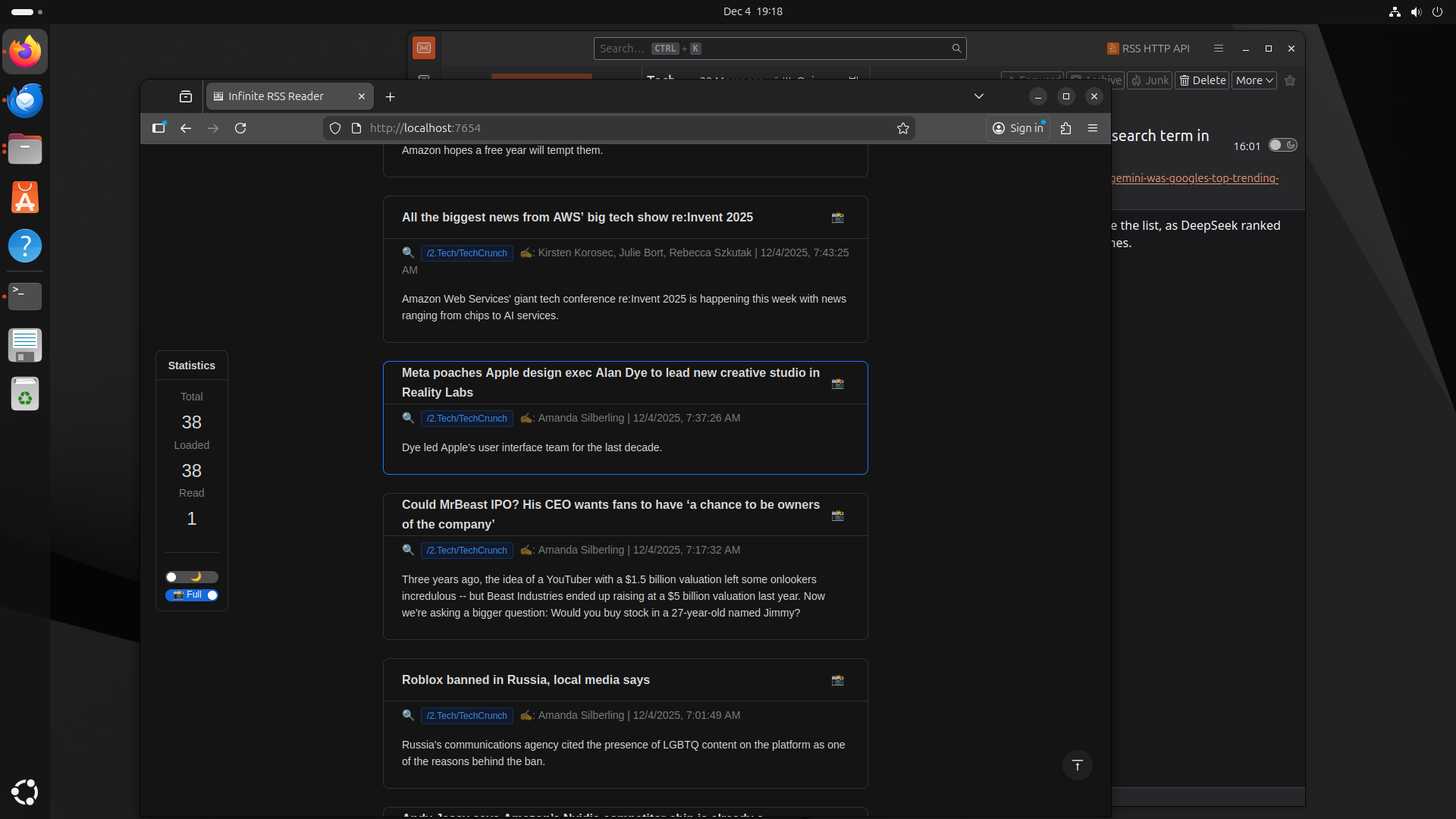
Table of Contents
Thunderbird is one of the best RSS aggregators ever made — rock-solid fetching, folders, filters, offline storage. Its reading UI, however, is still a 2005-era three-pane mail list.
Infinite RSS Reader keeps Thunderbird as the engine and replaces the reading experience with a modern, mobile-friendly web app:
- 🚀 Infinite scroll — browse hundreds of news items without pagination or clicking "next".
- ⚡ Lightning fast — content is pre-fetched and rendered instantly.
- 🌗 Dark mode — auto-detects your system theme for comfortable night reading.
- 📸 Visual-first — layout optimized for media-rich feeds, with one-click screenshots to clipboard.
- ✅ Auto mark as read — items are marked read (with clear visual distinction) as you scroll past them, and the state syncs back to Thunderbird.
- 🔒 Local & private — no cloud account, no tracking, no telemetry, no external server.
Features
| |
|---|
| Infinite scrolling stream | No "Next" button, no opening items one by one. Just scroll. |
| Two-way Thunderbird sync | Scrolling past an item in the browser marks it read in Thunderbird. |
| Distraction-free UI | Clean, responsive interface built with React 18 + Ant Design. |
| Mobile optimized | Fully adaptive layout for phones and tablets (iOS, Android). |
| Multi-device / LAN ready | Host on your PC, read from any device on your home network. |
| Single binary | Web UI, Thunderbird extension and native-messaging manifest are all embedded via go:embed. |
| Self-installing | Double-click the binary — no terminal, no git clone, no package manager required. |
| Auto-updating extension | Update the binary and the Thunderbird extension is silently re-synced on next launch. |
| Standalone mode | infrss-server: OPML in, SQLite storage, built-in feed fetcher, same reader UI. |
| Security first | Runs locally, sanitizes feed HTML to prevent XSS, no third-party libraries in the binary. |
| Cross-platform | Windows, macOS (Apple Silicon), Linux. |
| Open source | MIT licensed — fork it, audit it, ship it. |
Both binaries serve the same Infinite RSS Reader web UI; they differ only in the backend.
| infrss (Thunderbird companion) | infrss-server (standalone) |
|---|
| Thunderbird required | ✅ Yes (extension + Native Messaging) | ❌ No |
| Who fetches feeds | Thunderbird | The binary itself |
| Subscription management | Full add / edit / delete in Thunderbird | Read-only from an OPML file at startup |
| Storage | Thunderbird profile | SQLite |
| Read-state sync | Two-way with Thunderbird | Stored in SQLite |
| Default URL | http://localhost:7654 | http://localhost:7655 |
| Best for | Most users | Headless/self-contained RSS service |
-
Choose infrss if you already use (or are happy to use) Thunderbird — you get full feed and folder management for free.
-
Choose infrss-server if you want a self-contained RSS service backed by OPML + SQLite. It has no UI or API for adding/editing/deleting feeds; subscriptions are loaded from OPML at startup:
infrss-server --opml /path/to/feeds.opml
See docs/server.md for configuration and API details.
Installation
Prerequisites
- Mozilla Thunderbird (tested with 147.0.2; any recent version with MailExtension/WebExtension support should work) — only for
infrss.
- OS: Windows, macOS or Linux.
1. Get the binary
Option A — Package manager (recommended)
macOS / Linux (Homebrew):
# Thunderbird companion (infrss)
brew install AwesomeDog/tap/infrss && infrss

# Standalone server (infrss-server)
brew install AwesomeDog/tap/infrss-server
Windows (Winget):
# Standalone server (infrss-server)
winget install AwesomeDog.infrss-server
Option B — Manual download
Grab the binary for your platform from GitHub Releases:
| Platform | Thunderbird companion | Standalone server |
|---|
| macOS (Apple Silicon) | infrss-macos-arm64 | infrss-server-macos-arm64 |
| Windows (x64) | infrss-windows.exe | infrss-server-windows.exe |
| Linux (x86-64) | infrss-linux-amd64 | infrss-server-linux-amd64 |
2. Run the self-installer
Double-click the downloaded infrss binary (or run it from a terminal). It will:
- Copy itself to
~/.local/bin/infrss (infrss.exe on Windows).
- Build and install the Thunderbird extension (
.xpi) into every detected profile.
- Register the Native Messaging manifest so Thunderbird can launch the bridge.
No flags, no config files — everything is auto-detected.
3. Allow unsigned extensions in Thunderbird
The extension is unsigned (it is built locally by the binary), so:
- Open Thunderbird.
- Settings → General → Config Editor (bottom of the page).
- Search for
xpinstall.signatures.required.
- Double-click to set it to
false.
- Restart Thunderbird.
4. Enable the extension
- Tools → Add-ons and Themes.
- Find "Infinite RSS Reader" (shown as RSS HTTP API in older builds) and make sure it is Enabled.
5. Open the reader
Visit http://localhost:7654 🎉
Usage
- Start Thunderbird — the bridge starts automatically in the background.
- Open the reader at http://localhost:7654.
- Read:
- Scroll down to autoload more items (infinite scroll).
- Items are automatically marked as read as they pass by, and synced to Thunderbird.
- Use the Statistics panel on the left for reading stats and settings.
- Toggle Theme (☀️/🌙) and Screenshot mode (Full / Body) in the panel.
- Click the camera (📸) icon to copy a screenshot of an item to your clipboard.
- Click the magnifier (🔍) icon to open the original source page.
CLI
infrss              Run the installer (or double-click the binary)
infrss --version    Print version and exit
infrss --help       Print help and exit
The reader is a responsive web app, so any device on your LAN can use it:
- Keep Thunderbird (or
infrss-server) running on your PC.
- Find your PC's local IP (e.g.
192.168.1.20).
- On your phone or tablet, open
http://192.168.1.20:7654 (or :7655 for standalone mode).
- Optional: "Add to Home Screen" for an app-like RSS reader on iOS/Android.
> Nothing leaves your network — there is no cloud relay involved.
Standalone mode (infrss-server + OPML + SQLite)
Prefer a self-hosted RSS server without Thunderbird?
# Export an OPML file from Feedly / Inoreader / Thunderbird / any reader, then:
infrss-server --opml /path/to/feeds.opml
# Reader available at http://localhost:7655
- Fetches RSS and Atom feeds on its own schedule.
- Stores articles and read state in a local SQLite database.
- Serves the exact same infinite-scroll UI plus a JSON API.
- Subscriptions come from OPML at startup (no add/edit/delete UI or API).
Keep your OPML in git
Track feeds.opml in a repository and Thunderbird's export makes every commit noisy — feed order follows the folder tree, duplicate subscriptions pile up, and each feed carries an fz:options attribute holding its last update timestamp. --normalize-opml rewrites an export into a canonical form so diffs only show real changes:
infrss-server --normalize-opml feeds.opml > feeds.norm.opml && mv feeds.norm.opml feeds.opml
Full configuration, flags and API reference: docs/server.md.
Updating
- Download the new binary from GitHub Releases.
- Double-click it.
- It detects the version mismatch, overwrites the installed copy, updates the extension and clears the startup cache.
- Restart Thunderbird.
Via package managers:
# macOS / Linux
brew upgrade AwesomeDog/tap/infrss && infrss

# Windows
winget upgrade AwesomeDog.infrss-server
How it works (architecture)
Mode 1 — infrss (Thunderbird companion)
graph LR
    TB[Thunderbird RSS] <-->|Native Messaging via stdio| Go[infrss Go binary]
    Go <-->|HTTP JSON API :7654| Web[React web UI]
Mode 2 — infrss-server (standalone)
graph LR
    OPML[feeds.opml] --> Srv[infrss-server]
    Net[RSS / Atom feeds] --> Srv
    Srv <--> DB[(SQLite)]
    Srv <-->|HTTP JSON API :7655| Web[React web UI]
- Binary: single Go binary, zero third-party dependencies (standard library only).
- Frontend: React 18 + Ant Design, shipped as one HTML file embedded via
go:embed.
- Communication: Native Messaging (stdin/stdout) + a local REST API.
- Two-mode launcher: the
infrss binary auto-detects how it was started:
- No arguments → Install mode (self-install workflow).
- Extension ID as argument (launched by Thunderbird) → Bridge mode (native messaging + HTTP server).
Building from source
Requires Go 1.26+.
git clone https://github.com/AwesomeDog/infinite-rss-reader.git
cd infinite-rss-reader

VERSION=$(git describe --tags --always --dirty)
LDFLAGS="-X main.version=${VERSION}"

# infrss (Thunderbird companion)
GOOS=darwin  GOARCH=arm64 go build -ldflags "${LDFLAGS}" -o bin/infrss-macos-arm64 ./cmd/infrss
GOOS=windows GOARCH=amd64 go build -ldflags "${LDFLAGS}" -o bin/infrss-windows.exe  ./cmd/infrss
GOOS=linux   GOARCH=amd64 go build -ldflags "${LDFLAGS}" -o bin/infrss-linux-amd64  ./cmd/infrss

# infrss-server (standalone)
GOOS=darwin  GOARCH=arm64 go build -ldflags "${LDFLAGS}" -o bin/infrss-server-macos-arm64 ./cmd/infrss-server
GOOS=windows GOARCH=amd64 go build -ldflags "${LDFLAGS}" -o bin/infrss-server-windows.exe  ./cmd/infrss-server
GOOS=linux   GOARCH=amd64 go build -ldflags "${LDFLAGS}" -o bin/infrss-server-linux-amd64  ./cmd/infrss-server

# Release
git tag v0.0.1   # next version
git push && git push --tags
Troubleshooting
"Connection refused" / the web interface won't load
- Make sure Thunderbird is running (it launches the bridge).
- Check the extension is enabled: Tools → Add-ons and Themes → Infinite RSS Reader.
- Confirm nothing else is using port 7654 (or 7655 for
infrss-server).
"No items found"
- Make sure you actually have unread RSS items in Thunderbird.
- Check the logs:
~/.local/state/infrss/logs/infrss_YYYYMMDD.log.
The extension disappears or shows as unsupported
- Verify
xpinstall.signatures.required is still false in Config Editor.
- Re-run the binary once to reinstall the extension, then restart Thunderbird.
FAQ
Is this a Feedly or Google Reader alternative?
Yes — it gives you the same infinite-scroll reading experience, but self-hosted on your own machine with no account, no paywall and no tracking.
Can I use it without Thunderbird?
Yes. Use infrss-server with an OPML file; it fetches feeds itself and stores them in SQLite.
Does it work on iPhone / Android?
Yes. The UI is fully responsive — open your PC's LAN address in mobile Safari/Chrome and optionally add it to your home screen.
Do I need Docker, Node.js, Python or a database server?
No. It's one static Go binary with the web UI embedded. infrss-server uses an embedded SQLite database file.
Which Thunderbird versions are supported?
Tested with Thunderbird 147.0.2; recent versions supporting MailExtensions should work.
Can I import feeds from Feedly / Inoreader / NewsBlur?
Yes — export OPML from your old reader, then either import it into Thunderbird (for infrss) or pass it to infrss-server --opml.
Does it sync read/unread state?
Yes. In infrss mode, read state is written back to Thunderbird; in standalone mode it's stored in SQLite.
Is it free and open source?
Yes, MIT licensed.
Privacy & security
- Local only —
infrss never talks to the internet; Thunderbird does all the fetching. infrss-server only contacts the feed URLs listed in your OPML.
- No accounts, no telemetry, no analytics — nothing is phoned home, ever.
- HTML sanitization — all feed content is sanitized to strip scripts and prevent XSS before rendering.
- Zero dependencies — no third-party Go libraries in the binary; a small attack surface you can actually audit.
- Open source — read the source code and verify it yourself.
| Infinite RSS Reader | Thunderbird built-in | Feedly / Inoreader | FreshRSS / Miniflux |
|---|
| Hosting | Local / self-hosted | Local | Cloud (account required) | Self-hosted (server) |
| Infinite scroll stream | ✅ | ❌ | ✅ | Partial |
| Setup | Double-click one binary | Built in | Sign up | Web server / DB / Docker |
| Runtime dependencies | None | None | — | PHP or Go + DB |
| Mobile web UI | ✅ | ❌ | ✅ | ✅ |
| Feed management UI | Via Thunderbird | ✅ | ✅ | ✅ |
| Cost / tracking | Free, no tracking | Free | Freemium, cloud-hosted | Free |
Great projects, different trade-offs — Infinite RSS Reader is aimed at people who want a modern reading UI with zero infrastructure.
Contributing
Issues, feature requests and pull requests are welcome. If Infinite RSS Reader improved your daily reading, please ⭐ star the repo — it genuinely helps others discover it.
License
MIT. Fork it, modify it, ship it.
中文简介
Infinite RSS Reader 是一个本地、注重隐私的 RSS 阅读器:它把 Thunderbird 中的 RSS 订阅变成现代化的无限滚动信息流(类似 Feedly / Google Reader),支持深色模式、移动端自适应、滚动自动标记已读并回写 Thunderbird。整个程序是一个零依赖的 Go 单文件二进制,双击即用;也可用 infrss-server 以 OPML + SQLite 的方式独立运行,无需 Thunderbird。
Keywords: self-hosted RSS reader, infinite scroll RSS reader, Thunderbird RSS extension, Thunderbird add-on, Feedly alternative, Google Reader alternative, open source feed reader, RSS aggregator, Atom reader, OPML reader, SQLite RSS server, local-first news reader, privacy-friendly RSS, Go single binary, Windows / macOS / Linux RSS reader, 无限滚动 RSS 阅读器, 自建 RSS 阅读器