StreamDecky
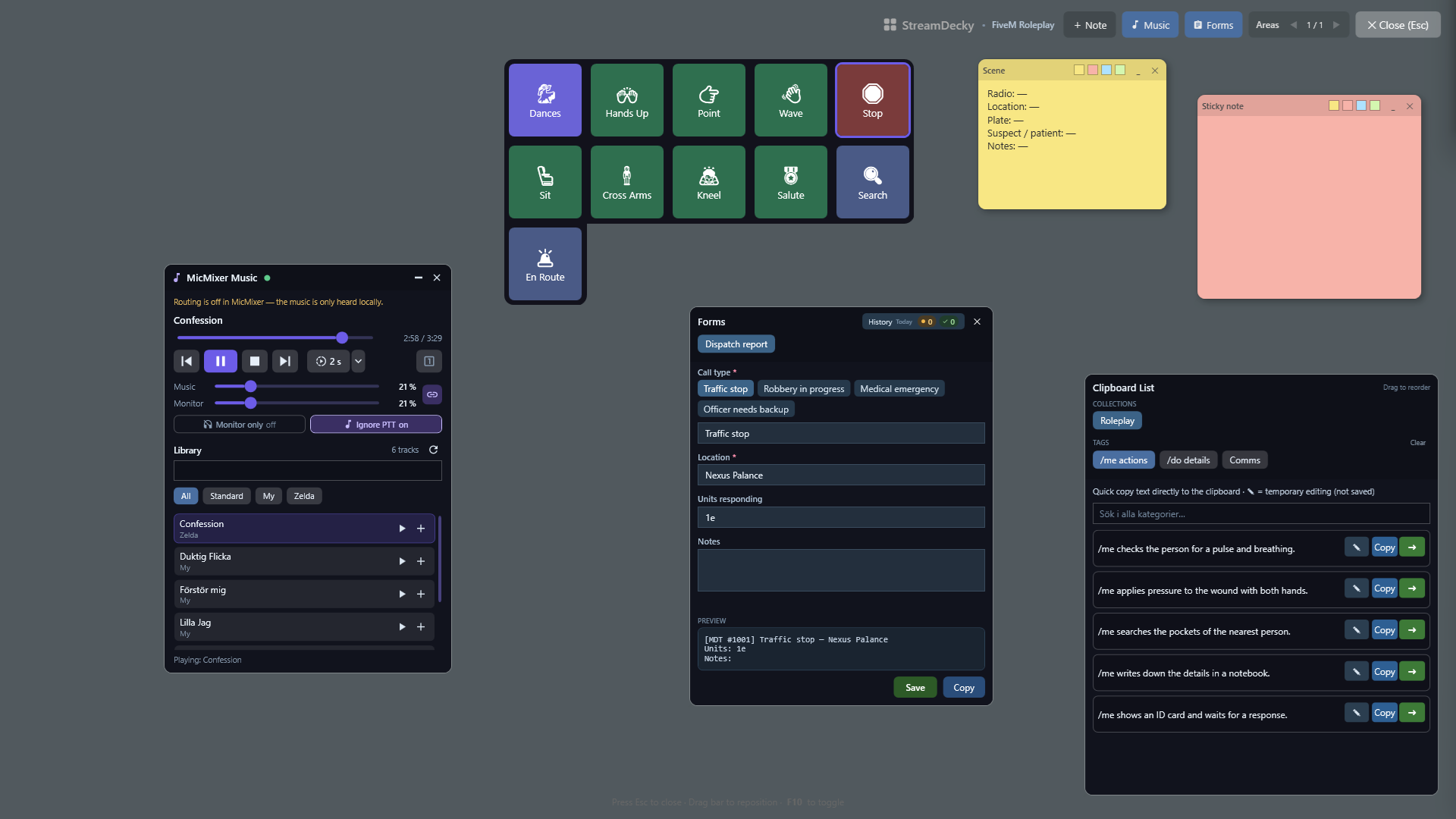
StreamDecky is a software command deck for Windows. Press a global hotkey (or a
gamepad combo) and a fullscreen overlay opens on top of your game: a grid of
macro buttons, ready-made chat lines, fill-in forms, and sticky notes. Click
something and StreamDecky hands focus back to the game and sends the keystrokes
or text there. No Stream Deck hardware needed — it's all software.
Download for Windows
· Windows 10/11 · installer or zip · self-contained, no .NET install · Apache-2.0
What it's for
- Roleplay servers like FiveM. Fire emotes and animations from one-press
buttons (
open chat → /e dance → Enter), keep your /me and /do lines in a
searchable quick-text panel, and pin radio channels or plates as sticky notes
over the game.
- Repeated paperwork. Build a form once — text fields, choice fields,
auto-incrementing case or invoice numbers,
{date}/{time} tokens — and fill
it from the overlay into a dispatch report or a real-world canned reply.
- Hotkey and gamepad control. Open the overlay with a global hotkey or a
recorded gamepad combo, and navigate it with the D-pad or stick when you don't
want to reach for the keyboard.
Quick setup
- Download the latest installer and run it.
- Start StreamDecky from the Start menu and build a deck in the editor.
- Set the overlay hotkey in Settings, then open the overlay over your game.
- Optionally import one of the ready-made profiles below via Settings →
Import Profile. It is added next to your own profiles, never over them.
Trust at a glance
- Official releases are built by GitHub Actions from the tagged source commit.
- Releases since
v2026.7.5 include a .sha256 file for the Windows archive.
- The current Windows release is unsigned. Check the release notes for its
authoritative signing status and see the code signing policy.
Templates and guides
The rest of this document is the detailed reference.
Requirements
- Windows 10 or Windows 11
.NET 10 SDK for local development- A writable
%LOCALAPPDATA%\StreamDecky folder for profiles, backups, and logs
- A stable install path if you plan to use
Start with Windows
Published releases are self-contained win-x64 builds, so end users do not need a separate .NET runtime installation.
Highlights
Overlay and focus
- Full-screen topmost overlay (
OverlayWindow)
- Close with
Esc or the close button
- Attempts to regain focus if the overlay loses it unexpectedly
- Restores focus to the previous foreground window before executing actions
Single instance and startup
- Runs as a single-instance app
- A second launch activates the existing window instead of starting a second process
- Supports
--minimized to start hidden in the tray
Start with Windows writes "" --minimized to HKCU\SOFTWARE\Microsoft\Windows\CurrentVersion\Run
Tray and main window
- Creates a tray icon with
Show and Exit
- Closing the main window hides it to the tray instead of exiting the process
- Loads the tray icon from the executable icon with a Windows application icon fallback
TextInput
- Clipboard paste mode or simulated typing
- Optional
Enter after text input
KeyPress
- SendKeys-style key strings with modifiers and special keys
MultiAction
- Ordered action steps:
KeyPress, TextInput, and Delay
LayoutNavigation
- Jumps directly to another page or virtual layout
Layouts, notes, and profiles
- Regular pages with previous/next navigation
- Virtual layouts for hidden menus and direct navigation targets
- Shared layout size (
Rows and Columns) across layouts in a profile
- Page-independent sticky notes stored in dedicated note pages
- Multiple profiles with separate layouts, notes, quick text, and overlay/input settings
- Export the active profile from Settings; import adds the file as a new profile
(renamed if the name is taken) and switches to it, leaving existing profiles untouched
Quick clipboard text
- Profile-scoped quick text items and categories
- Overlay search/filter support
- Shared multi-step action pipeline for clipboard rows
- Session-only inline edits in the overlay without autosaving temporary changes
- Profile-scoped fill-in forms designed in the editor and filled in from the overlay
- Field types: free text (single- or multiline) and choice fields where selecting an option prefills an editable text
- Per-field autocomplete suggestions from previously submitted values (opt-in per field)
- Optional shared suggestion keys let explicitly selected fields reuse autocomplete values across forms without sharing submissions or other field data
- Optional required-field validation that blocks submission until required values are filled in
- Auto-incrementing counters (e.g. invoice numbers) with optional zero padding; counters increment once per submission
- Output composed from a template with
{field}, Choice option-title {field_choice}, {counter}, and built-in {date}, {time}, {datetime} tokens, with live preview in both editor and overlay
- Submit to clipboard, or through an optional per-form action-step pipeline against the previously focused window
- Submission history stored outside the profile with view, copy, and delete in the editor
- Clearing form history also clears autocomplete suggestion data, including orphaned suggestions
- Draggable, resizable overlay panel persisted per profile
Text helper widget
- Optional overlay widget (
Text in the overlay top bar) with a roomy, dyslexia-friendly writing box: pick any installed font (Verdana by default) and text size in Settings
- Two looks for the writing area, switchable in Settings: a warm off-white that glares less than pure white (default, and easier for most people with dyslexia), or a dark one that matches the overlay theme
- Fix spelling — or
Ctrl+Enter in the box — replaces what you wrote with a respelled version from DeepSeek, keeping your language, wording, and any /commands; Enter on its own still inserts a newline, and Undo brings your own words straight back
- Copy always copies the box as it stands, whether or not the spell fix has run
- Ask — or
Ctrl+Shift+Enter — answers the question in the box without touching what you wrote; the answer appears in its own card underneath with the sources behind it, and Copy and Undo stay attached to your text as always (see Quick answers)
- Send — or
Ctrl+Alt+Enter (AltGr+Enter) — closes the overlay and runs a per-profile action with the text in the box, using the same step editor as the clipboard action (in Settings, under the text helper). The button only appears once steps exist. Typical game-chat setup: a KeyPress step that opens chat, then a TextInput step /me {{text}} with Press Enter after, so a respelled line goes straight out as a command
- Needs a DeepSeek API key in Settings, where the model, the correction prompt, and how much the model reasons can also be changed; the key is stored scrambled for your Windows account and never travels with a profile export
- Reasoning is requested off by default. DeepSeek otherwise thinks at
high effort on every call, which costs seconds and tokens that respelling a chat line does not need; raise it in Settings only if corrections come back wrong
- The writing box takes the caret as soon as the widget appears, and its text survives closing and reopening the overlay
- Draggable, resizable from both bottom corners, and persisted per profile
Quick answers
- Ask in the text helper answers a short question mid-stream — a score, a release date, a price — without alt-tabbing to a browser. It uses the same DeepSeek key as the spell fix
- The answer never overwrites the box. It lands in its own card with the question it belongs to, so an answer left on screen while you retype can never read as a reply to the new text. Dismiss it with the
x, or Clear to empty both at once
- Every answer says where it came from: Checked against the web with the source chips it used, or From the model, not checked against the web. Chips open in your browser. An answer with nothing behind it is never allowed to look like a sourced one
- Add a Brave Search API key in Settings to let answers be checked against the web; the free tier covers this kind of use. Create it under Brave's Web Search product — Brave issues a separate key per product, and an Answers key authenticates but comes back empty. Without a key, Ask still answers from the model alone and the card says so
- When to Search decides how the search is triggered:
- Let the model decide (default) — the model is offered a search tool and takes it for anything that could have changed (scores, prices, releases, who currently holds a role) and skips it for spelling, arithmetic and stable facts. Those come back a step faster and with no irrelevant sources attached, and the model writes a better search query than the raw question
- Always search — skips that decision and goes straight to Brave, which is quicker when nearly everything you ask is about current events
- Never search — answers from the model alone; no Brave key needed
- Answer Thinking is separate from the spell-fix setting and defaults to
low, not off: an answer is a factual claim you might read out on stream, and a little reasoning makes the model stick to its sources and admit when they do not answer the question. The search decision itself never uses thinking, whatever you pick, so the common case stays fast
- If a search fails, Ask reports the failure rather than quietly answering from memory — the question was routed to a search precisely because memory was not good enough for it
- Ask takes questions up to 600 characters; longer text can still have its spelling fixed
- The answer prompt is editable in Settings, next to a Reset to default
- Optional overlay widget (
Music in the overlay top bar) that remote-controls MicMixer's built-in music player
- Transport controls, seek, music/monitor volume, and a volume-link toggle synced with MicMixer
- Delayed start with a configurable countdown that plays the track marked in the list, plus single-track mode
- Library browsing with search, per-folder filter chips, click-to-mark and play/enqueue per track, and a reorderable queue
- Compact mode hides the queue and library, keeping only the player controls
- Draggable, resizable from both bottom corners, and persisted per profile; reconnects automatically when MicMixer is not running
Gamepad support
- Optional per-profile XInput support
- Recordable gamepad combo for toggling the overlay
- D-pad and left stick navigation in the overlay
A activates the selected button, LB and RB switch pages
Keyboard shortcuts
In the main window, when a text field is not focused:
Delete: clear the selected button- Drag a configured button onto another slot to move it, or hold
Ctrl while dragging to copy it; occupied slots ask before replacement
Ctrl+C: copy the selected button configurationCtrl+V: paste onto the selected button
In the overlay:
Esc: close the overlayCtrl+Enter in the text helper's writing box: fix the spelling (plain Enter inserts a newline)
Installation
Download StreamDecky--win-x64-setup.exe from the
latest release and
run it. It installs StreamDecky into Program Files, adds it to the Start menu and
to Apps in Windows Settings, and offers Run StreamDecky as administrator.
Uninstalling from Apps also removes StreamDecky's startup entries.
Without the installer:
- Download the latest release zip.
- Extract it to a stable folder, for example
%LOCALAPPDATA%\Programs\StreamDecky or another folder you control.
- Run
StreamDecky.exe.
- If you want background startup, enable
Start with Windows from Settings after the app is running from its final location.
Keeping the same install path helps Windows preserve tray icon preferences and keeps the startup registry entry valid.
To move a zip copy to the installer, run the installer and delete the old folder;
profiles and settings live in %LOCALAPPDATA%\StreamDecky and stay where they are.
Alternatively, install StreamDecky with Windows Package Manager, which installs
the zip version and updates it with winget upgrade:
winget install --id BenjiButten.StreamDecky --exact
StreamDecky is distributed outside Microsoft Store. Windows Defender SmartScreen
may show Windows protected your PC for an unsigned or newly published build.
Verify that the archive came from the official GitHub release and compare its
SHA-256 hash with the attached .sha256 file before selecting More info → Run
anyway. Windows 11 Smart App Control is a separate feature and may block unknown
unsigned apps without offering that override. See INSTALLATION.txt
for verification commands and details.
Release builds check GitHub for updates at most once every 12 hours while the
main window is open. When a newer version is available, StreamDecky can download,
verify, install, and restart itself. A manual check is available from
About → Check for updates. A copy set up by the installer updates by running
the new installer, which asks for UAC approval; StreamDecky stays open if the
prompt is declined. A zip copy replaces its own files; in a folder only
administrators can change, it points to the installer instead. Windows may show a security warning when a
new build restarts. After an update, StreamDecky shows what's new once.
Installations made through winget are updated through winget instead of the
built-in updater. Development builds do not perform update checks.
Code signing and privacy
Current releases are unsigned. Each release states its actual signing status.
See the code signing policy
for the signing scope, project roles, and build provenance. StreamDecky's
automatic update checks, local profile and form data, simulated input, and
MicMixer integration are covered by the
privacy policy.
Data storage and recovery
- Primary store:
%LOCALAPPDATA%\StreamDecky\profiles.json
- One-version-back backup:
%LOCALAPPDATA%\StreamDecky\profiles.backup.json
- Legacy import source:
%LOCALAPPDATA%\StreamDecky\profile.json
- Form submissions and autocomplete history:
%LOCALAPPDATA%\StreamDecky\form-data.json (kept outside the profile store so submissions never churn profile backups and personal history stays out of profile exports)
- Machine-wide settings, including the DeepSeek and Brave Search API keys, model, thinking levels, search mode, and the spell-fix and answer prompts:
%LOCALAPPDATA%\StreamDecky\app-settings.json (kept outside the profile store so the key is never included in a profile export; the key itself is protected with Windows DPAPI for your user account, so copying the file to another account or machine will not reveal it)
- Diagnostics log:
%LOCALAPPDATA%\StreamDecky\logs\streamdecky.log
Profile data is autosaved after real data mutations and can also be saved through explicit save flows.
The profile format uses explicit schema versions and versioned migrations. If StreamDecky opens data created by a newer app version, it will load that data without migration but block saving to avoid overwriting fields from a newer schema.
Recovery guidance, startup troubleshooting, and import/export recovery flows are documented in docs/recovery-and-troubleshooting.md.
Runtime target
The project currently stays on net10.0-windows.
The reasoning and release criteria for any future target change are documented in docs/runtime-target-assessment.md.
Architecture overview
StreamDecky/
|-- Models/
|   |-- DeckProfile, DeckProfileStore, DeckPage, NotePage, StickyNote
|   |-- ButtonConfig, ActionStep
|   |-- FormTemplate, FormField, FormFieldOption, FormCounter, FormSubmission, FormDataStore
|   |-- AppSettings
|   `-- enums (ActionType, ActionStepType, TextMode, ButtonShape, FormFieldType, ProfileSchemaVersion)
|-- ViewModels/
|   |-- MainViewModel (+ partials for profiles, layouts, sticky notes, quick text, text helper, and save flow)
|   |-- ButtonViewModel
|   |-- TextHelperWidgetViewModel
|   `-- StickyNoteViewModel
|-- Views/
|   |-- OverlayWindow
|   `-- SettingsWindow
|-- Services/
|   |-- ProfileService
|   |-- ProfileSchemaMigrator
|   |-- FormRenderService
|   |-- FormDataService
|   |-- AppSettingsService
|   |-- DeepSeekSpellCheckService
|   |-- QuickAnswerService
|   |-- BraveSearchService
|   |-- TextInputActionService
|   |-- MultiActionService
|   |-- OverlayWindowController
|   |-- HotkeyRegistrationController
|   `-- StartupRegistrySyncService
|-- Helpers/
|   |-- OverlayInterop
|   |-- InputSimulator
|   |-- OverlayImageCache
|   |-- DataProtection
|   `-- Converters
`-- MainWindow.xaml (+ code-behind)
MicMixer integration
Integrations/MicMixer contains a reconnecting, same-user named-pipe client for
MicMixer's built-in music player. It provides typed state, all configured library
folders, folder management, transport, queue, volume, delayed-start, single-track,
source-mode, and download operations. The client does not start MicMixer and has no
UI or profile coupling.
ViewModels/MusicWidgetViewModel owns an IMicMixerClient for the overlay music
widget. The client is created lazily and Start() is only called once the widget is
visible in an open overlay, so sessions that never show the widget pay no pipe cost.
Widget visibility, compact mode, position, and size are persisted per profile.
No extra service or companion process is required. The matching server runs inside
MicMixer.exe and the connection remains offline until MicMixer is running for the
same Windows user.
Run locally
Requirement: Windows with the .NET 10 SDK installed.
dotnet restore StreamDecky.slnx
dotnet run --project src/StreamDecky/StreamDecky.csproj
If WPF design-time build or C# Dev Kit locks generated files such as App.g.cs and triggers MC1000-style failures, use the safer sequence below instead:
dotnet build src/StreamDecky/StreamDecky.csproj -c Debug --disable-build-servers /nr:false
dotnet run --project src/StreamDecky/StreamDecky.csproj --no-build
To run the full automated test suite locally:
dotnet test tests/StreamDecky.Tests/StreamDecky.Tests.csproj -c Debug --disable-build-servers /nr:false
Publishing
Example self-contained single-file publish for win-x64:
dotnet publish src/StreamDecky/StreamDecky.csproj \
  -c Release \
  -r win-x64 \
  --self-contained true \
  -p:PublishSingleFile=true \
  -p:IncludeNativeLibrariesForSelfExtract=false \
  -p:EnableCompressionInSingleFile=false \
  -p:PublishReadyToRun=true
Single-file icon behavior:
- The executable embeds the app icon via
ApplicationIcon.
- The taskbar and window use the executable icon directly.
- The tray icon is loaded from the executable icon at runtime.
- No separate
.ico file needs to ship next to the executable for normal runtime icon behavior.
Release pipeline notes:
- Pushes to
main only trigger release.yml when src/** changes.
release.yml restores the complete solution and runs the full test suite before
publishing anything.- It injects
Version, AssemblyVersion, FileVersion, and
InformationalVersion during publish.
- The local
.csproj version is a fallback and can be overridden by CI.
- The release workflow signs and verifies the executable when both required PFX
secrets are configured, and fails if only one secret is present.
- The release tag points to the exact commit that was checked out and built.
- RELEASE_NOTES.md contains the short, hand-written notes.
The workflow adds version, commit, archive hash, and verified signing status.
build.yml is a manual candidate-build for any selected branch. It runs the
full restore, test, publish, and packaging flow and uploads ZIP plus SHA-256
without creating a tag or public release.
Feature branches can be combined on the optional next branch when a set of
changes should be tested together before next is merged to main. Small fixes
can go directly through a feature branch to main. Only main publishes a
release. Without a trusted signature, Windows SmartScreen may require manual
approval; even a newly signed build can initially lack reputation.
Known limitations
- Desktop apps cannot intercept system-level flows such as
Ctrl+Alt+Del, Secure Desktop, or some UAC transitions.
- Some games or applications with aggressive anti-cheat or low-level input filtering may ignore simulated input.
- The overlay is primarily designed around the primary display.
Security and privileges
- The app runs as
asInvoker; administrator rights are not required by default.
- While a program running as administrator has focus, Windows drops the keys a
non-elevated StreamDecky sends. Settings → General → Run StreamDecky as
administrator restarts it elevated (after a UAC prompt), and StreamDecky
points to that setting once when a button's keys go to such a program.
Running elevated, it opens links and folders through Explorer so the browser
does not inherit administrator rights, refuses folder junctions made without
administrator rights (Windows 11), and ignores
DOTNET_STARTUP_HOOKS. It starts
elevated through StreamDecky.Launcher.exe, a small native program that removes
the DOTNET_*, COMPlus_*, CORECLR_* and COREHOST_* environment variables
first, since any program can set those to load a DLL, such as a profiler, into the
.NET runtime.
Start with Windows writes to HKCU\SOFTWARE\Microsoft\Windows\CurrentVersion\Run.
With Run as administrator on and StreamDecky in a folder only administrators
can change, such as the installer's Program Files folder, it registers a Task
Scheduler task named StreamDecky () instead, which starts it elevated at
sign-in without a prompt.- Profiles, backups, and logs stay under
%LOCALAPPDATA%\StreamDecky.
- The text helper widget is the only feature that sends user content to a third party, and only when the user has entered a key and pressed
Fix spelling or Ask. Fix spelling sends the text to DeepSeek. Ask sends the question to DeepSeek, and — when a Brave key is set and the question is searched — sends a search query to Brave Search. Test Key for either provider sends a built-in sample, never your own text.
- Both API keys are stored DPAPI-protected for the current Windows account and are excluded from profile exports. If Windows cannot protect a key, StreamDecky refuses to save it rather than writing it in a reversible form.
- Source links from a quick answer are opened in your browser only when they are absolute
http(s) URLs, so a crafted search result cannot launch anything local.
Support and acknowledgements
StreamDecky is built and maintained by BenjiButten and released free of charge
as open-source software. A special thank you goes to
Pixlexi, who has contributed the use cases
behind the app, hands-on testing, and valuable feedback throughout development.
If you enjoy StreamDecky and would like to give something back, please consider
gifting a sub to Pixlexi on Twitch.
Third-party components and their license information are listed in
THIRD-PARTY-NOTICES.txt. That file, the project
license, and the attribution NOTICE are included in published distributions.
License
StreamDecky is licensed under the Apache License 2.0. Redistributions
must also preserve the applicable attribution information from NOTICE
as required by the license.
Published releases up to and including v2026.7.3 remain available under the
MIT terms under which they were originally released. Source from the Apache-2.0
relicensing commit onward is licensed under Apache-2.0.