Install Ciphra using Winget - wingetCollections
Go back Packages Ciphra Use this command to install Ciphra:
winget install --id=Ciphra.Ciphra -e Copy WinGet command to clipboard Ciphra is a private, zero-knowledge encrypted desktop application designed to provide a secure workspace for writing, organizing, and storing sensitive information. Built using Tauri and Convex, every byte of your data—documents, folder names, file names, images, and PDFs—is encrypted on your device using AES-256-GCM before being sent to the cloud.
Key Features:
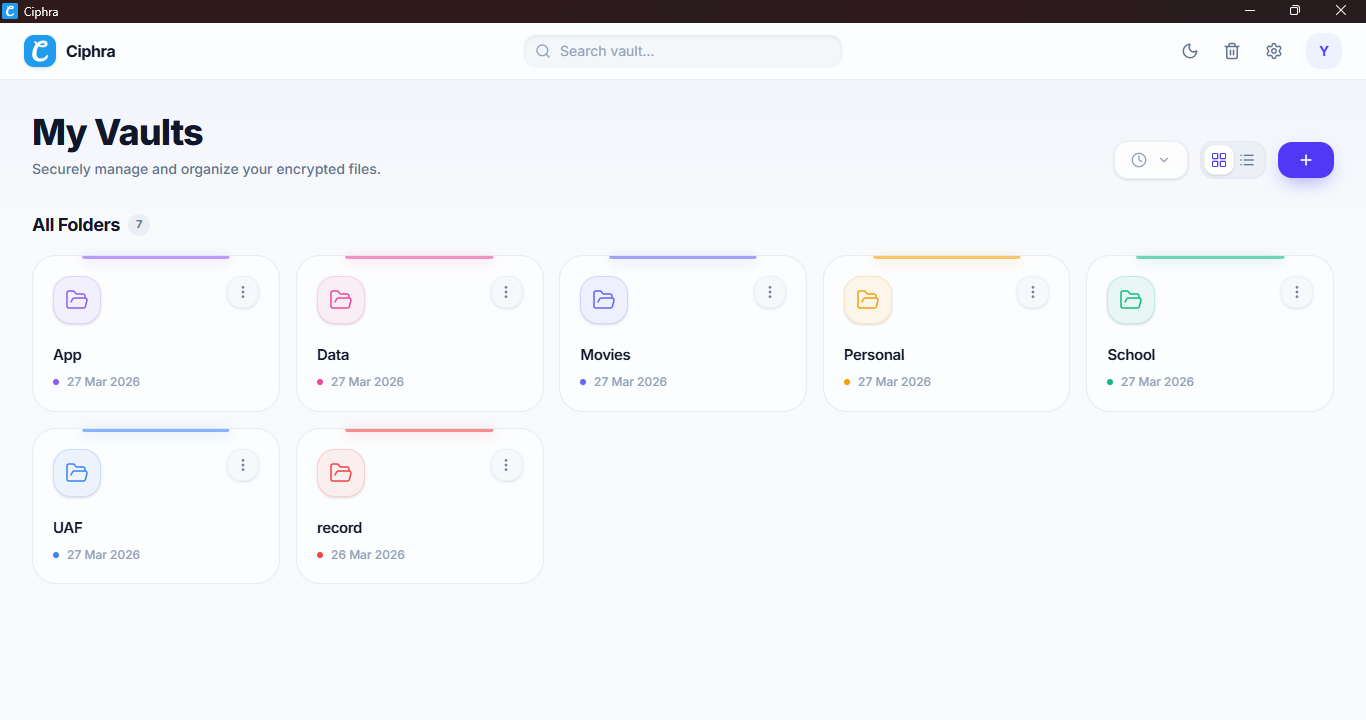
BIP39 12-word Mnemonic Authentication: Secure access using a BIP39 mnemonic phrase, ensuring only you control your vault.Rich Text Editor: Full-screen writing experience with features like slash commands, tables, and focus mode.Secure Media Viewer: View images and PDFs in full screen with decryption handled locally.Custom Folder Systems: Create unlimited folders with colors, stars for quick access, and encrypted names.App Lock: Optional 6-digit PIN or inactivity-based auto-lock to protect your data.Seamless Auto-Updates: Keep the application updated via winget.
Audience & Benefit:
Ideal for users prioritizing privacy and security. Ciphra offers a secure, encrypted workspace with full control over data, ensuring only you can access it.
README 0.1.1
Copy WinGet command to clipboard
Overview Ciphra is a zero-knowledge encrypted desktop application for writing, organizing, and storing your most important information. Built with Tauri v2, every single byte of your data — documents, folder names, file names, images, and PDFs — is encrypted on your device before it ever leaves to the cloud.
No passwords. No email. No recovery codes sent to a server. Your 12-word BIP39 mnemonic phrase is the only key to your vault. Lose it, and nobody — not even the developers — can help you recover access. That is the point.
> "If we can read it, it isn't really yours."
📥 Download Choose the easiest installation method for your operating system. All manual download files are securely hosted on our Releases page
🪟 Windows Recommended (via Winget):
The fastest way to install and keep Ciphra updated on Windows is through the Windows Package Manager. Open your terminal or command prompt and run:
winget install Ciphra.Ciphra
Direct Download:
If you prefer a manual installation, download the installer of your choice from the Releases page :
Ciphra_x.x.x_x64-setup.exe (Standard NSIS Installer) Ciphra_x.x.x_x64_en-US.msi (Windows MSI Installer)
🐧 Linux We provide multiple package formats to support your favorite distribution. Grab the latest version from the Releases page :
Universal: ciphra_x.x.x_amd64.AppImage (Portable, no installation required) Debian / Ubuntu: ciphra_x.x.x_amd64.debFedora / RHEL / openSUSE: ciphra-x.x.x-1.x86_64.rpm > 🍎 macOS: Not currently published due to Apple notarization requirements. However, you can easily build from source .
Key Features
🔐 Zero-Knowledge Security
BIP39 12-word mnemonic authentication — same standard used by crypto hardware walletsAES-256-GCM encryption for all data: documents, folder names, file names, images, and PDFsPrivate key lives only in RAM — never written to disk, never sent to any serverPublic key stored on Convex — used only to identify your accountRefresh the app = session cleared. Your key is gone until you log in again.
🔒 App Lock
Optional 6-digit PIN that encrypts your RAM key and stores it locally
Inactivity auto-lock — configurable: 1 min, 5 min, 30 min, or 1 hourApp close = instant lock — no data left in memoryPIN recovery via 12 words — verify your mnemonic to reset your PINLogout wipes the PIN from storage with a confirmation warning
📁 Folder System
Create unlimited folders with custom colors and names
Star important folders for quick access in the Starred sectionRename, recolor, lock individual foldersRecycle bin with 30-day auto-deletion via Convex scheduled cronsGrid and List view with sorting by name, date created, and date modifiedEncrypted folder names — Convex never sees what your folders are called
📄 Rich Text Editor
Full-screen TipTap editor — no boxes, no borders, just your writingSafe Mode — document locked by default to prevent accidental edits, one click to enable editingZoom control — adjust editor zoom from 70% to 150%Slash commands (/) for quick formatting: headings, lists, tables, code blocks, dividers
Tables — fully resizable, Google Docs style. Add/remove rows and columns, merge and split cellsText alignment — left, center, right via dropdownBold, italic, strikethrough, text color, highlight color
Inline image insertion with automatic WebP compression (max 800px width)
Code blocks with language selector and one-click copy button
Find & Replace — Ctrl+F to find, toggle replace mode, replace one or allFocus Mode — hides all UI, full immersion writing. Press Escape to exitAuto-save — debounced 500ms after every keystroke, encrypted before savingWord count, character count, reading time in the status barExport as PDF — opens print dialog with clean stylingExport as Markdown — downloads a .md file
🖼️ File Management
Upload images (JPG, PNG, GIF, WebP) and PDFs up to 15MB
Files are encrypted before upload — Convex storage never sees raw bytes
Image thumbnails — decrypted and rendered in the gridFull-screen viewer for images and PDFs — Escape to closeDownload decrypted file directly from the viewerFilter by: All, Images, PDFs, Documents
Pagination with configurable items per page (5, 10, 20, 30, 50, 100, All)
Right-click context menu on any file or document
♻️ Recycle Bin
All deleted items go to recycle bin first
30-day countdown shown on each item (color-coded: green → amber → red)Restore any item back to its original location
Permanent delete with confirmation modal
Empty bin button to wipe everything at onceAuto-purge via Convex daily cron job — no manual cleanup needed
⚙️ Settings
Appearance — Light/Dark mode toggle with live preview cardsSecurity — App Lock toggle, PIN setup, timeout configuration, change PINStorage — Visual storage usage bar with percentage and breakdownData — Delete account Permanently
🎨 UI & Experience
Light and Dark mode with smooth transitions
Premium glassmorphism design throughout
Animated empty states with 3D floating effect
Breadcrumb navigation — Home → Folder → Document
Back button on all inner pages
Custom 4px scrollbar that matches the theme
Splash screen with animated progress bar
How the Encryption Works Your 12 Words (BIP39)
│
▼
mnemonicToSeed() ← @scure/bip39
│
▼
PBKDF2 (100,000 iterations, SHA-256)
│
├──► Private Key (AES-256-GCM) ─── stays in RAM only
│
└──► Public Key (SHA-256 hash) ─── stored in Convex
used as account identifier
When you encrypt any data:
plaintext + Private Key → AES-256-GCM (random 12-byte IV) → base64 ciphertext
IV is prepended to ciphertext → single base64 string stored in Convex
When you decrypt:
base64 → split IV (first 12 bytes) + ciphertext → AES-256-GCM decrypt → plaintext
This happens 100% on your device. Convex only ever sees encrypted base64 strings.
Encrypted folder names (nameEncrypted)
Encrypted document titles (titleEncrypted)
Encrypted document content (contentEncrypted)
Encrypted file names (nameEncrypted)
Encrypted file bytes (uploaded to Convex Storage)
Your public key (used only to find your account on login)
Your 12 words
Your private key
Any plaintext content
Any readable file data
Tech Stack Layer Technology Desktop Shell Tauri v2 (Rust) Frontend React 18 + TypeScript + Vite Styling Tailwind CSS v4 + shadcn/ui Backend / Database Convex (real-time, serverless) Editor TipTap v3 Encryption Web Crypto API (AES-256-GCM) Mnemonic @scure/bip39 (BIP39 standard) State Management Zustand v5 Routing React Router v7 Icons Lucide React Notifications Sonner ZIP Export JSZip + FileSaver
📂 Folder Structure A complete and exhaustive breakdown of the Ciphra project architecture, including all frontend features, serverless backend files, native desktop integration, and their specific purposes.
ciphra/
├── .github/
│   ├── assets/
│   │   ├── app.png                           # App screenshot for README
│   │   └── icon.png                          # App logo
│   └── workflows/
│       └── release.yml                       # GitHub Actions — builds all platforms
│
├── convex/                                   # Convex backend (serverless functions)
│   ├── _generated/                           # Auto-generated by Convex CLI
│   │   ├── api.d.ts                          # TypeScript definitions for API
│   │   ├── api.js                            # Compiled API endpoints
│   │   ├── dataModel.d.ts                    # Schema data types
│   │   ├── server.d.ts                       # Server types
│   │   └── server.js                         # Compiled server code
│   ├── auth.ts                               # User create / login / delete
│   ├── crons.ts                              # Daily auto-delete scheduled job
│   ├── documents.ts                          # Document CRUD + recycle bin
│   ├── files.ts                              # File upload / storage / recycle bin
│   ├── folders.ts                            # Folder CRUD + recycle bin
│   ├── recycleBin.ts                         # Internal purge mutation
│   ├── schema.ts                             # Database schema (all tables)
│   ├── README.md                             # Convex backend documentation
│   └── tsconfig.json                         # TypeScript config for backend
│
├── src-tauri/                                # Tauri Rust backend
│   ├── capabilities/                         # Tauri permission definitions
│   │   └── default.json                      # Default system permissions
│   ├── gen/                                  # Auto-generated by Tauri
│   │   └── schemas/                          # IPC and configuration schemas
│   │       ├── acl-manifests.json
│   │       ├── capabilities.json
│   │       ├── desktop-schema.json
│   │       └── windows-schema.json
│   ├── src/
│   │   ├── lib.rs                            # Rust library and plugin setup
│   │   └── main.rs                           # Tauri application entry point
│   ├── .gitignore                            # Ignored files for Rust backend
│   ├── 2                                     # Tauri v2 flag/lock
│   ├── build.rs                              # Rust build script
│   ├── Cargo.lock                            # Rust dependency lockfile
│   ├── Cargo.toml                            # Rust dependencies and versioning
│   └── tauri.conf.json                       # App config, window size, identifier
│
├── src/                                      # React Frontend
│   ├── components/
│   │   ├── common/
│   │   │   ├── ConfirmModal.tsx              # Generic confirmation dialog
│   │   │   ├── EmptyState.tsx                # Animated empty state with 3D icon
│   │   │   ├── FullScreenViewer.tsx          # Decrypted image/PDF viewer
│   │   │   ├── SearchEmptyState.tsx          # UI for no search results
│   │   │   ├── UpdateProgressToast.tsx       # Progress bar for app updates
│   │   │   └── VerifyPinModal.tsx            # PIN verification modal
│   │   ├── layout/
│   │   │   ├── Breadcrumb.tsx                # Breadcrumb navigation
│   │   │   ├── LogoutModal.tsx               # Secure logout confirmation
│   │   │   └── TopNav.tsx                    # Sticky top navbar
│   │   └── ui/                               # shadcn/ui auto-generated components
│   │       ├── alert-dialog.tsx              # Alert dialog primitive
│   │       ├── badge.tsx                     # Badge primitive
│   │       ├── button.tsx                    # Button primitive
│   │       ├── card.tsx                      # Card container primitive
│   │       ├── checkbox.tsx                  # Checkbox primitive
│   │       ├── context-menu.tsx              # Right-click menu primitive
│   │       ├── dialog.tsx                    # Modal dialog primitive
│   │       ├── dropdown-menu.tsx             # Dropdown primitive
│   │       ├── input.tsx                     # Text input primitive
│   │       ├── popover.tsx                   # Popover primitive
│   │       ├── scroll-area.tsx               # Custom scrollbar container
│   │       ├── separator.tsx                 # Divider primitive
│   │       ├── sonner.tsx                    # Toast notification system
│   │       ├── tabs.tsx                      # Tab navigation primitive
│   │       └── tooltip.tsx                   # Tooltip primitive
│   │
│   ├── features/                             # Core App Modules
│   │   ├── auth/                             # Authentication Flow
│   │   │   ├── components/
│   │   │   │   ├── MnemonicInputGrid.tsx     # Reusable 12-word input grid
│   │   │   │   ├── MnemonicRevealStep.tsx    # Step 2 — show/copy/download 12 words
│   │   │   │   └── UsernameStep.tsx          # Step 1 — username availability check
│   │   │   ├── hooks/
│   │   │   │   └── useLogin.ts               # Login logic + lockout handling
│   │   │   ├── LoginPage.tsx                 # 12-word grid login page
│   │   │   └── SignupPage.tsx                # Multi-step signup orchestrator
│   │   ├── editor/                           # Rich Text Document Editor
│   │   │   ├── components/
│   │   │   │   ├── AlignDropdown.tsx         # Text alignment dropdown
│   │   │   │   ├── CodeBlockComponent.tsx    # Custom code block with copy
│   │   │   │   ├── EditorStatusBar.tsx       # Word count + save status
│   │   │   │   ├── EditorToolbar.tsx         # Formatting toolbar + title + nav
│   │   │   │   ├── ExportMenu.tsx            # PDF + Markdown export
│   │   │   │   ├── FindReplace.tsx           # Find & Replace panel
│   │   │   │   ├── FontSizeDropdown.tsx      # Text sizing controls
│   │   │   │   ├── LinkModal.tsx             # Insert hyperlink modal
│   │   │   │   ├── ResizableImage.tsx        # Inline image resizing
│   │   │   │   ├── SlashCommand.tsx          # '/' command palette
│   │   │   │   ├── TableControls.tsx         # Floating table toolbar
│   │   │   │   ├── TextStyleDropdown.tsx     # Headings and font styles
│   │   │   │   ├── TipTapEditor.tsx          # TipTap instance + extensions
│   │   │   │   └── ToolbarHelpers.tsx        # Helper functions for editor
│   │   │   ├── hooks/
│   │   │   │   ├── useAutoSave.ts            # Debounced encrypted auto-save
│   │   │   │   └── useFocusMode.ts           # Focus mode toggle + Escape key
│   │   │   ├── styles/
│   │   │   │   └── EditorPage.css            # Editor-specific styles
│   │   │   └── EditorPage.tsx                # Full-screen document editor page
│   │   ├── folder/                           # Folder & Vault View
│   │   │   ├── components/
│   │   │   │   ├── CreateDocModal.tsx        # New document modal
│   │   │   │   ├── FileCard.tsx              # Grid card for file/doc
│   │   │   │   ├── FileContextMenu.tsx       # Right-click menu for items
│   │   │   │   ├── FileFilter.tsx            # All/Images/PDFs/Documents filter
│   │   │   │   ├── FileGrid.tsx              # Unified grid with pagination
│   │   │   │   ├── FileListItem.tsx          # List row for file/doc
│   │   │   │   ├── FolderActionBar.tsx       # Filter + sort + view + actions
│   │   │   │   ├── ImageThumbnail.tsx        # Decrypt + render image thumbnail
│   │   │   │   ├── StarredItemsSection.tsx   # Starred items in folder
│   │   │   │   └── UploadFileModal.tsx       # Encrypted file upload
│   │   │   └── FolderPage.tsx                # Folder contents page
│   │   ├── home/                             # Main Dashboard
│   │   │   ├── components/
│   │   │   │   ├── CreateFolderModal.tsx     # New folder creation
│   │   │   │   ├── FolderCard.tsx            # Grid card for folders
│   │   │   │   ├── FolderContextMenu.tsx     # Right-click menu for folders
│   │   │   │   ├── FolderGrid.tsx            # Unified folder grid
│   │   │   │   ├── FolderListItem.tsx        # List row for folders
│   │   │   │   └── StarredSection.tsx        # Pinned/Starred folders
│   │   │   └── HomePage.tsx                  # Root page — all folders grid
│   │   ├── lock/                             # Security & App Lock
│   │   │   ├── components/
│   │   │   │   ├── AppLockSettings.tsx       # Enable/disable/change PIN settings
│   │   │   │   ├── PinInput.tsx              # 6-digit PIN input logic
│   │   │   │   └── PinResetModal.tsx         # Reset PIN via 12 words
│   │   │   └── LockScreen.tsx                # PIN entry screen overlay
│   │   ├── recycle/                          # Recycle Bin
│   │   │   ├── components/
│   │   │   │   ├── ConfirmDeleteModal.tsx    # Permanent delete confirmation
│   │   │   │   ├── RecycleItemCard.tsx       # Grid card for deleted items
│   │   │   │   └── RecycleItemList.tsx       # List row for deleted items
│   │   │   └── RecycleBinPage.tsx            # Recycle bin with grid/list view
│   │   ├── settings/                         # App Settings & Preferences
│   │   │   ├── components/
│   │   │   │   ├── AboutSettings.tsx         # App info, social links, and updates
│   │   │   │   ├── DataSettings.tsx          # Account deletion and data export
│   │   │   │   ├── SettingsSidebar.tsx       # Collapsible sidebar navigation
│   │   │   │   └── StorageSettings.tsx       # Storage bar + space breakdown
│   │   │   └── SettingsPage.tsx              # Settings layout wrapper
│   │   └── splash/
│   │       └── SplashScreen.tsx              # Splash with animated progress bar
│   │
│   ├── hooks/
│   │   └── useInactivity.ts                  # Inactivity timer for app lock
│   │
│   ├── lib/                                  # Core Logic & Algorithms
│   │   ├── crypto/
│   │   │   ├── aes.ts                        # AES-256-GCM encrypt / decrypt
│   │   │   ├── bip39.ts                      # Mnemonic generate / validate / seed
│   │   │   ├── fileCrypto.ts                 # File-specific encryption handling
│   │   │   └── keys.ts                       # Key derivation (PBKDF2 → AES key pair)
│   │   ├── storage/
│   │   │   ├── pinStorage.ts                 # PIN-encrypted localStorage key storage
│   │   │   └── ram.ts                        # In-memory private key store
│   │   └── utils.ts                          # Tailwind class merge utilities
│   │
│   ├── router/
│   │   └── AppRouter.tsx                     # Routes + PrivateRoute guard
│   │
│   ├── store/                                # Global State (Zustand)
│   │   ├── lockStore.ts                      # App lock state + timeout setting
│   │   ├── sessionStore.ts                   # User session (userId, username, publicKey)
│   │   └── themeStore.ts                     # Light/dark mode state
│   │
│   ├── App.css                               # Global styles
│   ├── App.tsx                               # Root — Convex provider, theme, lock
│   ├── main.tsx                              # React entry point
│   └── vite-env.d.ts                         # Vite environment types
│
├── .env                                      # Local environment variables
├── .env.local                                # Convex local deployment URL
├── .env.production                           # Convex production deployment URL
├── .gitignore                                # Git ignore rules
├── components.json                           # shadcn/ui configuration
├── convex.json                               # Convex project configuration
├── index.html                                # Main HTML entry point
├── LICENSE                                   # Open source license
├── package-lock.json                         # NPM dependency lockfile
├── package.json                              # NPM dependencies & scripts
├── README.md                                 # Project documentation
├── tsconfig.json                             # TypeScript base configuration
├── tsconfig.node.json                        # Node environment TypeScript config
├── updater.json                              # Tauri auto-updater endpoint configuration
└── vite.config.ts                            # Vite bundler configuration
Self Hosting
Node.js v20+Rust stable toolchainA free Convex account
Step 1 — Clone and install git clone https://github.com/miangee21/ciphra.git
cd ciphra
npm install
Step 2 — Set up Convex (development) In Terminal 1, start the Convex dev server:
You will be prompted to log in to Convex (browser opens)
Select Create a new project , name it ciphra or anything you like
Convex automatically creates .env.local in your project root with your dev deployment URL
Step 3 — Run the app in development In Terminal 2, start the Tauri dev build:
The app window will open. Create an account, add folders, create documents — everything is fully functional in development mode.
Step 4 — Deploy Convex to production
Go to your Convex Dashboard
Open your project → click the Production tab
Under Settings , copy these values:
Production Deploy Key — looks like prod:f...
Convex URL — looks like https://f***.convex.cloud
Create .env.production in your project root:
VITE_CONVEX_URL="https://f*********************.convex.cloud"
Step 5 — Generate signing keys Tauri requires all distributed builds to be cryptographically signed. Generate your key pair:
npx tauri signer generate
You will be prompted to set a password — choose a strong one and save it somewhere safe.
Create .env in your project root:
TAURI_SIGNING_PRIVATE_KEY="your_private_key_here"
TAURI_SIGNING_PRIVATE_KEY_PASSWORD="your_password_here"
> Important: Add .env to your .gitignore. Never commit your signing private key to version control.
Environment file summary File Purpose Created by .env.localDev Convex deployment URL Convex CLI (auto-generated in Step 2) .env.productionProduction Convex URL You (Step 4) .envTauri signing keys You (Step 5)
Building from Source
Prerequisites
Node.js v20+
Rust stable toolchain — run rustup update stable
Linux only: install system libraries first: # Ubuntu / Debian
sudo apt install libwebkit2gtk-4.1-dev libssl-dev libgtk-3-dev libayatana-appindicator3-dev librsvg2-dev
# Fedora
sudo dnf install webkit2gtk4.1-devel openssl-devel gtk3-devel libappindicator-gtk3-devel librsvg2-devel
Windows Build Open PowerShell in the project root. Run these commands in order:
# 1. Deploy Convex schema and functions to production
$env:CONVEX_DEPLOY_KEY="prod:f**********************************"
npx convex deploy

# 2. Set signing key environment variables
$env:TAURI_SIGNING_PRIVATE_KEY="your_private_key_here"
$env:TAURI_SIGNING_PRIVATE_KEY_PASSWORD="your_password_here"

# 3. Build the app
npx tauri build
Output files (inside src-tauri/target/release/bundle/):
File Description msi/Ciphra_x.x.x_x64_en-US.msiWindows Installer package nsis/Ciphra_x.x.x_x64-setup.exeNSIS installer executable
Linux Build The Convex production deployment only needs to be done once. If you already ran npx convex deploy on Windows, skip that step here.
Open a terminal in the project root:
# 1. Set signing key environment variables
export TAURI_SIGNING_PRIVATE_KEY="your_private_key_here"
export TAURI_SIGNING_PRIVATE_KEY_PASSWORD="your_password_here"

# 2. Build the app
npx tauri build
If you encounter AppImage build errors, use this alternative command:
NO_STRIP=1 APPIMAGE_EXTRACT_AND_RUN=1 npm run tauri build
Output files (inside src-tauri/target/release/bundle/):
File Description appimage/ciphra_x.x.x_amd64.AppImageUniversal Linux portable app deb/ciphra_x.x.x_amd64.debDebian / Ubuntu package rpm/ciphra-x.x.x-1.x86_64.rpmFedora / openSUSE / RHEL package
 Ciphra