MOOTx01
The memory layer that survives every model, agent, and device.
Private, on-device intelligence has finally become practical. MOOTx01 supplies
the durable memory that local runtimes, and every other AI client, still need,
on terms set by the estate's owner rather than by a model vendor, cloud
platform, or operating-system assistant.
The Community Edition puts that ownership in the hands of one person, ready to
run: one local-first MOOT of your own, available across your devices.
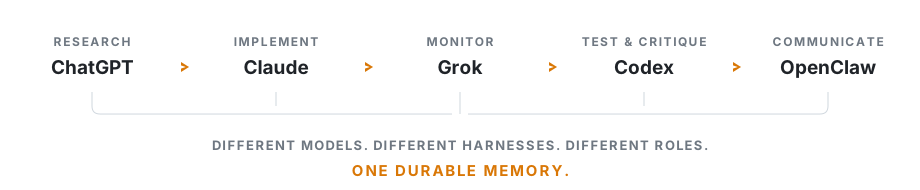
Recall arrives distilled: compact, ranked memory in place of pages of pasted context.
The frontier intelligence is rented. The memory is yours.






> Every release asset ships with a minisign-signed checksums.txt so you can
> verify what you install.
MOOTx01 is open source
Everything here is Apache-2.0 — retroactively, over every prior release
(RELICENSE.md). Personal, corporate, embedded, hosted:
all free, no meter, no timer. Commercial offerings are separate products
and promises (MOOTx01 Pro, MOOTx01 Enterprise, supported builds,
compliance programs) — see the plain-language licensing
guide, EDITIONS.md, and the binding
LICENSE.
> Development branch: 1.1.0 has shipped and the public release links below
> install it. This branch runs ahead of the release; to test what is on it
> rather than the release, build this checkout, pin the commit, and use a
> backed-up estate — see the
> development instructions.
Install in 60 seconds
Pick your platform, run two commands, done.
| Platform | Install |
|---|
| macOS (installer) | Download the notarized .pkg and double-click — a setup assistant walks you through it |
| macOS / Linux (Homebrew) | brew install codedaptive/mootx01-ce/mootx01 |
| macOS / Linux (script) | curl -fsSL https://raw.githubusercontent.com/codedaptive/mootx01-ce/stable/1.1.x/install.sh | sh |
| Windows (installer) | Download setup.exe and double-click |
| Windows (winget) | winget install Codedaptive.MOOTx01 |
| Windows (script) | See PowerShell install below |
| Linux (tarball) | Grab the tar.gz for x86_64 or aarch64 |
Then wire it into your AI clients and verify:
mootx01 install
mootx01 status
That's it. The installer finds your MCP clients (Claude Code, Cursor, Codex,
and more), registers MOOTx01 at the deepest level each client supports, and
starts the local services. Full details, addresses, and verification steps in
the Quickstart below.
Then ask your AI to try memory:
Remember that this project ships the importer behind a flag.
Search my MOOT for what we decided about the importer.
Why MOOTx01
- One memory across clients. Claude Code, Cursor, Codex, and other
compatible clients can use the same personal MOOT.
- Built for people and local agents. Human-directed AI clients and agentic
workflows on the same computer can share durable memory.
- Governed memory. Model-written records are auditable; edits retain
history; deletion is reversible.
- Native and local-first. MOOTx01 ships as native applications and
binaries across supported platforms.
- Secure by design. Compiled native binaries, signed release artifacts,
and encrypted local storage reduce the runtime and dependency surface.
What it is
MOOTx01 gives your AI a memory that lasts.
Every AI today has the same basic problem: when the chat ends, the useful context often disappears with it. You start over. You re-explain the same project rules. You re-introduce old decisions. You switch from one AI tool to another and the memory does not come with you.
MOOTx01 stores useful memory in a local estate your AI can read from later. It runs on your machine by default. Any AI client that speaks the Model Context Protocol can connect to it through ARIA, the MOOTx01 memory language.
The model can change. Your memory stays yours.
What it fixes
Your AI has a context window. That is what it can think with right now.
MOOTx01 gives it a memory estate. That is what it can remember from later.
Use MOOTx01 when you want your AI to:
- remember project decisions,
- recall prior conversations,
- keep durable facts and notes,
- link related ideas,
- search across sessions,
- stop asking you to rebuild the past every time.
MOOTx01 is not just a vector database. It stores memory as a substrate: memories, facts, links, journals, trust state, recall indexes, graph structure, reasoning lenses, and background consolidation signals.
In plain English: it keeps what happened, finds what matters, and helps your AI use that memory when it matters.
Drop-in replacement for Anthropic's memory system
MOOTx01 implements Anthropic's memory_20250818 tool contract — the same six commands Claude already knows — but backed by a governed estate instead of flat files. Every model-written memory lands as unconfirmed and auditable. Deletes are soft and reversible. Edits preserve full history.
Enable it with:
mootx01 enable memory-tool for MCP and Interactive use.pip install moot-memory for the Messages API.
See the Memory Adapter README for details.
What it looks like
Behind the scenes, the AI uses ARIA tools like these:
// store a memory
moot_file_memory {
  "content": "We ship the importer behind a flag.",
  "location": "project/alpha"
}

// retrieve memory
moot_memory_search {
  "query": "what did we decide about the importer?"
}
Show me the current status of my MOOT estate.
Where to go next
Quickstart
1 · Install the binary
Prebuilt, no toolchain, no clone. Native installers are the easiest path:
macOS — native installer (recommended)
Download the notarized .pkg for your architecture from the
latest release
and double-click. A SwiftUI setup assistant handles the rest.
macOS / Linux — Homebrew
brew install codedaptive/mootx01-ce/mootx01
Upgrades arrive with brew upgrade.
macOS / Linux — script
curl -fsSL https://raw.githubusercontent.com/codedaptive/mootx01-ce/stable/1.1.x/install.sh | sh
Windows — native installer (recommended)
Download setup.exe for your architecture from the
latest release
and double-click, or use the Windows Package Manager:
winget install Codedaptive.MOOTx01
Windows — script (PowerShell)
[Net.ServicePointManager]::SecurityProtocol=[Net.SecurityProtocolType]::Tls12
irm https://raw.githubusercontent.com/codedaptive/mootx01-ce/stable/1.1.x/install.ps1 -OutFile install.ps1
# Review install.ps1 before running it, then:
powershell -ExecutionPolicy Bypass -File .\install.ps1
(Downloads the script to disk so you can review it before running it.
The TLS line is required on Windows PowerShell 5.1. The
-ExecutionPolicy Bypass flag is needed because Windows blocks script
files by default; it applies to this one run only and changes no
system setting.)
Script and tarball installs land in:
~/.mootx01/bin
To upgrade any script or tarball install, run mootx01 upgrade — it
downloads the latest release (SHA-256 verified), converges the plugin
packages and tool permissions, and restarts the background services.
Re-running the install script works too. Every release asset is covered
by a minisign-signed checksums.txt on the release page.
2 · Wire it in
mootx01 install
The installer registers MOOTx01 with supported MCP clients and starts the local services when supported.
By default:
| Surface | Address |
|---|
| MOOTx01 resident daemon | http://127.0.0.1:4242 |
moot-mgr dashboard | http://127.0.0.1:4200 |
Both are loopback addresses. They are meant for your own machine, not the public internet. For security they will reject connection from other devices.
If you want a more secure local setup
Use direct stdio when one AI client should launch its own MOOTx01 subprocess
instead of connecting to the resident HTTP listener:
mootx01 install --target codex --mode server --no-daemon --vault-off
For Codex, this writes a command entry to ~/.codex/config.toml:
[mcp_servers.mootx01]
command = "/absolute/path/to/mootx01"
args = ["serve"]
env = { MOOTX01_HTTP_PORT = "", MOOTX01_VAULT = "0" }
Direct stdio normally limits the MCP transport to the parent client's process
pipes. Clearing MOOTX01_HTTP_PORT prevents an inherited shell setting from
turning that child back into an HTTP server. mootx01 serve will, however, forward to a resident daemon over
localhost when that daemon already owns the same estate. Stop or disable the
existing resident service first if you require socket-free MCP operation, then
restart the AI client and confirm its MOOTx01 entry contains command and
args, not url.
This mode gives up the shared resident's background governor, central
telemetry, and moot-mgr visibility. See
INSTALLING_MOOTX01.md
for service-stop and verification steps.
3 · Verify it
mootx01 status
If the manager is installed:
moot-mgr status
Open the dashboard:
http://127.0.0.1:4200
If your AI client supports MCP tool discovery, confirm it can see MOOTx01 tools such as:
moot_estate_pingmoot_estate_statusmoot_memory_searchmoot_file_memory
4 · Make the AI use memory automatically
Installing the runtime gives the AI the tools. The next step teaches the client when to reach for memory. mootx01 install wires this at the deepest level each client supports — three integration depths:
| Depth | What it installs | Clients |
|---|
| Server | MCP tools only | every MCP client |
| Skills | a SKILL.md adapter that teaches the AI when to use memory | clients with a skills surface |
| Plugin | a native plugin package for the client | clients with a plugin format (Claude Code, Cursor, …) |
install picks the deepest available and falls back automatically (plugin → skills → server). Why the plugin depth is worth having: apps/moot-agent-skills/PLUGIN.MD.
The plugin is also installable straight from your client's marketplace — in Claude Code:
claude plugin marketplace add codedaptive/mootx01-plugin
claude plugin install mootx01@mootx01
``` The per-client adapters and plugin sources live in:

```text
apps/moot-agent-skills/        # claude · cursor · codex · continue · cline · roo · openai-agents · generic
apps/moot-agent-skills/README.md
How it works
MOOTx01 combines durable records, semantic and graph recall, governed
model writes, background consolidation, and one ARIA interface for AI
clients and local agents.
Applications can use MOOTx01 through MCP, as a sidecar, or through its
native SDKs.
See the MOOTx01 Technical Overview for the
architecture, SDKs, kit stack, implementations, security model, and
repository map.
Security
Security-relevant changes go through an independent adversarial review before
merge. The full review record lives in the
Technical Overview. To report a
vulnerability, see SECURITY.md.
Contributing
See CONTRIBUTING.md.
MOOTx01 is a Codedaptive project. With thanks to Dennis E. Taylor, author of the Bobiverse — the replicants and their moots showed the shape of what we needed, and why.