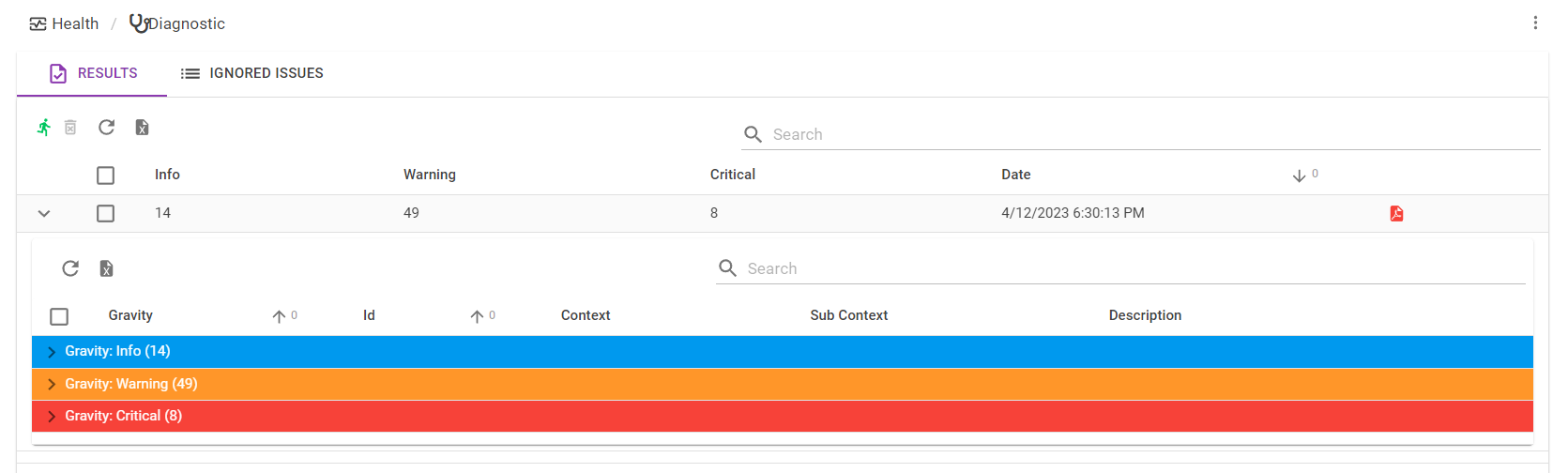
cv4pve-diag is a comprehensive diagnostic tool designed to perform health checks and system analysis on Proxmox VE infrastructure. It helps identify potential issues, optimize performance, and ensure reliability for virtualization environments.
Key Features:
Node health and status monitoring to ensure optimal system operation.
VM/Container diagnostics and configuration validation for accurate resource allocation.
Storage capacity and performance checks to manage disk usage effectively.
Replication and backup status verification for data integrity and disaster recovery readiness.
Snapshot age monitoring to maintain efficient storage utilization.
Multiple output formats (Text, HTML, JSON, Markdown) for flexible reporting.
Audience & Benefit:
Ideal for system administrators managing Proxmox VE clusters, cv4pve-diag provides actionable insights to improve infrastructure performance and reliability. By identifying issues early, it helps users maintain high availability and operational efficiency.
The tool supports customizable severity thresholds, ignore patterns, and integrates seamlessly with cluster environments. It can be installed via winget for easy setup on Windows systems.
# Check available releases at: https://github.com/Corsinvest/cv4pve-diag/releases
# Download specific version (replace VERSION with actual version number)
wget https://github.com/Corsinvest/cv4pve-diag/releases/download/VERSION/cv4pve-diag-linux-x64.zip
unzip cv4pve-diag-linux-x64.zip

# Run diagnostic
./cv4pve-diag --host=YOUR_HOST --username=root@pam --password=YOUR_PASSWORD execute
# Check available releases and get the specific version number
# Visit: https://github.com/Corsinvest/cv4pve-diag/releases

# Download specific version (replace VERSION with actual version like v1.9.0)
wget https://github.com/Corsinvest/cv4pve-diag/releases/download/VERSION/cv4pve-diag-linux-x64.zip

# Alternative: Get latest release URL programmatically
LATEST_URL=$(curl -s https://api.github.com/repos/Corsinvest/cv4pve-diag/releases/latest | grep browser_download_url | grep linux-x64 | cut -d '"' -f 4)
wget "$LATEST_URL"

# Extract and make executable
unzip cv4pve-diag-linux-x64.zip
chmod +x cv4pve-diag

# Optional: Move to system path
sudo mv cv4pve-diag /usr/local/bin/
Windows Installation
Option 1: WinGet (Recommended)
# Install using Windows Package Manager
winget install Corsinvest.cv4pve.diag
Option 2: Manual Installation
# Check available releases at: https://github.com/Corsinvest/cv4pve-diag/releases
# Download specific version (replace VERSION with actual version)
Invoke-WebRequest -Uri "https://github.com/Corsinvest/cv4pve-diag/releases/download/VERSION/cv4pve-diag.exe-win-x64.zip" -OutFile "cv4pve-diag.zip"

# Extract
Expand-Archive cv4pve-diag.zip -DestinationPath "C:\Tools\cv4pve-diag"

# Add to PATH (optional)
$env:PATH += ";C:\Tools\cv4pve-diag"
macOS Installation
# Check available releases at: https://github.com/Corsinvest/cv4pve-diag/releases
# Download specific version (replace VERSION with actual version)
wget https://github.com/Corsinvest/cv4pve-diag/releases/download/VERSION/cv4pve-diag-osx-x64.zip
unzip cv4pve-diag-osx-x64.zip
chmod +x cv4pve-diag

# Move to applications
sudo mv cv4pve-diag /usr/local/bin/
# Store password in file
cv4pve-diag --host=192.168.1.100 --username=root@pam --password=file:/etc/cv4pve/password execute

# First run: prompts for password and saves to file
# Subsequent runs: reads password from file automatically
# Follow Proxmox VE documentation for:
# - API token creation with proper privilege separation
# - Permission assignment for required roles
# - Required permissions: VM.Audit, Datastore.Audit, Pool.Audit, Sys.Audit
# Refer to official Proxmox VE API documentation for detailed steps