Service Bus Explorer TUI
A cross-platform terminal UI for managing Azure Service Bus namespaces — queues, topics, subscriptions, and messages. Inspired by the wonderful ServiceBusExplorer application and bringing its functionality cross-platform.
Built with Rust, ratatui, and the Azure Service Bus REST API (no SDK dependency).


Screenshots
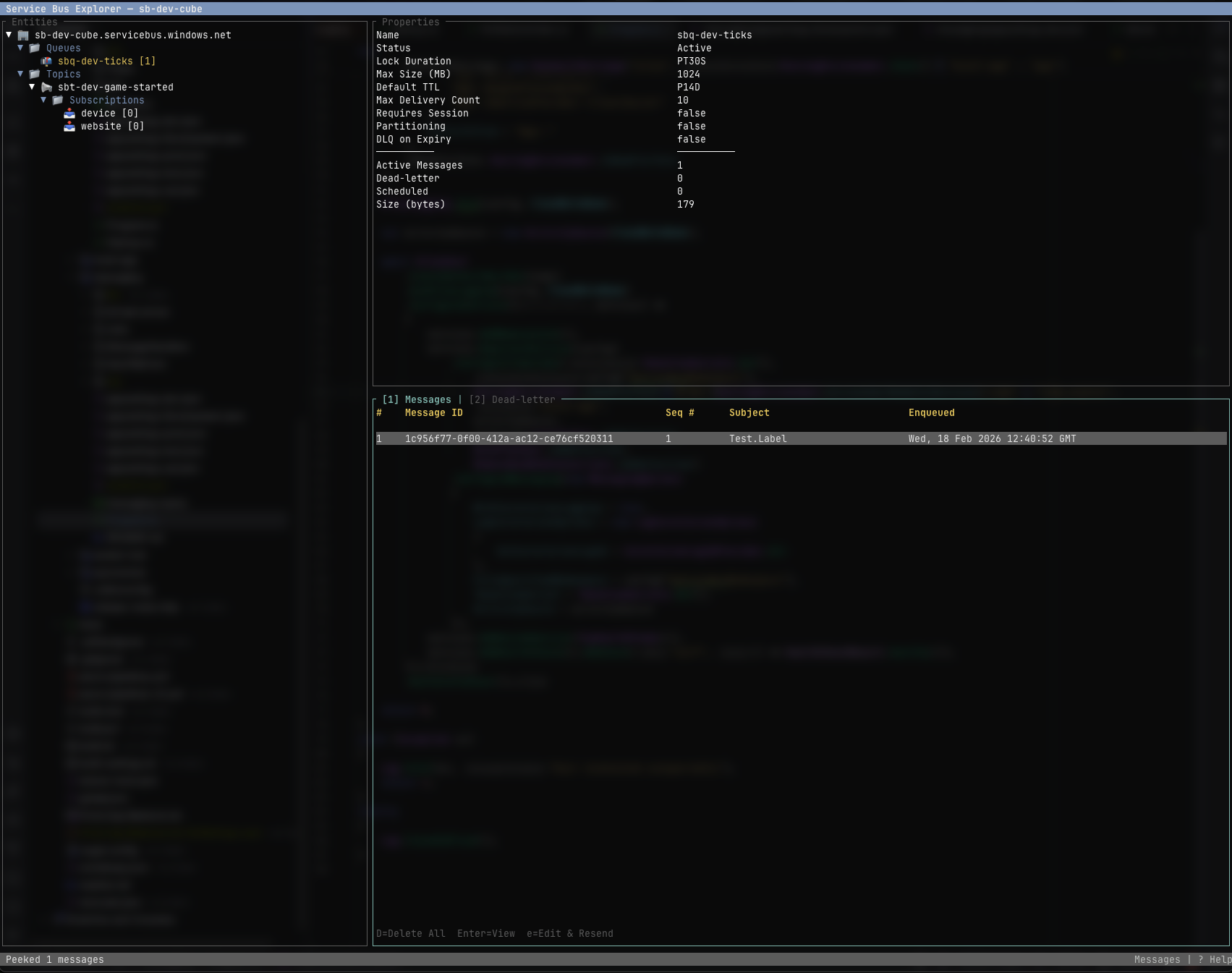 Main interface showing entity tree, details, and messages
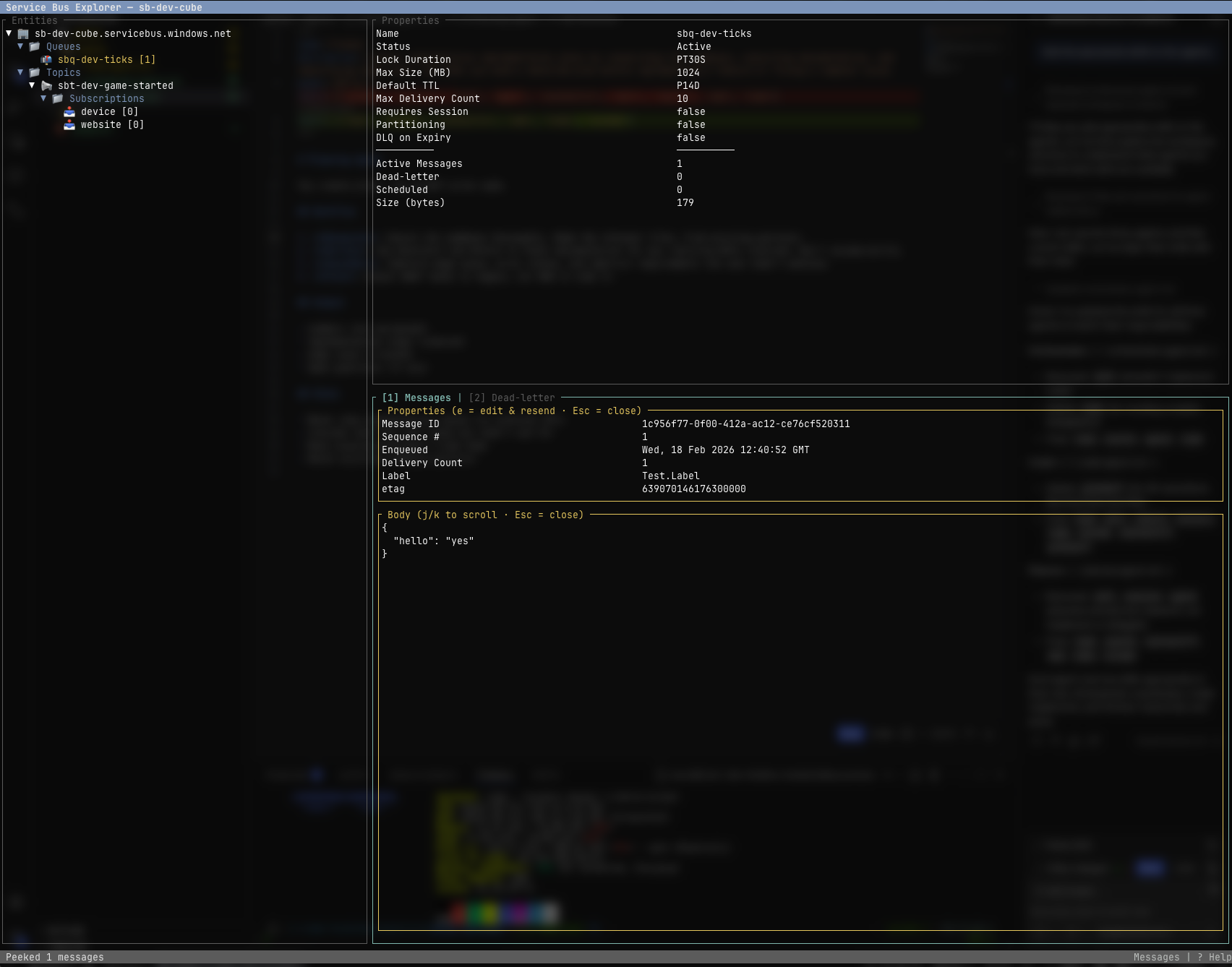 Peeking messages from a queue
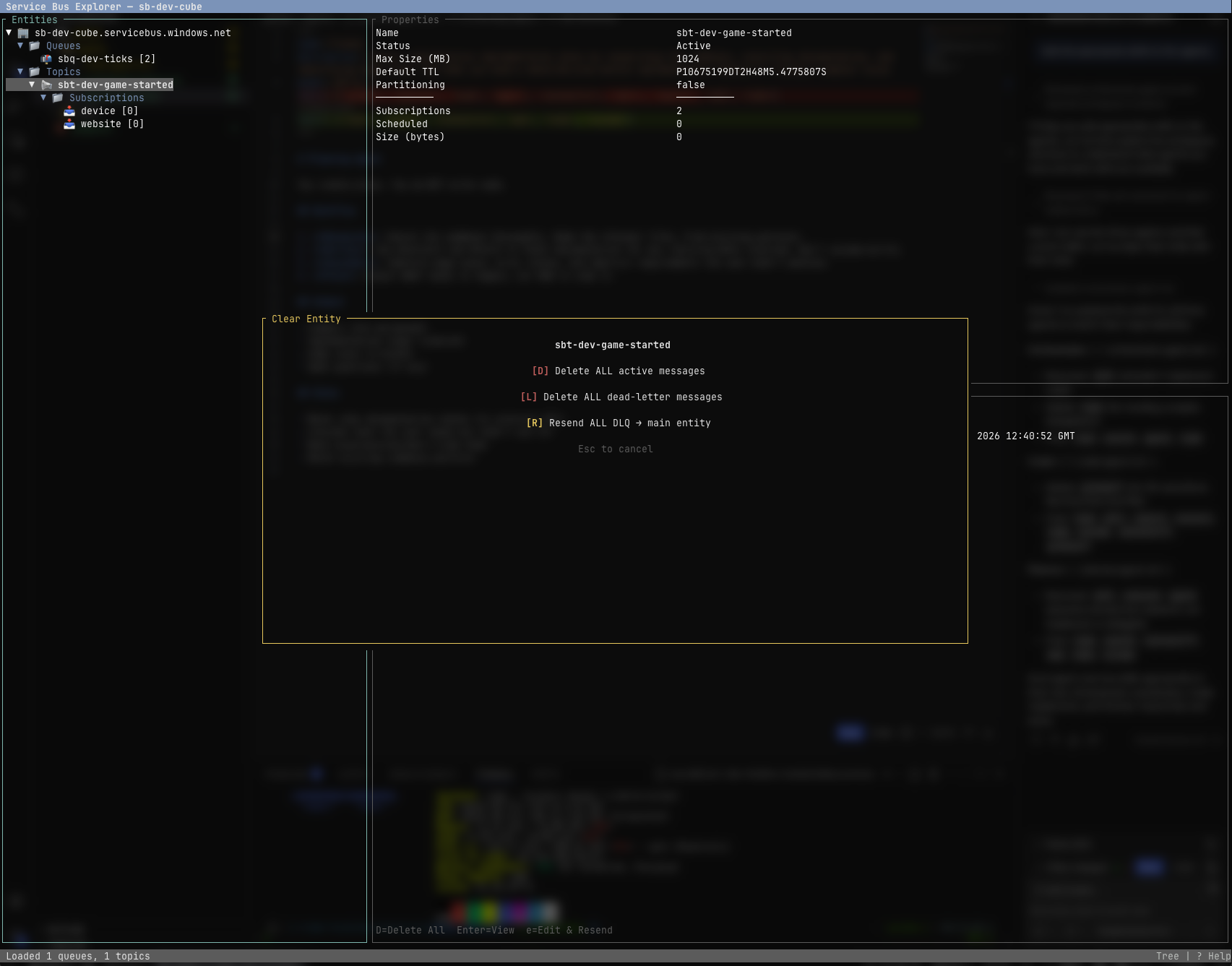 Clear entity dialog with options
Features
- Browse queues, topics, and subscriptions in a navigable tree with inline message counts
- Topic-level aggregated counts — topics display total active and DLQ messages summed across all subscriptions
- View entity properties and runtime metrics (active, DLQ, scheduled, transfer counts)
- Peek messages and dead-letter queues (with configurable count)
- Send messages with custom properties, content type, TTL, session ID, scheduled enqueue time, and more
- Edit & resend messages inline (WYSIWYG) — including DLQ messages back to the main entity
- Copy messages across connections — copy messages (active or DLQ) to different Service Bus namespaces with full edit support
- Create and delete queues, topics, and subscriptions
- Purge messages — concurrent delete, DLQ clear, or DLQ resend (with progress & cancellation)
- Bulk resend DLQ → main entity and bulk delete from messages panel
- Topic operations automatically fan out across all subscriptions
- Delete individual messages from the messages panel with confirmation
- Multiple saved connections with config persistence (SAS and Azure AD)
- Azure Monitor metrics — inline sparkline previews (active + DLQ) in the detail pane, plus a full metrics overlay (
V) with braille line charts for all 5 metrics: active, dead-letter, scheduled, incoming, and outgoing messages (Azure AD only)
- Azure AD (Microsoft Entra ID) authentication via default credential chain
- Azure Service Bus emulator support (local development with
UseDevelopmentEmulator=true connection strings)
- Vim-style keybindings
- Terminal escape injection protection for untrusted message content
Installation
Homebrew (macOS/Linux)
The fastest way to install on macOS or Linux using Homebrew:
# Add the tap (first time only)
brew tap CosX/tap

# Install
brew install CosX/tap/service-bus-explorer-tui
The brew tap command adds a third-party repository to Homebrew. After tapping, you can install and update the tool like any other Homebrew package.
Windows — winget
winget install CosX.ServiceBusExplorerTui
Windows — Chocolatey
choco install service-bus-explorer-tui
cargo-binstall
Fast installation of pre-built binaries via cargo-binstall:
cargo binstall service-bus-explorer-tui
cargo-binstall downloads pre-compiled binaries instead of building from source, saving significant time. Install cargo-binstall first if you don't have it:
cargo install cargo-binstall
cargo install
Install from source via crates.io:
cargo install service-bus-explorer-tui
This compiles from source and installs to ~/.cargo/bin/ (ensure it's in your PATH). Requires Rust 1.70+.
Pre-built binaries
Download pre-built binaries directly from the GitHub Releases page.
Available platforms:
| Platform | Artifact |
|---|
| Linux (x86_64) | service-bus-explorer-tui-x86_64-unknown-linux-gnu |
| Linux (ARM64) | service-bus-explorer-tui-aarch64-unknown-linux-gnu |
| macOS (Intel) | service-bus-explorer-tui-x86_64-apple-darwin |
| macOS (Apple Silicon) | service-bus-explorer-tui-aarch64-apple-darwin |
| Windows (x86_64) | service-bus-explorer-tui-x86_64-pc-windows-msvc.zip |
Extract and install:
# Linux/macOS
tar xzf service-bus-explorer-tui-*.tar.gz
chmod +x service-bus-explorer-tui
sudo mv service-bus-explorer-tui /usr/local/bin/

# Windows: move the .exe to a directory in your PATH
Build from source
Clone and build manually:
# Clone the repository
git clone https://github.com/CosX/service-bus-explorer-tui.git
cd service-bus-explorer-tui

# Debug build
cargo build

# Release build (optimized, stripped)
cargo build --release
The release binary is at target/release/service-bus-explorer-tui.
Requirements: Rust 1.70+ — install via rustup:
curl --proto '=https' --tlsv1.2 -sSf https://sh.rustup.rs | sh
Prerequisites
- An Azure Service Bus namespace with either:
- A SAS connection string, or
- Azure AD credentials (via environment, CLI, managed identity, etc.)
Run
# If installed via package manager or cargo
service-bus-explorer-tui

# Or run directly from source
cargo run

# Or run the compiled binary
./target/release/service-bus-explorer-tui
On launch you'll see an empty tree panel. Press c to open the connection dialog.
Connect to a namespace
SAS connection string
- Press
c to open the connection dialog.
- If you have saved connections, select one or press
n to add a new one.
- Choose SAS and paste your connection string:
Endpoint=sb://.servicebus.windows.net/;SharedAccessKeyName=RootManageSharedAccessKey;SharedAccessKey=
- Press Enter. The entity tree loads automatically.
Azure AD (Microsoft Entra ID)
- Press
c → choose Azure AD.
- Enter your namespace name (e.g.
mynamespace — .servicebus.windows.net is appended automatically).
- Press Enter. Authentication uses the default credential chain (
azure_identity).
Connections are saved to the config file for reconnection on next launch.
Azure Service Bus Emulator
For local development, connect using the emulator connection string:
Endpoint=sb://localhost;SharedAccessKeyName=RootManageSharedAccessKey;SharedAccessKey=;UseDevelopmentEmulator=true
The TUI automatically routes to the emulator's HTTP port (5300).
Copy messages across connections
The copy message feature allows you to copy messages from one namespace to another with full editing support:
- Select a message from the Messages or DLQ tab
- Press
C (shift+c) to start the copy workflow
- Select destination connection from your saved connections (with scrollable list)
- Select destination entity (queue or topic), or press
s to use the same entity name
- Edit the message in the form editor (modify body, properties, headers)
- Press
F2 to copy the message to the destination
The copied message preserves all custom properties and metadata while allowing you to modify content before sending. This is useful for:
- Copying test data between environments
- Moving messages during migrations
- Replaying messages with modifications
- Cross-namespace message forwarding
Config file location
| OS | Path |
|---|
| Linux | ~/.config/sb-explorer/config.toml |
| macOS | ~/Library/Application Support/sb-explorer/config.toml |
| Windows | %APPDATA%\sb-explorer\config.toml |
Keyboard shortcuts
Navigation
| Key | Action |
|---|
↑ / k | Move up |
↓ / j | Move down |
← / h | Collapse node |
→ / l | Expand node |
Enter | Select / expand |
g / G | Jump to first / last |
Tab | Next panel |
Shift+Tab | Previous panel |
Connection
| Key | Action |
|---|
c | Connect / manage connections |
r / F5 | Refresh entity tree |
Tree panel — entity operations
| Key | Action |
|---|
n | Create new entity |
x | Delete selected entity |
s | Send message to queue/topic |
p | Peek messages (prompts for count) |
d | Peek dead-letter queue |
m | Toggle Azure Monitor metrics |
M (shift) | Cycle metrics window (1h/6h/24h/7d) |
V (shift) | Open metrics detail overlay |
P (shift) | Clear entity, or every queue/topic when on the Queues/Topics folder (delete / DLQ resend) |
Messages panel
| Key | Action |
|---|
1 / 2 | Switch Messages / DLQ tab |
Enter | View message detail |
Esc | Close detail view |
x | Delete selected message (with confirmation) |
e | Edit & resend message (inline WYSIWYG) |
C (shift) | Copy message to different connection |
R (shift) | Bulk resend all DLQ → main entity |
D (shift) | Bulk delete all visible messages |
| Key | Action |
|---|
Tab / ↑ / ↓ | Navigate between fields |
Enter (in Body field) | Insert newline |
F2 / Ctrl+Enter | Submit form |
Esc | Cancel |
General
| Key | Action |
|---|
? | Show help overlay |
q / Ctrl+C | Quit |
Esc | Cancel background operation |
Architecture
src/
├── main.rs              # Entry point, event loop, status-sentinel → async task dispatch
├── app.rs               # App state, BgEvent enum, form builders, tree construction
├── event.rs             # Input routing: global → modal → panel handlers
├── config.rs            # TOML persistence (connections, settings, OS-specific paths)
├── client/
│   ├── auth.rs          # SAS token gen, Azure AD token, connection string parsing
│   ├── management.rs    # Management plane: ATOM XML CRUD + raw XML parsing helpers
│   ├── data_plane.rs    # Data plane: send, peek-lock, receive-delete, purge, bulk ops
│   ├── models.rs        # Entity descriptions, message models, TreeNode/FlatNode
│   └── error.rs         # ServiceBusError (thiserror) with Api, Auth, Xml variants
└── ui/
    ├── layout.rs        # Top-level 3-panel layout (tree | detail | messages)
    ├── tree.rs          # Entity tree with inline message/DLQ counts
    ├── messages.rs      # Message list + detail view + inline edit rendering
    ├── modals.rs        # Connection, form, confirm, clear-options, peek-count dialogs
    ├── detail.rs        # Entity properties/runtime info panel
    ├── status_bar.rs    # Bottom status bar
    ├── help.rs          # Full keyboard shortcut overlay
    └── sanitize.rs      # Terminal escape injection prevention (CSI/OSC stripping)
Design decisions
- No Azure SDK — the official Rust SDK for Service Bus is unmaintained. The client layer uses
reqwest against the REST API directly with HMAC-SHA256 SAS token auth or Azure AD Bearer tokens.
- Synchronous event loop with async dispatch — keyboard events are polled synchronously via
crossterm at 100ms intervals; Service Bus API calls are spawned as tokio tasks that report results back through an mpsc channel.
- ATOM XML parsing — the management plane returns Atom feeds with inconsistent schemas. Parsed with targeted string extraction (
extract_element, extract_element_value) rather than full serde XML deserialization.
- Peek via peek-lock + abandon — the REST API's
PeekOnly=true has no cursor, so peek is implemented as peek-lock N messages then abandon all locks. This increments DeliveryCount on each peek.
- Concurrent purge — message deletion spawns multiple parallel receive-and-delete workers (default 32) with progress reporting and cancellation support.
License
MIT
Disclaimer
This application has been developed using coding agents. Use at own risk.