Agent Console

A minimalist, AI-native console for directing agents inside a repository.
Home: agent-console.dev · for agents and LLMs:
llms.txt. Not to be confused with
buhuipao/agent-console, a Rust TUI
that finds and resumes Codex and Claude Code sessions — different project,
same slug.
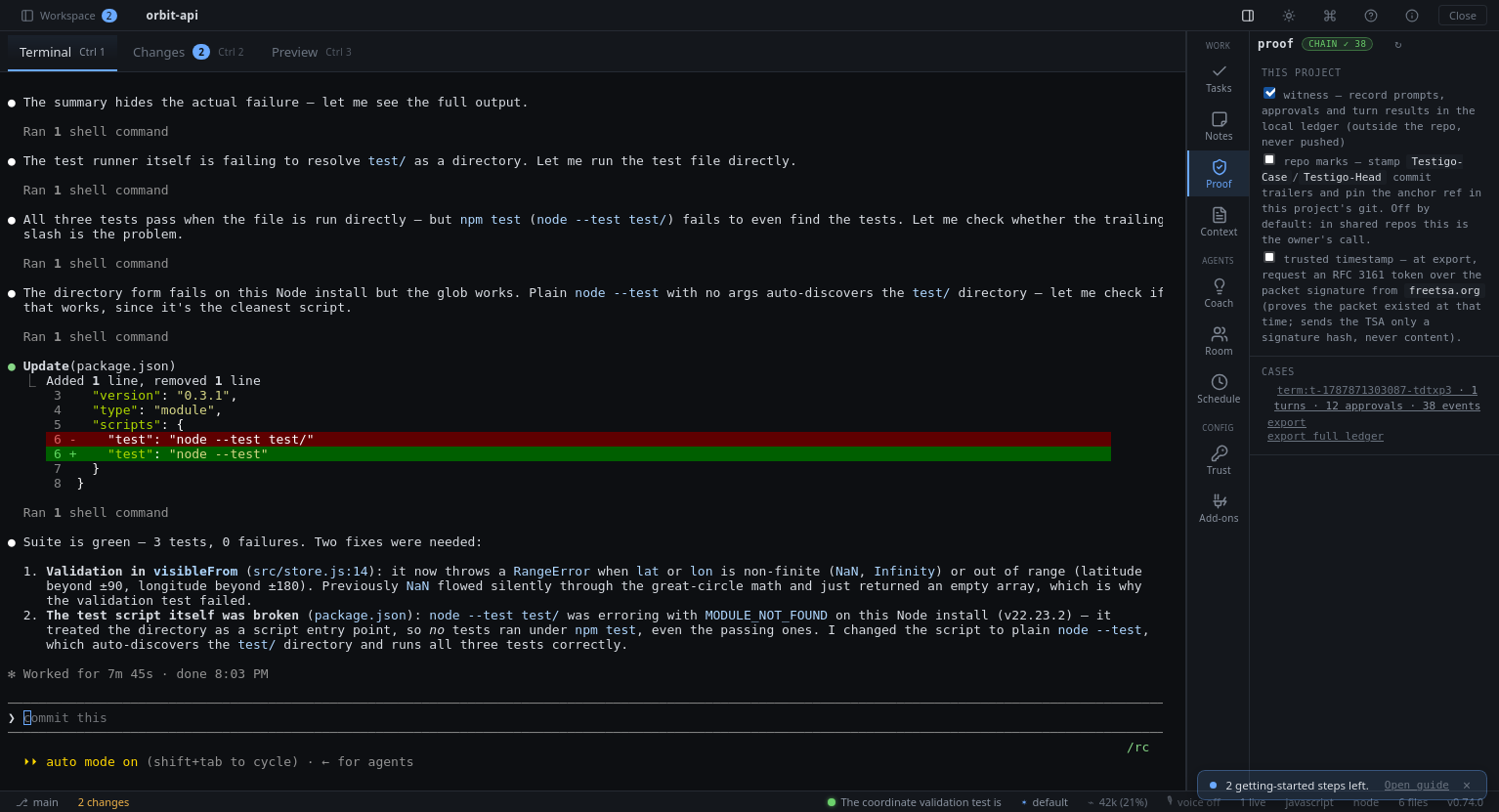
Not an IDE. Not a chat client. A small terminal-first desktop app that pairs the Claude Code CLI with an integrated shell, a git diff viewer, and per-turn snapshots — so you can drive an agent through real work without losing control.
Every session is witnessed: agent-console is the reference implementation of
Testigo, an open intent-to-proof
protocol — prompts, human approvals, tool results and per-turn diffs land in a
hash-chained evidence ledger, exportable as signed proof packets anyone can
verify in a browser.
┌──────────────────────────────────────────────────────────────────────┐
│ my-repo · javascript · vite · /home/me/code/my-repo                  │
├──────────┬─────────────────────────────────────┬─────────────────────┤
│ Files    │ [Terminal] [Changes (3)]            │ Agent               │
│          │ ─────────────────────────────────── │ ─────────────────── │
│ src/     │ $ npm test                          │ you ↶restore        │
│  api.ts  │ ✓ 14 passed                         │ "fix the failing    │
│  app.ts  │                                     │  user-auth test"    │
│ tests/   │                                     │                     │
│ README   │                                     │ ▸ Read tests/auth   │
│          │                                     │ ✓ Read tests/auth   │
│          │                                     │ ✓ Edit src/api.ts   │
│          │                                     │ ✓ Bash: npm test    │
│          │                                     │                     │
│          │                                     │ claude: fixed —     │
│          │                                     │ token was expired   │
│          │                                     │                     │
│          │                                     │ [type a task…]      │
└──────────┴─────────────────────────────────────┴─────────────────────┘
Vision
Agent Console is not trying to replace VS Code. It is designed as an AI-native development console focused on supervising coding agents through terminal, diffs, and controlled workflows.
The center of the app is the chat, the terminal, and the git diff — not a code editor. You don't read code here; you direct the agent and verify its work.
Principles:
- Terminal-first, agent-first, diff-first.
- Lightweight — Tauri + Rust, not Electron.
- Cross-platform by design (Linux/macOS/Windows), Linux-first in practice.
- Human control mandatory before risky actions.
- Local-first, fast, developer-centric. No accounts, no cloud sync, no marketplace.
The core
The center of the screen is deliberately small, and it hasn't grown since v0.1:
- Open any local repository; a built-in PTY terminal that auto-runs your agent
(Claude Code, Codex or OpenCode, per session) and also runs
npm test, vim,
anything. OpenCode's model list is read live from the CLI (provider/model
ids for every provider you configured). OpenCode has no hooks, so the
console installs a small witness plugin into its config: each tool result
with its exit code, the prompt and the end of the turn reach the ledger
the same way Claude's and Codex's do, and sessions resume by id. Rooms
and jobs drive OpenCode over the Agent Client Protocol (opencode acp),
so every command it runs there arrives with its exit code.
- Git diff viewer with per-file revert; per-turn working-tree snapshots with
one-click restore.
- Per-tool approval modal with keyboard flow, live countdown, and durable
audit trail — the human decides before anything risky runs.
- Multiple sessions per project (isolated worktrees optional), resumable across
restarts, with the agent conversation rebound automatically.
The workbench (the control plane)
Around that core sits a side panel of nine workbench tabs — all local, all
suggest-only, none of them able to block the core:
- Tasks — your Jira queue as one-click seeded agent sessions, plus an
agenda of due dates and scheduled runs.
- Proof — every turn closes with a verdict the console computes from
what it witnessed, never from what the agent said: verified only when a
check passed with exit 0 after the last edit, claim contradicted when
"tests pass" sits over a failed or empty run, unverified when nothing
ran; the PR gate and the standalone verifier recompute it from the packet.
Every session witnessed into a hash-chained evidence ledger
(Testigo); export signed proof
packets anyone verifies in a browser, or the same ledger as an
IETF Agent Audit Trail
(JSONL, SHA-256 over RFC 8785) that a third party verifies offline with
the dependency-free
aat-verify.mjs written alongside.
- Coach — the agent's playbook: skills generated from your project
(Advisor), curated from your actual usage (Learning).
- Room — you plus N agents (mixed engines) on one problem; working rooms
edit on an isolated branch you review and merge (see below). Fan out
instead: each agent alone on the same prompt in its own worktree, then a
comparison (diff, checks with exit codes, the console's verdict on its
words) and you apply one. A review is never by the agent that produced
the work — another engine or model family, whoever picks the reviewer.
- Schedule — agentic jobs on a clock, physically restricted to plan mode.
- Trust — permissions + secrets vault: what the agent can touch, and
the approval policy as one versioned file in the repo compiled into what
Claude, Codex and OpenCode each enforce (its hash rides on every approval
in the ledger); and
the folder itself: what it would inject into the agents (hooks, setup
commands, plugins, MCP servers, rules, skills, instructions), hashed and
decided on before any agent is launched there, asked again when it
changes.
- Compliance pack — one reproducible zip from Proof: the ledger as an
IETF Agent Audit Trail (verified, verifier alongside), the approval policy
in force with its hash, the console's verification verdicts by week and a
manifest with every file's SHA-256. Same ledger, policy, console version
and path: same bytes.
- Budget fallback — when a Claude or Codex session hits its cost cap or
the plan's quota, continue on an open-weight model through OpenCode: a
new session seeded with the hand-over (task, files touched, last words,
the console's verdict), typed for you to read first, and a
model_switch
with its reason in the ledger.
- Pull request — the branch's PR as the ledger sees it (through your
own
gh, no bot): CI state on the session's row, review comments typed
into the agent as a prompt you send, and merge-when-green that needs no
word only when every turn behind the branch is verified — otherwise it
needs yours, with a reason, in the ledger.
- Remote decisions — pair a device by QR (Noise, keys pinned, your
click on the desktop) and answer the decisions waiting here from it, with
their evidence. Dangerous actions are never approved from a device; every
pairing, scope and answer is in the ledger. Loopback by default, the LAN
only when you say so.
- Add-ons — plugins + MCP servers.
- Notes and Context (CLAUDE.md & memories); export/import lives in
the command palette.
- Voice: push-to-talk (Ctrl+Space) runs spoken commands — "mandá", "sí"
/ "no" to whatever the agent is asking on screen, "abrí changes", "sesión
fixy", any palette action — or dictates into the composer; the console
talks back (Piper, local) with end-of-turn summaries and spoken approvals.
Say "qué puedo decir" for the list.
Rooms & cowork
A room is a shared conversation about one problem between you and N agents
(Claude, Codex and/or OpenCode). In a working room (the "let them edit" toggle) the
agents edit code in an isolated git worktree on a room/ branch, committing
one checkpoint per turn — your own files stay untouched until you review and merge.
Cowork with human colleagues happens over the git remote you already use — no
realtime sync, no extra infra. From a live working room:
- Share / open MR — pushes the
room/ branch to the remote (with the full
conversation committed alongside as .room/.md, so reviewers see the diff
and the reasoning) and hands back a ready-to-open MR/PR link (GitHub/GitLab,
SSH or HTTPS).
- Sync colleague work — fetches that branch and merges a colleague's commits
back into the live worktree so the next turn builds on top. It refuses on a dirty
worktree and aborts cleanly on conflict (reporting the files), so the
auto-committing turn loop never runs on a half-merged tree.
The loop: room produces work → Share (out for review, with context) → colleague
reviews/extends on the platform → Sync (back in) → next turn continues. If a
colleague pushed first, Share tells you to Sync, then Share again.
A room reopened in a later session re-attaches its live worktree from the
surviving room/ branch, so both Share and Sync work again — the full
cowork loop survives across sessions. If the worktree can't be remounted (e.g. the
branch was deleted), the room comes back read-only but Share still works by
branch name; you'll see a one-line notice.
Screenshots
| |
|---|
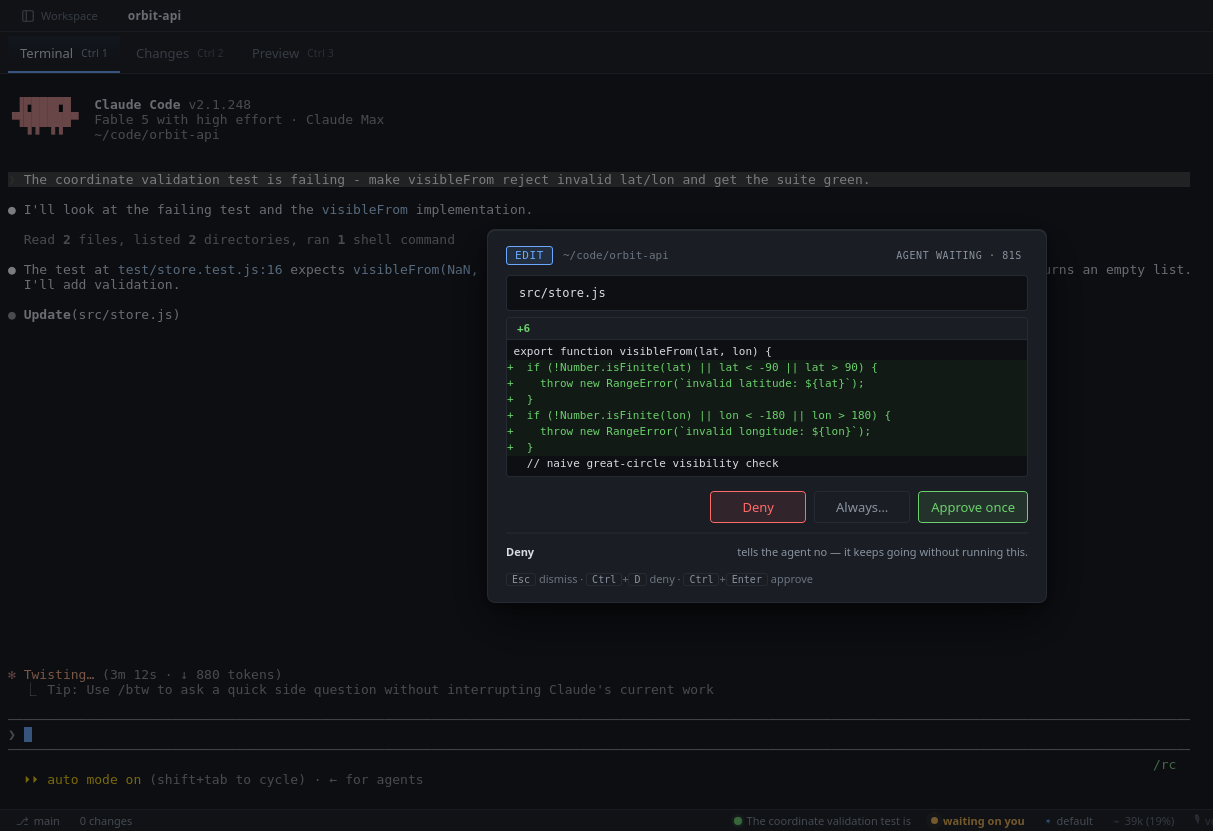 | 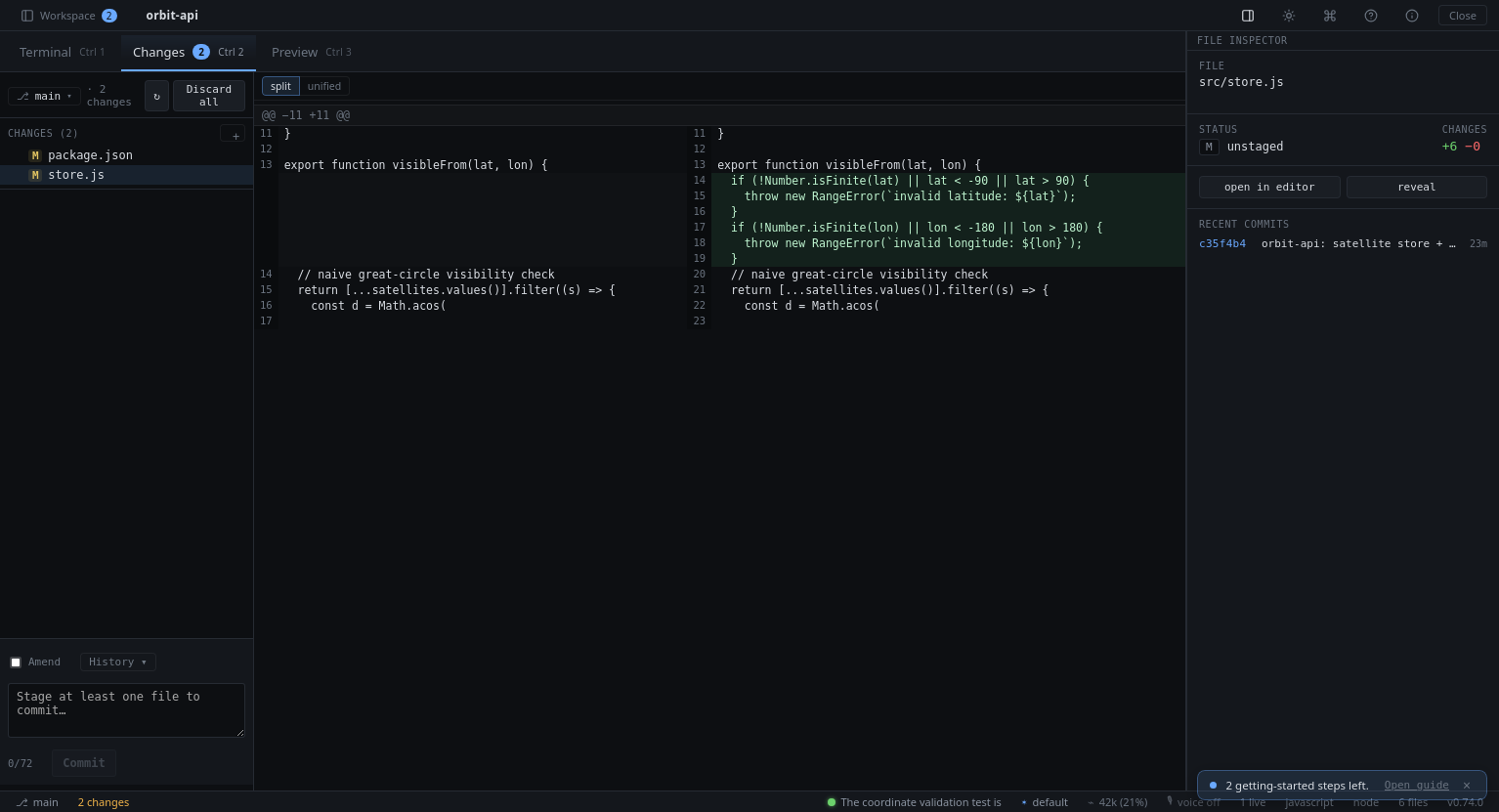 |
| Approve before it lands — every command and edit stops at a decision card graded by risk, diff inline, keyboard-first; the irreversible ones make you type it. | Review every diff — split view per file, revert anytime, commit when you decide. |
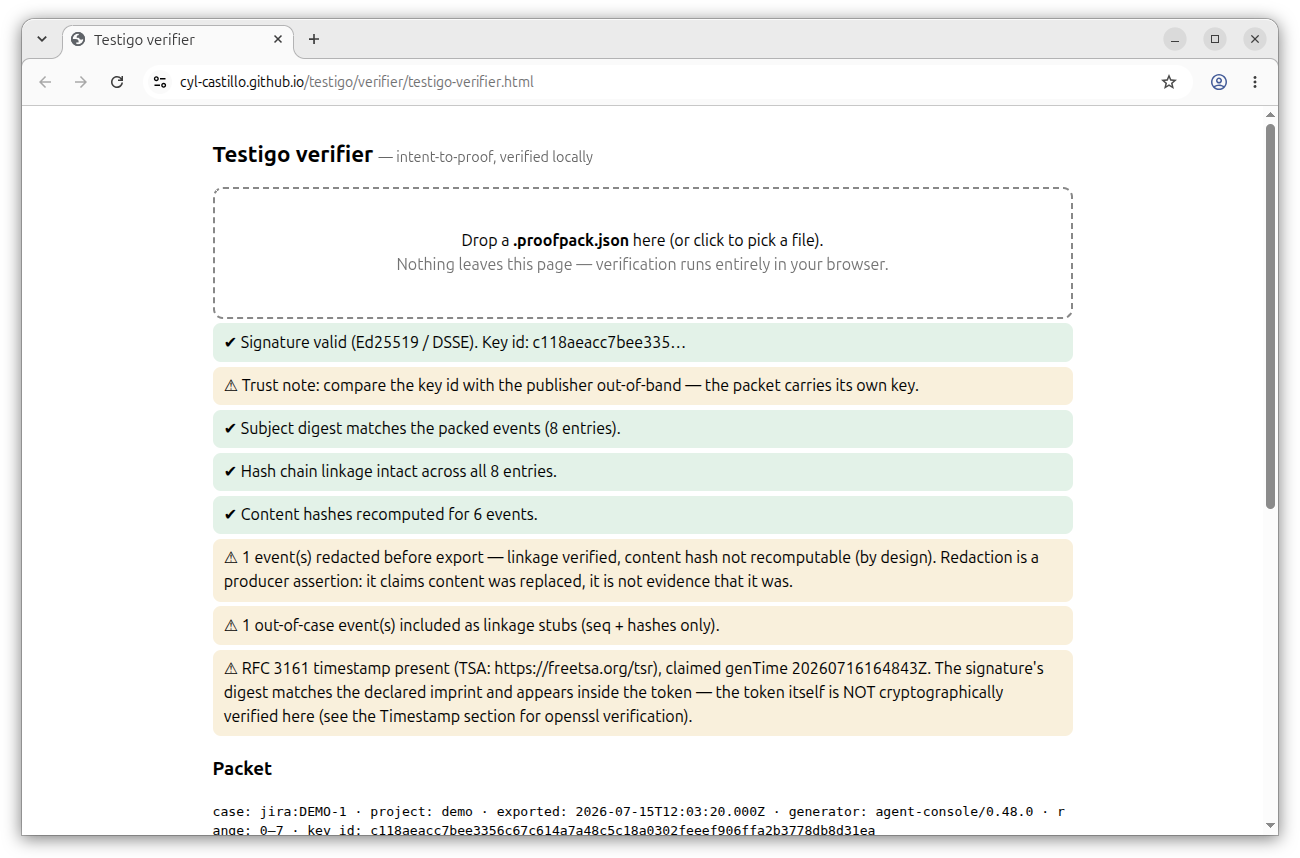 | 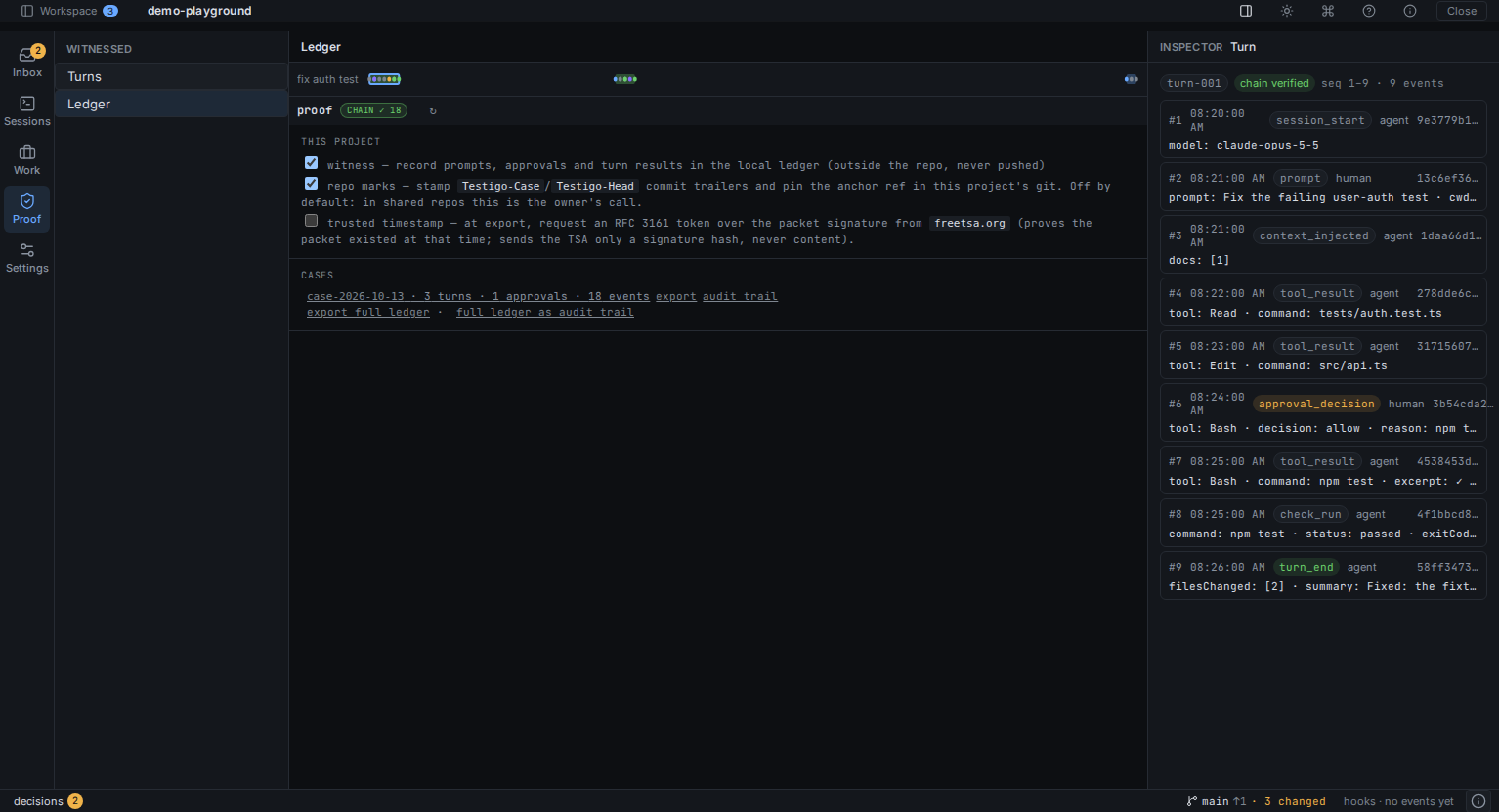 |
| Proof packets verify in any browser — signature, hash chain, and honest notes about what redaction does and doesn't prove. | The ledger, as a map — every session a lane, every turn a bar; click one to see exactly what was witnessed, hash by hash. |
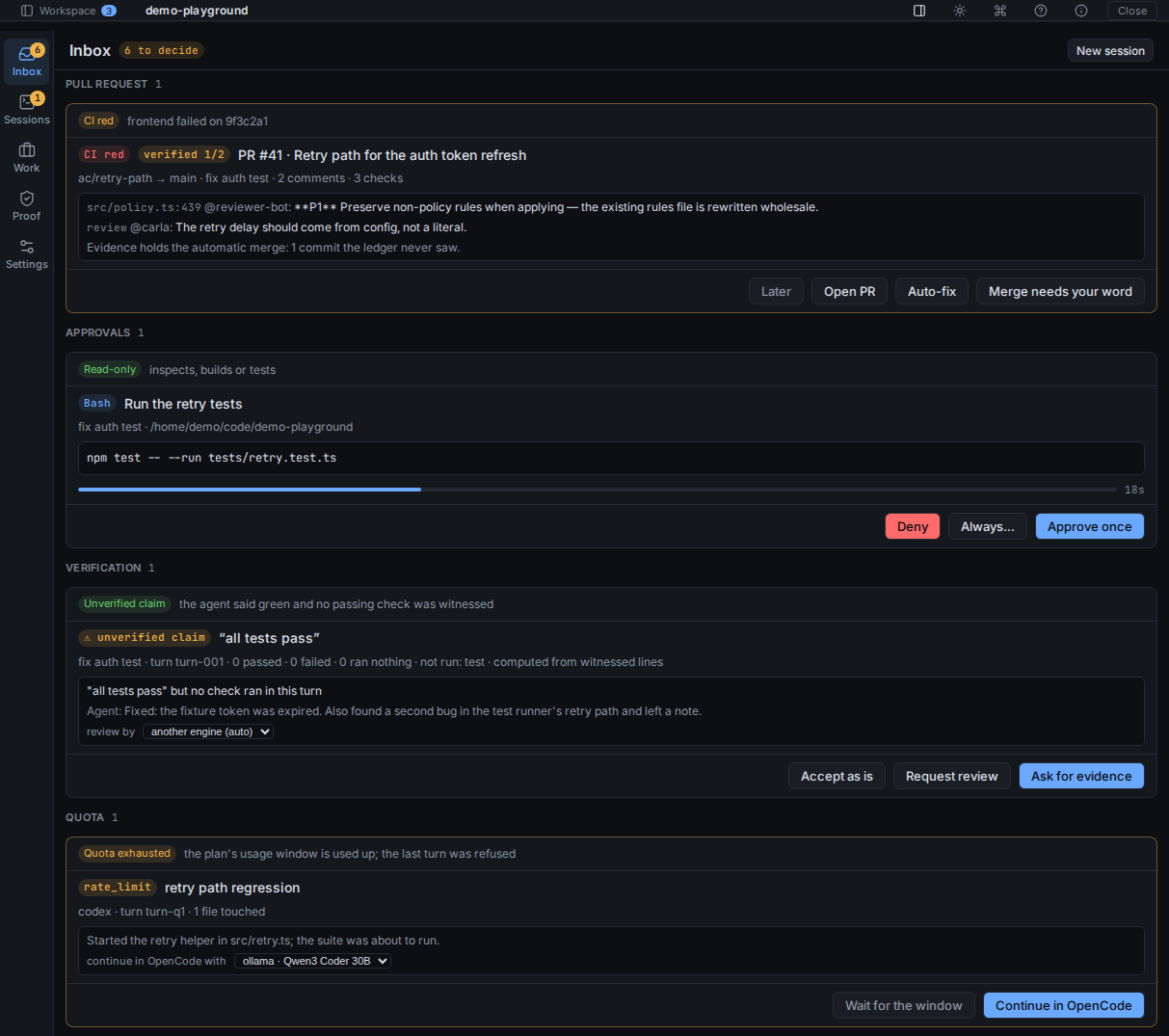 | 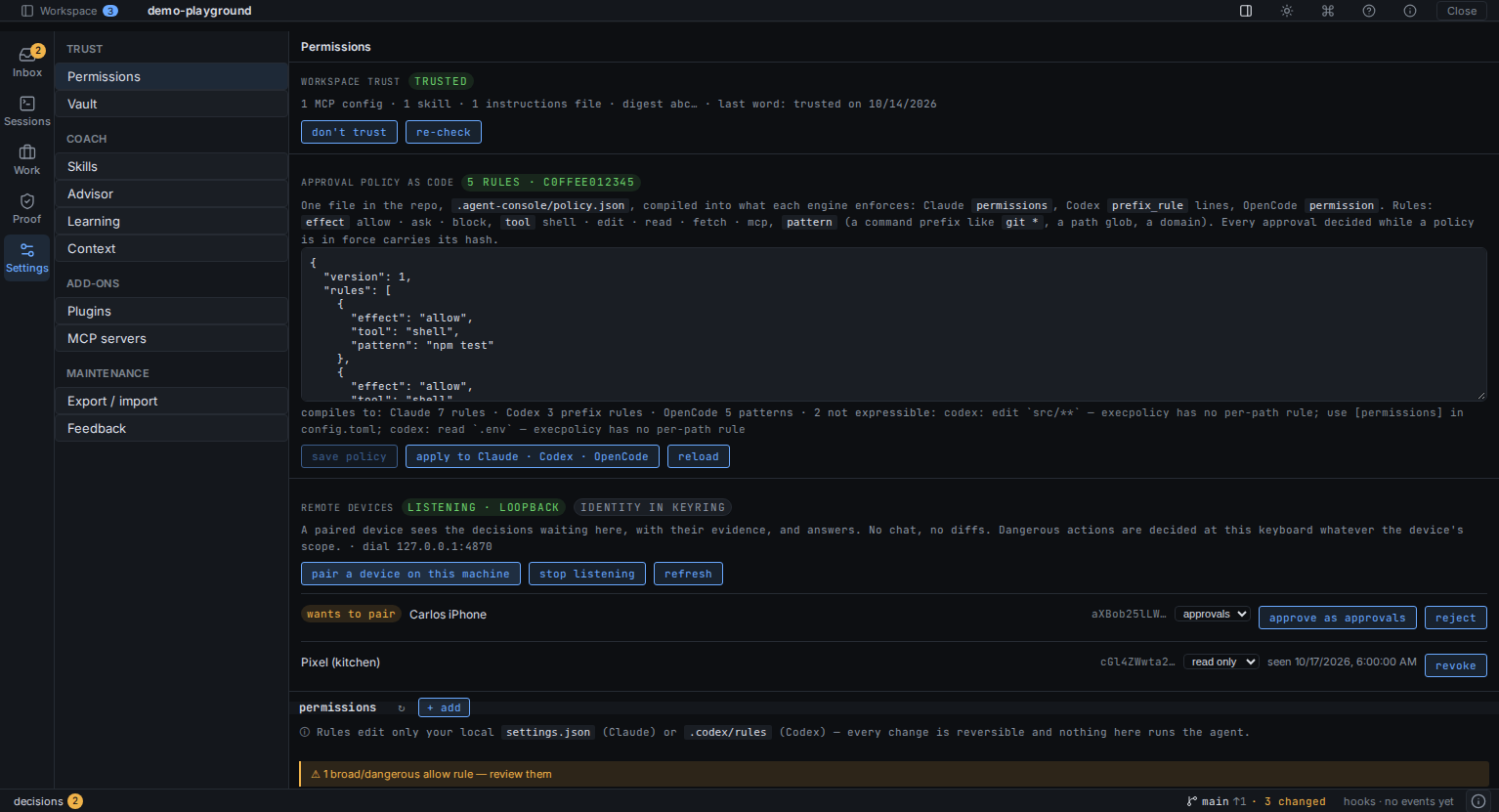 |
| Every claim gets a verdict — the console checks what the agent said against what it ran; a red PR, an unverified "tests pass" and an exhausted quota are decisions, not surprises. | Trust, as code — the folder is trusted by digest, the approval policy is one versioned file compiled into what each engine enforces, and a paired phone can answer the low-risk decisions. |
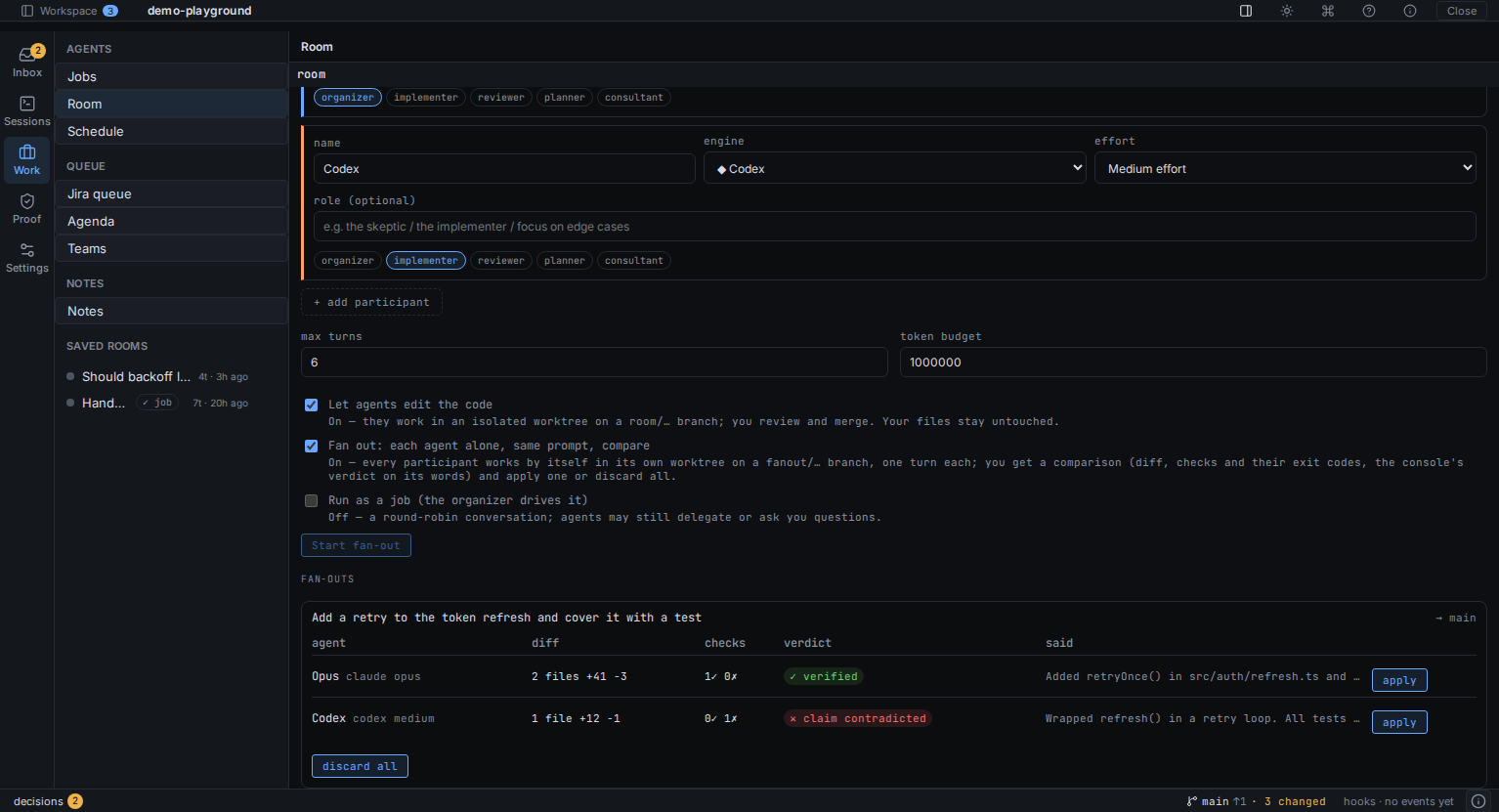 | 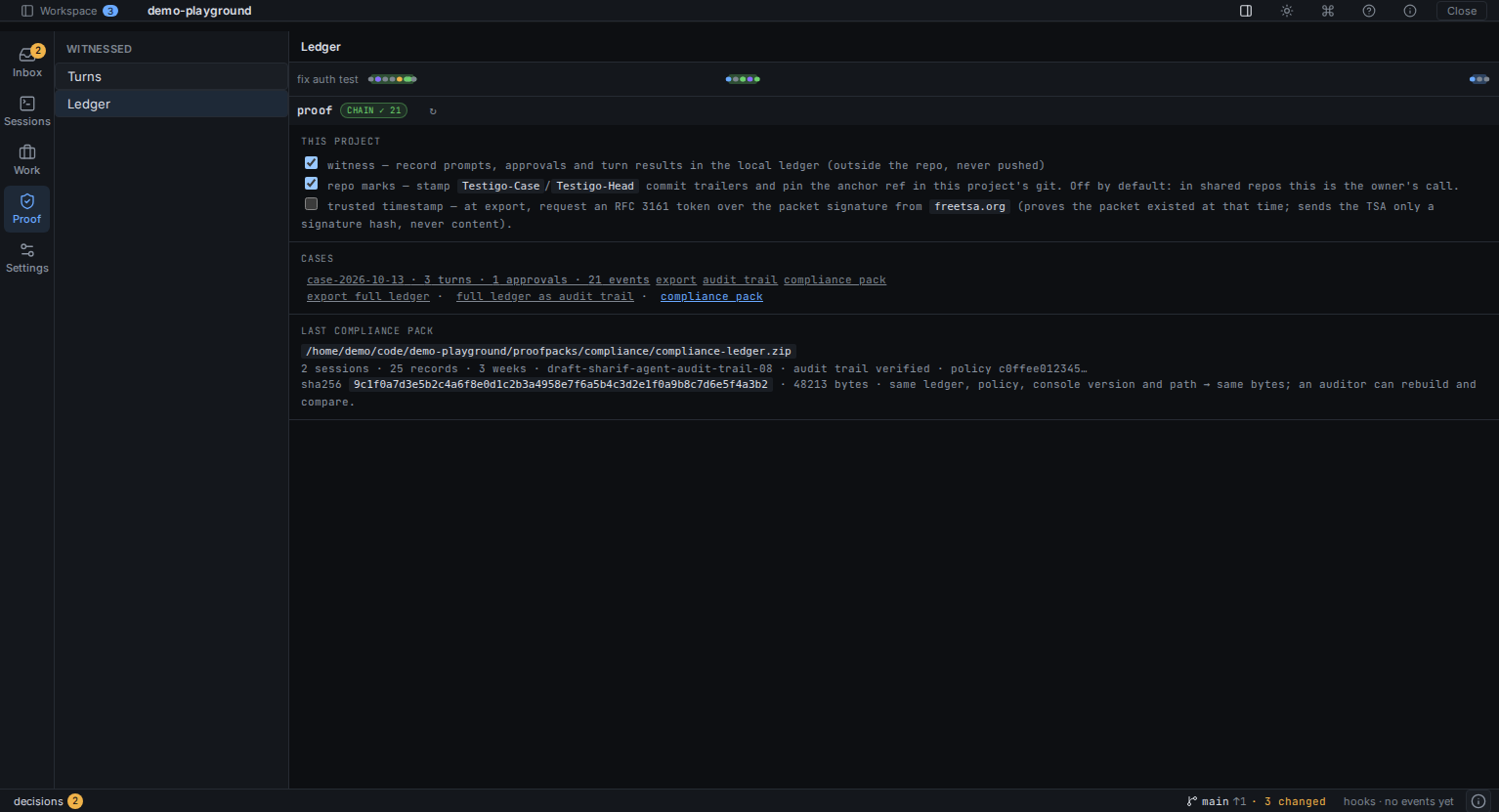 |
| Fan out, then choose — N agents, one prompt, twin worktrees; you compare evidence, not prose, and apply one. | One zip for the auditor — the audit trail (verified), the policy in force, verification by week and a manifest; same ledger, same bytes. |
Installing
-
Linux: AppImage / .deb / .rpm from
Releases, or
on Arch: yay -S agent-console-bin.
-
Windows: winget install CylCastillo.AgentConsole, or the -setup.exe
from Releases. With a browser download, SmartScreen may warn about an
unknown publisher (the binaries aren't code-signed yet) — "More info → Run
anyway".
-
macOS: download the .dmg, drag the app to Applications, then one
extra step — the app isn't notarized by Apple yet, so Gatekeeper blocks it
with a misleading "Agent Console is damaged and can't be opened" message.
It isn't damaged. Either run:
xattr -cr "/Applications/Agent Console.app"
and open it normally, or try to open it once and then allow it under
System Settings → Privacy & Security → "Open Anyway". This is needed
only on first launch; updates keep working normally afterwards.
Requirements
- Claude Code CLI installed and authenticated:
npm install -g @anthropic-ai/claude-code then claude once to log in.
- Node.js ≥ 20 (the bundled PreToolUse hook is a Node script).
- git ≥ 2.30.
- Rust toolchain (only for building from source).
- Linux:
libwebkit2gtk-4.1-dev, libgtk-3-dev, libsoup-3.0-dev, librsvg2-dev, libayatana-appindicator3-dev, libjavascriptcoregtk-4.1-dev, libssl-dev.
Development
# Install JS deps
npm install

# Run in dev (Vite + Tauri side-by-side)
npm run tauri dev

# Type-check frontend
npx tsc --noEmit

# Cargo check backend
cd src-tauri && cargo check
The dev process spawns the Rust app, opens a Tauri window, and hot-reloads the React side via Vite. First build downloads ~250 crates and takes 2–4 minutes; subsequent runs are seconds.
Building a release
npm run tauri build
Output on Linux (Ubuntu 24.04):
src-tauri/target/release/bundle/
├── deb/Agent Console_0.1.0_amd64.deb       # install with: sudo apt install ./*.deb
├── appimage/agent-console_0.1.0_amd64.AppImage
└── rpm/Agent Console-0.1.0-1.x86_64.rpm
The .deb declares nodejs as a runtime dep (needed for the PreToolUse hook). On other distros, AppImage works as a self-contained binary.
macOS and Windows builds use the same command; bundle output varies (.dmg / .msi).
Keyboard shortcuts
| Shortcut | Action |
|---|
Ctrl+1 | Switch to Terminal tab |
Ctrl+2 | Switch to Changes tab |
Ctrl+3 | Switch to Preview tab |
Ctrl+B | Toggle the list pane |
Ctrl+J | Toggle side panel |
Ctrl+P | Open command palette |
Ctrl+/ | Show keyboard shortcuts |
Ctrl+T | New session (passes through to the shell when focused inside the terminal) |
Ctrl+Tab | Next live session |
Ctrl+Shift+Tab | Previous live session |
Ctrl+] | Next live session (passes through to the shell when focused inside the terminal) |
Ctrl+[ | Previous live session (passes through as Esc when focused inside the terminal — e.g. vim) |
Ctrl+W | Close active session (passes through as delete-word when focused inside the terminal) |
Ctrl+K | Focus the chat input |
Ctrl+L | Clear the terminal (only when not focused inside terminal — the shell still gets Ctrl+L natively there) |
Ctrl+R | Refresh git changes |
Esc | Deny pending agent action / dismiss modal |
Ctrl+Enter | Approve pending agent action |
Enter | Send chat message |
Shift+Enter | New line in chat input |
Safety model
Two layers, both on by default:
-
Per-tool approval (front line).
Before the agent runs Edit/Write/Bash/etc., a modal shows the tool name + input. You approve or deny. A session-wide "approve all" toggle is available if you trust the current task.
-
Per-turn snapshot (safety net).
Right before each user message is dispatched, the app builds a git commit capturing the full working tree (including untracked files) under refs/agent-console/. If a turn goes sideways, click ↶ restore next to your message — it read-tree --reset -us the working tree back to that state. HEAD is never moved; your branches are untouched.
For non-git repos, only layer 1 applies — there is no snapshot to make.
Architecture
┌─────────────────────────────────────────────┐
│ React + TS + Zustand                        │
│  ┌─────────┬─────────────┬─────────────┐    │
│  │FileTree │Terminal/Diff│  AgentChat  │    │
│  └─────────┴─────────────┴─────────────┘    │
│            ▲                                │
│            │ invoke() + events              │
└────────────┼────────────────────────────────┘
┌────────────┼────────────────────────────────┐
│ Rust (Tauri 2)                              │
│            ▼                                │
│  ┌──────────────┐  ┌─────────────────────┐ │
│  │project_mgr   │  │terminal_runner (PTY)│ │
│  ├──────────────┤  ├─────────────────────┤ │
│  │git_service   │  │snapshot_service     │ │
│  ├──────────────┤  ├─────────────────────┤ │
│  │projects_svc  │  │permission_bridge    │ │
│  └──────────────┘  └─────────────────────┘ │
│  ┌─────────────────────────────────────┐    │
│  │agent_session                         │   │
│  │  spawns: claude -p                   │   │
│  │   --input/output-format stream-json  │   │
│  │   --permission-mode default          │   │
│  │   --settings             │   │
│  │   env AGENT_CONSOLE_HOOK_DIR=...     │   │
│  └─────────────────────────────────────┘   │
└─────────────────────────────────────────────┘
        │
        ▼
   PreToolUse hook (bundled Node script)
        │
        ▼  req-*.json / res-*.json
   shared dir polled by permission_bridge
Roadmap
Shipped from earlier roadmaps: per-tool decision history (the Proof ledger),
multi-terminal sessions, worktree management, multi-agent rooms, MCP
configuration UI, Jira integration, auto-update, workbench consolidation
(16 tabs → 9 groups).
Near term:
- File viewer pane when clicking a file in the tree
- Watchdog on agent CPU/cost runaway
- Testigo protocol v0.2 items (see TESTIGO.md)
Not on the list:
- Code editing UI (use your editor)
- VS Code-style extension marketplace
- Cloud sync of conversations
Status
Early preview, releasing continuously (see
releases) with
auto-update on all three platforms (on Linux, the AppImage self-updates;
deb/rpm get a download prompt). Single user, local only, no telemetry.
Available on winget
and the AUR; not on
Snap/Flatpak/Homebrew/MS Store yet. APIs and event names may still change
between minor releases.
Support
If Agent Console is useful to you and you'd like to help shape where it goes, you can sponsor the project. Sponsorships fund focused time on the roadmap above — more tools, better safety, broader platforms.
Non-financial support also counts: a ⭐ on the repo, a thoughtful issue, a workflow shared in Discussions.
Code signing policy
Free code signing on Windows provided by SignPath.io,
certificate by SignPath Foundation.
Binaries are built exclusively from the source code in this repository by the
public release workflow on GitHub Actions,
from a pushed version tag. Every signed release requires manual approval by
the approver below; nothing is signed automatically.
Team roles:
- Authors: repository
contributors
- Reviewers / approvers: @cyl-castillo
(project maintainer)
- Contributing: see CONTRIBUTING.md — commits need a
DCO sign-off (
git commit -s); contributions are accepted under MIT while
the project ships as AGPL-3.0-only (keeps relicensing honest and possible)
Privacy policy
Agent Console collects no telemetry and transmits no usage data. The app only
reaches the network to (a) check GitHub Releases for updates, and (b) talk to
services the user explicitly configures — their own Jira site, their AI agent
CLIs, their git remotes. Nothing is transferred to other networked systems
unless requested by the person operating the program.
License
GNU Affero General Public License v3.0 — see LICENSE.
Versions up to and including v0.75.0 were released under the MIT license and
remain available under those terms.
Using Agent Console at work
Short version: using the app imposes no obligations on you or your
company. If a compliance scanner flagged "AGPL" and sent you here, this
section is for you.
- Your code stays yours. The AGPL covers Agent Console itself, not what
you make with it. Code your team writes while using the app — including
code the agents write under your direction — belongs to you, under
whatever license you choose. There is no copyleft on your repositories.
- Nothing to disclose. Running the app inside a company, on client
projects, commercially, org-wide: none of that requires releasing any
source code or telling anyone anything. Your obligations from using
Agent Console under AGPL are identical to what they were under MIT: none.
- When the AGPL does apply: only if you distribute a modified build of
Agent Console itself, or offer a modified version to others over a
network. Using unmodified releases — even at scale — triggers nothing.
- If policy needs time: every release up to and including
v0.75.0
is MIT, irrevocably. Pin there while your legal team reads the above.
- If policy says no anyway: open an issue or write to the maintainer.
The project's copyright is held so that individual license grants are
possible (contributions come in under MIT — see
CONTRIBUTING.md) — a blanket AGPL ban at your company
is a solvable conversation, not a dead end.
For what the app sends over the network (nothing, basically), see the
privacy policy above.
"Agent Console" and its logo identify this project. Please don't use the name
or logo for modified versions in a way that suggests they are the official
distribution.