DevLogBus
DevLogBus is a real-time log viewer for full-stack development. It coalesces
records from backend services, CLI/TUI tools, Chrome tabs, Linux journald,
direct HTTP calls, and language SDKs so you can see them side by side or merged
into one local timeline.
It is not a retention stack, alerting system, metrics backend, or production
observability platform. The first job is simple: make active development logs
from multiple sources readable in one place while you are debugging.
What It Solves
DevLogBus is for the moment when debugging turns into five terminals, a browser
console, a CLI command, and a Linux journal tail that all need to line up in
your head at the same time.
It gives full-stack local development workflows one live stream for:
- backend and service logs
- CLI and TUI records
- Chrome console, runtime, browser log, and network events
- Linux
journald records
- SDK-published records from Go, C, .NET/C#, Rust, Java/Kotlin,
Node/TypeScript, and Python
View those sources side by side, drill into noisy browser/network groups, or
merge everything into one chronological stream when order matters most.
The goal is not to replace production observability. The goal is to make active
development and troubleshooting less stupid.
Install
Homebrew on macOS or Linux:
brew install dan-sherwin/tap/devlogbus
Scoop on Windows:
scoop bucket add dan-sherwin https://github.com/dan-sherwin/scoop-bucket
scoop install devlogbus
Debian or Ubuntu:
echo "deb [trusted=yes] https://dan-sherwin.github.io/devlogbus-linux-repo/apt stable main" | sudo tee /etc/apt/sources.list.d/devlogbus.list
sudo apt update
sudo apt install devlogbus
For DNF/RPM, Alpine, WinGet status, manual archives, and signature verification
options, see Package Managers.
User Choice
DevLogBus provides the tools you need to maintain your own security, but it does
not force you to use them. The project publishes checksums, signing keys, and
verification instructions. Use them as you see fit, because I am not your mother
and it is not my job to make sure you wear a damn helmet. That choice belongs to
you.
In short, piss on the electric fence if you want. Just don't act surprised when
physics files a bug report on your ass.
Documentation
Start with the public documentation index for install,
package managers, viewer, CLI, API, SDK, Browser Tap, journal bridge,
security, compatibility, and release notes.
For a standalone project page, see
Introducing DevLogBus.
License
DevLogBus is released under the MIT License.
Layout
cmd/
  devlogbusd/        local broker daemon entrypoint
  devlogbus/         CLI client and interactive TUI entrypoint
  devlogbus-journal-bridge/
                     Linux journald-to-DevLogBus bridge

internal/
  devlogbusd/app/    service-template-style bootstrap app for the daemon
  devlogbusd/ui/     React live viewer embedded into devlogbusd
  devlogbus/app/     cli-template-style bootstrap app for the CLI
  journalbridge/app/ journald bridge app
  completions/       shared shell-completion installer helpers
  recordfmt/         shared human log formatting

extensions/
  chrome-devlogbus/  Chrome extension that publishes browser debug events

sdk/
  c/                 Small C SDK for the HTTP API
  dotnet/            .NET/C# SDK for the HTTP API
  jvm/               Java/Kotlin SDK for the HTTP API
  node/              Node and TypeScript SDK for the HTTP API
  python/            Python SDK for the HTTP API
  rust/              Rust SDK for the HTTP API

pkg/
  protocol/          wire messages and filtering helpers
  client/            Go client for the broker
  sloghandler/       non-blocking slog.Handler publisher
  runtime/           reconfigurable slog runtime controls
Quick Start
Start the broker:
go run ./cmd/devlogbusd run
The broker listens on its configured endpoint for Go/CLI clients and on
127.0.0.1:7423 for browser clients by default. The default broker endpoint is
the stable local Unix socket /tmp/devlogbus/devlogbus.sock on macOS/Linux and
127.0.0.1:7422 on Windows, but it can also be a TCP address like
0.0.0.0:7422.
Disable the browser endpoint with --http "", or set a different address with
--http 127.0.0.1:7424. Open http://127.0.0.1:7423/ to use the embedded live
viewer.
To expose the broker to another machine during active troubleshooting, run the
primary endpoint on TCP:
go run ./cmd/devlogbusd run --endpoint 0.0.0.0:7422
go run ./cmd/devlogbus tail --endpoint prod-box:7422 --replay 50
On a Linux host, bridge systemd journal records into that remote broker:
go run ./cmd/devlogbus-journal-bridge run --endpoint tcp://devbox:7422 --since now
go run ./cmd/devlogbus-journal-bridge run --endpoint tcp://devbox:7422 --tail 100 --match _SYSTEMD_UNIT=billing.service
In another terminal, tail the stream:
go run ./cmd/devlogbus tail --replay 50
Or open the terminal UI:
go run ./cmd/devlogbus tui
go run ./cmd/devlogbus tui --endpoint prod-box:7422 --replay-per-source 500
Inside the TUI, press ? for the full control reference, including search,
pane layouts, source-group drilldown, level filters, pause/follow-bottom,
details, clear, and expunge controls.
Emit a test record:
go run ./cmd/devlogbus emit --source demo --level warn --message "catalog unavailable" --attr service=billing_svc
Expunge replay records from the broker:
go run ./cmd/devlogbus expunge --source demo
go run ./cmd/devlogbus expunge --all
Run the live browser viewer directly during UI development:
VITE_DEVLOGBUS_API_URL=http://127.0.0.1:7423 npm --prefix internal/devlogbusd/ui run dev
Publish browser records over HTTP:
curl -X POST http://127.0.0.1:7423/api/records \
  -H 'Content-Type: application/json' \
  -d '{"level":"info","source":"chrome:demo","message":"button clicked"}'
Load the Chrome browser tap from extensions/chrome-devlogbus to publish
console, runtime, browser log, and network events from the active tab into the
same DevLogBus stream as backend service records.
For Linux install, systemd, and journald bridge notes, see
docs/linux.md.
For Windows install and platform notes, see docs/windows.md.
For package-manager release prep, see docs/package-managers.md.
For Browser Tap Chrome Web Store prep, see docs/browser-tap-store.md.
Interactive Viewers
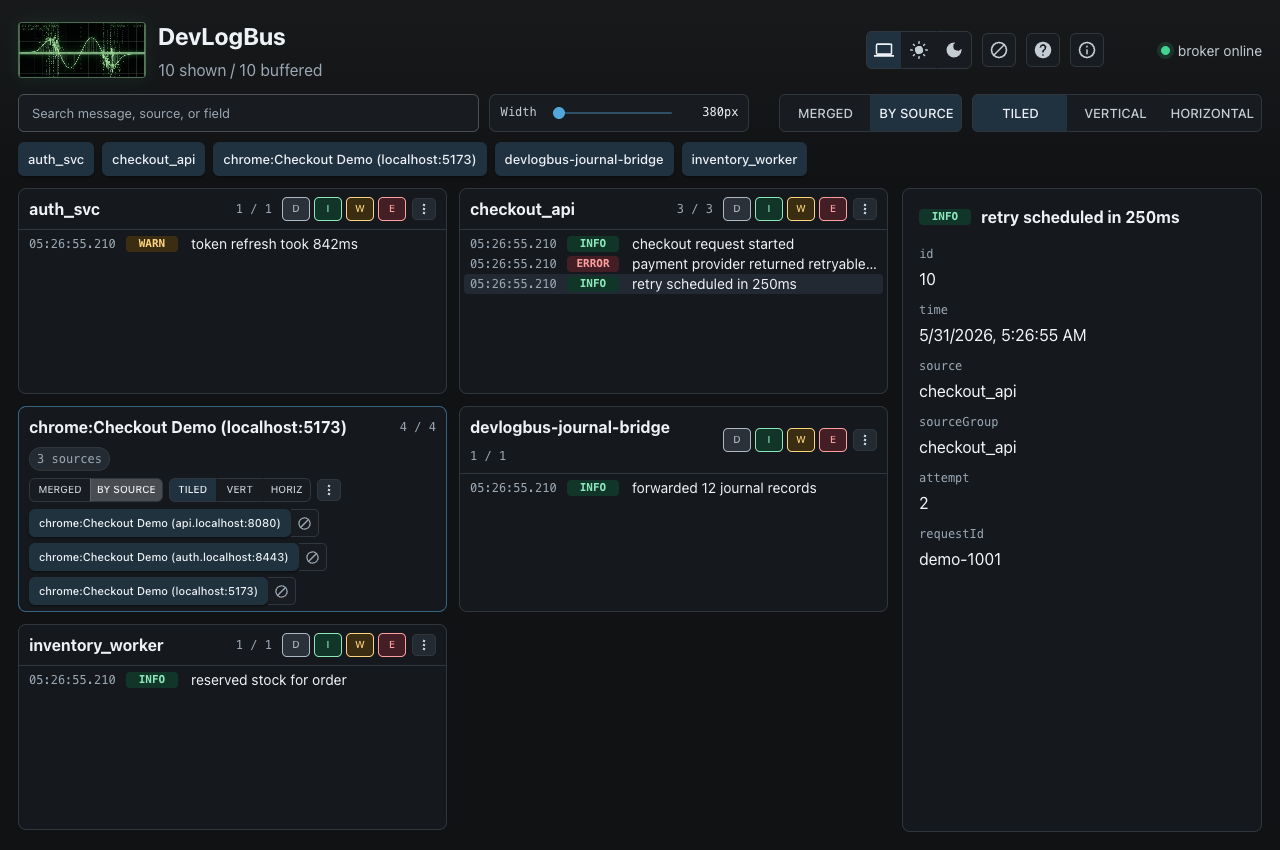
The embedded browser UI and the terminal UI both support the two modes that
matter during active debugging:
MERGED shows every selected record in one chronological timeline.BY SOURCE splits the same stream into source panes.
Browser publishers can include a sourceGroup attribute. DevLogBus uses that
to treat one browser tab as a parent source group while still preserving child
sources for console/runtime records and individual network targets. When the
top-level view is merged, child sources are flattened into the same timeline.
When the top-level view is by source, a multi-child browser group acts like a
mini DevLogBus window with its own merged/by-source mode, layout controls,
level filters, pause, clear, expunge, and details controls.
The browser UI can pop a source group or individual source into its own window
and later reattach it to the main layout. The TUI has the same grouping model:
press enter on a grouped pane to drill into child sources, and press esc or
backspace to return to the parent source list. Press ? or h in the TUI for
the full on-screen help reference.
Go slog Handler
Services can publish directly with pkg/sloghandler:
logger := slog.New(sloghandler.New(sloghandler.Options{
    Source: "event_management_svc",
}))
For remote troubleshooting, point the handler at the TCP listener:
logger := slog.New(sloghandler.New(sloghandler.Options{
    Source:   "event_management_svc",
    Endpoint: "devbox:7422",
}))
The handler uses a bounded queue and drops records when the broker is
unavailable or the queue is full. It keeps a persistent publisher connection and
reconnects after transport errors. Application logging should never block normal
service work. Optional filter and redaction hooks can drop records or scrub
known sensitive attributes before records leave the process.
Go Runtime Controls
Applications that need to enable/disable DevLogBus or change the broker
endpoint at runtime can use pkg/runtime:
devlog := runtime.New(runtime.Options{
    Enabled:  true,
    Source:   "event_management_svc",
    Endpoint: "/tmp/devlogbus/devlogbus.sock",
})
defer devlog.Close()

logger := slog.New(devlog.Handler())
devlog.Disable()
devlog.Enable()
_ = devlog.SetEndpoint("devbox:7422")
The runtime package is public-friendly by design. It has no dependency on any
private application settings, CLI, RPC, service-template, or business-specific
packages. Higher-level applications can store the Enabled and Endpoint
values however they want and pass changes into the runtime controls.
Bootstrap Apps
The Go binaries use small bootstrap apps around the public packages:
devlogbusd uses the service-style bootstrap: Kong commands, persistent settings, build info, shell completions, and systemd service commands.devlogbus uses the CLI-style bootstrap: Kong commands, persistent settings, build info, and shell completions.devlogbus-journal-bridge uses a small CLI bootstrap and streams Linux journald records to any DevLogBus broker endpoint.
Examples:
go run ./cmd/devlogbusd settings list active
go run ./cmd/devlogbusd settings set endpoint /tmp/devlogbus/devlogbus.sock
go run ./cmd/devlogbusd settings set endpoint 0.0.0.0:7422
go run ./cmd/devlogbus settings set endpoint /tmp/devlogbus/devlogbus.sock
go run ./cmd/devlogbus settings set endpoint prod-box:7422
go run ./cmd/devlogbus version
go run ./cmd/devlogbusd version
go run ./cmd/devlogbus buildinfo
devlogbusd retains max_records per source in memory so a noisy process does
not push quiet sources out of the replay buffer. The terminal UI requests replay
records per source as well; use --replay-per-source to tune that startup
window.
The importable Go packages stay in the root module for now:
github.com/dan-sherwin/devlogbus/pkg/client
github.com/dan-sherwin/devlogbus/pkg/protocol
github.com/dan-sherwin/devlogbus/pkg/runtime
github.com/dan-sherwin/devlogbus/pkg/sloghandler
The C, .NET/C#, Rust, Java/Kotlin, Node/TypeScript, and Python SDK source
packages live under sdk/. They publish through the HTTP API at
http://127.0.0.1:7423 by default.
Run the local quality gate with:
./dev/ci-local.sh
Release Artifacts
Tagged GitHub releases build the public artifacts with
.github/workflows/release.yml. The workflow calls ./dev/release-artifacts.sh,
which builds the embedded browser UI, stamps version/commit/build date into the
Go binaries, packages macOS/Linux/Windows archives, packages the Browser Tap
extension zip, and writes checksums.txt.
To smoke test the release package locally:
VERSION=v1.3.1 ./dev/release-artifacts.sh
When running for a tag, the Browser Tap manifest version must match the tag
without the leading v, so v1.3.1 expects the Chrome extension manifest to
declare 1.3.1.