Your SignalRGB effect already drives keyboards, fans and strips —
why not your desktop too? This project lets the live colours from
SignalRGB shine through transparent regions of your wallpaper. Pick a
bundled image, drop in your own, or carve cut-outs in the in-browser
Builder — the holes light up in whatever colour your current SignalRGB
effect is producing, in real time, at 60 fps, with negligible CPU cost.
Runs on top of Lively Wallpaper
(free) or Wallpaper Engine (paid,
on Steam). The one-click installer sets everything up — no Python, no
manual file copies, no terminal.
What you get
Visuals
- 🌈 Live RGB glow behind a transparent background, 60 fps


- 🎨 42 bundled wallpapers spanning cyberpunk, synthwave, aurora,
underwater, sci-fi — each in 1080p + 4K with saliency-cut alpha
baked in
- 🎬 Video backgrounds (MP4 / WebM / MOV / M4V)
- ✨ Ambient effects — snow, rain, sparks, aurora, constellation,
fireflies, plasma, vortex, bubbles + a screen-wide audio-reactive
glow layer
- 🧩 12 desktop widgets — clock, calendar, weather, sticky notes,
countdowns, photo frame, quote of the day, CPU / RAM / network
meters, hardware sensors, audio spectrum, now-playing, RSS feed
- 🖌️ In-browser Builder — pick any image, click out transparent
regions, Auto-Cut for one-click bright-region detection, reference-
image colour picker
- ⚙️ In-browser Configurator — change background, glow, effects,
widgets on-the-fly without restarting anything; live WYSIWYG preview
- 🎯 Quick Looks — 10 pre-built bundles (Streamer / Focus /
Pomodoro / Gaming / …) swap effects + widget layout in one click
- 💾 Preset slots — save full "background + glow + widgets" combos
per screen, switch with one click, undo via Ctrl+Z
Multi-monitor
- 🖥️ Up to 4 bridge screens, each independent, mirroring, or
declared as a multi-monitor span (ultrawides, landscape+portrait)
- 🧭 Per-screen apply + per-tile apply — route an image to a
specific monitor or to one half of a span layout, all from the
Library right-click menu
LED ecosystem hub (beta)
- 🔌 OpenRGB output (v1.4) — mirror the wallpaper glow to every
OpenRGB device (RAM, fans, keyboards, …)
- 🎛 Per-screen colour source (v1.5) — SignalRGB UDP, an OpenRGB
device, or an incoming sACN/E1.31 universe
- 📡 sACN / E1.31 output (v1.5) — DMX-over-IP to xLights, QLC+,
Hyperion, hardware DMX nodes
- 🎯 Spatial mapping (v1.5) — drag each OpenRGB device's marker
on a live preview so it samples the right region of the wallpaper
Quality of life
- 🌐 DE / EN UI, auto-detected from your Windows locale
- 🎮 Auto-pause when a fullscreen app is active — no GPU drain
during games
- 🩺 Diagnostics export — one-click ZIP for bug reports
- 🆕 In-app auto-update — tray downloads + runs the new installer
See it in action
| Configurator | Wallpaper Builder |
|---|
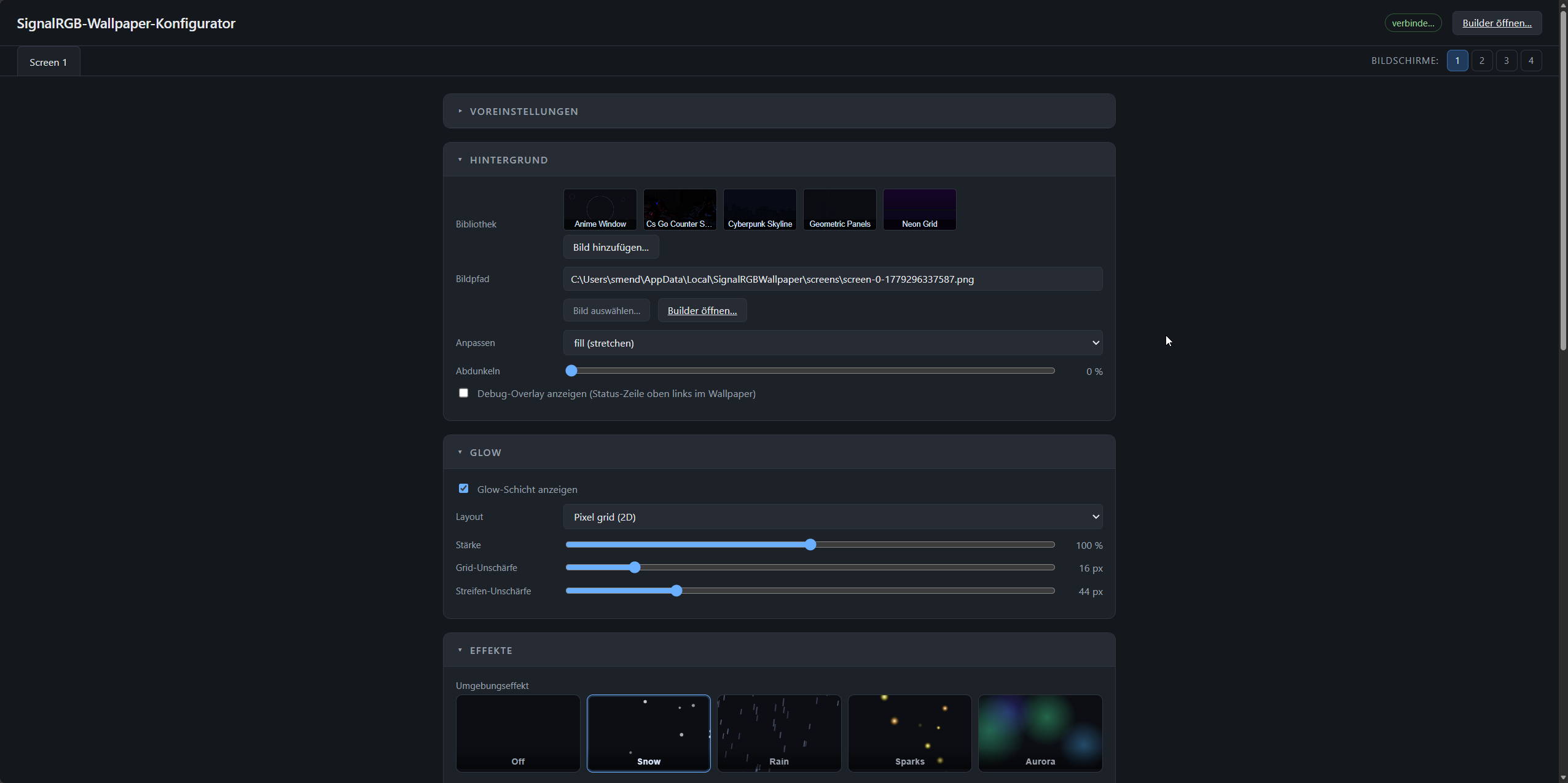 | 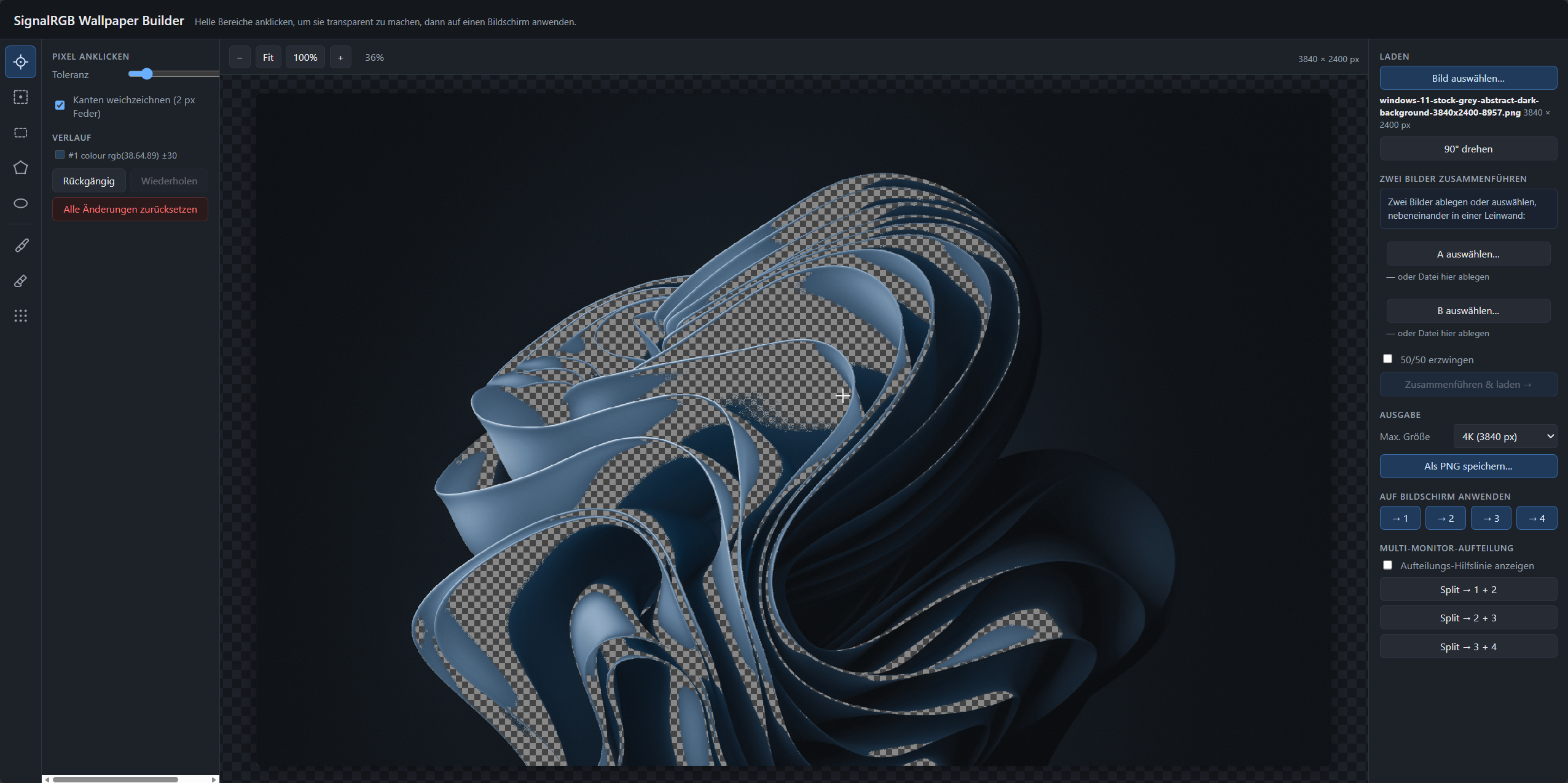 |
| Pick a background, dial in glow strength, ambient effects, widgets — everything live in your browser. | Click any colour to make it transparent. Rectangles, polygons, ellipses. Soft brushes. Apply with one click. |
| SignalRGB integration | Wallpaper Engine |
|---|
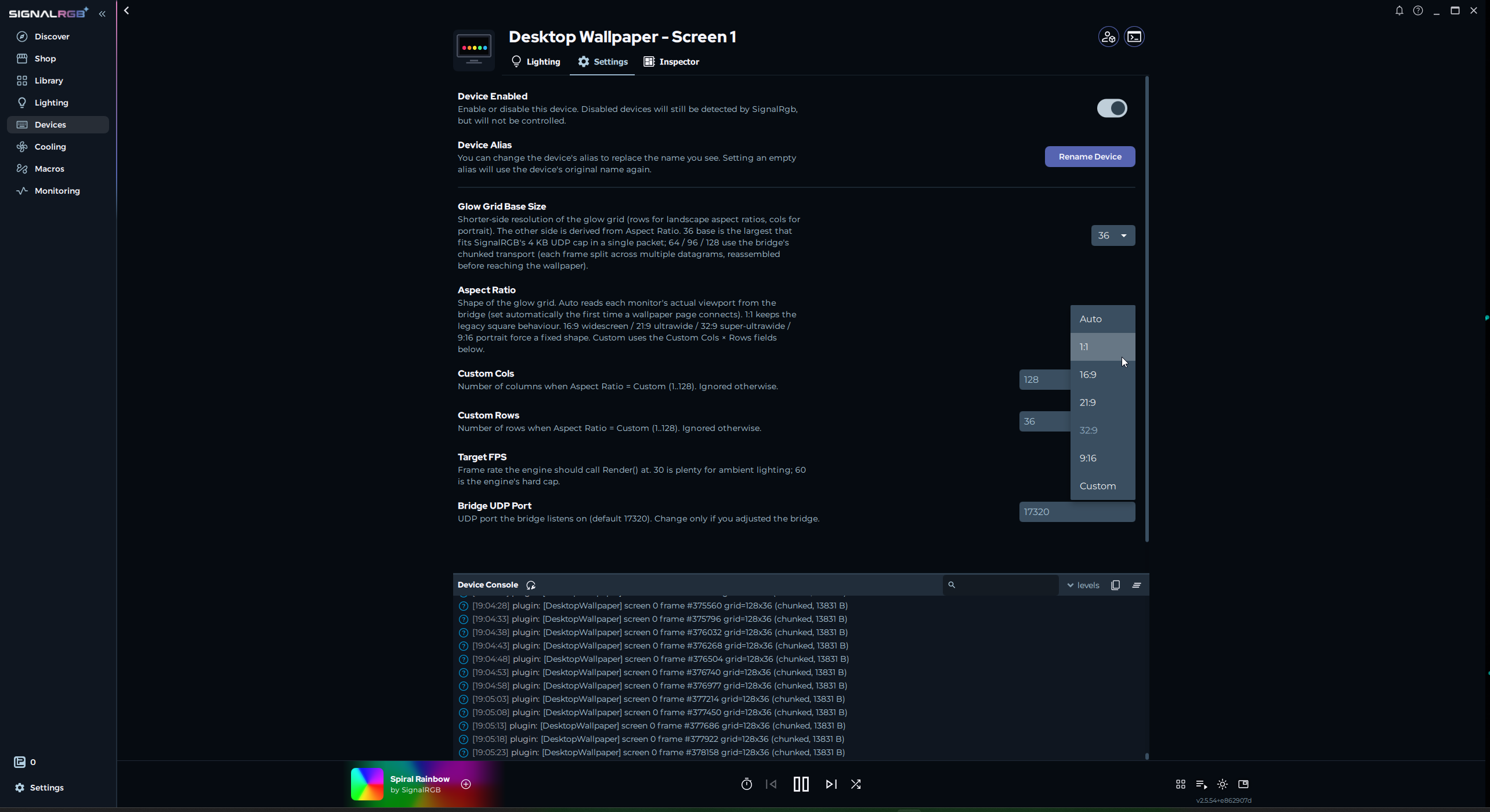 | 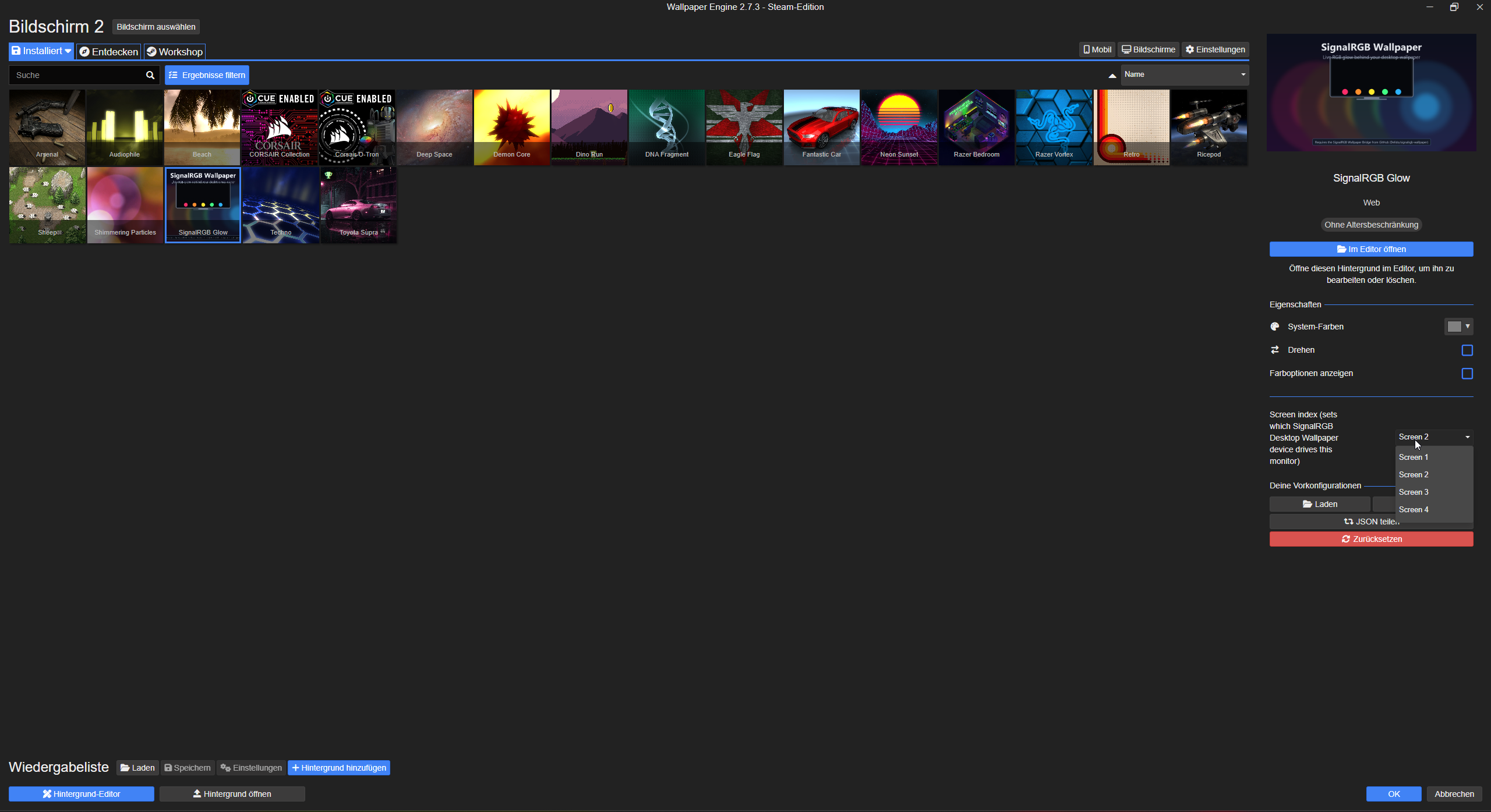 |
| The plugin announces 1–4 "Desktop Wallpaper – Screen N" devices in SignalRGB. Aspect = Auto matches each monitor. | One Workshop-style bundle assigned to every monitor with a different Screen index. No canvas tricks needed. |
Quick start
1 · Install
> 📸 Step-by-step walkthrough with screenshots:
> docs/installation.md
Fastest path — winget:
winget install Delido.SignalRGBWallpaper
Manual: grab SignalRGBWallpaperSetup-.exe from
Releases
and run it. No admin needed — installs per-user.
The wizard's defaults cover the common path: Lively + auto-import +
SignalRGB plugin + autostart + open the Configurator when done. Both
hosts are auto-detected; if Lively isn't installed yet, the wizard
can fetch + silent-install it for you.
The Configurator opens automatically at
http://127.0.0.1:17320/configurator. Set the screen count (top right
Screens: 1 / 2 / 3 / 4), pick a wallpaper from the Library tab,
tweak the glow — done.
3 · Place SignalRGB devices
Open SignalRGB → Layouts. Drag each Desktop Wallpaper – Screen N
device onto the canvas where you want colours sampled from. For a
single monitor: cover the canvas. For side-by-side: left half + right
half. The multi-screen guide has worked
examples.
4 · Assign in your wallpaper host
- Lively users — the installer dropped the four wallpapers into
your Lively library. Right-click each SignalRGB Glow – Screen N
tile → Set as wallpaper → pick the matching monitor.
- Wallpaper Engine users — My Wallpapers now contains SignalRGB
Glow. Assign it to every monitor and pick a different Screen
index (1 / 2 / 3 / 4) per assignment.
> 💡 Stuck? Right-click the bridge's tray icon → Help… for
> scenario walkthroughs covering every Lively / Wallpaper Engine setup
> for 1–4 monitors, including ultrawide and spanned configs
> (DE / EN, auto-localised).
Requirements
- Windows 10 or 11
- SignalRGB installed and able to
drive your hardware (open it once, pick any effect; if no LEDs light
up, fix that first)
- A wallpaper host — at least one:
In Configurator → Glow card:
- Grid renderer: DOM (default, best on RTX-class GPUs) or
Canvas (lower CPU, slight GPU bump — good for weaker CPUs)
- Glass quality: Medium (6 px blur, default), Low (no blur,
biggest GPU win with many Glass widgets), High (12 px blur,
GPU-heavy)
How it works
The SignalRGB plugin registers as virtual lighting devices (one per
monitor) and samples your effect canvas every frame. Each frame goes
out as a UDP datagram to a small bridge (SignalRGBBridge.exe,
runs in your tray) that fans the colours out to one HTML wallpaper
page per monitor over WebSocket. The wallpaper page renders the
colours as a CSS-grid glow layer behind your background image. All
per-screen settings (background, glow, widgets, effects) live in the
in-browser Configurator which pushes changes live to the wallpaper
without any reload.
Full architecture: docs/architecture.md.
Documentation
The tray icon's Help… entry opens a scenario-based walkthrough
covering every Lively / Wallpaper Engine setup for 1–4 monitors,
including ultrawide / non-16:9 panels and spanned configurations
(DE / EN, auto-localised). For deeper docs:
Latest release — v2.0.1
- 6 essentials in the installer + 13 themed wallpaper packs on
GitHub release
library-packs-v1 (cyberpunk, synthwave, aurora,
underwater, magic, fireworks, crystal, forest, energy, space,
blockbuster, film, video games). 1080p + 4K per slug. Locally
generated with Juggernaut XL v9 + Phips' 4xNomos8kDAT — clean
redistribution chain, attribution in
docs/credits.md and
installer/assets/library/IMAGES_NOTICE.md.
- Library tab redesign — search, sort, tag chips, category
filter, per-source filter row + section headers (Bundled / pack
ids / Your uploads), one-click apply, larger grid.
- Tag-Picker dialog — multi-select existing tags + free-text
field.
- Per-screen + per-tile apply — route an image to a specific
monitor or one half of a span layout. The span dialog now leads
with the two tile buttons (left/right or top/bottom).
- Builder Apply Wall fallback — leaving a tile empty keeps the
existing background underneath instead of wiping it.
Heads up — Windows Defender false positive
In v2.0.0 the bridge briefly included an in-app downloader for the
themed wallpaper packs. The combination of unsigned binary +
network download + ZIP extraction triggered Windows Defender's
heuristic (Wacatac.B!ml) on some systems. v2.0.1 removes the
in-app downloader so the bridge stops hitting that pattern; the
themed packs are still available — you grab the ZIPs straight off
the library-packs-v1
release and extract them into
%LOCALAPPDATA%\SignalRGBWallpaper\library\. The Library tab has a
direct link.
We're evaluating code-signing + a separate small downloader so the
in-app flow can come back without the false-positive risk. If
Defender still flags SignalRGBBridge.exe for you, please
submit it as a false positive
and (optionally) add the install folder to Defender's exclusion
list — your local copy is safe, the binary is built from this
repo's source.
Full beta-line history in CHANGELOG.md.
Manual install (without the installer)
If you'd rather not run the installer:
| File | Where it goes |
|---|
SignalRGBBridge.exe | Anywhere stable (e.g. C:\Tools\SignalRGBWallpaper\) |
SignalRGB_Desktop_Wallpaper.js + .qml | Documents\WhirlwindFX\Plugins\ |
SignalRGB_Glow_Screen{1,2,3,4}.zip (Lively) | Drag each zip onto Lively |
SignalRGB_Glow_WE_Single.zip (Wallpaper Engine) | Extract; drop signalrgb-glow/ into …\steamapps\common\wallpaper_engine\projects\myprojects\ |
Then run SignalRGBBridge.exe. The tray icon appears; right-click
→ Configurator… to set everything up.
Uninstall
Windows Settings → Apps → SignalRGB Desktop Wallpaper → Uninstall.
The uninstaller removes the bridge, the auto-imported Lively folders
(signalrgb-glow-screen-{1..4}\), the WE bundle (signalrgb-glow\),
and the autostart registry entry. Your custom backgrounds, widgets and
presets in %LOCALAPPDATA%\SignalRGBWallpaper\ stay; delete that
folder by hand to clear them too.
The SignalRGB plugin in Documents\WhirlwindFX\Plugins\ is not
removed automatically — delete by hand if you want SignalRGB to forget
about it.
Contributing
Issues and PRs welcome. Bug reports should include:
- Windows version (Win+R →
winver)
- SignalRGB version (Settings → About in SignalRGB)
- Lively / Wallpaper Engine version (and which Lively build —
Microsoft Store vs GitHub installer)
- The bridge log if relevant: run
SignalRGBBridge.exe from a CMD
window (or python wallpaper_bridge\bridge.py directly)
Support / donate
This project is built and maintained in spare time. If it saves you
the hassle of writing your own SignalRGB → wallpaper plumbing, or if
seeing a glow that matches your effect just makes you smile every
morning, a small tip keeps the motivation up.
Issues, feature requests and pull requests are also very welcome —
even just an issue
saying "this is broken on my machine" helps a lot.
License
MIT © 2026 Sebastian Mendyka (@Delido)