Use this command to install DimonSmart.PdfCropper.Cli:
winget install --id=DimonSmart.PdfCropper -e
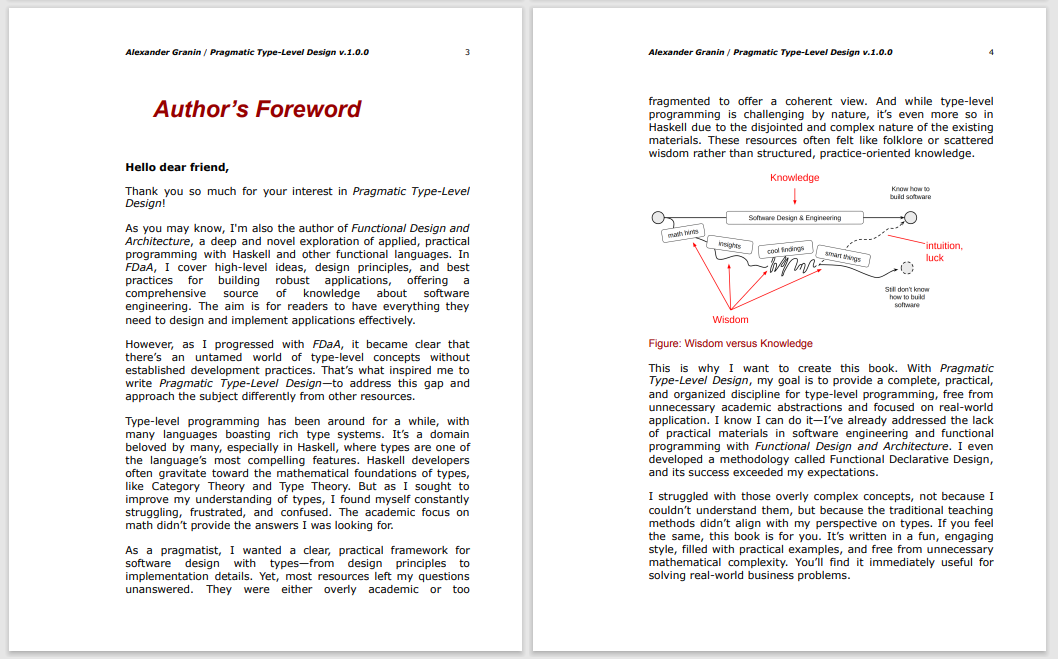
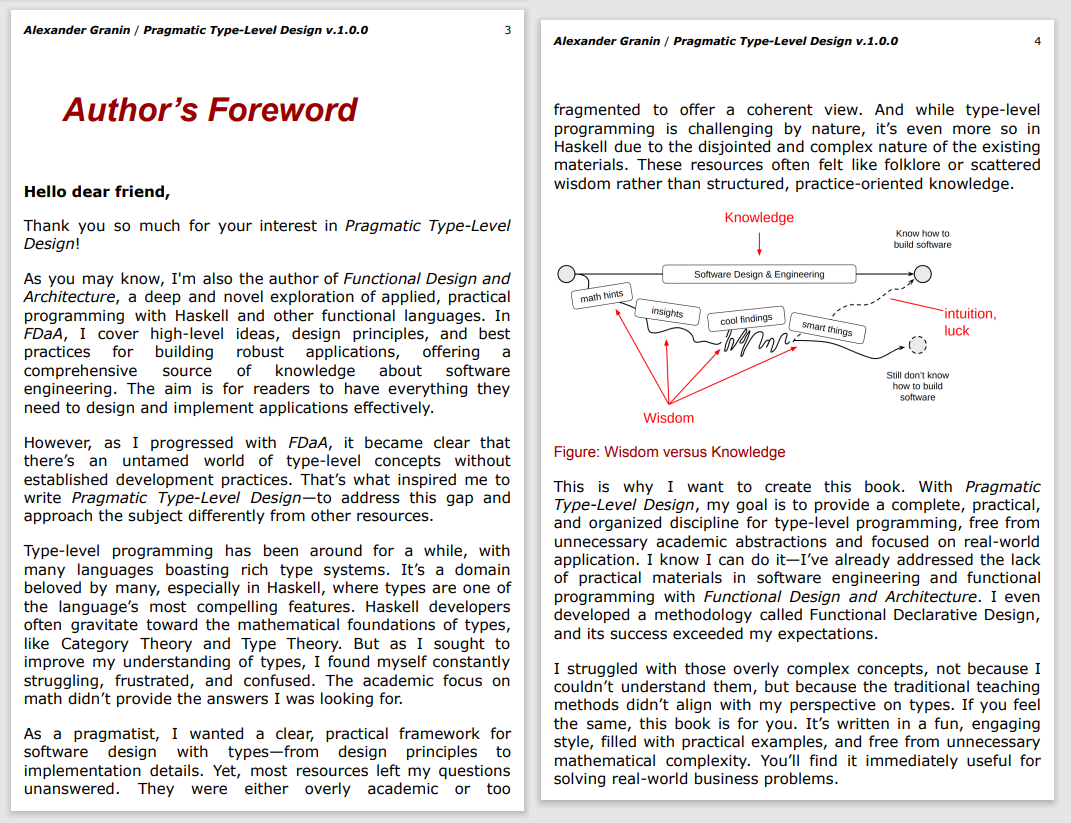
DimonSmart.PdfCropper.Cli is a command-line tool designed to automatically trim PDF pages to their actual content, removing unnecessary margins and whitespace. This utility enhances readability, particularly for e-books, by optimizing the layout for devices like tablets and e-readers.
Key Features:
Two Cropping Methods: Choose between ContentBased (analyzes PDF content directly) or BitmapBased (renders pages to images for more accurate cropping).
Cross-Platform Support: Works seamlessly on Windows, Linux, and macOS.
Preserves Metadata and Resources: Maintains document metadata, fonts, and resources while optimizing the layout.
Optimization Profiles: Includes predefined settings like "ebook" or "aggressive" to fine-tune the output for specific use cases.
Merge Functionality: Combines multiple PDF files into a single optimized document.
Audience & Benefit:
Ideal for users who work with PDFs on portable devices. By removing excessive margins and whitespace, DimonSmart.PdfCropper.Cli enhances reading comfort and makes content more accessible without manual adjustments.
The tool can be installed via winget for easy setup, ensuring quick access to its powerful features.
README
DimonSmart.PdfCropper
DimonSmart.PdfCropper is a cross-platform .NET library that intelligently trims PDF pages to actual content using two different methods.
The library exposes a simple API through PdfSmartCropper.CropAsync, which accepts a PDF document in memory and returns a new PDF with recalculated CropBox and TrimBox on every non-empty page.
Example
Here's a visual example of what PdfCropper does - it removes unnecessary margins and whitespace:
The CLI utility is particularly useful for reading e-books with minimal margins, making them more comfortable to read on tablets and e-readers by removing excessive whitespace around the content.
Download the CLI
Need the tool without compiling it yourself? Grab the latest self-contained Windows build here:
Full compression, smart mode, unused-object removal, metadata cleanup, PDF 1.7 target.
Retrieve a profile via PdfCropProfiles.Simple, PdfCropProfiles.Ebook, or PdfCropProfiles.Aggressive. You can also resolve a profile dynamically by key: PdfCropProfiles.TryGet("ebook", out var profile).
Custom logger
using DimonSmart.PdfCropper;

public sealed class MyLogger : IPdfCropLogger
{
    public void LogInfo(string message) => Console.WriteLine($"[INFO] {message}");
    public void LogWarning(string message) => Console.WriteLine($"[WARN] {message}");
    public void LogError(string message) => Console.Error.WriteLine($"[ERROR] {message}");
}

var logger = new MyLogger();
byte[] cropped = await PdfSmartCropper.CropAsync(inputBytes, CropSettings.Default, logger);
Every overload throws PdfCropException with a PdfCropErrorCode when the input PDF is invalid, encrypted, or fails to process.
Command Line Utility
The repository includes a console application that wraps the library. This CLI tool is especially useful for preparing e-books and documents for comfortable reading on tablets and e-readers by removing excessive margins and whitespace.
Perfect for e-book readers: Transform PDF books with large margins into reader-friendly versions that utilize screen space more efficiently.
# Run the ready-made Windows build (download link above)
DimonSmart.PdfCropper.Cli.exe input.pdf output.pdf

# Use the e-book preset (ignores edge artefacts, keeps 1pt margin)
DimonSmart.PdfCropper.Cli.exe input.pdf output.pdf --preset ebook

# Apply the aggressive preset with verbose logging
DimonSmart.PdfCropper.Cli.exe input.pdf output.pdf --preset aggressive -v

# Emit detailed diagnostics for a single page
DimonSmart.PdfCropper.Cli.exe input.pdf output.pdf --debug-page 2

# Apply per-side margins
DimonSmart.PdfCropper.Cli.exe input.pdf output.pdf --margin-left 1 --margin-right 3 --margin-top 2 --margin-bottom 0.5

# Merge multiple PDFs matched by a mask into a single output
DimonSmart.PdfCropper.Cli.exe "scans/*.pdf" merged/scans.pdf --merge

# From source (cross-platform)
dotnet run --project src/DimonSmart.PdfCropper.Cli/DimonSmart.PdfCropper.Cli.csproj -- input.pdf output.pdf --preset simple
CLI Options
--preset - Apply a predefined set of crop/optimisation options
-m, --method <0|1> - Cropping method:
0 = ContentBased (default, analyzes PDF content)
1 = BitmapBased (renders to image, slower but more accurate)
--margin - Uniform safety margin in points around content (default: 0.5)
--margin-left - Left safety margin in points
--margin-bottom - Bottom safety margin in points
--margin-right - Right safety margin in points
--margin-top - Top safety margin in points
--merge - Crop every matched input and merge the results into a single PDF. Requires an explicit output file path without wildcards.
-v, --verbose - Enable verbose logging
--debug-page - Emit extended diagnostics for a single page (1-based index). Enables info logging if none is set.
All low-level switches (--margin, --margin-left, --compression-level, --smart, etc.) remain available to fine-tune or override a preset
Tip: When using --merge, the output argument must be a file (for example merged/book.pdf). Directory paths or wildcard masks are not allowed because the tool produces one PDF.
Cropping Methods Comparison
Feature
ContentBased
BitmapBased
Speed
⚡ Fast
🐌 Slower
Quality
✅ Preserves vector quality
✅ Preserves vector quality
Accuracy
Good for standard documents
Better for complex layouts
Use case
Most PDFs
PDFs with complex graphics
Development
Library target frameworks: .NET 8.0, .NET 9.0
Cross-platform support: Windows, Linux, macOS, and other Unix systems
Dependencies:
iText 9.3.0 (PDF manipulation)
PDFtoImage 5.1.1 (PDF to bitmap rendering) - includes native libraries for all platforms