Git of Theseus
> If a ship's planks are replaced one by one over time, is it still the same ship?
Git of Theseus analyzes the evolution of a Git repository over time, answering questions like: how much of the code written in 2018 still exists today? Which authors' code has the longest survival half-life? How has the codebase grown across different file types?
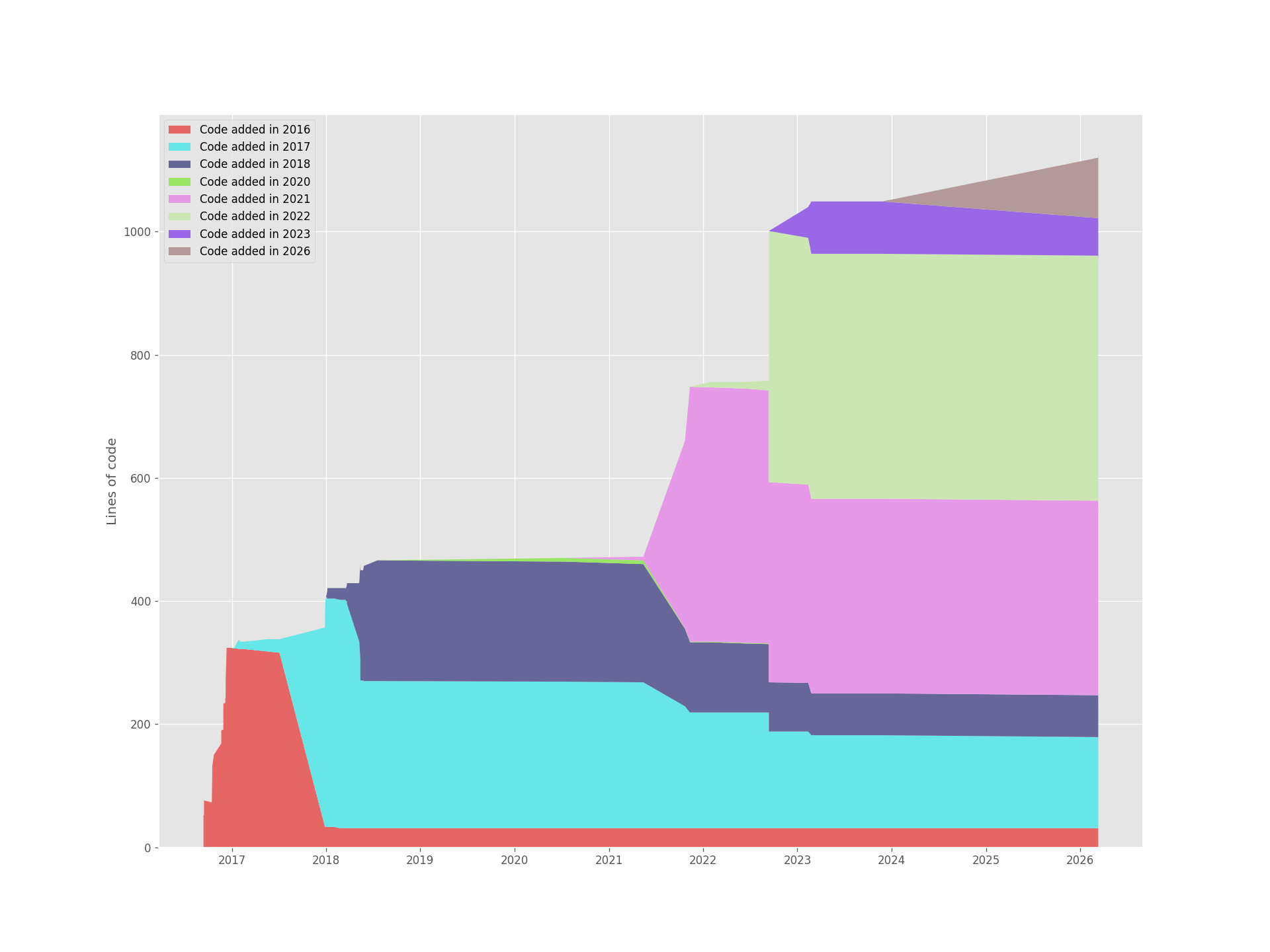
Here's an example running it on this very repository — code broken down by the year it was added:
Installation
Pre-built binaries
Download the archive for your platform from GitHub Releases, then extract its contents and add them to your PATH. Replace `` below with the release tag, including its leading v (for example, v0.4.0). On Linux:
curl -LO https://github.com/eapolinario/git-of-theseus/releases/download//git-of-theseus--x86_64-unknown-linux-gnu.tar.gz
tar -xzf git-of-theseus--x86_64-unknown-linux-gnu.tar.gz
mkdir -p ~/.local/bin
install -m 755 \
  git-of-theseus--x86_64-unknown-linux-gnu/git-of-theseus-analyze \
  git-of-theseus--x86_64-unknown-linux-gnu/git-of-theseus-line-plot \
  git-of-theseus--x86_64-unknown-linux-gnu/git-of-theseus-stack-plot \
  git-of-theseus--x86_64-unknown-linux-gnu/git-of-theseus-survival-plot \
  ~/.local/bin/
Ensure ~/.local/bin is on your PATH. Releases provide archives for Linux x86_64, macOS x86_64 and Apple Silicon, and Windows x86_64. On Windows, extract the .zip archive and add the directory containing the .exe files to your PATH.
Windows with WinGet
After the package manifest for a release has been accepted into the Windows
Package Manager Community Repository,
install or upgrade all four commands without a Rust toolchain:
winget install --id Eapolinario.GitOfTheseus --exact
winget upgrade --id Eapolinario.GitOfTheseus --exact
The portable package places git-of-theseus-analyze,
git-of-theseus-line-plot, git-of-theseus-stack-plot, and
git-of-theseus-survival-plot on PATH. Run winget list --id Eapolinario.GitOfTheseus --exact to confirm the installed version.
Maintainers: every tagged release generates and validates the versioned WinGet
manifests alongside the release assets. Follow the submission procedure in
the WinGet release guide to submit them to the community
repository.
The Linux binaries link against system libraries, so a minimal installation may need them installed first (fontconfig and FreeType for plotting, OpenSSL for HTTPS support in libgit2):
# Debian/Ubuntu
sudo apt-get install -y libfontconfig1 libfreetype6 libssl3
# Fedora/RHEL
sudo dnf install -y fontconfig freetype openssl-libs
Homebrew (macOS releases)
After a tagged release has published the macOS archives and generated Formula/git-of-theseus.rb, install on Intel or Apple Silicon by tapping this repository directly:
brew tap eapolinario/git-of-theseus https://github.com/eapolinario/git-of-theseus
brew install eapolinario/git-of-theseus/git-of-theseus
This installs all four executables: git-of-theseus-analyze, git-of-theseus-line-plot, git-of-theseus-stack-plot, and git-of-theseus-survival-plot. To upgrade to the latest release:
brew update
brew upgrade eapolinario/git-of-theseus/git-of-theseus
The generated formula downloads the same prebuilt macOS binaries published to GitHub Releases. Its version, download URLs, and checksums are updated automatically by the release workflow (.github/workflows/release.yml) whenever a new vX.Y.Z tag is pushed, so brew upgrade always matches the latest tagged release.
Build from source
Clone the repository and build with Cargo:
git clone https://github.com/eapolinario/git-of-theseus.git
cd git-of-theseus
cargo build --release
Executables will be in target/release/. Add that directory to your $PATH, or run them directly:
./target/release/git-of-theseus-analyze --help
Release versioning and tag preparation are documented in
docs/releasing.md.
Usage
Step 1 — Analyze a repository
git-of-theseus-analyze --outdir
This writes several JSON files to ``:
| File | Contents |
|---|
cohorts.json | Lines of code grouped by the year they were added |
authors.json | Lines of code grouped by author |
exts.json | Lines of code grouped by file extension |
dirs.json | Lines of code grouped by top-level directory |
domains.json | Lines of code grouped by author email domain |
survival.json | Data for survival curve estimation |
Analysis can take a while on large repos. Run git-of-theseus-analyze --help for all options including --interval, --branch, --ignore, and --only. For repositories with long histories, opt in to write a commit graph before analysis:
git-of-theseus-analyze --opt --outdir
This runs git commit-graph write --reachable for each requested repository. It requires Git 2.18+ and changes only repository commit-graph metadata; libgit2's revwalk (used by this tool's history walk) reads the commit-graph when present, which can make history traversal about 1.1–2x faster, though end-to-end analysis gains are usually smaller because blame dominates runtime.
Analyzing multiple repositories
Pass two or more repository paths to analyze them in one run:
git-of-theseus-analyze repo-one repo-two --outdir got
Each repository writes the normal JSON files to a named subdirectory:
got/repo-one/cohorts.json, got/repo-two/cohorts.json, and so on. If two
repositories have the same directory name, a numeric suffix is added.
Plotting
The Rust implementation includes the full pipeline — analyze + line/stack/survival plots. Line, stack, and survival plots accept multiple input files. Line and stack plots align repository timelines, carry values forward between samples, and prefix labels with the repository directory name:
git-of-theseus-line-plot got/repo-one/authors.json got/repo-two/authors.json
git-of-theseus-stack-plot got/repo-one/cohorts.json got/repo-two/cohorts.json
git-of-theseus-survival-plot got/repo-one/survival.json got/repo-two/survival.json
Build and run end-to-end:
cargo build --release
OUT=got-rs
./target/release/git-of-theseus-analyze  --outdir $OUT
./target/release/git-of-theseus-stack-plot $OUT/cohorts.json --outfile cohorts.png
./target/release/git-of-theseus-line-plot   $OUT/authors.json --normalize --outfile authors.png
./target/release/git-of-theseus-survival-plot $OUT/survival.json --exp-fit --outfile survival.png
Analyzing multiple repositories and overlaying their plots works the same way:
./target/release/git-of-theseus-analyze repo-one repo-two --outdir got-rs
./target/release/git-of-theseus-line-plot got-rs/repo-one/authors.json got-rs/repo-two/authors.json --outfile authors.svg
./target/release/git-of-theseus-stack-plot got-rs/repo-one/cohorts.json got-rs/repo-two/cohorts.json --outfile cohorts.svg
./target/release/git-of-theseus-survival-plot got-rs/repo-one/survival.json got-rs/repo-two/survival.json --outfile survival.svg
git-of-theseus-analyze additionally supports --merge: instead of one output subdirectory per repository, it
combines every repository into a single set of output files written
directly to --outdir. Series for a label shared across repositories
(the same author, extension, cohort, directory, or domain) are aligned
onto a shared timeline and summed, so the result reads as if all the
repositories were one project:
./target/release/git-of-theseus-analyze repo-one repo-two --outdir got-rs-merged --merge
./target/release/git-of-theseus-stack-plot got-rs-merged/cohorts.json --outfile cohorts-merged.png
All Rust plot binaries support both PNG and SVG output (chosen by file extension)
and accept the existing plot flags (--outfile, --max-n, --normalize,
--exp-fit, --years). --display is currently a no-op. The Rust
line and stack plot commands support the same optional --events manifest.
The Rust CLI is now the only shipped implementation; the Python package has
been removed. A handful of features from the former Python CLI are not yet
implemented in Rust and are documented below as a breaking change rather than
a gap versus a still-available reference implementation: interactive SIGINT
pause/resume. Invocations that relied on that flag will now fail; see the
deferred-features checklist below for tracking. --merge is the reverse
case: a Rust-only addition that had no Python equivalent.
Mailmap author/email rewriting is implemented: git-of-theseus-analyze
resolves each commit's author identity through the repository's .mailmap
(via git2::Repository::mailmap / Mailmap::resolve_signature), mirroring
the Python get_mailmap_author_name_email helper.
Rust port — TODO
The Rust port is being delivered incrementally. Tracked work:
Part 1 — got-core / got-cli scaffold (this PR)
Part 1.x — fill in deferred Python features
Part 2 — got-wasm web target
Part 3 — Rust ports of plot CLIs
Part 4 — Cutover
Step 2 — Generate plots
Stack plot (cohorts, authors, file extensions, or directories):
git-of-theseus-stack-plot /cohorts.json
git-of-theseus-stack-plot /authors.json
git-of-theseus-stack-plot /exts.json --outfile exts.png
Survival plot (percentage of lines still present after N years):
git-of-theseus-survival-plot /survival.json
git-of-theseus-survival-plot /survival.json --exp-fit
Line plot (normalized trends for authors or cohorts):
git-of-theseus-line-plot /authors.json --normalize
Add event markers
Line and stack plots use calendar-time x axes. Add external event markers
with a YAML manifest:
git-of-theseus-line-plot /authors.json \
  --events examples/events.yaml --outfile authors-with-events.png
git-of-theseus-stack-plot /cohorts.json \
  --events examples/events.yaml --outfile cohorts-with-events.png
git-of-theseus-line-plot /authors.json \
  --events examples/events.yaml --outfile authors-with-events.svg
git-of-theseus-stack-plot /cohorts.json \
  --events examples/events.yaml --outfile cohorts-with-events.svg
Each marker has a number above the chart. The event key below the chart
shows its date, provider, event type, label, and scope. Events on the same
date keep separate numbers. Nearby numbers use separate rows to prevent
overlap. Long key entries wrap, and the output height increases as needed.
The data area and axis limits do not change.
SVG files also have tooltips. Open the .svg file directly in a web
browser. Hold the pointer over an event line, its number, or its key entry
to see the full label, date, provider, model, event type, scope, source,
and notes. Notes are omitted when empty. Sources are plain text; the plot
does not open them or run scripts. Events on the same date share a line
position, so use their separate numbers or key entries to inspect each one.
PNG files keep the same static chart and key.
To use a local manifest in PowerShell:
cargo run -p got-cli --bin git-of-theseus-stack-plot -- `
  .\got\cohorts.json --events "C:\path\to\model-releases.yaml" `
  --outfile .\cohorts-with-events.svg
The manifest has schema_version: 1 and an events list. Each event requires
date, provider, model, event, scope, label, and source.
Dates support ISO YYYY-MM-DD values and ISO timestamps; timezone-aware
timestamps are converted to UTC before their calendar date is used. Valid
event values are announced, available, pilot, default, and retired.
Partial dates such as 2026-09 are rejected. Quote dates to keep them
portable between YAML tools. The optional notes field must be a string.
Extra fields, such as window, coverage, limitations, and per-event
evidence, are allowed. The window field is metadata; it does not crop the
plot. An omitted schema version defaults to 1.
provider controls a stable line color.
event controls the line style. The key also states the provider and
event type, so it does not rely on color alone. Events outside the plot
range are ignored and do not expand the axis. An empty manifest, or one
with no events in range, leaves the plot unchanged. Invalid manifests
produce an error before the output file is written.
Event markers describe external dates only. announced and available do not
mean that code used the model, and the chart makes no causal claim. Shaded
intervals are not inferred from overlapping releases. The survival plot is
not calendar-time data: its x axis is elapsed code age in years, so
--events is rejected by both survival plot commands. The tools read the
manifest locally. They do not fetch or verify the sources in it.
Rust callers can set events: Some(path) in LinePlotOptions or
StackPlotOptions. Omit events to keep the normal plot behavior.
Shared fixtures in tests/fixtures cover dates, same-day events, all event
types, and out-of-range events. Run the tests with
cargo test --workspace --locked.
All commands accept --help for the full list of options.
Sample Plots
The following plots were generated by running Git of Theseus on its own repository.
Code by cohort (year added)
Lines of code broken down by the year they were first committed:
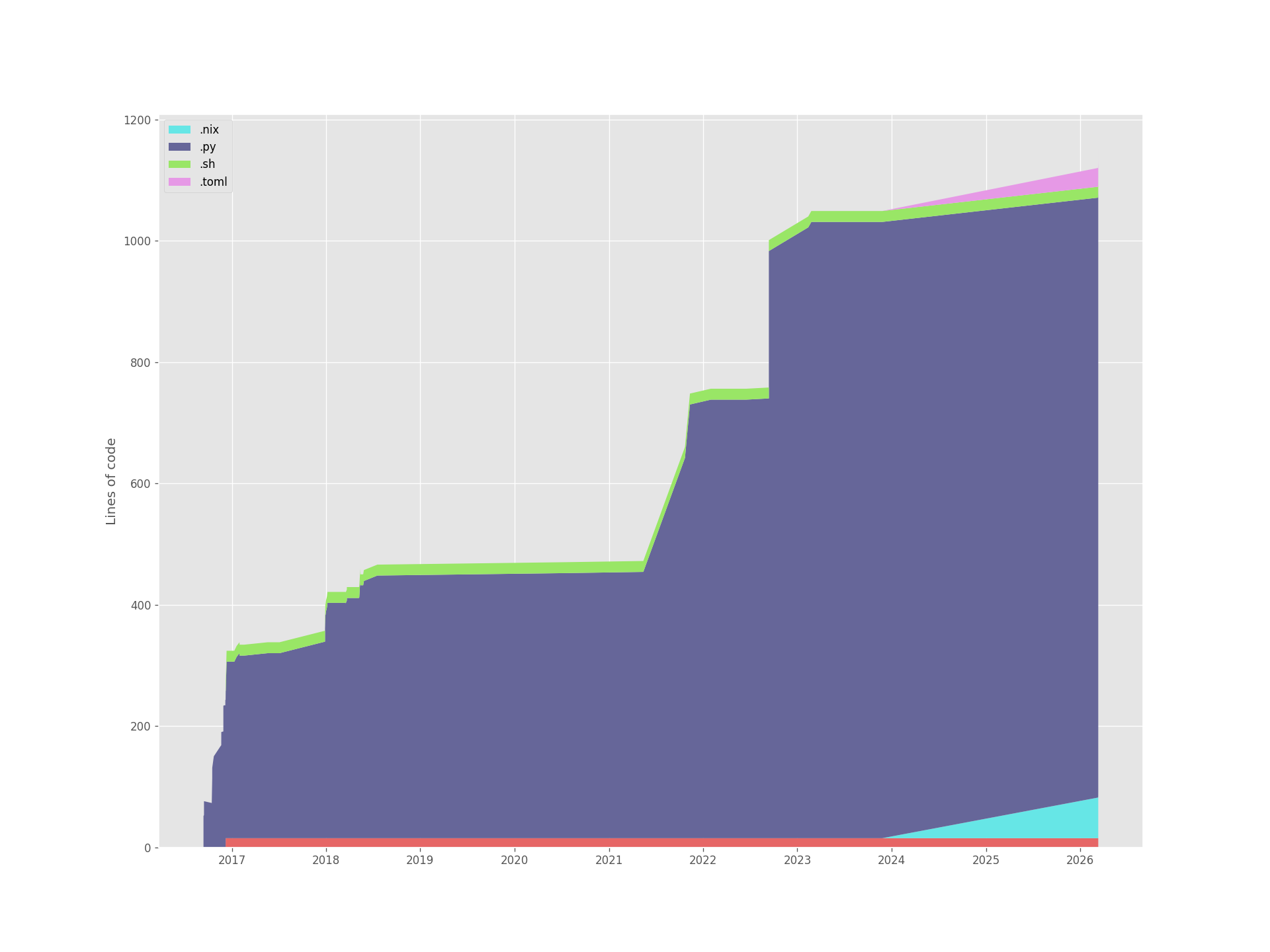
Code by file extension
The codebase is almost entirely Python, with shell scripts and Nix/TOML files added in later years:
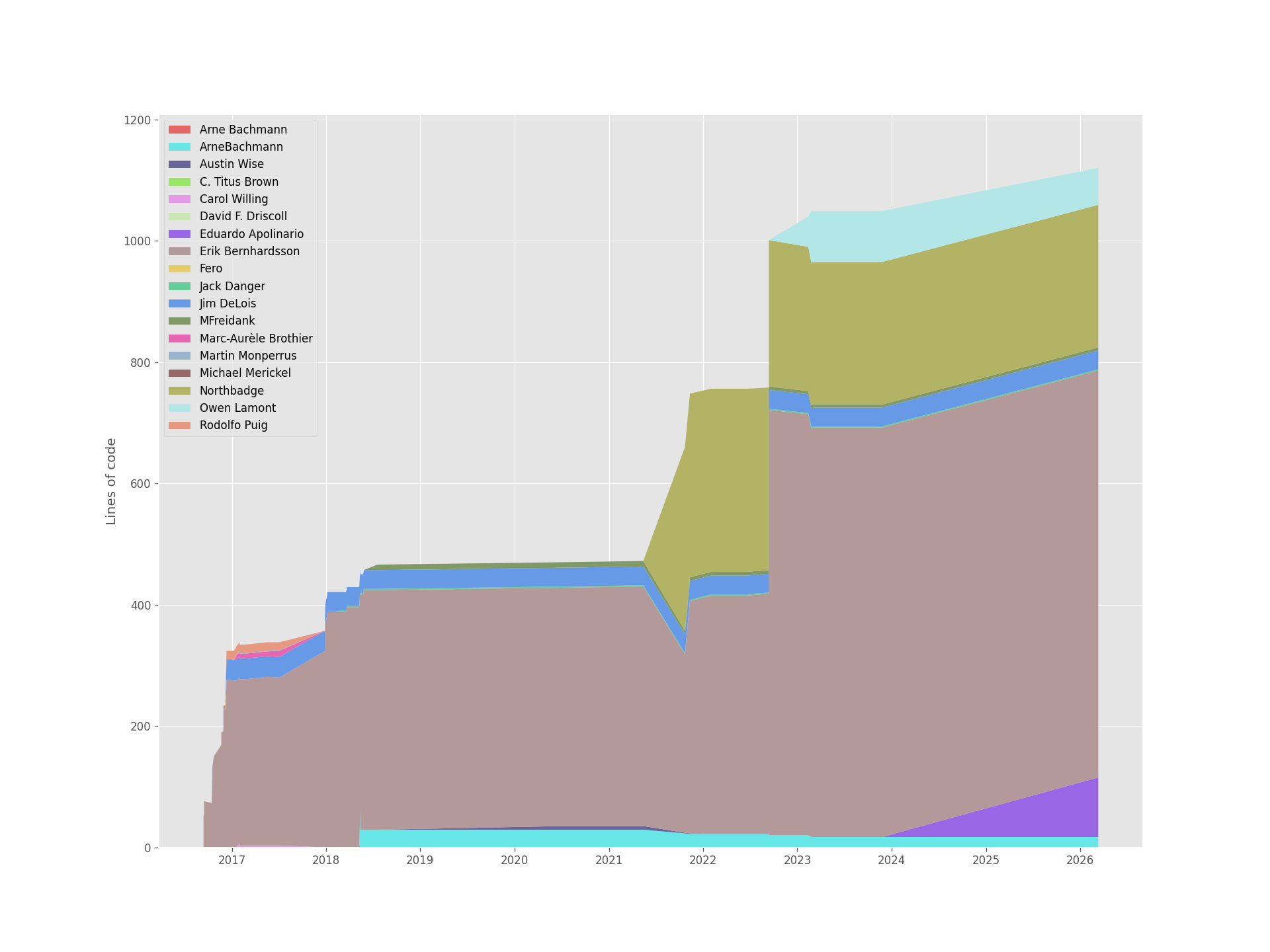
Code by author
Contributions over time from each author:
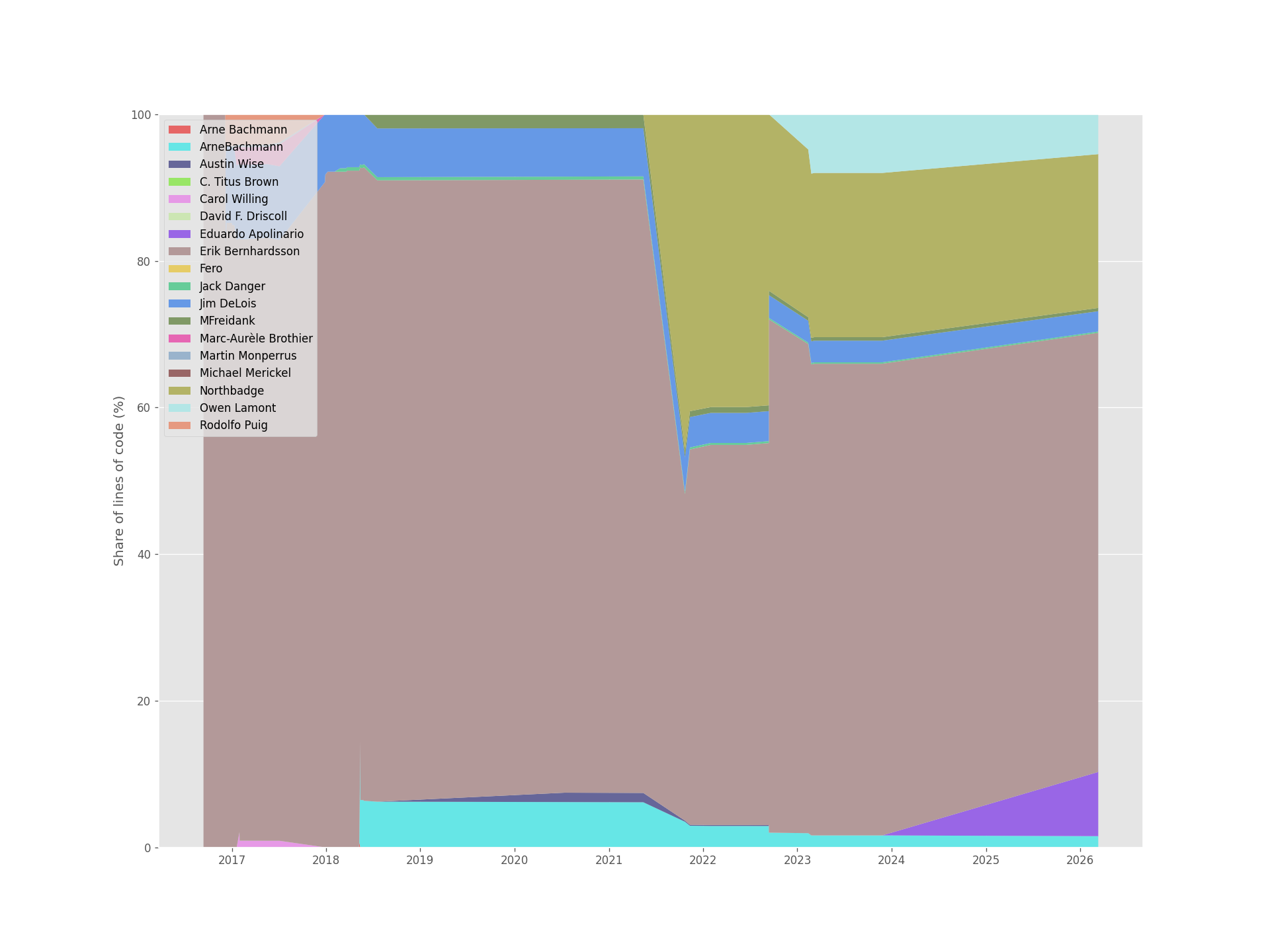
Author contributions (normalized)
The same data normalized to 100%:
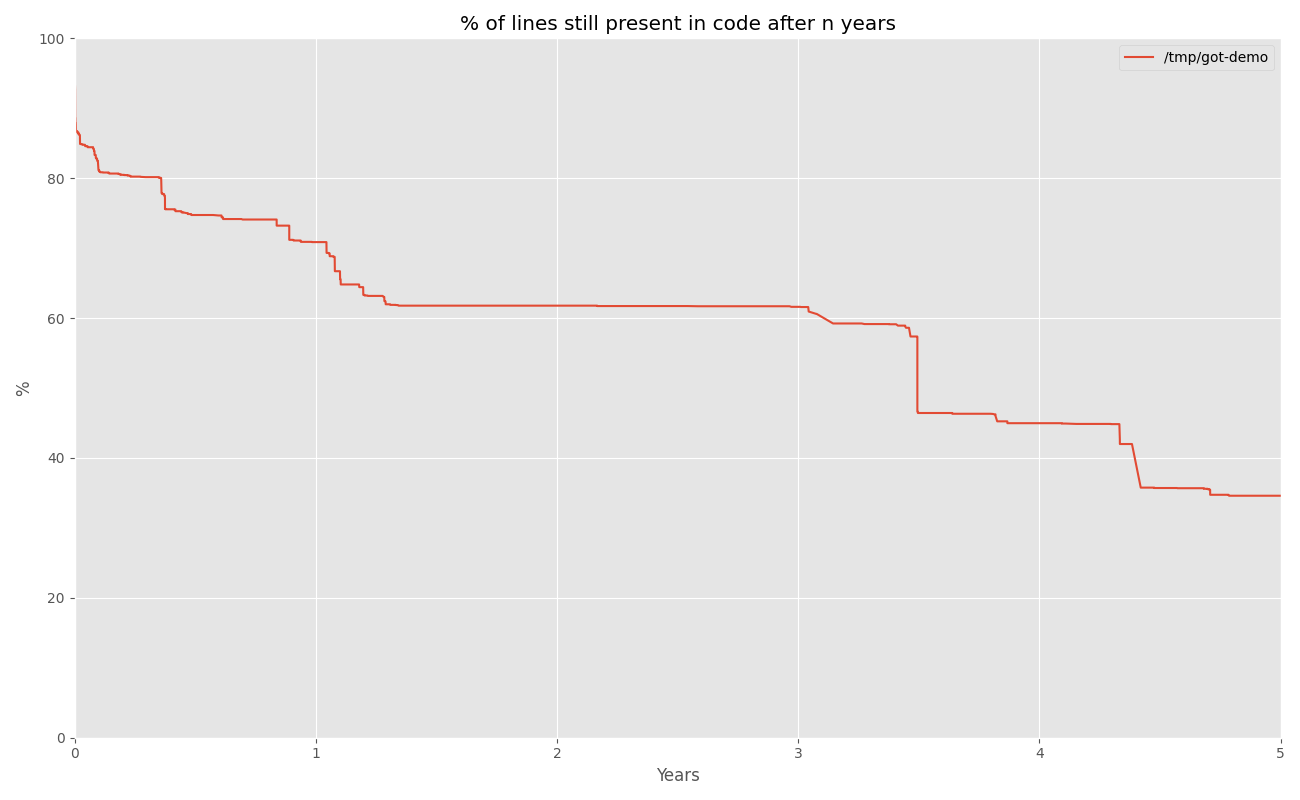
Survival of a line of code
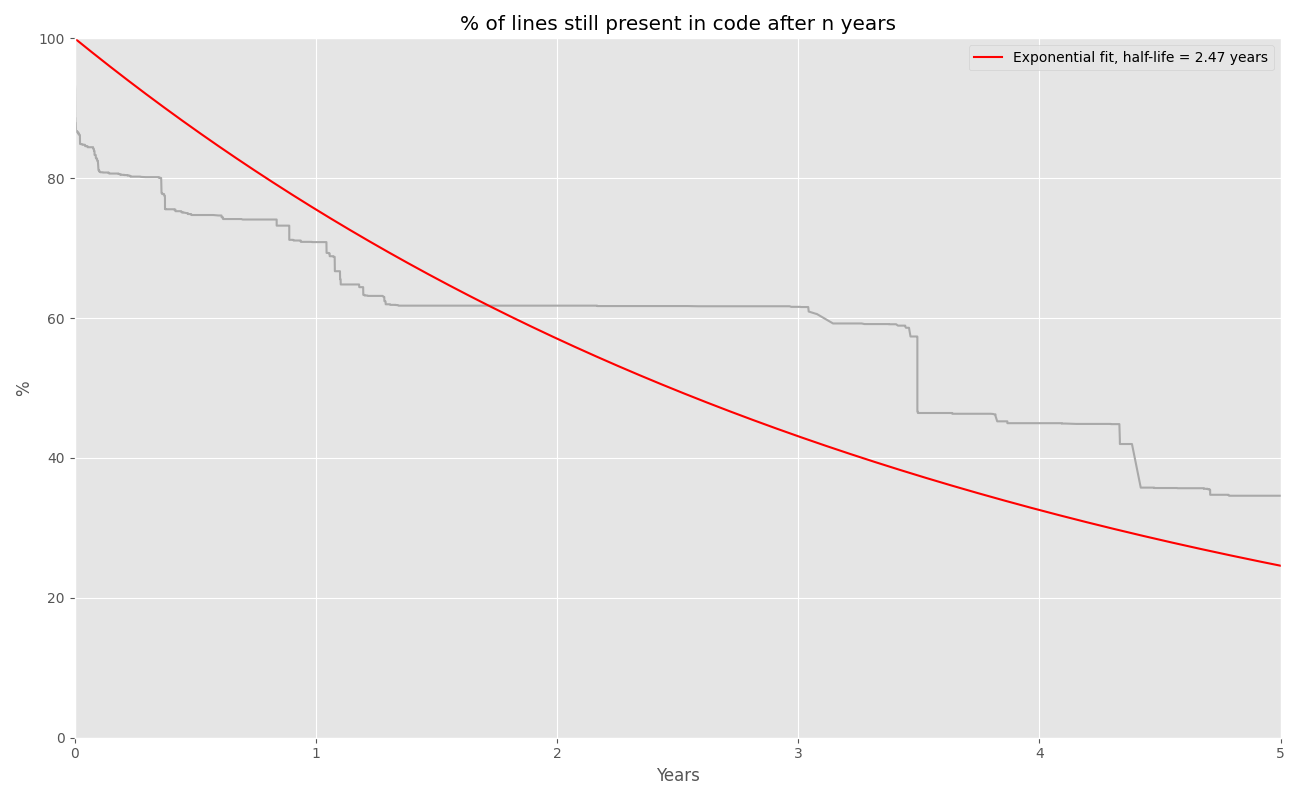
What percentage of lines written at a given point in time are still present N years later, estimated using Kaplan-Meier:
With an exponential decay fit:
Analyzing Multiple Repositories
See Analyzing multiple repositories in
Step 1 above for how to analyze several repositories in one run (or
separately) and feed the results into any plot command — line, stack, or
survival:
git-of-theseus-analyze /path/to/repo-a --outdir repo-a-data
git-of-theseus-analyze /path/to/repo-b --outdir repo-b-data
git-of-theseus-survival-plot repo-a-data/survival.json repo-b-data/survival.json --exp-fit
Working with Authors
If the same contributor appears under multiple names or email addresses, create a .mailmap file in the root of the repository to deduplicate them.
To list unique author/email combinations:
macOS / Linux
git log --pretty=format:"%an %ae" | sort | uniq
Windows PowerShell
git log --pretty=format:"%an %ae" | Sort-Object | Select-Object -Unique
Hercules by Markovtsev Vadim performs a similar analysis and claims to be 20%–6x faster. There's a good blog post covering the complexity involved in analyzing Git history.