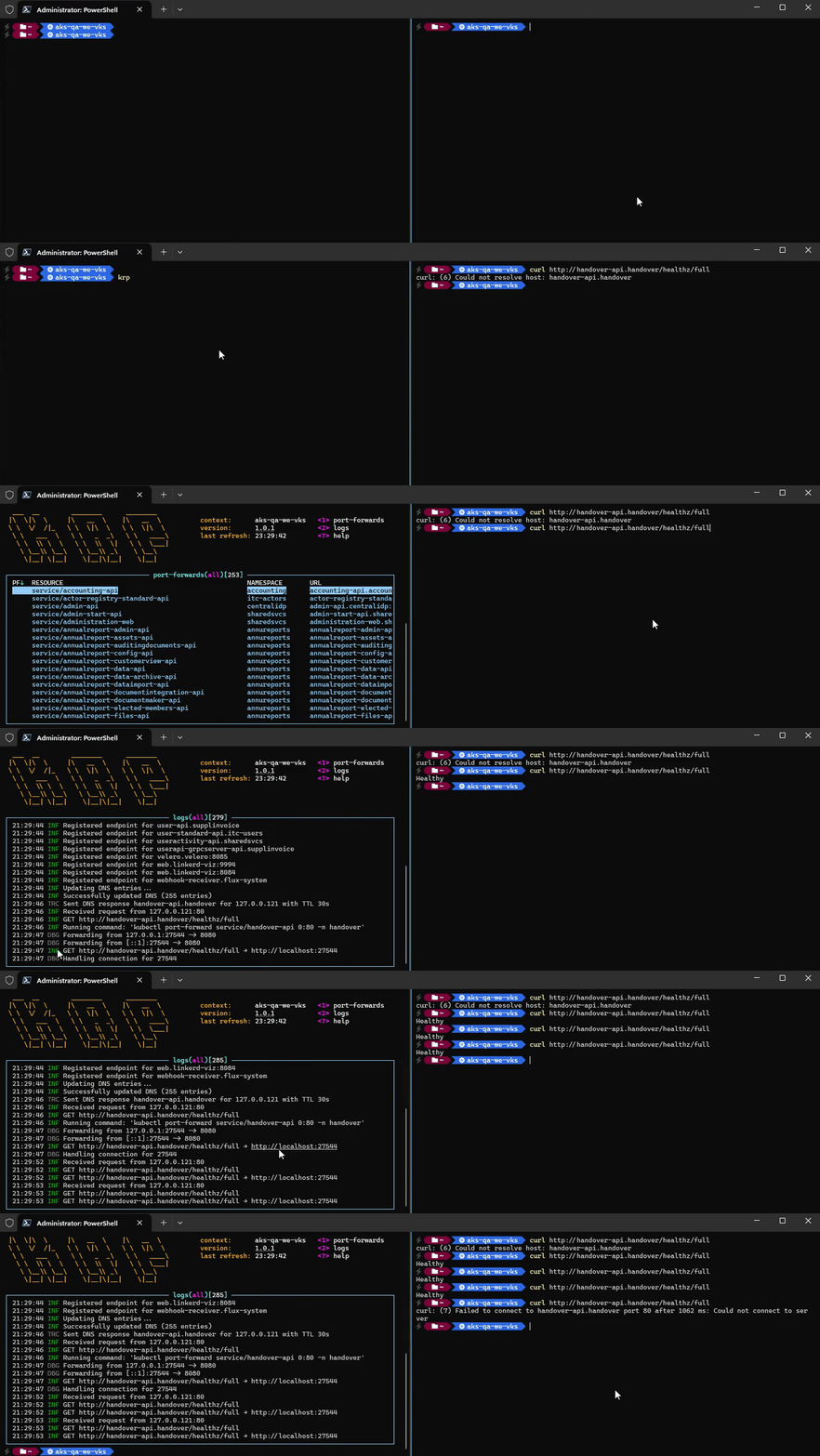
KRP is a lightweight Kubernetes reverse proxy designed to provide on-demand port forwarding and seamless access to cluster services through loopback addresses. It automates port-forwarding processes and routes traffic efficiently for local development and testing.
Key Features:
On-Demand Port Forwarding: Automatically initiates kubectl port-forward when needed, eliminating manual setup.
Context Awareness: Adapts to changes in Kubernetes cluster context, ensuring seamless operation across environments.
Dynamic Traffic Routing: Routes traffic through loopback addresses (e.g., 127.0.0.x), enabling local access to Kubernetes services without external dependencies.
Zero Configuration: Requires minimal setup once running, allowing users to focus on development tasks.
Automatic Cleanup: Safely terminates all active port forwards upon application exit, preventing resource leaks.
Audience & Benefit:
Ideal for developers and DevOps teams working with Kubernetes clusters. KRP streamlines access to cluster services by automating complex networking configurations, reducing operational overhead, and enabling efficient local testing of Kubernetes-based applications. It supports dynamic environments where frequent context changes or endpoint updates are common, ensuring consistent and reliable service access.
KRP can be installed via winget for easy setup and integration into development workflows.
README
krp - Kubernetes Reverse Proxy
krp is a lightweight Kubernetes reverse proxy designed to provide on-demand port forwarding and seamless forwarding to internal Kubernetes resources. The tool facilitates automatic port forwards and provides dynamic routing via loopback addresses.
Features
On-Demand Port Forwarding – Automatically runs kubectl port-forward when you need it.
Context Aware – Adapts to changes in your current cluster context.
Automatic Cleanup – All active port forwards is cleaned up on application exit.
Dynamic Traffic Routing – Routes through localhost using hosts file or WinDivert.
Zero Configuration – Once running, the tool requires no further setup or user intervention.
Routing configuration:
Each endpoint will get a unique loopback address (eg. 127.0.0.x myapi.namespace).
Reverse proxying:
Listens on the local machine and proxies requests to endpoint targets.
Port forwarding endpoints:
Runs kubectl port-forward and forwards traffic to Kubernetes pods to local ports. Re-uses existing process if already exists, and if the pod dies the process also dies in which case a new one will spawn on-demand.
HTTP proxy endpoints:
Routes to local port if up, otherwise routes to original IP.
Examples
Use case: Kubernetes endpoint
.UseEndpoint(0, 80, "namespace", "service/myapi") // 0 for dynamic local port selection
Assume your cluster has a service exposed at myapi.namespace:80.
The DNS will be modified to resolve myapi.namespace to 127.0.0.x (using hosts file or WinDivert).
Traffic will be proxied to krp.
krp will find corresponding target endpoint based on loopback address and run kubectl port-forward to forward traffic to local port.
You can then make requests as if the service was hosted locally: curl myapi.namespace
windivert for Windows Packet Filter driver requires administrator privileges.
Installation
# Using winget
winget install EddieTisma.Krp
# Using dotnet tool
dotnet tool install --global dotnet-krp
krp
# Using docker
curl -fsSL https://raw.githubusercontent.com/eddietisma/krp/main/docker-compose.yml -o docker-compose.yaml
docker compose up
# Using local code
git clone https://github.com/eddietisma/krp.git
cd krp
dotnet run
Usage
Configuration
You can configure port-forwarding and routing behavior as follows:
# krp --help
Usage: krp [options]

Options:
  -v|--version                   Show version information.
  -n|--nameserver   DNS server, used for HTTP proxy endpoints
                                 Default value is: 8.8.8.8.
  --no-certificate-validation    Disable certificate validation
  --no-discovery                 Disable automatic Kubernetes endpoint discovery
  --no-ui                        Disable terminal UI
  -f|--forwarder      Forwarding method
                                 Allowed values are: tcp, http, hybrid.
                                 Default value is: hybrid.
  -r|--routing          Routing method
                                 Allowed values are: hosts, windivert.
                                 Default value is: windivert.
  -?|-h|--help                   Show help information.

Commands:
  https                          Manage HTTPS certificates

Environment variables:
  KRP_HOSTS                       Override path to hosts file
Routing methods
hosts
Modifies system hosts file (eg. C:\Windows\System32\drivers\etc\hosts on Windows).
Each endpoint gets a unique loopback IPs (e.g., 127.0.0.x).
Network traffic destined for these loopback IPs is intercepted and redirected to krp.
Requirements
Requires administrator privileges to modify the hosts file.
Requires administrator privileges when running in docker.
Requires a mounted path and env variable KRP_HOSTS when running in docker.
windivert (default)
WinDivert is a Windows packet capture and manipulation tool used by krp to implement a transparent UDP proxy for the DNS protocol. It redirect DNS traffic for endpoint hostnames. When enabled, WinDivert allows krp to dynamically reroute traffic to loopback addresses.
Captures outgoing DNS requests (UDP/53) matching endpoints hostnames.
Crafts DNS responses to resolve these hostnames to unique loopback IPs (e.g., 127.0.0.x).
Network traffic destined for these loopback IPs is intercepted and redirected to krp.
Requirements
Only supported on Windows.
Running WinDivert requires administrator privileges to capture and inject network packets.
> [!NOTE]
> WinDiverts installs as an ephemeral windows driver service at runtime. Once stopped, it's automatically removed.
Forwarders available
HttpForwarder
Supports HTTP requests (only).
Supports domain based routing (using HTTP headers).
Multiplexing HTTP/1.1 and HTTP/2 over cleartext using same port without TLS is not supported.
For HTTPS either disable certificate validation on client or setup certificate for each domain.
TcpForwarder
Supports low-level TCP requests.
Supports domain based routing (using domain-based IP per hostname in hosts file).
TcpWithHttpForwarder (default)
Supports low-level TCP requests.
Supports domain based routing (using domain-based IP per hostname in hosts file)
Forwards HTTP/x request to HttpForwarder using packet inspection.
Inspects TCP traffic and routes HTTP requests to different server ports based on protocol (81 for HTTP/1.1 and 82 for HTTP/2) without TLS requirement.
> [!NOTE]
> When running Docker on Windows: No support for domain based routing for low-level TCP due to docker networking limitations. Windows do not yet have full support for host network driver, which results in NAT issues when routing (all loopback IPs will originate from Docker gateway). Limiting routing to HTTP requests only for Windows hosts.
>
> For HTTPS we could use SNI to detect hostnames and use for routing but ran into issues with reacting to network changes due to already established TCP tunnels (need some more work to break existing TCP connections when needed).
HTTPS certificate management
krp uses its own certificate authority (CA) for optional local HTTPS routing.
Run krp https --trust to create a new certificate and trust it.
When HTTPS requests are proxied, krp dynamically generates per-host leaf certificates signed by that CA, so each routed hostname gets a valid certificate.
Running in Docker
To run krp in a Docker container, follow these steps:
Start Docker Desktop as an administrator (required for hosts file modification).
Build and run the Docker container:
docker buildx bake -f .buildcharts\docker-bake.hcl docker
docker compose up -d
Authenticate kubectl with cluster:
Most providers will encrypt the auth config for the specific machine. Hence mounting the config folder won't work inside the container.
# For AKS
docker exec -it $(docker ps --filter "name=krp" --format "{{.ID}}") az login  --use-device-code
docker exec -it $(docker ps --filter "name=krp" --format "{{.ID}}") kubelogin convert-kubeconfig -l azurecli

# For GKE
todo..

# For EKS
todo...