


About ElegooSlicer
ElegooSlicer is an open-source slicer compatible with most FDM printers. Currently, ElegooSlicer is undergoing rapid iteration, with more features to be released soon. Please stay tuned for updates. We invite you to join our Discord and follow the announcement to join the BETA channel for FDM slicer to stay updated on the latest news about ELEGOO products and FDM slicer.
How to install
Windows:
- Download the installer for your preferred version from the releases page.
- For convenience there is also a portable build available.
- If you have troubles to run the build, you might need to install following runtimes:
Mac:
-
Download the DMG for your computer: arm64 version for Apple Silicon and x86_64 for Intel CPU.
-
Drag ElegooSlicer.app to Application folder.
-
If you want to run a build from a PR, you also need to follow the instructions below:
Details
-
Option 1 (You only need to do this once. After that the app can be opened normally.):
- Step 1: Hold cmd and right click the app, from the context menu choose Open.
- Step 2: A warning window will pop up, click Open
-
Option 2:
Execute this command in terminal: xattr -dr com.apple.quarantine /Applications/ElegooSlicer.app
softfever@mac:~$ xattr -dr com.apple.quarantine /Applications/ElegooSlicer.app
-
Option 3:
- Step 1: open the app, a warning window will pop up
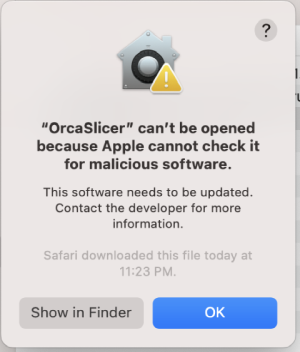
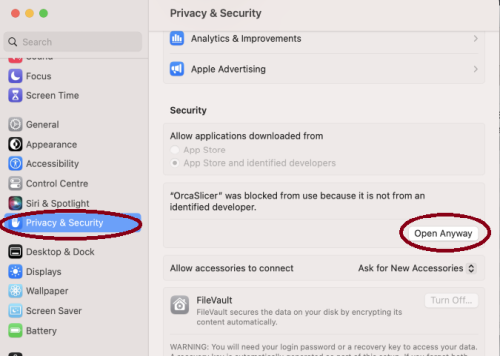
- Step 2: in
System Settings -> Privacy & Security, click Open Anyway:
How to compile
-
Windows 64-bit
- Tools needed: Visual Studio 2022, CMake, git, git-lfs, Strawberry Perl.
- Run
build_release_windows.bat in x64 Native Tools Command Prompt for VS 2022
- Note: Don't forget to run
git lfs pull after cloning the repository to download tools on Windows
-
Mac 64-bit
- Tools needed: Xcode, Cmake, git, gettext, libtool, automake, autoconf, texinfo
- You can install most of them by running
brew install cmake gettext libtool automake autoconf texinfo
- run
build_release_macos.sh
- To build and debug in Xcode:
- run
Xcode.app
- open
build_`arch`/OrcaSlicer.Xcodeproj
- menu bar: Product => Scheme => OrcaSlicer
- menu bar: Product => Scheme => Edit Scheme...
- Run => Info tab => Build Configuration:
RelWithDebInfo
- Run => Options tab => Document Versions: uncheck
Allow debugging when browsing versions
- menu bar: Product => Run
See doc/DEVELOPER.md for developer tools and AI assistant rules.
We recommend joining our Discord BETA channel to provide real-time feedback and engage in discussions. You can also report issues and track progress on GitHub Issues.
License
ElegooSlicer is licensed under the GNU Affero General Public License, version 3. ElegooSlicer is based on Orca Slicer by SoftFever.
Orca Slicer is licensed under the GNU Affero General Public License, version 3. Orca Slicer is based on Bambu Studio by BambuLab.
Bambu Studio is licensed under the GNU Affero General Public License, version 3. Bambu Studio is based on PrusaSlicer by PrusaResearch.
PrusaSlicer is licensed under the GNU Affero General Public License, version 3. PrusaSlicer is owned by Prusa Research. PrusaSlicer is originally based on Slic3r by Alessandro Ranellucci.
Slic3r is licensed under the GNU Affero General Public License, version 3. Slic3r was created by Alessandro Ranellucci with the help of many other contributors.
The GNU Affero General Public License, version 3 ensures that if you use any part of this software in any way (even behind a web server), your software must be released under the same license.
Orca Slicer includes a pressure advance calibration pattern test adapted from Andrew Ellis' generator, which is licensed under GNU General Public License, version 3. Ellis' generator is itself adapted from a generator developed by Sineos for Marlin, which is licensed under GNU General Public License, version 3.
The Bambu networking plugin is based on non-free libraries from BambuLab. It is optional to the Orca Slicer and provides extended functionalities for Bambulab printer users.
Licensed under the AGPL-3.0 license.