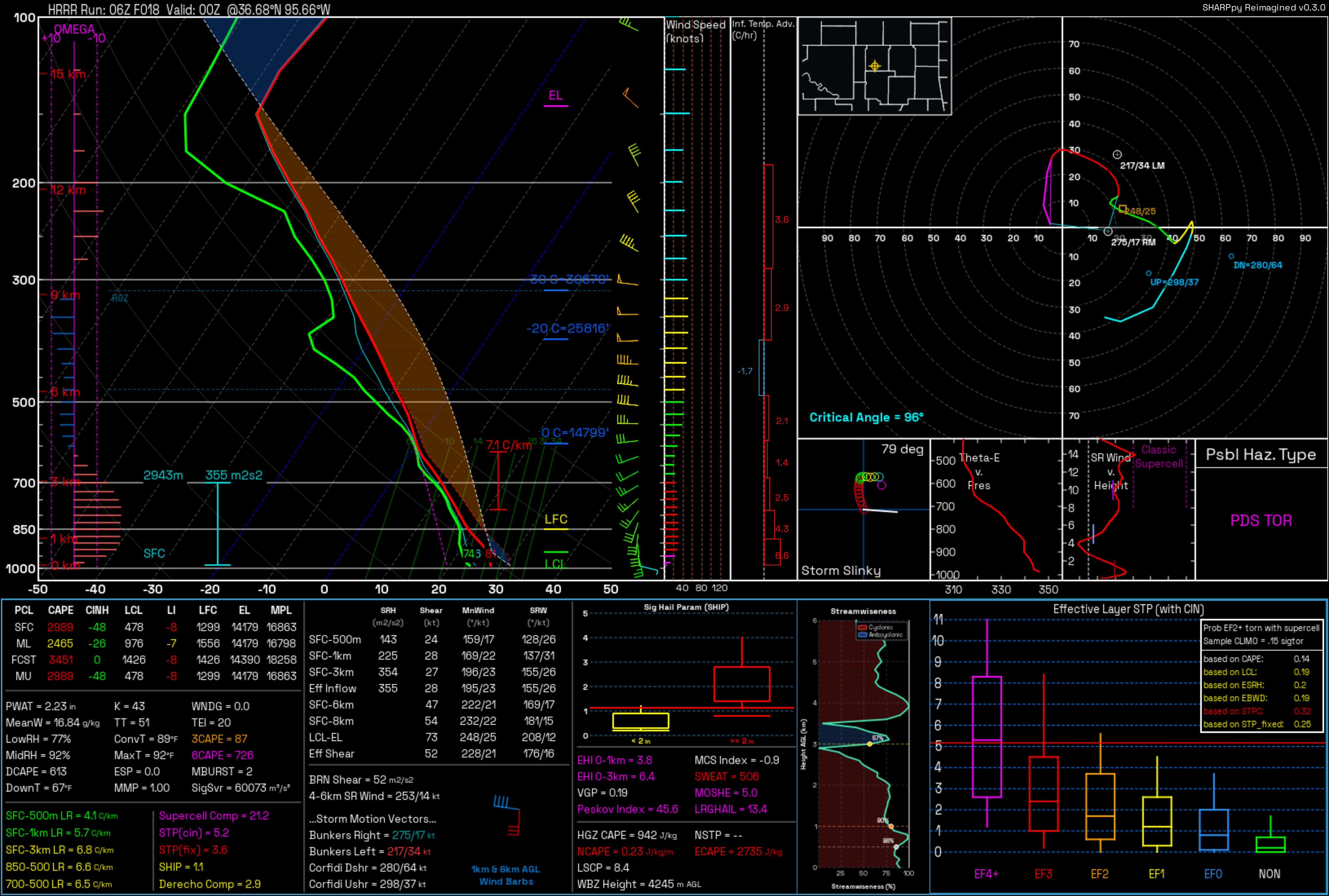
SHARPpy Reimagined is a modernized, standalone fork of
SHARPpy, focused on packageable Python
3.11+ workflows, Qt6/PySide6 rendering, and reproducible point-sounding tools.
It keeps the familiar SPC-style skew-T, hodograph, hazard, and derived-parameter
views while adding clean command-line entry points, bundled resources, and a
test-backed decoder/extractor layer.
v0.3.2 build targets
The v0.3.2 release packaging is configured to produce these
no-Python-required desktop artifacts:
- Windows x64: a single
.exe and a portable one-folder .zip.
- Linux x64: a single executable and a portable one-folder
.tar.gz.
- macOS Apple Silicon and Intel: zipped
.app bundles.
This checkout does not claim that v0.3.2 has already been published. Check the
GitHub Releases page
for the tags and artifacts that are actually available; until a v0.3.2 tag is
present, build and test it from source on the target operating system.
When built, the macOS community artifacts are ad-hoc signed, not
Apple-notarized; use Control-click → Open the first time if Gatekeeper asks
for confirmation. On Linux, extract the locally built or published archive and
run SHARPpy-Reimagined-vRust (or make the single-file artifact executable
with chmod +x first).
Highlights
- Hybrid forecast retrieval that uses an existing Rusty Weather
.rws model
hour immediately, but prefers small point/subregion downloads for a cold
request instead of downloading an entire model hour unnecessarily.
- A one-call, GIL-free native analysis extension:
sharppyrs supplies the
display-analysis layer, sharprs supplies the sounding core and parcel/
meteorological calculations, and ecape-rs supplies analytic ECAPE/NCAPE.
- Explicit compatibility fallbacks when the extension cannot load or analyze a
profile, plus narrowly scoped Python features for data contracts the pinned
Rust APIs do not yet expose.
- Synced upstream v0.3.1 fixes for scalar ERA5 point coordinates,
equilibrium-level-bounded NCAPE saturation work, and Windows PyInstaller
inclusion/runtime verification of the local
sharpmod package.
- Headless PNG rendering for
.npz, SPC tabular, BUFKIT, PECAN, and WRF-ARW
text sounding inputs.
- Portable
.npz point-sounding output from UWyo, ERA5, WRF-ARW, and public
forecast models fetched through Herbie.
- Qt6/PySide6 compatibility shims around the upstream SHARPpy widget stack.
- Offline UWyo station catalog plus package-relative bundled fonts.
- Property-based pytest coverage for decoders, derived parameters, hazards,
renderer-facing widgets, and extraction paths.
Quick Start
Requires Python 3.11 or newer. Start from a repository checkout and use an
isolated environment:
git clone https://github.com/FahrenheitResearch/SHARPpy-Reimagined-vRust.git
cd SHARPpy-Reimagined-vRust
python -m venv .venv

# Windows PowerShell: .venv\Scripts\Activate.ps1
# macOS/Linux: source .venv/bin/activate

python -m pip install --upgrade pip setuptools wheel
python -m pip install ".[render]"
python -m pip install --no-deps "SHARPpy==1.4.0a5"

python -c "import sharpmod, sharppy, sutils, PySide6, qtpy; print('imports OK')"

sharpmod-render examples/soundings/hrrr_point_36.68N_95.66W_f018.npz out.png
The Python source install remains usable without a Rust toolchain and then uses
the complete SHARPpy-compatible Python analysis fallback. To enable the same
native analysis used by the standalone build from a source checkout, install
Rust, then build the pinned extension:
git clone https://github.com/FahrenheitResearch/sharppyrs native/sharppyrs
git -C native/sharppyrs checkout 958bcd685b1e28b8fce0ab5c7b8daea3cdd993aa
git -C native/sharppyrs apply ../patches/sharppyrs-ecape-el.patch
git -C native/sharppyrs apply ../patches/sharppyrs-sharppy-parity.patch
cargo build --manifest-path native/sharpmod-native/Cargo.toml --release --locked
python packaging/install_native_extension.py
python -c "from sharpmod import sharpmod_native; print(sharpmod_native.backend_info())"
sharpmod-render writes a 2x HD PNG by default; add --uhd for the larger
2.8x export or --lossless for the original-size compact/lossless PNG.
The upstream SHARPpy==1.4.0a5 package is installed with --no-deps because
its published metadata pins an old NumPy version. SHARPpy Reimagined provides
the modern runtime dependencies separately. Contributors who intend to edit
the checkout can replace pip install ".[render]" with the editable form
pip install -e ".[render]".
Desktop GUI
An interactive, legacy-SHARPpy-style desktop app is included:
sharpmod-gui # or: python -m sharpmod.gui
On Windows, source-checkout GUI runs use Python 3.11-3.13. If this command is
invoked by Python 3.14 and the checkout has a .venv or .gribenv, the launcher
automatically hands the GUI to that compatible environment before Qt starts.
The Windows packaging target bundles Python 3.11.
The Sounding Picker opens with four ways to load a sounding:
- Station Map — a clickable map of every UWyo radiosonde station over a
coastline basemap. Click a dot to select, double-click to open; scroll to
zoom, drag to pan, and pick a region from the Map area menu. Observation
times are selectable every three hours from 00Z through 21Z.
- Station List — the full catalogue with live id/name filtering and the
same three-hourly UTC observation-time choices.
- Forecast Model — click a point or enter latitude/longitude, then choose a
public model, UTC run, forecast hour, and optional ensemble member. The picker
checks that inventory in the background. If publication is delayed, it offers
the newest available earlier cycle without silently changing the selection;
an uncertain check never disables manual Fetch. The fetch runs in the
background with stage/byte progress and a Cancel button, then opens the point
sounding only after its display calculations are ready. Once the first model
sounding is open, a single click on another map point fetches that point and
refreshes the same interactive plot instead of opening another window. For a
Rust-supported selection, Cache This Hour for Fast Map Browsing builds a
reusable full-hour
.rws store in the background with progress and cancel
support.
- Open File — a local
.npz, SPC, BUFKIT, PECAN, or WRF-ARW text sounding
(or just drag the file onto the window).
Each sounding opens in the full interactive SPC window (the upstream SHARPpy
widget stack), so every interaction from the
SHARPpy GUI guide
works:
- Right-click the Skew-T for the readout cursor, Modify Surface, parcel
lifting, and reset.
- Click + drag temperature / dewpoint / wind points to edit the profile —
every index recalculates live.
- Mouse wheel zooms; right-click the hodograph re-centers it, and
double-clicking the RM/LM markers sets the storm motion.
- Double-click the lower-left inset to swap lifted parcels.
- Keys: ← / → step in time, ↑ / ↓ change ensemble member,
Space swaps
focus, I interpolates, C collects observed, W returns to the picker.
- Undo / Redo:
Ctrl+Z reverses profile, interpolation, and storm-motion
edits; Ctrl+Y reapplies them. Each viewer retains the latest 50 edits.
- File → Preferences switches the color palette (Standard / Inverted /
Protanopia), units, and the parcel visualized by default when a Skew-T opens.
GUI choices persist across launches, including temperature/wind/PWAT units,
palette, top/bottom readouts, default parcel, multi-sounding behavior, dismissed
tips, recent files, and last selections. On Windows they are stored in
%APPDATA%\SHARPpy Reimagined\settings.ini; set SHARPMOD_SETTINGS_PATH to
use a different INI file.
Rust-first sounding analysis
When sharpmod_native is present, decoded soundings target a compatible native
profile adapter. One GIL-free call normalizes the profile and computes the
parcels, thermodynamic fields, kinematics, severe-weather composites, fire and
winter diagnostics, watch inputs, and the complete 84-field sharppyrs
derived set through sharppyrs and its sharprs core. Interactive user-parcel
lifts use sharprs too. The authoritative vRust ECAPE/NCAPE values come from
the in-process ecape-rs path.
The extension returns the versioned sharpmod.native-analysis.v1 schema and
records per-result provenance (sharprs-core, sharppyrs-rust, and
ecape-rs). backend_info() also exposes the exact pinned sharppyrs,
sharprs, and ecape-rs revisions used to build it.
The Rust ECAPE path is compared directly with ecape-parcel-py over committed
synthetic, observed, HRRR point and BUFKIT profiles; the current 55 comparable
cases all satisfy the release threshold of max(10 J/kg, 5%). See the
Rust ECAPE validation report for the numerical
summary, edge cases and reproduction command.
The SHARPpy-compatibility corpus passed 83,631 of 83,631 comparisons across 57
profiles. The complete 100-case fixed-seed stress run then found one
zero-depth effective-layer edge with three failed comparisons. After the
targeted correction, that case passed 1,455 of 1,455 comparisons and the
affected canonical profile passed 1,473 of 1,473. See
Rust calculation parity for the scope and tolerances.
All normal runtime meteorological calculations are native, including detailed
fire/PBL diagnostics and precipitation source/layer-energy analysis. On a
successful native profile, Python remains only for the SARS analog-database
and station PWV-climatology lookups; these are data lookups, not calculation
fallbacks. If the extension is missing, disabled, rejects the profile, or
fails at runtime, the app constructs the full legacy-compatible Python
ConvectiveProfile instead. Set SHARPMOD_DISABLE_NATIVE_ANALYSIS=1 to test
that fallback explicitly.
The final precipitation-only sweep passed 714 of 714 field comparisons across
51 constructible committed real soundings; source, phase, layer-energy, and
precipitation-type results matched the legacy oracle.
Compare Rust and Python in the viewer
With a Rust-backed sounding highlighted, choose Profiles → Compare Rust vs
Python…. The app snapshots that sounding and calculates a legacy Python
ConvectiveProfile in a background thread only after you request the
comparison. Normal sounding loads and cached map-point refreshes remain on the
fast Rust path and do not pay for a second profile.
The result window lists the Rust value, legacy Python value, absolute
difference, allowed difference, and pass/fail result for each displayed field;
differences are sorted first. Numeric rows use the same unit-specific
tolerances as the release parity audit. Upstream legacy MMP reads undefined
working-array cells, so MMP itself is informational. Watch rows marked
MMP-normalized re-run the legacy watch classifier with the deterministic Rust
MMP value instead of reporting allocator-dependent differences.
Use Show Legacy Python to mount the reference as a temporary, separate
profile or Show Rust (fast) to return to the original cached profile. The
comparison never replaces the source sounding, and a cached result is not
reused after that sounding changes. This interactive view is a convenient
spot-check; the reproducible 57-profile corpus and 100-case stress audit remain
the release gate. See Rust calculation parity for its
scope, tolerances, seams, and reproduction commands.
Final v0.3.2 calculation timings below use the release-mode extension on one
Windows development machine after import warm-up. They are median calculation
times, not hardware, GUI-paint, or network guarantees.
| Operation | Observed time |
|---|
| Bulk Rust analysis call | 2.00 ms |
| Interactive Rust user-parcel lift | 0.60 ms |
| Compatible profile, including the two Python lookup-only features | 6.98 ms |
.npz load + native profile + display companion | 8.93 ms |
Full legacy Python ConvectiveProfile on the same sample | 205.67 ms |
Model transport is a separate cost. On the same development setup, an existing
.rws hour exported another point in 39–49 ms; an uncached HRRR Zarr point took
2.6–3.5 seconds and about 12.3 MB; and the deliberate cold Rust full-hour path
took about 43.5 seconds and roughly 500 MB. Network conditions and model-hour
size dominate those retrieval numbers.
Analysis sessions
Use File → Save Analysis Session… (Ctrl+Shift+E) in a sounding window to
save every loaded sounding, the active profile, current profile/interpolation/
storm-motion edits, parcel selection, and viewer state. Open Analysis
Session… (Ctrl+Shift+O) is available from both the picker and sounding
window and restores the saved soundings together in one viewer.
Session files use the .sharpmod-session extension and a versioned, portable
JSON format; they do not execute code or embed source GRIB downloads. Forecast
download directories still follow the normal lifecycle and are deleted when
their original viewer closes.
Export
The sounding window's Export menu saves the current view:
- Export Image (HD PNG) (
Ctrl+E) — a 2x high-density image of the full
window, including the mounted derived-parameter panels, with a sensible
default filename (STATION_YYYYMMDDHHZ_hd.png) in your Desktop folder.
- Export Image (UHD PNG) — a larger 2.8x ultra-high-density image
(
STATION_YYYYMMDDHHZ_uhd.png).
- Export Image (Lossless PNG) — the original-size compact/lossless image
for smaller files (
STATION_YYYYMMDDHHZ_lossless.png).
- Copy Image to Clipboard (
Ctrl+Shift+C) — the same current view, ready
to paste into another app.
- Export Text (SHARPpy) — the focused profile as a text file that loads
back into the app.
(The upstream File → Save Image / Save Text actions remain available too.)
Standalone application
A one-folder, no-Python-required build is produced with PyInstaller:
python -m pip install pyinstaller
pyinstaller packaging/sharpmod_gui.spec --noconfirm
The result is dist/SHARPpy-Reimagined-vRust/ on Windows/Linux and a
dist/SHARPpy-Reimagined-vRust.app bundle on macOS. Set
SHARPMOD_ONEFILE=1 on Windows or Linux for a single self-extracting
executable instead. PyInstaller outputs are platform-specific, so each build
must be created on its target operating system.
| Command | Purpose |
|---|
sharpmod-render | Render a sounding file to a PNG |
uwyo-sounding | List, search, and fetch University of Wyoming soundings |
era5-extract | Extract an ERA5 point sounding to .npz |
model-extract | Fetch all pressure levels for a supported forecast-model point sounding |
wrf-extract | Extract a WRF-ARW point sounding to .npz |
Install the GRIB stack before fetching model data. Add the render stack and the
upstream SHARPpy runtime when --render is needed:
# Extraction only
python -m pip install -e ".[era5]"

# Extraction plus PNG rendering
python -m pip install -e ".[era5,render]"
python -m pip install --no-deps "SHARPpy==1.4.0a5"
Discover the installed CLI and check remote inventory before a large fetch:
model-extract --help
model-extract --list
model-extract gfs --probe --fxx 0

# Also download and open the pressure-level subset during the probe
model-extract gfs --probe --fxx 0 --open-subset
Fetch a point sounding by model key, latitude, and longitude:
# Keep the portable .npz and its .json metadata sidecar
model-extract gfs 35.18 -97.44 gfs_oun.npz --fxx 0 --loc "Norman, OK"

# Select an exact UTC cycle and forecast hour
model-extract gfs 35.18 -97.44 gfs_oun_f006.npz --run "2026-07-14 00:00" --fxx 6

# Render to a named PNG; fetched GRIB/.npz/.json data is removed afterward
model-extract hrrr 35.18 -97.44 --fxx 0 --render hrrr_oun.png

# Omit the PNG name to use the generated point-sounding filename stem
model-extract hrrr 35.18 -97.44 --fxx 0 --render

# Select an ensemble member (GEFS defaults to c00)
model-extract gefs 35.18 -97.44 gefs_p01.npz --fxx 0 --member p01
If --run is omitted, the CLI chooses the most recent configured cycle at or
before the current UTC time; upstream publication can lag that cycle, so use
--probe or pass an earlier --run when inventory is not available. Without
--render, the .npz and .json outputs remain. With --render, only the PNG
remains. The GUI instead retains fetched files until the sounding window closes.
Download acceleration and cache
The extractor keeps every pressure level published by the selected model while
avoiding fields that are duplicates for sounding construction. It tries the
smallest compatible route first:
- For HRRR, GFS, and RRFS-A, an exact model hour already present in the bundled
Rusty Weather
.rws store is exported directly.
- An uncached HRRR F000 analysis uses direct point reads from the public HRRR
Zarr archive when available.
- Other cold requests use either a small NOAA NOMADS geographic subset or
validated, coalesced HTTP byte ranges from a healthy indexed provider. The
planner chooses between them from the model inventory and expected size.
- Any unavailable or incompatible optimization falls back to Herbie's
standard downloader.
- In automatic mode, if those Python point/subregion routes all fail for a
Rust-supported model, Rusty Weather makes a final full-hour ingest attempt.
That last cold Rust path deliberately downloads and processes a complete model
hour, which can mean hundreds of megabytes rather than a point-sized subset. It
is therefore a late fallback in auto mode, but its durable .rws result makes
later points from the same model/run/hour very inexpensive. Set
SHARPMOD_MODEL_BACKEND=rust when that full-hour cache-building tradeoff is
intentional; set it to python to disable all Rust model acquisition.
For repeated map browsing, select a supported model/run/forecast hour and click
Cache This Hour for Fast Map Browsing. The independent background worker
builds the durable .rws hour without opening a dummy sounding, reports
progress, supports cancellation, and removes the source GRIB after the store is
successfully written (unless raw-GRIB retention is explicitly enabled). Later
map clicks for that exact hour use the fast cached exporter.
The GUI keeps downloaded model hours under
%LOCALAPPDATA%\sharpmod\model-cache on Windows (or the platform cache folder),
up to 3 GB and 48 hours by default. In the File menu, Prefetch Next Forecast
Hour optionally warms the next valid hour, Clear Downloaded Model Cache
removes retained entries, and the model tab's Cancel button stops the active
request. Verified partial files from compatible range downloads are retained so
the same request can resume.
Advanced overrides are available for testing or constrained environments:
| Environment variable | Default | Effect |
|---|
SHARPMOD_MODEL_BACKEND | auto | auto uses cached Rust first and cold Rust last; rust forces native full-hour ingest; python disables Rust |
SHARPMOD_HRRR_BACKEND | auto | auto, zarr, or grib for HRRR F000 |
SHARPMOD_POINT_BACKENDS | auto | Set to grib to bypass point/subregion routes |
SHARPMOD_PROVIDER_RACING | 1 | Set to 0 to disable equivalent-provider probes |
SHARPMOD_MODEL_CACHE | platform cache | Override the GUI model-cache directory |
SHARPMOD_MODEL_CACHE_GB | 3 | Maximum retained cache size in GiB |
SHARPMOD_MODEL_CACHE_HOURS | 48 | Maximum retained entry age |
SHARPMOD_RUSTY_WEATHER_CACHE | platform cache | Override the Rust .rws store directory |
SHARPMOD_RUST_CACHE_GB | 4 | Maximum retained Rust store size in GiB |
These are the canonical keys accepted by this checkout. model-extract --list
is the runtime source of truth and also reports known models that are not
enabled. Remote run availability still depends on the upstream provider.
| Canonical key | Model / product | Coverage | Configured forecast hours | Aliases / notes |
|---|
hrrr | HRRR pressure levels | CONUS | 00/06/12/18Z: F000-F048 hourly; other cycles: F000-F018 hourly | — |
rap | RAP 13 km AWIPS pressure levels | CONUS | F000-F051 hourly | — |
nam | NAM 12 km pressure levels | CONUS | F000-F084 every 3 hours | — |
nam-3km-conus | NAM 3 km CONUS nest | CONUS | F000-F060 hourly | nam3, nam-3km |
hrw-wrf-arw | NOAA HiResW WRF-ARW 5 km | CONUS | F000-F048 hourly | hiresw-arw, hrw-arw |
hrw-fv3 | NOAA HiResW FV3 5 km | CONUS | F000-F048 hourly | hiresw-fv3 |
rrfs-a | RRFS-A 3 km pressure levels | CONUS | F000-F060 hourly | rrfs |
gfs | GFS 0.25-degree pressure levels | Global | F000-F120 hourly, then every 3 hours to F384 | — |
aigfs | AI-GFS pressure levels | Global | F000-F384 every 6 hours | Humidity is read from specific humidity |
cfs | CFS 6-hourly pressure levels | Global | F000-F384 every 6 hours | Member 1 by default |
ecmwf-ifs | ECMWF IFS Open Data | Global | F000-F144 every 3 hours, then every 6 hours to F360 | ecmwf, ifs |
ecmwf-aifs | ECMWF-AIFS Open Data | Global | F000-F144 every 3 hours, then every 6 hours to F360 | aifs |
gefs | GEFS 0.5-degree pressure levels | Global | F000-F384 every 3 hours | Control member c00 by default |
# Observed sounding: fetch Norman, OK at 00Z and render it
uwyo-sounding fetch 72357 "2024-05-20 00" --out oun.npz --render oun.png

# Render the mixed-layer parcel on the Skew-T (MU is the default)
sharpmod-render oun.npz oun_ml.png --parcel ML

# Reanalysis / local WRF point soundings
era5-extract "2024-05-20 00:00" 35.18 -97.44 era5.npz --render
wrf-extract wrfout_d01_2024-05-20_00:00:00 35.18 -97.44 wrf.npz --render
era5-extract retrieves all 37 pressure levels from the official Copernicus
Climate Data Store API. Create a free CDS account, accept the ERA5 dataset
licence, and copy the credentials shown on the
CDS API setup page into
$HOME/.cdsapirc before the first request. Public forecast models continue to
use Herbie and do not require CDS credentials.
sharpmod-render --parcel accepts SFC, ML, FCST, MU, EFF, and
USER. Parcel keys are case-insensitive.
| Extra | Installs | Use it for |
|---|
[render] | SHARPpy runtime companions | PNG rendering |
[era5] | CDS API, Herbie, cfgrib, ecCodes, xarray, numcodecs, pyproj | ERA5 and public forecast-model point extraction |
[wrf] | xarray, netCDF4 | WRF-ARW NetCDF extraction |
[dev] | pytest, Hypothesis | Test and development work |
python -m pip install -e ".[dev,era5,wrf,render]"
python -m pip install --no-deps "SHARPpy==1.4.0a5"
pytest
For the full setup reference, see installation.txt. For
usage recipes and Python API examples, see docs/USAGE.md.
Data Flow
UWyo / ERA5 / WRF ------------------------------+
                                                |
forecast model                                  |
  |                                             |
  +-> existing Rust .rws cache                  |
  +-> optimized point/subregion -> Herbie       |
  +-> cold Rust full-hour fallback              |
                 |                              |
                 +----> portable .npz sounding <+
                                   |
                                   +-> interactive SPC window
                                   +-> sharpmod-render -> PNG
Repository Map
sharpmod/
  gui.py        interactive desktop app (sounding picker + SPC window)
  gui_compare.py on-demand Rust/legacy-Python comparison window
  render.py     headless PNG render entry point
  sharptab/     derived-parameter and meteorological calculations
  io/           decoders for SPC, BUFKIT, PECAN, WRF-ARW, .npz, and UWyo
  viz/          Qt6/PySide6 rendering widgets
  tools/        UWyo, ERA5, forecast-model, WRF, basemap, and render CLI tools
  resources/    bundled fonts, station catalog, GUI assets, and Rust helpers
  tests/        unit, smoke, and property-based tests

packaging/
  sharpmod_gui.spec   PyInstaller spec for the standalone GUI build

examples/
  example_sounding.png
  soundings/    bundled sample inputs

docs/
  USAGE.md                  workflow guide and API examples
  NATIVE_PARITY.md          native calculation acceptance and reproduction
  ECAPE_RUST_VALIDATION.md  analytic ECAPE oracle results
Attribution
This project builds on the abandoned upstream
SHARPpy project. See LICENSE
for license terms and attribution. This is an independent fork and is not
endorsed by the upstream SHARPpy or MetPy contributors. The optional model
backend is built from
Rusty Weather under its
MIT license. The native analysis extension integrates
sharppyrs, its
sharprs core, and
ecape-rs; see the pinned
source repositories and bundled third-party notices for their license terms.



