Filegram Filegram
Use this command to install Filegram with WinGet:
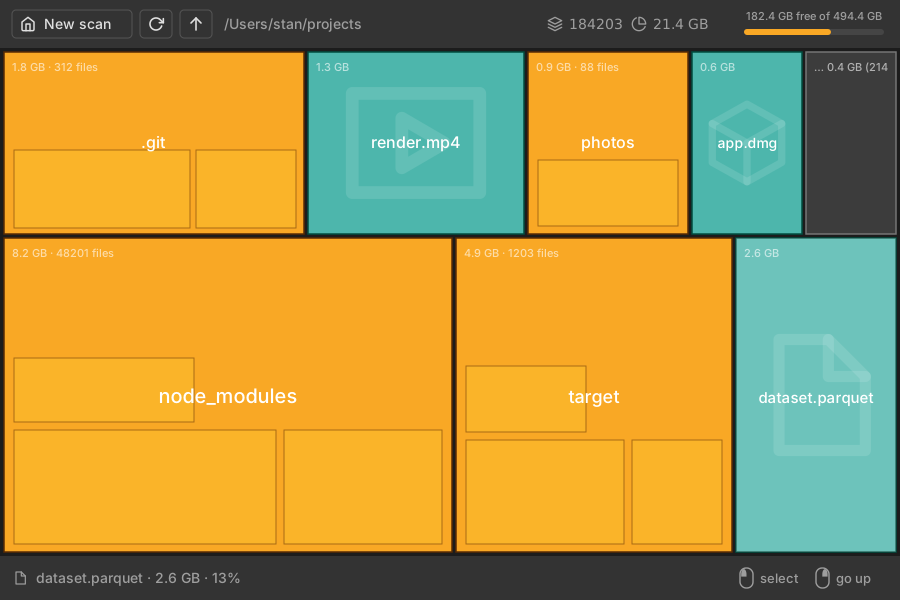
winget install --id=Filegram.FilegramDesktop -e Filegram is a desktop disk analyzer designed to help users visualize and manage their file storage efficiently. It scans directories and presents file sizes as an interactive treemap chart, allowing users to quickly identify large files or folders that consume significant disk space.
Key Features:
- Interactive Treemap Visualization: Files and folders are displayed as bricks sized proportionally to their disk usage, using a golden-ratio strip algorithm for layout. Small files are aggregated into a "rest" brick for clarity.
- Fast Parallel Scanning: Directory traversal is optimized with rayon, enabling rapid scans that can be canceled at any time.
- Navigation Capabilities: Users can explore the file tree by clicking on folder bricks to dive in or go back up, and rescan directories as needed.
- File Actions: Directly from the treemap interface, users can reveal files in their system's file manager or move them to the trash with confirmation.
- Scan History: Recently scanned paths are saved for quick access in future sessions.
- Light and Dark Themes: The application automatically adapts to the system theme for optimal visual comfort.
Audience & Benefit: Ideal for users managing large storage spaces on Windows, macOS, or Linux systems, Filegram provides a clear and efficient way to monitor and optimize disk usage. Its intuitive interface ensures that even non-technical users can easily identify and manage space-consuming files without complexity.
Filegram is available for installation via winget, offering seamless integration into your workflow.