What It Does
PrimeDictate is a tray-first dictation workflow for people who move faster by voice.
- Trigger dictation from configurable global hotkeys
- Capture the default Windows microphone with WASAPI
- Run transcription locally with local model files
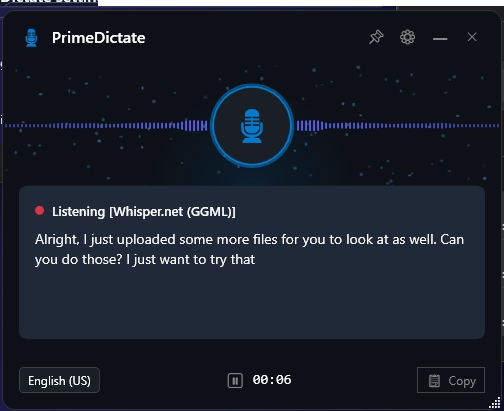
- Keep live edits in the overlay instead of mutating the target app while you speak
- Inject final text once with SharpHook Unicode text entry
- Manage everything from a tray-first app with first-run setup, settings, history, updates, launch-at-login, and optional Ollama prompt modes
The current typing path does not rely on clipboard paste. That avoids clipboard races and paste timing issues in editors and browsers.
Why it feels different from basic desktop dictation tools:
- Live corrections stay in the overlay instead of fighting your editor while you speak.
- Final injection happens once, on commit, instead of backspacing and retyping into the target app.
- Models run locally, so the core transcription path does not depend on a cloud API.
- The app is optimized around tray-first use, fast toggling, and low-friction first-run setup.
Why People Use It
PrimeDictate is a good fit when you want:
- local dictation without sending speech to a hosted transcription service
- a coding-friendly workflow where your editor is not constantly rewritten during live recognition
- a tray app you can leave running all day and toggle instantly from anywhere in Windows
- Windows-native packaging through direct MSI downloads, winget, or Chocolatey
It is usually faster to talk than type, so we open-sourced the workflow on Windows.
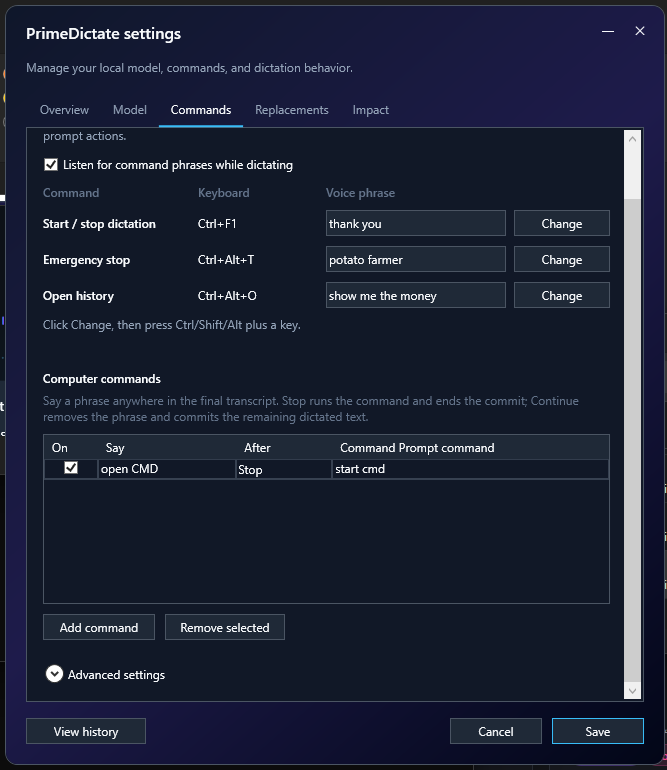
PrimeDictate supports polite send phrases like "thank you" and strips them before final injection, so your flow stays natural without polluting final text.
Automation Story
The problem
The keyboard is no longer the primary interface for work. Your voice is.
The automation approach
Voice is the new interface. PrimeDictate turns speech into a practical local workflow: hotkey, speak, review, commit.
Qualified result
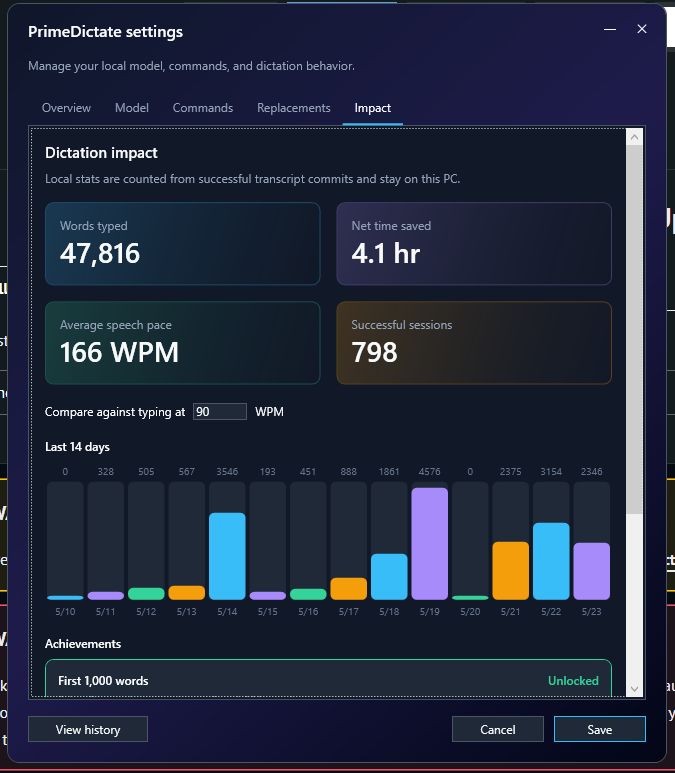
Most people type around 50 to 70 WPM. Dictation can run around 160 WPM in real workflows. The impact dashboard tracks this in-app so results are visible.
What it costs
PrimeDictate is free and runs on your own computer.
For the best experience, use stronger local hardware:
- a modern CPU
- a capable GPU
- or a Copilot+ PC with NPU support
We continue improving model options and plan to keep upgrading quantized model support as newer variants become available.
Why this matters for FlowDevs
This is one of the internal tools our engineering team uses to move faster. As one of our engineers put it: this tool changed his life.
See how FlowDevs builds practical automation systems at FlowDevs.
Why It Wins
- Global control: Configurable hotkeys for start/stop toggle, emergency stop/discard, and history.
- Live preview overlay: Non-activating overlay shows local transcript hypotheses while dictation is in progress.
- Final-only injection: The focused app receives the final result once, after stop or silence auto-commit.
- Voice commands: Built-in phrases can commit, discard, open history, or trigger command prompt actions.
- Tray workspace UI: Open Workspace from the tray to review sessions, logs, and history in a clearer dashboard layout.
- History and recovery: Every committed transcript is saved locally with metadata and delivery status.
- Impact stats: Tracks local productivity metrics, milestones, average speaking pace in WPM, and recent usage history.
- Model picker and downloads: First-run setup and Settings can download supported models or browse to existing local folders.
- Optional coding mode: Sends Enter after a successful final injection, once the target has caught up with the typed text and is still the window in front.
- Launch at login: Installers enable launch at login by default; MSI and winget installs can opt out.
- Built-in updater: Checks GitHub Releases, downloads the matching MSI, verifies checksums, and hands off to Windows Installer.
- Local rewrite modes: Optional Ollama integration can post-process dictated text with context-aware prompt modes.

Product Walkthrough
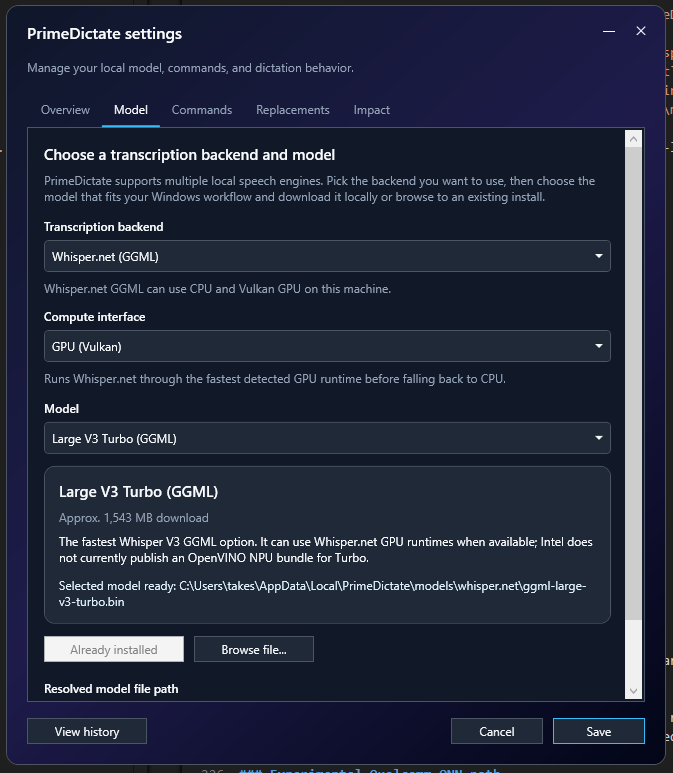
Model setup
Pick your backend, compute interface, and model from the Settings model tab.
Commands and phrases
Map hotkeys, voice phrases, and optional command actions so speaking and committing feels natural in your daily workflow.
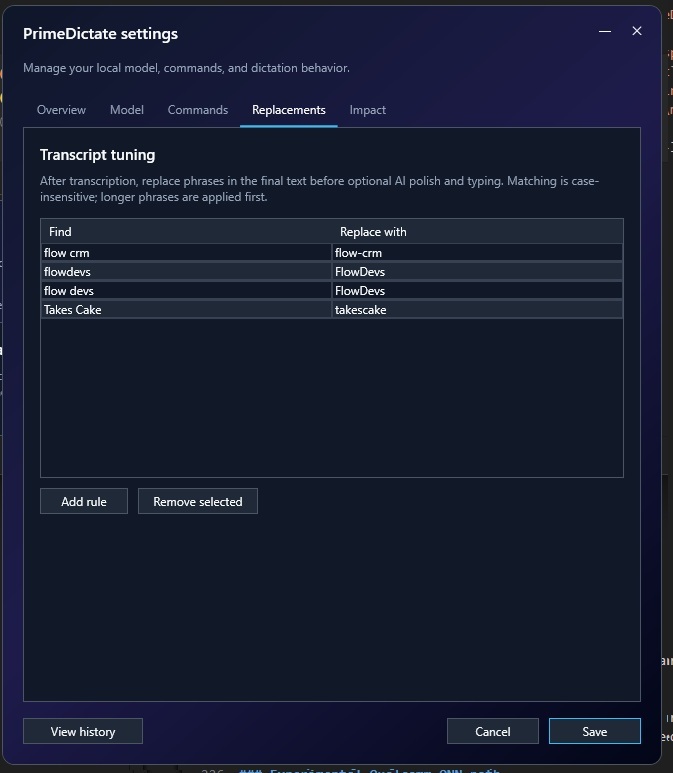
Transcript replacements
Tune frequent phrases before final typing so recurring terms normalize automatically.
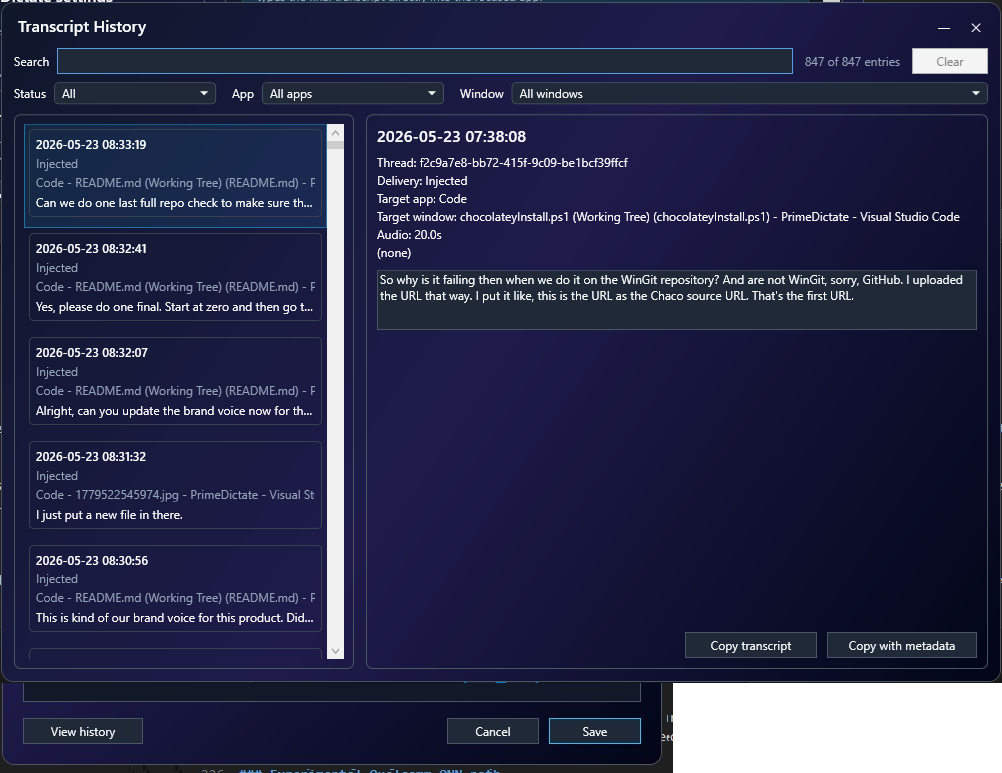
Transcript history
Review previous sessions, delivery targets, and transcript details in the history window.
Get PrimeDictate
PrimeDictate currently targets Windows x64 and ARM64.
Install options
| Option | Best for | Install |
|---|
| GitHub Releases | Direct MSI download | https://github.com/flowdevs-io/PrimeDictate/releases/latest |
| winget | Standard Windows package install | winget install --id FlowDevs.PrimeDictate --exact |
| Chocolatey | Chocolatey-managed environments | choco install primedictate -y |
Important:
- The MSI installs the app only. Model download happens in PrimeDictate during first-run setup or later in Settings.
- Chocolatey Community Repository pages show only approved versions publicly. A successful upload may remain invisible until moderation completes.
- ARM64 Windows should use the native ARM64 installer or package when available.
Which install path should you use?
- GitHub Releases if you want the newest MSI directly
- winget if you already manage desktop apps with winget
- Chocolatey if your environment already standardizes on Chocolatey
Silent install and upgrade commands
- MSI install x64:
msiexec /i PrimeDictate-Setup-vX.Y.Z-x64.msi /qn /norestart
- MSI install ARM64:
msiexec /i PrimeDictate-Setup-vX.Y.Z-arm64.msi /qn /norestart
- MSI install without launch at login:
msiexec /i PrimeDictate-Setup-vX.Y.Z-.msi LAUNCHATLOGIN=0 /qn /norestart
- MSI uninstall:
msiexec /x PrimeDictate-Setup-vX.Y.Z-.msi /qn /norestart
- winget install:
winget install --id FlowDevs.PrimeDictate --exact --silent --accept-package-agreements --accept-source-agreements
- winget install without launch at login:
winget install --id FlowDevs.PrimeDictate --exact --silent --accept-package-agreements --accept-source-agreements --override "LAUNCHATLOGIN=0"
- winget upgrade:
winget upgrade --id FlowDevs.PrimeDictate --exact --silent --accept-package-agreements --accept-source-agreements
- winget uninstall:
winget uninstall --id FlowDevs.PrimeDictate --exact --silent
- Chocolatey install:
choco install primedictate -y
- Chocolatey upgrade:
choco upgrade primedictate -y
- Chocolatey uninstall:
choco uninstall primedictate -y
Get Dictating in 60 Seconds
- Install PrimeDictate.
- Launch it from Start Menu or let the Startup shortcut run it after sign-in.
- Complete first-run setup.
- Pick a backend and download or browse to a local model.
- Focus the target app and use the dictation hotkey.
First-run setup handles:
- backend and model selection
- command phrases and transcript replacements
- overlay style and silence auto-commit timing
- coding mode, impact stats, and other core behavior
Impact tracking includes:
- average speech pace in words per minute (WPM)
- configurable typing comparison baseline in WPM
Dictation runtime flow:
flowchart LR
  A[Press hotkey] --> B[Record microphone]
  B --> C[Show live overlay preview]
  C --> D[Stop or silence auto-commit]
  D --> E[Run final transcription]
  E --> F[Inject final text once]
Default controls:
- Start/stop toggle hotkey:
Ctrl+Shift+Space
- Emergency stop/discard hotkey:
Ctrl+Shift+Enter
- History hotkey:
Ctrl+Shift+H
- Silence auto-commit delay: 3 seconds
Pro tips:
- Keep the caret in the field where you want text before starting.
- Do not switch apps while PrimeDictate is processing the final transcript if you want focus safety checks to pass.
- Use the overlay as live feedback; the target editor is updated only on final commit.
- Set silence delay to
0 if you want commits only from the hotkey.
- If you are testing model quality, start with short phrases first; larger models and longer recordings increase turnaround time.
Requirements
- Windows is the primary supported platform.
- .NET 10 SDK is required to build from source (pinned in
global.json).
- Local transcription uses local model files only.
- sherpa-onnx backends require extracted ONNX model folders and tokens.
- Whisper.net uses GGML
.bin files and optional hardware-specific sidecars.
Local Models and Backends
PrimeDictate supports multiple local transcription backends. Setup and Settings expose a curated picker and download flow.
Which backend should you start with?
| If you want... | Start here |
|---|
| The simplest English setup | Base English ONNX |
| The lightest/faster English setup | Tiny English ONNX |
| Better English accuracy with more compute | Small English ONNX or Whisper.net |
| An alternative English backend | Parakeet or Moonshine |
| Snapdragon X NPU experimentation | Qualcomm AI Hub Whisper on native ARM64 |
Backend summary
| Backend | Typical use | Notes |
|---|
| Whisper ONNX | General-purpose local dictation | Uses sherpa-onnx encoder/decoder/token layout |
| Whisper.net GGML | Larger Whisper variants and optional GPU/NPU paths | Compute options depend on local runtime support |
| Parakeet ONNX | Alternative English local backend | Uses encoder/decoder/joiner/tokens layout |
| Moonshine ONNX | Lightweight English local backend | Smaller non-Whisper option |
| Qualcomm AI Hub Whisper | Experimental Snapdragon X NPU path | Native Windows ARM64 only |
Model storage
Downloaded models are stored under %LocalAppData%\PrimeDictate\models.
- Whisper ONNX:
%LocalAppData%\PrimeDictate\models\whisper
- Parakeet:
%LocalAppData%\PrimeDictate\models\parakeet
- Moonshine:
%LocalAppData%\PrimeDictate\models\moonshine
- Qualcomm AI Hub Whisper:
%LocalAppData%\PrimeDictate\models\qualcomm-aihub-whisper
During development, PrimeDictate can also discover repo-local model folders under models\....
Expected model folder contents
Whisper ONNX expects:
*-encoder.int8.onnx or *-encoder.onnx*-decoder.int8.onnx or *-decoder.onnx*-tokens.txt
Parakeet expects:
encoder.int8.onnxdecoder.int8.onnxjoiner.int8.onnxtokens.txt
Moonshine expects:
preprocess.onnxencode.int8.onnxuncached_decode.int8.onnxcached_decode.int8.onnxtokens.txt
Whisper.net compute behavior
PrimeDictate normalizes unsupported saved Whisper.net hardware settings at startup.
- CPU is always available.
- GPU appears only when supported local Whisper.net GPU runtime support is present.
- NPU appears only for supported GGML models with the required sidecars.
Experimental Qualcomm QNN path (native Windows ARM64; in the ARM64 installer)
The Qualcomm backend is experimental and intended for native Windows ARM64 builds on supported Snapdragon X devices. It is in the app that the installers ship (6.1.0 and later) as well as in the legacy WPF app. The models are offered in Settings and first-run setup only where they can run; on any other PC they are hidden, and a saved Qualcomm choice falls back to Whisper or Moonshine on the CPU.
It requires:
- Windows ARM64 process/runtime
- QNN runtime assets in the build output (the ARM64 installer carries them)
- Qualcomm AI Hub Whisper wrapper package files, including
encoder.onnx, decoder.onnx, context binaries, metadata, and tokenizer files
- Successful EPContext session creation without CPU fallback when strict validation is requested
- For Moonshine on the NPU, the prepared
qnn subfolder of the Moonshine model (see scripts/qnn/quantize_moonshine_for_qnn.py); such a model is then listed again as "(Qualcomm NPU)"
Developer validation commands (print a JSON report, optionally also write it to a file; they never start the app): --qnn-aihub-whisper-transcribe [out], --qnn-whisper-smoke [out], --qnn-whisper-proof [true|false] [out], --qnn-smoke [out], --qnn-proof [true|false] [out].
Maintainer environment knobs:
PRIMEDICTATE_QNN_STRICT=1PRIMEDICTATE_QNN_CONTEXT_CACHE=0|1PRIMEDICTATE_QNN_CONTEXT_EMBED=0|1PRIMEDICTATE_QNN_PROFILE=basic|detailed|optracePRIMEDICTATE_QNN_PROFILE_DIR=
Build and Run From Source
From the repository root:
dotnet run
The app starts in the tray. On first launch, complete setup, choose a model, then focus another application and start dictation.
Most contributors only need dotnet run and dotnet build. Publishing and installer generation are only needed when validating release outputs.
Common build commands:
dotnet build -c Release
.\scripts\Publish-Windows.ps1
.\scripts\Build-Installers.ps1
Note: A running PrimeDictate.exe from dotnet run can lock the apphost on Windows. Stop the running instance before rebuilding if you hit copy or file-lock errors.
Windows Installers
PrimeDictate ships MSI installers for x64 and ARM64 Windows using WiX through NuGet. No separate WiX installation is required.
| MSI | Behavior |
|---|
| Online x64 | Installs the x64 app under Program Files with Start Menu entry, ARP branding, and launch-at-login enabled by default |
| Online ARM64 | Installs the native ARM64 app with the same installer behavior and ARM64 runtime payload |
Installer characteristics:
- Installs app payload only; no install-time model download
- Does not launch the app from the finish dialog
- Uses consistent English installer UI resources
- Keeps upgrade identity for clean MSI upgrades
- Supports
LAUNCHATLOGIN=0 for unattended installs that should not auto-start on sign-in
For installer-specific details, see installer/README.md.
Release and Distribution
Tagged pushes that match vX.Y.Z build the app, produce release assets, and publish to GitHub Releases. Merging into main alone publishes nothing.
From 6.1.0 the release pipeline packages the Avalonia app in src/PrimeDictate.Desktop as PrimeDictate.exe: one app for dictation and for transcription and meetings. The WPF app at the repository root is legacy: it still builds but is not packaged. The Qualcomm QNN path described above is in both apps.
In practice, the release pipeline keeps three public distribution channels aligned:
- GitHub Releases for direct MSI downloads
- winget for Windows package management
- Chocolatey for Chocolatey-managed environments
If you only want to install or evaluate PrimeDictate, you can stop reading here. The remaining release details are maintainer-facing.
GitHub Releases
- Release page:
https://github.com/flowdevs-io/PrimeDictate/releases/tag/vX.Y.Z
- Latest release:
https://github.com/flowdevs-io/PrimeDictate/releases/latest
- Direct x64 MSI asset:
https://github.com/flowdevs-io/PrimeDictate/releases/download/vX.Y.Z/PrimeDictate-Setup-vX.Y.Z-x64.msi
- Direct ARM64 MSI asset:
https://github.com/flowdevs-io/PrimeDictate/releases/download/vX.Y.Z/PrimeDictate-Setup-vX.Y.Z-arm64.msi
If signing secrets are unavailable, the release flow still publishes unsigned assets instead of failing before upload. If they are set but signing fails (for example an expired secret), the run stops before anything is published.
winget
- Package identifier:
FlowDevs.PrimeDictate
- Source repository:
https://github.com/microsoft/winget-pkgs
The same tag-triggered workflow generates versioned manifests from the release MSI assets, validates them, and optionally submits a winget PR when WINGET_CREATE_GITHUB_TOKEN is configured.
For resubmission without rebuilding binaries, use workflow_dispatch with:
submit_winget_only=truetarget_version=X.Y.Z
The winget step never fails the release, so check its log after each tag run. If it could not sync the submitting fork, see "When the winget step warns" in installer/README.md.
Chocolatey
- Package id:
primedictate
- Community package page:
https://community.chocolatey.org/packages/primedictate
- Community feed source:
https://community.chocolatey.org/api/v2/
- Community push source:
https://push.chocolatey.org/
- Moderation queue:
https://ch0.co/moderation
The tag-triggered workflow also builds a Chocolatey .nupkg from the release assets and attempts to push it to the configured source.
GitHub Actions secrets:
CHOCO_API_KEYCHOCO_SOURCE_URL (optional; defaults to https://push.chocolatey.org/)
Important moderation note:
- Chocolatey Community Repository only shows approved versions publicly.
- A version can be uploaded successfully and still remain invisible on the public package page while pending automated checks or human moderation.
Maintainer release flow
Maintainer release details
From a clean main worktree:
$Version = "4.3.1"

git status --short --branch
# Update Directory.Build.props to $Version before committing.
dotnet build -c Release

git add -A
git commit -m "release: v$Version"

git ls-remote --tags origin "refs/tags/v$Version"
git tag -a "v$Version" -m "v$Version"

git push origin main
git push origin "v$Version"
If the tag already exists, inspect the existing release instead of recreating it blindly.
Configuration and Local Data
User settings
User settings live at %LocalAppData%\PrimeDictate\settings.json and include:
- first-run completion
- launch-at-login scope
- hotkeys
- voice commands
- selected backend and model path
- overlay style and placement
- silence auto-commit delay
- return-to-original-target behavior
- audio cue toggle
- automatic update checks
- coding mode
- baseline typing speed for impact estimates
Local data files
- Transcript history:
%LocalAppData%\PrimeDictate\history.json
- Impact stats:
%LocalAppData%\PrimeDictate\stats.json
Architecture Overview
| Area | Technology |
|---|
| Hotkey | SharpHook SimpleGlobalHook |
| Audio capture | NAudio WasapiCapture + MediaFoundationResampler to 16 kHz mono PCM |
| Live preview | DictationController.LivePreviewLoopAsync snapshots the buffer and re-runs the selected backend |
| Transcription | Shared engine host over Whisper, Parakeet, Moonshine, Whisper.net, and experimental Qualcomm paths |
| Overlay | WPF TranscriptionOverlayWindow, topmost and non-activating |
| Final injection | WhisperTextInjectionPipeline + SharpHook EventSimulator.SimulateTextEntry |
| Target safety | Foreground capture/restore helpers in WindowsInputHelpers.cs |
Why the app avoids clipboard paste:
- Clipboard restore races can cause the target app to paste stale clipboard data.
- Final-only simulated Unicode entry is the current baseline because it is more predictable across apps.
Troubleshooting
- No text injected: Check whether focus changed between recording start and final processing.
- Model not loading: Verify the selected folder contains the expected files for that backend.
- Build cannot replace PrimeDictate.exe: Stop any running app instance before rebuilding.
- Chocolatey version not visible: Check the moderation queue; public package pages only show approved versions.
For Maintainers
- Installer-specific packaging details live in
installer/README.md
- Release automation is centered in
.github/workflows/build.yml
- Versioning is driven from
Directory.Build.props
- Chocolatey publishing uses
CHOCO_API_KEY and optional CHOCO_SOURCE_URL
- winget submission requires
WINGET_CREATE_GITHUB_TOKEN
License
This repository's application code is provided as in-repo source. Follow the licenses of dependencies and the model publishers' terms when redistributing binaries or model files.
About FlowDevs
PrimeDictate is built by Justin Trantham, Co-Founder and Prime Automator at FlowDevs.
FlowDevs builds internal tools, workflow automation, integrations, and business software for teams that have outgrown spreadsheet-driven operations.