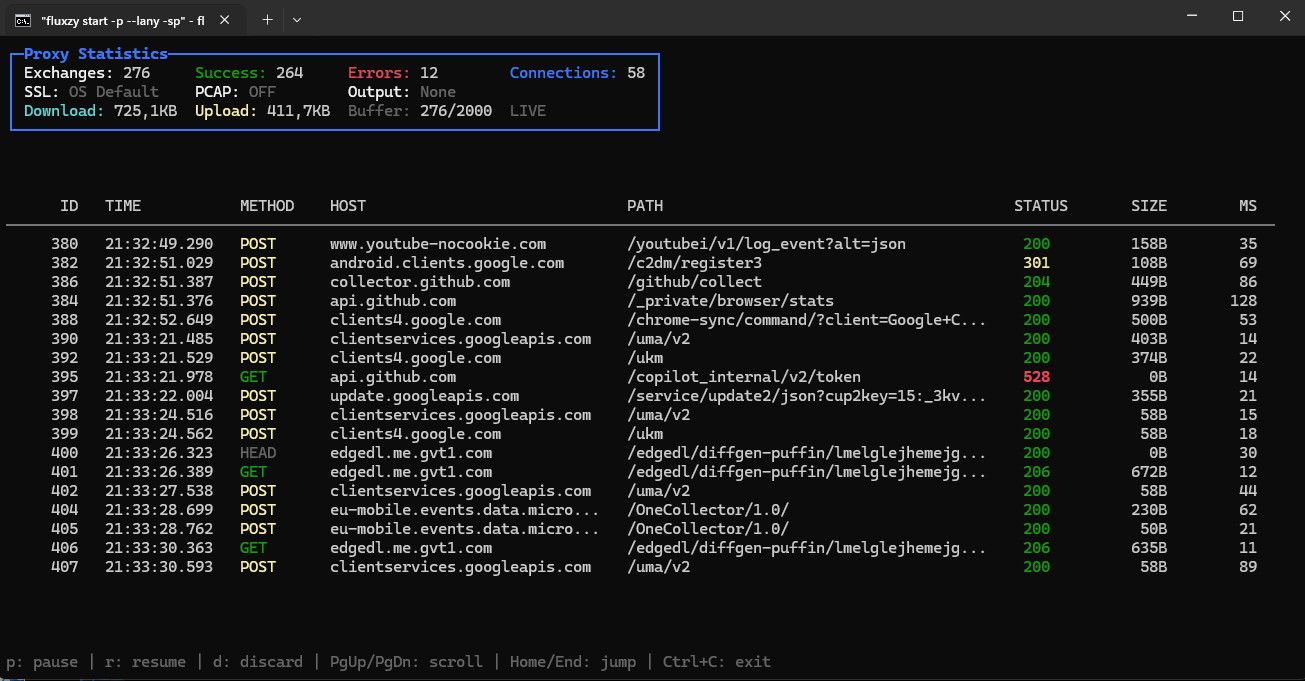
Fluxzy is a high-performance man-in-the-middle (MITM) proxy designed to intercept, record, and modify HTTP/1.1, H2, and WebSocket traffic. It supports both plain and secure channels, enabling developers and security professionals to analyze and manipulate network communication effectively.
Key Features:
Traffic Interception: Captures HTTP/1.1, HTTP/2, and WebSocket traffic in real-time.
PCAP Export: Exports raw packet data in PCAP format for further analysis.
TLS Support: Offers multiple TLS providers, including .NET native and BouncyCastle.
HAR Export: Records sessions as HTTP Archive (HAR) files for easy sharing and playback.
Certificate Management: Manages custom certificates and impersonates JA4 fingerprints.
Traffic Modification: Supports a wide range of actions, such as header manipulation, response substitution, HTML injection, and static directory serving.
Audience & Benefit:
Ideal for developers, security researchers, QA engineers, and DevOps professionals seeking to debug HTTP/HTTPS applications, analyze network traffic, or test API endpoints. Fluxzy provides a powerful toolset for understanding and modifying network behavior in both development and production environments.
A fast and fully streamed MITM proxy to intercept, record, and modify HTTP/1, HTTP/2, and WebSocket traffic, whether in plain or secured with TLS.
Fluxzy is a man-in-the-middle (MITM) proxy that acts as both client and server, enabling interception and modification of HTTP/1, HTTP/2, and WebSocket traffic. It's designed for high performance, using full streaming to minimize overhead, while response bodies exceeding the initial buffer are fully stored in memory for inspection. Fluxzy supports configuration-driven setups through rule files, allowing easy reuse and switching of configurations between CLI, .NET applications, and the Fluxzy Desktop application without additional effort.
Fluxzy can be used as a CLI tool, a Docker container or a .NET library and is used under the hood by Fluxzy Desktop which is a cross-platform HTTP debugger.
Supported Proxy Protocols
Protocol
Description
HTTP CONNECT
Standard forward proxy tunneling for HTTPS traffic
SOCKS5
Full SOCKS5 support with no-auth and username/password authentication (RFC 1928)
Reverse Proxy
Secure (TLS) and plain HTTP modes for backend service proxying
System Proxy
Transparent system-wide interception via OS proxy settings
Protocol detection is automatic: clients can connect using either HTTP CONNECT or SOCKS5 on the same listening port.
Alternatively, you can download the binaries directly from the releases page or fluxzy.io.
fluxzy root commands
Usage:
  fluxzy [command] [options]

Options:
  -v, --version   Show version information
  -?, -h, --help  Show help and usage information

Commands:
  start                                   Start a capturing session
  cert, certificate                       Manage root certificates used by the fluxzy
  pack      Export a fluxzy result directory to a specific archive format
  dis, dissect   Read content of a previously captured archive file or directory.
fluxzy start options
Usage:
  fluxzy start [options]

Options:
  --llo                                                Listen on localhost address with default port. Same as -l
                                                       127.0.0.1/44344 [default: False]
  --lany                                               Listen on all interfaces with default port (44344) [default: False]
  -l, --listen-interface             Set up the binding addresses. Default value is "127.0.0.1:44344" which
                                                       will listen to localhost on port 44344. 0.0.0.0 to listen on all
                                                       interface with the default port. Use port 0 to let OS assign a random
                                                       available port. Accepts multiple values. [default: 127.0.0.1:44344]
  -o, --output-file                       Output the captured traffic to an archive file []
  -d, --dump-folder                       Output the captured traffic to folder
  -r, --rule-file                           Use a fluxzy rule file. See more at :
                                                       https://www.fluxzy.io/resources/documentation/the-rule-file
  -R, --rule-stdin                                     Read rule from stdin
  -sp, --system-proxy                                  Try to register fluxzy as system proxy when started [default: False]
  -k, --insecure                                       Skip remote certificate validation globally. Use
                                                       `SkipRemoteCertificateValidationAction` for specific host only
                                                       [default: False]
  -ss, --skip-ssl-decryption                           Disable ssl traffic decryption [default: False]
  -b, --bouncy-castle                                  Use Bouncy Castle as SSL/TLS provider [default: False]
  -c, --include-dump                                   Include tcp dumps on captured output [default: False]
  --external-capture                                   Indicates that the raw capture will be done by an external process
                                                       [default: False]
  -t, --trace                                          Output trace on stdout [default: False]
  -i, --install-cert                                   Install root CA in current cert store if absent (require higher
                                                       privilege) [default: False]
  --no-cert-cache                                      Don't cache generated certificate on file system [default: False]
  --cert-file                               Substitute the default CA certificate with a compatible PKCS#12 (p12,
                                                       pfx) root CA certificate for SSL decryption
  --cert-password                       Set the password of certfile if any
  --parse-ua                                           Parse user agent [default: False]
  --use-502                                            Use 502 status code for upstream error instead of 528. [default: False]
  --mode           Set proxy mode [default: Regular]
  --mode-reverse-port               Set the remote authority port when --mode ReverseSecure or --mode
                                                       ReversePlain is set []
  --proxy-auth-basic                 Require a basic authentication. Username and password shall be
                                                       provided in this format: username:password. Values can be provided in
                                                       a percent encoded format. []
  --request-buffer                     Set the default request buffer []
  --max-upstream-connection   Maximum connection per upstream host [default: 16]
  -n, --max-capture-count           Exit after a specified count of exchanges []
  --enable-process-tracking                            Enable tracking of the local process that initiated each request. Only
                                                       works for connections originating from localhost. [default: False]
  --no-android-emulator                                Disable inclusion of Android emulator host (10.0.2.2) in self
                                                       detection. By default, Fluxzy considers 10.0.2.2 as a local address
                                                       for Android emulator compatibility. [default: False]
  -p, --pretty                                         Enable interactive pretty output with live exchange table and
                                                       statistics panel [default: False]
  --pretty-max-rows                   Maximum number of exchanges to keep in the pretty output buffer
                                                       [default: 2000]
  -?, -h, --help                                       Show help and usage information
Usage overview
The following highlights the basic way to use fluxzy with an optional rule file.
The "rule file" is a straightforward YAML file containing a list of directives that fluxzy will evaluate during proxying.
For more detailed documentation, visit fluxzy.io or use the --help option available for each command.
Create a rule.yaml file as follows:
rules:
  - filter:
      typeKind: requestHeaderFilter
      headerName: authorization # Select only requests with authorization header
      operation: regex
      pattern: "Bearer (?.*)" # A named regex instructs fluxzy
                                             # to extract the token from the authorization
                                             # header into the variable BEARER_TOKEN
    action:
      # Write the token to a file
      typeKind: FileAppendAction # Append the token to the file
      filename: token-file.txt # Save the token to token-file.txt
      text: "${authority.host} --> ${user.BEARER_TOKEN}\r\n"  # user.BEARER_TOKEN retrieves
                                                              # the previously captured variable
      runScope: RequestHeaderReceivedFromClient  # Run the action when the request header
                                                 # is received from the client
  - filter:
      typeKind: anyFilter # Apply to any exchanges
    action:
      typeKind: AddResponseHeaderAction # Append a response header
      headerName: fluxzy
      headerValue: Passed through fluxzy
The rule file above performs two actions:
It extract any BEARER token from the authorization header and write it to a file (`token-file.txt``)
It appends a response header (fluxzy: Passed through fluxzy) to all exchanges
For more information about the rule syntax, visit the documentation page.
Visit directive search page to see all built-in filters and actions.
-o will save all collected data in a fluxzy file. The file will be created only at the end of the capture session.
-sp will make fluxzy act as system proxy. The proxy settings will be reverted when fluxzy is stopped with SIGINT (Ctrl+C). The proxy settings won't be reverted if the fluxzy process is killed.
-c will enable raw packet capture.
--install-cert will install the default certificate on the current user. This option needs elevation and may trigger interactive dialogs on certain OS.
You can use the command dissect to read the fluxzy file or, alternatively, you can use Fluxzy Desktop to view it with a GUI.
More command and options are available, including exporting to HAR or managing certificates, you can run --help to see all available options and commands.
By default, fluxzy will bind to 127.0.0.1:44344.
Integrate with a .NET application
Install NuGet package Fluxzy.Core
dotnet add package Fluxzy.Core
Create a top-level statement console app, with .NET 10.0 or above:
// Creating settings
var fluxzySetting = FluxzySetting
    .CreateDefault(IPAddress.Any, 44344);

// configure rules
fluxzySetting
    .ConfigureRule()
    .WhenAny()
    .Do(new AddResponseHeaderAction("x-fluxzy", "Captured by Fluxzy"))
    .WhenAll(new JsonResponseFilter(), new StatusCodeSuccessFilter())
    .Do(new MockedResponseAction(MockedResponseContent.CreateFromPlainText("Not allowed to return JSON", 403, "text/plain")));
    .When(new HtmlResponseFilter())
    .Do(new TransformResponseBodyAction(async (transformContext, bodyReader) => {
        var content = await bodyReader.ConsumeAsString();

        // Use bodyReader.ConsumeAsStream() to avoid reading the body into memory
        // and process it as a stream

        return new BodyContent(content.ToUpperInvariant());
    }));
// Create proxy instance and run it
await using var proxy = new Proxy(fluxzySetting);
var endpoints = proxy.Run();

Console.WriteLine($"Fluxzy is running on {endpoints.First().Address}:{endpoints.First().Port}");
Console.WriteLine("Press any key to stop the proxy and exit...");
Console.ReadKey();
docker run -it -p 44344:44344 fluxzy/fluxzy:latest start
To test:
curl -x 127.0.0.1:44344 https://www.fluxzy.io
🏗️ Build
Requirements
.NET 10.0 SDK
Git Bash (required on Windows)
libpcap or an equivalent packet capture library (tests that collect PCAP files or install certificates require elevated privileges)
No IDE is required to build the application. For reference, the project has been developed and tested using Visual Studio 2022 and JetBrains Rider on Windows, macOS, and Linux
Building the Project
To build the core components:
# Clone the repository
git clone https://github.com/haga-rak/fluxzy.core.git
cd fluxzy.core

# Build the core library
dotnet build src/Fluxzy.Core

# Build the packet capture extension
dotnet build src/Fluxzy.Core.Pcap
📬 Contact
Use github issues for bug reports and feature requests