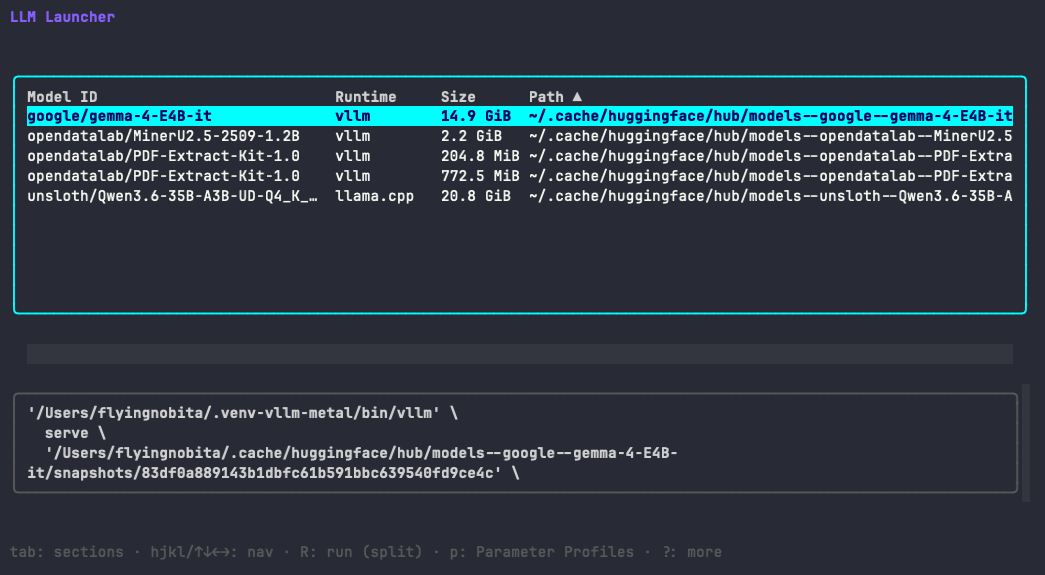
LLM Launcher (llml)
LLM Launcher is a terminal user interface (TUI) tool designed to streamline the process of discovering and launching local language models using various runtimes such as llama-server, vLLM, Ollama, and KoboldCpp. It simplifies model management by scanning your filesystem for GGUF and Hugging Face-style safetensors models and detecting installed runtimes.
Key Features:
Automatic Model Discovery: Efficiently scans common directories for GGUF and safetensors models, caching results to expedite future launches.
Runtime Detection: Automatically identifies installed runtimes like llama.cpp, vLLM, KoboldCpp, Ollama, and maps each model to compatible runtimes.
Named Parameter Profiles: Save multiple profiles per model (e.g., "fast-laptop" or "quality") for quick access to preferred configurations.
Profile Export/Import: Share parameter profiles via TUI or CLI, ensuring portability across machines.
One-Key Launch: Execute models with a single keystroke after selecting the desired profile, displaying commands before execution and streaming server output in the UI.
Status Monitoring: Tracks long-running tasks like Ollama preloads and maintains an alert history for errors and warnings.
Audience & Benefits:
Ideal for developers, researchers, and professionals managing local language models, LLM Launcher saves time by eliminating manual command reconstruction. It offers a user-friendly interface for efficient model management and execution.
Installation:
LLM Launcher can be installed via winget on Windows, making it easily accessible for users to integrate into their workflow seamlessly.
README
LLM Launcher (llml)
LLM Launcher (llml) is a TUI for people who already have models on disk and are
tired of reconstructing launch commands from shell history.
It scans your local filesystem for GGUF and Hugging Face-style safetensors models,
detects installed runtimes (llama.cpp,
vLLM,
Ollama, and
KoboldCpp),
and lets you save named parameter profiles per model — so the command that worked
last time is always one keystroke away.
Browse local models. Detect the right runtime. Launch with one key.
✨ Features
Model discovery — auto-scans common paths for GGUF files and safetensors model
directories; add extra roots via LLML_MODEL_PATHS and/or config.toml. Results are
cached under {UserConfigDir}/llml/config.toml so the next launch can skip the
filesystem walk when the cache is still valid.
Runtime detection — finds installed llama-server, vllm, and koboldcpp binaries and maps
installed ollama plus the configured Ollama host, then maps each model to its
compatible runtime. GGUF models can use llama.cpp or KoboldCpp via profile selection.
Named parameter profiles — save multiple profiles per model (e.g. fast-laptop,
quality, api-8080), each storing runtime args, env vars, port, and context
settings. The active profile is always one key away.
Profile export — share your parameter profiles with others via the TUI
(E) or CLI (llml export). Profiles are written to a portable TOML file
matching the same schema the llml-import skill reads. Filter by model or
profile name, toggle individual profiles or entire model groups, and handle
file collisions (overwrite or auto-suffixed save).
Portable profile format — the shared import/export contract is documented in
docs/profile-format.md and used by the repo-managed llml-import agent skill.
One-keystroke launch — select a model, select a profile, press R. The generated
command is shown before execution and server output streams directly in the TUI.
Persistent status and alert history — long-running work such as Ollama preloads stays
visible in a persistent status line, while warnings and errors remain inspectable in a
dedicated alert-history pane.
Ollama preload flow — Ollama models are discovered via the Ollama API. Pressing
R starts ollama serve if needed, then preloads the selected model into the
shared Ollama service with keep_alive: -1.
Zero required setup — common model directories and binary locations are checked
automatically; configure only what differs from the defaults.
🚀 Quick start
Runtime Requirements
Runtime engine (at least one): llama.cpp (llama-server) or KoboldCpp (koboldcpp) for GGUF models,
vLLM (vllm) for safetensors models, and/or Ollama (ollama) for Ollama
models are installed (see Runtime Engines).
Models in default scan locations, or configure custom roots with LLML_MODEL_PATHS (see Model Discovery).
Install
Pick one path; you only need a single install method.
Go (go install)
Requires Go 1.26+. Ensure $(go env GOPATH)/bin is on your PATH.
go install github.com/flyingnobita/llml/cmd/llml@latest
Homebrew
brew tap flyingnobita/tap
brew install llml
Upgrade later with brew upgrade llml.
Scoop
llml is published to the maintainer bucket, not the default Scoop main bucket.
After the package manifest merges into the public Windows Package Manager catalog:
winget install --id FlyingNobita.llml
Upgrade later with:
winget upgrade --id FlyingNobita.llml
Pre-built binaries
For each GitHub release, archives are published for Linux and macOS (tar.gz) plus Windows (zip). Names follow GoReleaser’s pattern, for example llml_1.2.3_Linux_x86_64.tar.gz, llml_1.2.3_Darwin_arm64.tar.gz, or llml_1.2.3_Windows_x86_64.zip (adjust version and OS/arch to match your download). Extract the llml binary or llml.exe.
# Example: Linux x86_64 — use the archive name from the release you downloaded
tar -xzf llml_1.2.3_Linux_x86_64.tar.gz
chmod +x llml
Install on your PATH if you like (Linux/macOS/WSL):
git clone https://github.com/flyingnobita/llml.git
cd llml
go build -o llml ./cmd/llml
To install a development build from your clone, use go install ./cmd/llml from the repo root, or copy the llml binary onto your PATH.
Start
llml
llml will automatically scan common locations for models and binaries. If your setup is non-standard (e.g., binaries not on PATH or models in custom folders), see the Configuration section to point the app to the right directories. Select a model in the UI and press R to launch.
⌨️ Usage
Key
Action
hjkl/↑↓←→
Move selection; horizontal scroll when the path column is wider than the terminal
E
Open profile export modal — select profiles by model group, filter by name or backend, and save to a portable TOML file you can share across machines
r
Reload [runtime] from config.toml and re-detect binaries (no model rescan)
S
Full model filesystem rescan; refresh cached [[models]] in config.toml
R
Run server (split view: table + log pane)
ctrl+R
Run server full-screen
c
Edit runtime environment (paths, ports)
p
Edit parameter profiles for the selected model
m
Edit extra model search paths (saved in config.toml)
, / .
Change sort column / reverse sort direction
enter
Copy the launch command for the selected row to the clipboard
a
Toggle alert history pane
t
Cycle theme (dark → light → auto → …)
?
Toggle the full shortcut help overlay
q
Quit
Server output
R runs the server in a split layout: the model table stays in the upper half and server logs stream into a scrollable pane below. tab switches focus between the two panes; esc, q, or ctrl+c stops the server.
ctrl+R runs full-screen: the TUI is suspended and the server process is attached directly to your terminal. On Linux/macOS, after the server exits you are prompted to press Enter before the TUI redraws. On Windows there is no Enter prompt; you return when the server process exits.
For Ollama rows, R and ctrl+R do not start a dedicated per-model port.
Instead, llml ensures the shared Ollama daemon is running on the configured host
and preloads the selected model into memory with keep_alive: -1. The selected row
still matters, but the service endpoint remains the shared Ollama host.
Status and alerts
llml separates active work from alert history:
a persistent status line shows in-flight operations such as starting Ollama or loading a model
a opens a bottom alert-history pane with timestamped INFO, WARN, and ERROR entries
when the pane is closed, the footer shows an unread alert count
Minor confirmations such as copy-to-clipboard remain transient. Important failures and lifecycle
events remain inspectable in alert history until you dismiss or replace them by later work.
Parameter profiles (p)
Each model path can have multiple named profiles. Each profile stores:
Environment variables (KEY=value per line).
Extra arguments (--flag value per line).
R / ctrl+R use the active profile (the highlighted row in the p profile list is prefixed with (active) in the name column). Changes persist automatically. tab cycles: profile list → env → extra args. On the profile list: a add profile, c clone (duplicate) the highlighted profile, d delete (not the last), r rename. esc closes the panel (and n cancels a delete confirmation).
Safetensors: Directories containing config.json and *.safetensors files (Hugging Face style).
Data Integrity & Backups
To protect your settings and cache, llml maintains a history of your configuration:
Atomic Writes: Files are written to a temporary location before being moved, preventing corruption.
Automatic Backups: The newest 10 versions of each file are kept in the backups/ directory.
Upgrade Snapshots: When the llml version changes, a snapshot of both config.toml and model-params.json is created automatically so you can roll back if needed. The file .last-run-version in the same directory records the last run version for that behavior.
Go1.26+ and Node.js (LTS) — both installed automatically by mise install.
Set up tooling
Clone the repository and install tooling:
mise install   # installs Go, Node.js, pre-commit (pipx), and other tools from mise.toml
npm ci         # installs Prettier + markdownlint
pre-commit install   # optional: enable git pre-commit / pre-push hooks (see .pre-commit-config.yaml)
Common Tasks
mise run run      # go run ./cmd/llml
mise run build    # build to bin/llml
mise run format   # auto-fix: gofmt + prettier + markdownlint
mise run lint     # check only: gofmt + vet + prettier + markdownlint
mise run test     # go test -race ./...
mise run check    # lint + test (run before opening a PR)
Layout
cmd/llml — entrypoint.
internal/config — config.toml read/write and cache helpers.