ResumeBuilder
A cross-platform desktop resume builder: edit a resume in a live editor, see a real-time PDF preview, pick from 25 templates, and export to PDF, DOCX, HTML, PNG, plain text, or JSON Resume.
Free, local, and account-free. Resumes are stored in a local SQLite database. AI can run against a local model (Ollama, LM Studio) for offline use. If you choose cloud AI, relevant text is sent to that provider. Folder sync can use your own cloud-synced folder.
Download
On Windows, install through winget:
winget install Gentian28.ResumeBuilder
Or grab the latest build from the releases page.
| Platform | Download | Notes |
|---|
| Windows | ResumeBuilder-win-Setup.exe | Installer, updates itself. win-Portable.zip if you'd rather not install. |
| Linux | ResumeBuilder.AppImage | chmod +x and run. Needs libfontconfig1, present on most desktops. |
| macOS, Apple silicon | ResumeBuilder-osx-Setup.pkg | M1 and later. See the Gatekeeper note below. |
| macOS, Intel | ResumeBuilder-osx-x64-Setup.pkg | Macs with an Intel processor. Choose the package matching About This Mac. |
Not sure which Mac you have? Apple menu → About This Mac.
No .NET runtime needed: every build is self-contained.
SHA256SUMS-*.txt is published with every release so you can verify what you downloaded.
Code signing
Windows builds are not yet code-signed. The SignPath Foundation
application was declined in July 2026; reapplication remains pending. Direct downloads can
show an unknown-publisher warning. Windows applies reputation and security checks
according to the device's settings. Download only from the official release page and compare
the published SHA-256 checksum. Winget is another installation route, not a signing guarantee.
macOS packages are not yet notarised and can require approval under System Settings, Privacy & Security.
Privacy
The app has no account, no telemetry and no analytics. See PRIVACY.md for exactly
what is stored and the three cases where it touches the network.
Features
- Live preview: the editor renders the selected template to a paged PDF preview as you type.
- 25 resume templates: Modern, Classic, Minimal, Creative, Executive, Technical, Academic, Two Column, Compact, Elegant, Professional, Starter, Simple, Timeline, Bold, Dark Sidebar, Infographic, ATS Plain, Chronology, Color Block, Developer, Europass, Federal, One Page, Photo Header, plus 3 cover-letter templates.
- Section ordering and visibility: reorder or hide any section, including custom sections.
- Export: PDF, DOCX, HTML, PNG, plain text (ATS-friendly), native JSON, and JSON Resume.
- Import: JSON Resume, native JSON, LinkedIn data export (.zip), Word (.docx), and PDF text extraction. A persistent review banner keeps warnings next to the editor.
- Spell check: Hunspell, with a personal dictionary.
- ATS keyword analysis: paste a job description to get a match score, matched/missing keywords, and warnings.
- AI assistance: optional; works against OpenAI or any OpenAI-compatible endpoint, including a local LLM (Ollama, LM Studio).
- First session: open a bundled synthetic example, edit it, review its extracted PDF text and export. Existing saved work stays separate.
- Document layout: choose A4 or US Letter and English or Albanian generated headings and dates. User-authored text is preserved.
- Find and follow up: search grouped resumes, filter applications, edit applied/next-action dates and contacts, and export CSV or calendar events.
- Cover-letter controls: select a template, edit sender details and explicitly change the captured source with undo support.
- Support diagnostics: preview and copy software/OS details and fixed error codes without document content, paths or keys.
- Undo/redo: across text edits and list operations.
- Sync: two-way sync through a local folder, with conflict detection. The sync panel finds your Google Drive, OneDrive, Dropbox or iCloud folder and offers it as one button; no account, no upload.
- Applications: track which résumé went to which company, when, and what happened; one click reopens the exact version they read. Anything silent for more than a fortnight is marked worth chasing.
- Backups before upgrades: the database is copied before any upgrade that changes its schema, and the last three copies are kept.
- Complete workspace recovery: Workspace backup (JSON) saves all resumes, cover letters, applications and sent-content snapshots. Import that file to restore the workspace, with validation and a safety copy before replacement. Older single-resume JSON backups still import as individual resumes.
- Persistent preferences: your model endpoint, model choice, sync destination and last open resume survive restarts. API keys remain in memory for the current session.
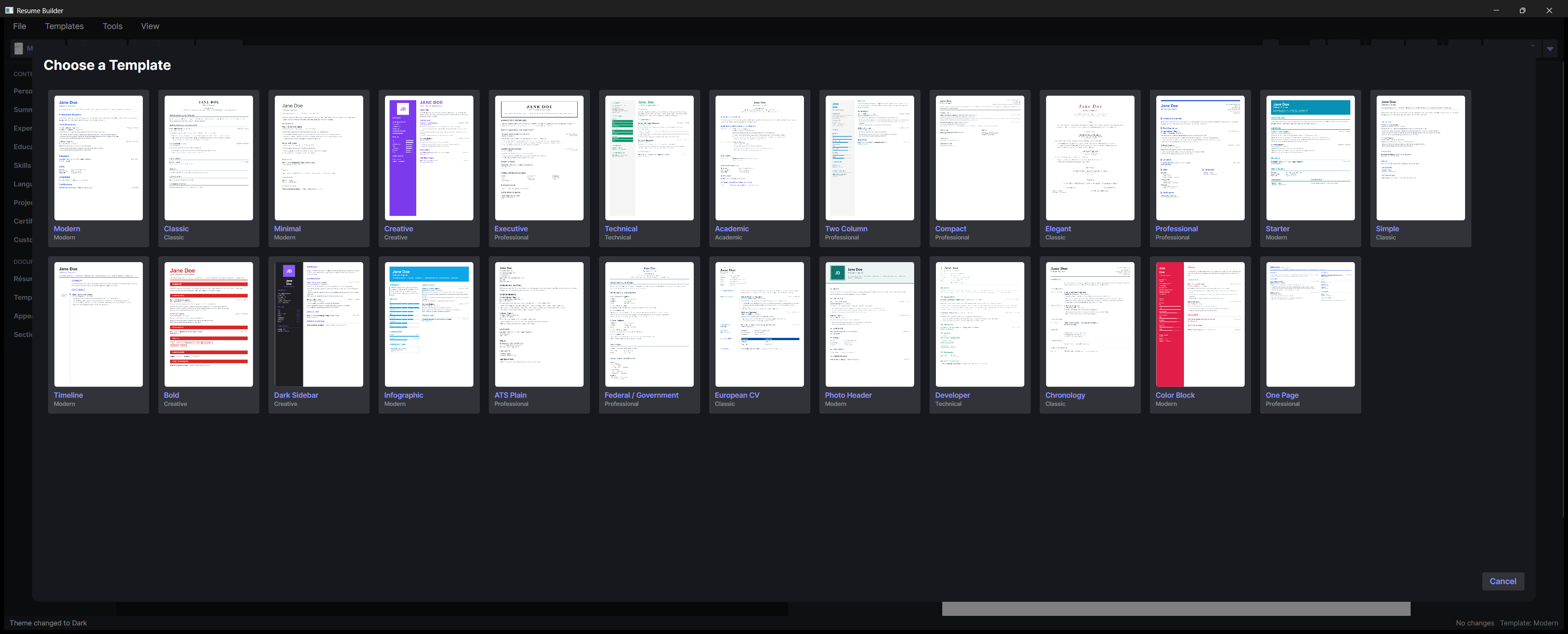
For a first run, choose Open example resume, edit a field, choose a template and export PDF. Review export shows the current page count, basic warnings and extracted text. You can also import the synthetic sample resume. Use Open or Show in folder on the export confirmation to find the result.
Workspace backups contain your personal documents. Keep them in a location you trust. Restoring replaces the local document workspace and pauses folder sync until you configure it again. Marking a draft application as sent captures its resume, linked letter and generated PDFs. These are the documents captured at that moment, not a verification of an externally uploaded file. Saved PDFs stay available after source edits or deletion. A sent application opens its captured content as a separate editable copy, so changing that copy does not change the historical record. Older application records remain live links because their original sent content is unknown.
Building from source
Requirements:
Getting started
git clone https://github.com/Gentian28/resume-builder.git
cd resume-builder

dotnet restore ResumeBuilder.sln
dotnet build ResumeBuilder.sln
dotnet run --project src/ResumeBuilder.App/ResumeBuilder.App
Run the tests:
dotnet test ResumeBuilder.sln
samples/sample-resume.json is a synthetic JSON Resume file you can import to see the app populated.
Project layout
The solution is layered; each project depends only on the ones above it.
| Project | Responsibility |
|---|
ResumeBuilder.Core | Domain models, validation, undo/redo, spell check, keyword analysis, AI, sync. No UI, no persistence. |
ResumeBuilder.Data | EF Core + SQLite persistence. Owns the Resume schema and repository. |
ResumeBuilder.Templates | QuestPDF template implementations and the template registry. |
ResumeBuilder.Export | Exporters (PDF/DOCX/HTML/PNG/TXT/JSON) and importers (JSON Resume, LinkedIn, PDF). |
ResumeBuilder.App | Avalonia desktop UI (MVVM, CommunityToolkit.Mvvm). |
ResumeBuilder.Tests | xUnit tests across Core, Data, Export, and Templates. |
ResumeBuilder.App.Tests | Editor workflow and command-routing regressions. |
ResumeBuilder.Ui.Tests | Headless layout, binding and keyboard checks in light/dark themes. |
Dependency direction: App → {Core, Data, Templates, Export}, Export → {Core, Templates}, Data → Core, Templates → Core.
Where things live
- Data storage:
%LocalAppData%/ResumeBuilderData/resumes.db on Windows (SQLite), outside the installer folder so uninstalling preserves work. The older Windows workspace is copied safely on first launch without replacing an existing destination. macOS uses ~/Library/Application Support/ResumeBuilder; Linux uses $XDG_DATA_HOME/ResumeBuilder or ~/.local/share/ResumeBuilder. Schema upgrades keep a safety backup.
- Preferences:
preferences.json beside the database stores non-secret settings. Theme selection remains in settings.json.
- Dictionaries:
Dictionaries/ inside the data folder (downloaded on first spell check).
- Sync history: destination-specific state files beside the database keep separate deletion and conflict histories for each sync folder.
Adding a template
- Add a class under
ResumeBuilder.Templates/Templates/ deriving from BaseTemplate.
- Fill in its
Info (Id, Name, Description, Category, Layout, and its default accent color / font).
- Drive the body from
GetOrderedSections() and ShouldRenderSection(...) so the user's section order and visibility are honored, and use the shared Compose* helpers on BaseTemplate for standard blocks.
- Register it in
TemplateRegistry.
The template smoke test renders every registered template against a fully populated resume, so a new template is covered as soon as it is registered.
Configuration
The AI features are off until configured. They target any OpenAI-compatible /chat/completions endpoint:
- OpenAI: supply an API key. Requests (including your resume text) go to
api.openai.com.
- Local LLM: point the base URL at a loopback address (Ollama, LM Studio). No key is needed and nothing leaves your machine.
For volunteer usability sessions and privacy-preserving observation, use the session kit. scripts/verify-distribution.ps1 verifies the currently published installer links and checksums.
License
MIT, © 2026 Gentian Shkembi.
The application's source is MIT licensed; dependencies retain their own licenses.
QuestPDF 2026.7.2, which renders the templates, uses a source-available Community
License, not MIT or another OSI-approved license. Its license selection guide
includes qualifying open-source projects among those eligible for free use. Commercial
forks and other uses must check the applicable Community License
and eligibility rules rather than assuming the application's MIT license covers QuestPDF.
The test suite uses AwesomeAssertions,
the Apache-2.0 community fork of FluentAssertions.