Sound Mixer Get it Simple
Use this command to install Sound Mixer with WinGet:
winget install --id=GetItSimple.SoundMixer -e Control per-application and system volume from an always-on-top overlay, tray menu, and global hotkeys.
winget install --id=GetItSimple.SoundMixer -e Control per-application and system volume from an always-on-top overlay, tray menu, and global hotkeys.
A per-application volume mixer for Windows. Adjust the volume of any running program with an audio session (or the system master volume) from a small always-on-top overlay, the system tray, or global hotkeys.
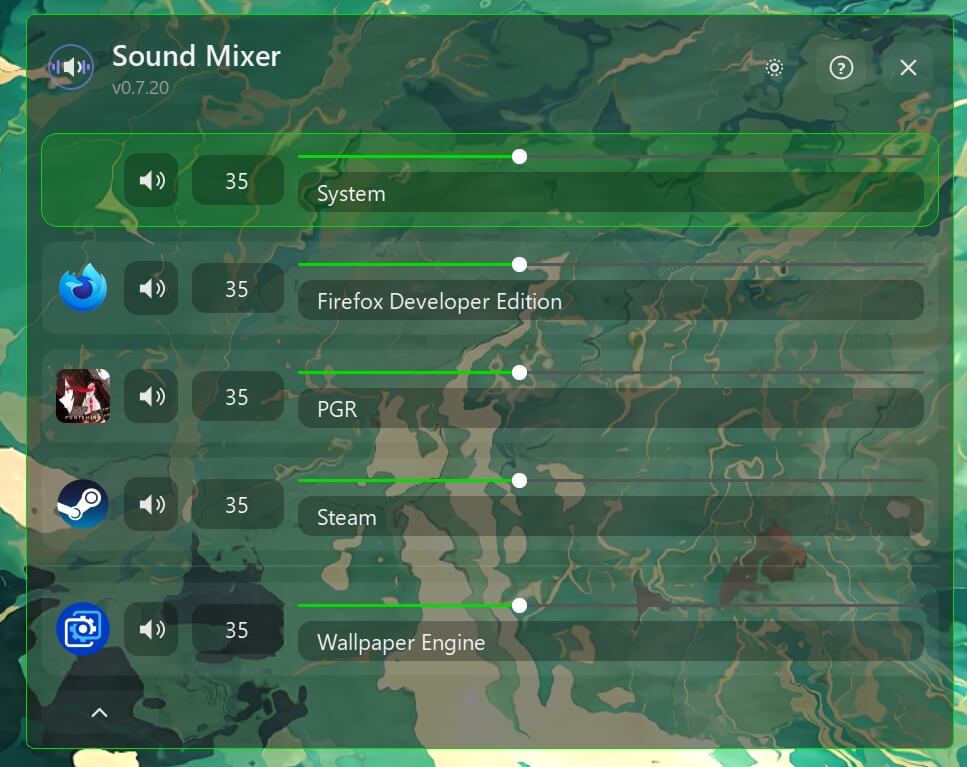
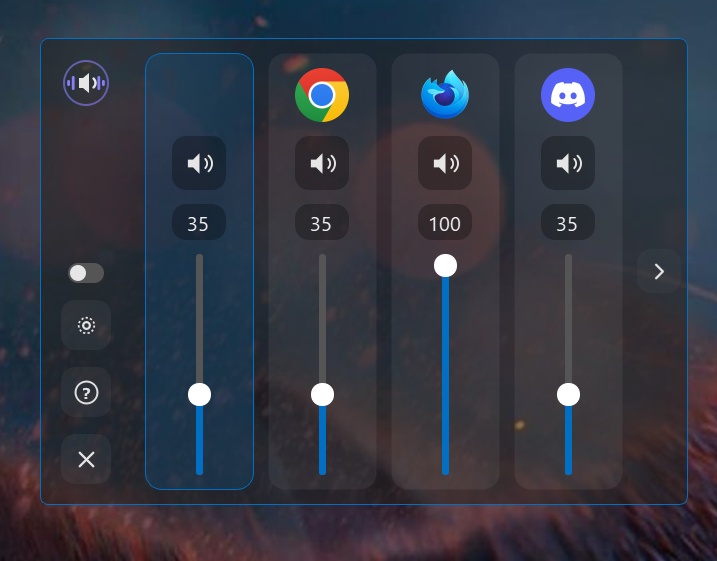
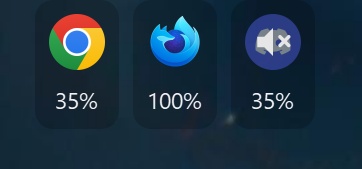
Run, Build, Test details
Sound Mixer is available on WinGet as GetItSimple.SoundMixer:
winget install --id GetItSimple.SoundMixer --exact --source winget
pip install -r requirements.txt
python -m sound_mixer
python build.py
build.py checks that all packages in requirements.txt are installed at
the required versions. If anything is missing or outdated, it lists the
packages and asks whether to install them with pip before continuing. It
then runs PyInstaller and produces dist/SoundMixer.exe.
NSIS 3.12 is required. Build the application first, then compile both x64 installer scopes with warnings treated as errors:
python build.py
./scripts/build-installers.ps1 -Version 0.9.3 -MakeNsis "C:\Program Files (x86)\NSIS\makensis.exe"
The user installer writes to %LOCALAPPDATA%\Programs\SoundMixer without UAC.
The machine installer writes to %ProgramFiles%\SoundMixer through an
unelevated bootstrap and a controlled elevated file/registry phase. Both
support normal interactive installation, /S, and /SILENTWITHPROGRESS. The
user installer also supports the standard NSIS /D= override;
the machine installer rejects every directory other than %ProgramFiles%\SoundMixer.
The WinGet manifest uses the machine installer, whose bootstrap requests elevation only for the protected file and registry phase. The user installer remains available as a release asset for direct installation without UAC.
To prepare the five release assets, checksums, and the four WinGet 1.12 manifests locally:
./scripts/prepare-release.ps1 -Version 0.9.3
winget validate --manifest dist/winget
GitHub Actions tests branch and pull-request builds, but publishes a GitHub
Release only for a pre-existing X.Y.Z tag that exactly matches
sound_mixer.__version__. Optional Authenticode signing requires all three
repository secrets: WINDOWS_SIGNING_CERTIFICATE_BASE64,
WINDOWS_SIGNING_CERTIFICATE_PASSWORD, and WINDOWS_TIMESTAMP_URL. With none
configured, the same release is produced unsigned and verified by SHA-256.
When signing is configured, SoundMixer.exe is signed before packaging, NSIS
signs the embedded uninstaller, and the completed installers are signed last.
python -m pytest
Tests run in parallel via pytest-xdist (configured in pytest.ini). Tests
that need real Windows APIs (audio devices, the registry) are skipped on
non-Windows platforms.
Features
Application audio subscriptions stay active with either widget shown or hidden. Session events are batched in 50 ms windows; changing volume does not require a full session scan. When subscriptions are healthy and optional launcher scanning is off, idle audio synchronization does not periodically scan sessions or processes. If subscriptions fail, session polling runs every 5 seconds with a visible widget or every 30 seconds with both hidden. Subscription retries back off from 5 to 30 seconds, and polling stops after recovery. Changing the default output or restoring the audio service reconnects subscriptions and refreshes application sessions.
Optional launcher scanning checks full executable paths. While no configured launcher is running, its interval doubles up to 30 seconds (or the configured interval when that is already longer). Detection can therefore take up to that interval. Finding a launcher restores the configured interval. Disabling scanning stops its timer and resets the backoff.
Hidden main-widget updates are deferred until it is shown. Volume-only changes reuse the mini widget's layout. Application name and icon caches each retain at most 256 recently used entries, with no cleanup timer. Window-title retries run only while a widget is visible.
Extra details
settings.json)Schema version 14 adds presets, active_preset_id (null for normal mode), and
isolation_restore (saved application states temporarily overridden by isolation).
Each preset has an immutable id, a name, an apps map keyed by normalized
executable path with volume/muted values, master_volume, master_muted,
an optional isolated_app, and a hotkey with combo/enabled fields.
Normal levels remain in app_volumes, master_volume, and master_muted.
The default_mode hotkey returns to normal mode. Existing settings migrate automatically.
Open Settings > Presets and use the plus button to create a preset. Rename it,
drop local .exe files or application shortcuts into its card, and set application
and system volume/mute levels. The arrow button opens that preset's shortcut row.
Use the card's activation button or the Normal mode button to select a mode.
These edits take effect only after OK; Cancel discards the preset draft.
Up to nine presets are supported. The overlay keeps the Sound Mixer title and shows P1–P9 beside the monitoring toggle (or Settings when the toggle is hidden), in both layouts. Numbers follow the preset list order; hover over the indicator to see its name. Click the indicator to choose another profile or normal mode from a popup menu; the active profile is checked and profile names appear on hover. Normal mode has no indicator. Settings files with more than nine presets load only the first nine unique profiles; if the active profile is outside that limit, normal mode is selected. Volume changes arriving while Settings is open are preserved for fields you did not edit, including applications automatically added in the background.
Assign each preset an optional global shortcut under Hotkeys. Press it once to activate the preset and again to return to normal mode. The separate Normal mode shortcut always restores normal levels. Shortcuts pause while Settings is open. Duplicate enabled shortcuts are rejected, and holding a preset shortcut does not toggle it repeatedly. The last active mode is restored when Sound Mixer starts.
While a preset is active, changes from either widget, hotkeys, or the Windows mixer update that preset. An allowed application is automatically added on its first volume or mute change. Applications absent from the preset use their normal levels. Whitelist rules limit ordinary preset control; excluded entries remain saved. The overlay shows the mode name, also available in the mini widget tooltip.
Each application row has an isolation switch. Only one can be selected per preset; selecting another transfers isolation. All other applications are held at 0%, including hidden applications, applications outside the whitelist, and newly created audio sessions. Their saved levels are preserved and their controls are disabled. Removing the isolated application or excluding it from the whitelist clears isolation. A temporarily closed isolated application does not clear it.
An external attempt to change an isolated-out application's volume or mute is reverted and triggers a Windows system notification explaining the active preset and isolated application. Notifications are limited to one every 10 seconds across all applications and presets, without a delayed queue. External changes made by an application itself are handled the same way. Windows notification preferences may hide messages; audio isolation still works. Sound Mixer's own audio writes, initial sessions, and unchanged or obsolete events do not trigger messages.
Switching presets applies the destination preset's levels and normal levels for applications absent from it. Returning to normal mode restores normal application and system levels. Deleting the active preset returns to normal mode. Closing Sound Mixer leaves the current Windows audio levels in place.
Source runs keep settings.json next to the source tree. A packaged executable
uses %LOCALAPPDATA%\GetItSimple\SoundMixer\settings.json unless it is started
with --portable. Portable mode keeps settings next to the executable when
that directory passes a real write check and otherwise falls back to
LocalAppData. A legacy file beside an executable is migrated atomically only
when the target file does not already exist. Migration and runtime warnings are
written to the rotating
%LOCALAPPDATA%\GetItSimple\SoundMixer\logs\sound-mixer.log file (1 MiB, two
backups). The file is plain JSON and is safe to edit by hand while the app is
not running. If the format changes in a future version, it is migrated
automatically on load.
The application lists accept dropped Windows shortcuts (.lnk) and resolve them to their target executables; duplicate shortcuts to the same application create only one entry. Broken shortcuts and shortcuts to non-executable targets display an error.
Managed-app and whitelist entries must be absolute paths to existing local
.exe files. UNC paths, Windows device paths, mapped network drives,
directories, missing files, and other extensions are ignored before executable
metadata is read.
Uninstall always removes the current user's SoundMixer login Run value,
independently of the setting-data purge option. A machine uninstaller can only
remove that value for the user who launched it. Selecting the purge option also
removes settings and rotating logs for that user.
| Field | Type | Description |
|---|---|---|
version | integer | Settings schema version, used for migrations. |
master_volume | float (0.0-1.0) | System master volume level. |
master_muted | bool | System master mute state. |
app_volumes | object | Per-application volume/mute, keyed by the lowercase executable path with forward slashes (e.g. "d:/games/mygame/game.exe"), so two apps that share a file name keep separate settings. Each value is { "volume": float, "muted": bool }. A bare executable name (e.g. "chrome.exe") is still read as a legacy key and applies to any app with that file name. |
hotkeys | array | Global hotkey bindings. Each entry is { "action": string, "combo": string, "enabled": bool }. |
presets | array | Up to nine named profiles containing application and system volume/mute, an optional isolated application, and a shortcut. |
active_preset_id | string or null | Last active preset ID; null selects normal mode. |
isolation_restore | object | Normal application states preserved before temporary isolation, including apps without an explicit normal entry. |
autostart_enabled | bool | Whether the app starts automatically on Windows login. |
overlay | object | Overlay window state: "layout_mode" ("horizontal" or "vertical"), "visible_on_start" (bool), and one { "x", "y", "width", "height" } (pixels) block per layout mode under "horizontal" and "vertical", so each mode keeps its own position and size. |
tooltip_delay_ms | integer | Delay, in milliseconds, before action button tooltips appear. |
volume_step | object | { "arrow": float, "scroll": float } - volume change per arrow-key press and per scroll wheel notch. |
ui_scale | float (0.5-3.0) | Overlay interface scale factor (fonts, icons, sliders). 1.0 is 100%. |
default_app_volume | float (0.0-1.0) | Initial volume applied to apps the first time they appear, if not already in app_volumes. |
transparency_enabled | bool | Whether the overlay background uses the translucent acrylic effect. If disabled, the overlay has a solid background. |
ignored_apps | array of string | Lowercase executable paths (e.g. "d:/games/mygame/game.exe") hidden from the main entry list. Legacy bare executable names (e.g. "discord.exe") still hide every app with that file name. Ignored entries can be revealed via the expand button. |
language | string | Windows language code discovered from sound_mixer/i18n//strings.json, or "system" to follow the Windows locale. Defaults to "system". Changes take effect immediately when saved from Settings. Missing translations fall back to English. |
subprocess_management | object | { "interval_seconds": int, "apps": [{ "path": string, "enabled": bool }] } - shared polling interval and the list of host executables (e.g. sandbox/launcher apps) whose child processes need active background scanning because they don't trigger the normal session-created event. The scan itself is also gated by a session-only on/off switch in the overlay (not persisted - always starts off). |
whitelist | object | { "enabled": bool, "apps": [{ "path": string, "enabled": bool }] } - optional display filter for both the main overlay and mini widget. Hold the left mouse button on a row's drag handle in Settings and drag vertically within the list to reorder it; enabled apps follow that order in both widgets, with unlisted apps afterward when filtering is off. Full normalized paths distinguish same-named apps; bare session names fall back to matching an enabled path's file name. |
mini_widget | object | { "enabled": bool, "x": int, "y": int, "dock_edge": string, "scale": float, "background_transparency": float, "show_master": bool, "show_above_taskbar": bool } - mini widget visibility, position, independent 0.5-3.0 scale, app tile background transparency (0 = opaque, 1 = transparent; default 0.8), optional master volume in first position (default false), and display above the taskbar (default false). Enabling display above the taskbar allows placement across the full screen, including the taskbar area, and maintains window stacking without taking keyboard focus. Disabling it moves the widget back into the work area. dock_edge is "" (free, the default), "left", "right", "top", or "bottom"; docking survives restarts, scale changes, and session updates. Side docking uses a vertical app list with non-interactive volume indicators, wrapping into additional columns when needed. Settings schema 12 adds docking without changing existing positions or preferences. |
Settings schema 13 adds unassigned mini widget navigation, volume, and system volume visibility shortcuts. Migration preserves existing shortcut assignments.
| Action | Default combo | Effect |
|---|---|---|
toggle_overlay | ctrl+alt+num5 | Show/hide the overlay. |
default_mode | (none) | Return to normal mode and restore its volume/mute levels. |
preset: | (none) | Toggle the identified preset; generated from its hotkey field in presets. |
toggle_mini_widget | (none) | Show/hide the mini volume widget and persist the state. |
mini_focus_next | (none) | Select the next mini widget entry, wrapping to the first. |
mini_focus_prev | (none) | Select the previous mini widget entry, wrapping to the last. |
mini_volume_up | (none) | Increase the selected mini widget entry's volume by the arrow step. |
mini_volume_down | (none) | Decrease the selected mini widget entry's volume by the arrow step. |
toggle_mini_master | (none) | Show/hide system volume in the mini widget and persist the state. |
volume_up | (none) | Increase the focused entry's volume by the arrow step. |
volume_down | (none) | Decrease the focused entry's volume by the arrow step. |
focus_next | (none) | Move focus to the next entry. |
focus_prev | (none) | Move focus to the previous entry. |
mute_toggle | (none) | Toggle mute on the focused entry. |
Hotkey combos are stored as +-separated key names, e.g. ctrl+alt+num5,
ctrl+shift+f9, win+s. In Settings they are shown key
names such as Ctrl (Left), Alt (Left), and NumPad 5 as selectors inside
the same shortcut input. Modifier keys: ctrl, alt, shift, win. Numpad
digit keys are written as num0-num9.
The mini widget keeps its own selected entry, marked with an accent-colored border. Clicking or scrolling an entry selects it without changing the main widget's selection. Navigation follows the displayed application order and includes system volume only when its display is enabled. Initially, or when the selected entry disappears, the first available entry is selected. Selection survives hiding and showing the mini widget but resets on application restart. Mini widget navigation and volume shortcuts only act while the widget is shown; both visibility toggles also work while it is hidden. All mini widget shortcuts are unassigned and disabled by default. Configure them in Settings > Hotkeys.
SoundMixer.exe is moved after enabling autostart, the registry entry
still points at the old path; re-enable autostart from Settings to update
it.The application includes 24 languages:
| Language | Windows language code |
|---|---|
| Bulgarian | bg |
| Chinese (Simplified, mainland China) | zh-CN |
| Croatian | hr |
| Czech | cs |
| Danish | da |
| Dutch | nl |
| English | en |
| Finnish | fi |
| French | fr |
| German | de |
| Greek | el |
| Hungarian | hu |
| Italian | it |
| Japanese | ja |
| Korean | ko |
| Norwegian Bokmål | nb |
| Polish | pl |
| Portuguese (Portugal) | pt-PT |
| Romanian | ro |
| Slovak | sk |
| Spanish (wording for Spain) | es |
| Swedish | sv |
| Turkish | tr |
| Ukrainian | uk |
Languages are discovered automatically from sound_mixer/i18n//strings.json
and included in each build. English (en) is the base language; missing translated keys
use the English text. Display names come from Windows. System language detection prefers
an exact locale match, then its parent language, then English.
How to add a new translation
sound_mixer/i18n/en/strings.json to
sound_mixer/i18n//strings.json. Use a Windows locale code for the
directory name, such as de or pt-BR.python build.py. The new language appears in Settings automatically;
no language registry, loader branch, or language-specific tests are needed.
Version bumps follow the normal project release rules.The Missing your language? button below the language selector opens a short guide. To share a translation, submit its JSON file to this project on GitHub.
When adding, changing, or removing UI strings, update the English catalog and every existing language catalog, including languages contributed later. Translation-content and UI tests use English; generic tests cover language discovery and fallback.
Third-party packages
| Package | License | Notes |
|---|---|---|
| pycaw | MIT | |
| comtypes | MIT | |
| PySide6 | LGPL-3.0 | |
| psutil | BSD-3-Clause | |
| PyInstaller | GPL-2.0 with Bootloader Exception | build tool only |
| pytest | MIT | test only |
| pytest-xdist | MIT | test only |
