MaximizeToVirtualDesktop
Bring macOS's green-button "maximize to full-screen virtual desktop" behavior to Windows 11.
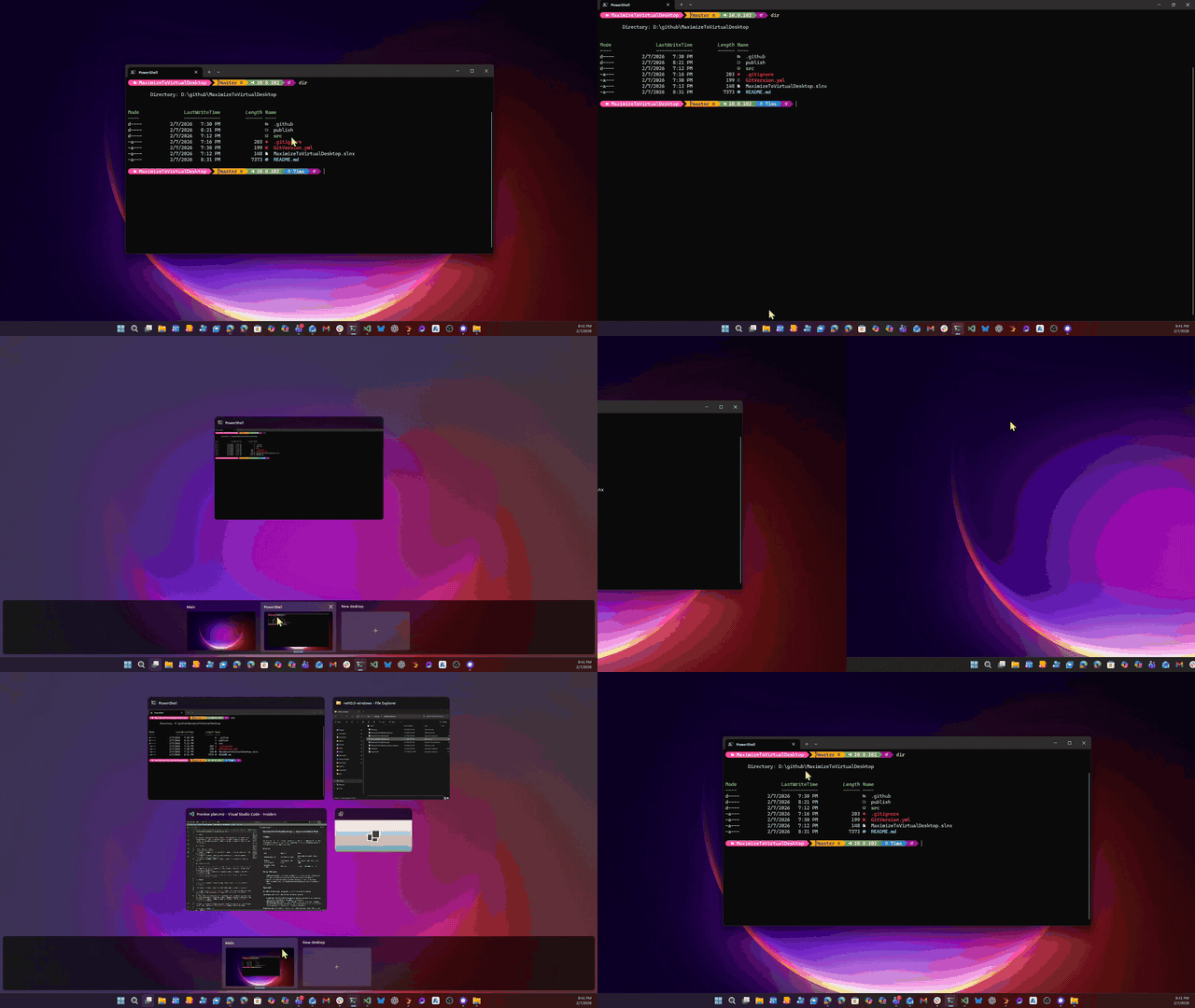
When triggered, the foreground window is moved to a brand-new virtual desktop and maximized. Closing, un-maximizing, or toggling the hotkey again restores everything — the window returns to its original desktop and size, and the temporary desktop is removed.
Usage
| Trigger | How |
|---|
| Hotkey | Ctrl + Alt + Shift + X — toggles the foreground window |
| Shift + Click | Hold Shift and click a window's maximize button |
The app runs in the system tray. Right-click the tray icon for options:
- Restore All — brings all windows back and removes temp desktops
- How to Use — shows usage instructions
- Settings — configure hotkeys and whether switch popups are shown
- Check for Updates — checks for new releases on GitHub
- Exit — restores all windows, then exits
How It Works
- Maximize — creates a new virtual desktop, moves the window there, switches to it, and maximizes the window. The desktop is named
[MVD] ProcessName so you can identify it in Task View.
- Auto-restore on un-maximize — if you restore/un-maximize a tracked window, it's automatically sent back to its original desktop and the temp desktop is cleaned up.
- Auto-restore on close — closing a tracked window triggers the same cleanup.
- Toggle — pressing the hotkey on an already-tracked window restores it.
- Crash recovery — if the app is killed or crashes, orphaned desktops are automatically cleaned up on next launch.
Requirements
- Windows 11 (any version — 21H2 through 24H2+)
- Self-contained — no .NET installation required
The app auto-detects your Windows build and selects the correct COM vtable layout. If a future Windows update breaks things, the app enters degraded mode and checks for updates automatically.
Shift+Click Compatibility
Shift+Click works wherever Windows 11 Snap Layouts works — apps that correctly handle WM_NCHITTEST and return HTMAXBUTTON. This includes:
| App | Works? |
|---|
| Notepad, Explorer, traditional Win32 | ✅ |
| Windows Terminal (WinUI) | ✅ |
| VS Code (Electron 13+) | ✅ |
| Visual Studio | ✅ |
| Apps with fully custom title bars | ❌ (use hotkey) |
The hotkey always works, regardless of the window type.
Building
dotnet build
Single-file publish
dotnet publish -c Release -r win-x64 --self-contained -p:PublishSingleFile=true -p:IncludeNativeLibrariesForSelfExtract=true
Architecture
src/MaximizeToVirtualDesktop/
├── Program.cs                  Entry point, single-instance Mutex
├── TrayApplication.cs          System tray, hotkey, lifecycle owner
├── FullScreenManager.cs        Orchestrator with rollback on every step
├── FullScreenTracker.cs        Thread-safe hwnd → tracking state map
├── VirtualDesktopService.cs    COM wrapper, 4 operations, Explorer restart recovery
├── WindowMonitor.cs            SetWinEventHook for close/un-maximize detection
├── MaximizeButtonHook.cs       WH_MOUSE_LL for Shift+Click on maximize button
├── TrackerPersistence.cs       JSON crash recovery in %LOCALAPPDATA%
└── Interop/
    ├── NativeMethods.cs        P/Invoke declarations
    ├── VirtualDesktopCom.cs    Vendored COM interfaces (from MScholtes/VirtualDesktop)
    └── DesktopManagerAdapter.cs Multi-version COM vtable adapter
Zero NuGet dependencies. COM interop declarations are vendored from MScholtes/VirtualDesktop (MIT license, actively maintained). The app ships two vtable layouts (pre-24H2 and 24H2+) and auto-selects the correct one with a smoke test fallback.
Design Principles
- Reliable over featureful — every code path handles failure. No crashes, no orphaned desktops, no stuck windows. If something goes wrong, roll back to the state before we touched anything.
- Tight — one project, zero packages, 9 files. Each file has one job.
- Clean —
IDisposable on every native resource. No fire-and-forget. All WinEvent callbacks marshal to the UI thread.
Known Limitations
- Elevated windows — cannot move windows running as Administrator from a non-elevated instance.
- App crash — if the app crashes, temporary desktops are cleaned up automatically on next launch. They're prefixed with
[MVD] in Task View for easy manual identification.
The Virtual Desktop GUID Problem
Microsoft's Virtual Desktop feature has a proper, documented COM interface — IVirtualDesktopManager — but it can only tell you which desktop a window is on and move a window you own between desktops. The actually useful operations — creating desktops, switching desktops, moving any window, naming desktops — all live behind undocumented COM interfaces like IVirtualDesktopManagerInternal and IVirtualDesktop.
The problem? Microsoft changes the interface GUIDs with nearly every major Windows update. Not the methods. Not the signatures. Just the GUIDs. This means every app that uses virtual desktop automation — this one, Peach, FancyWM, and dozens of others — breaks silently 2-3 times a year and has to scramble to update hardcoded GUIDs.
This is the single biggest fragility in this app. When it breaks, the app shows an error dialog on startup saying "Failed to initialize Virtual Desktop COM interface." The fix is straightforward but shouldn't be necessary:
How to update the GUIDs
- Check MScholtes/VirtualDesktop — Markus Scholtes maintains per-build interface files (e.g.,
VirtualDesktop11-24H2.cs) and typically updates within days of a new Windows build. Huge thanks to him for doing this thankless work for the entire community.
- If it's a vtable change (new/removed methods, same GUIDs), add a new adapter class in
DesktopManagerAdapter.cs and a new COM interface in VirtualDesktopCom.cs.
- If it's a GUID change, update the GUIDs on the affected interfaces.
- The fragile GUIDs are on these interfaces:
| Interface | What it does | Stable? |
|---|
IVirtualDesktopManager | Check/move owned windows | ✅ Documented, stable since Win10 |
IServiceProvider10 | Standard COM service lookup | ✅ Stable |
IObjectArray | Standard COM collection | ✅ Stable |
IVirtualDesktop | Desktop identity, name, wallpaper | ⚠️ Breaks with Windows updates |
IVirtualDesktopManagerInternal | Create, switch, move, remove desktops | ⚠️ Breaks with Windows updates |
IApplicationView | Window view for cross-process moves | ⚠️ Breaks with Windows updates |
IApplicationViewCollection | Get views by window handle | ⚠️ Breaks with Windows updates |
Dear Microsoft
Please stabilize the Virtual Desktop COM interfaces or provide a proper public API. Every third-party virtual desktop tool in the ecosystem depends on reverse-engineered GUIDs that break with every update. A stable API for creating, switching, naming, and moving windows between virtual desktops would eliminate an entire class of fragility. PowerToys has asked for this too.
Prior Art & Credits
- Markus Scholtes (MScholtes/VirtualDesktop) — the COM interface definitions we vendor are from his project (MIT license). He does the hard work of reverse-engineering and publishing updated GUIDs for every Windows build. This app and many others wouldn't be possible without his work.
- Peach — MS Store app with similar hotkey UX
- PowerToys feature requests #13993, #21597
License
MIT
Credit to Kieran Mockford for the original idea. May he rest in peace.