PeekDesktop 👀
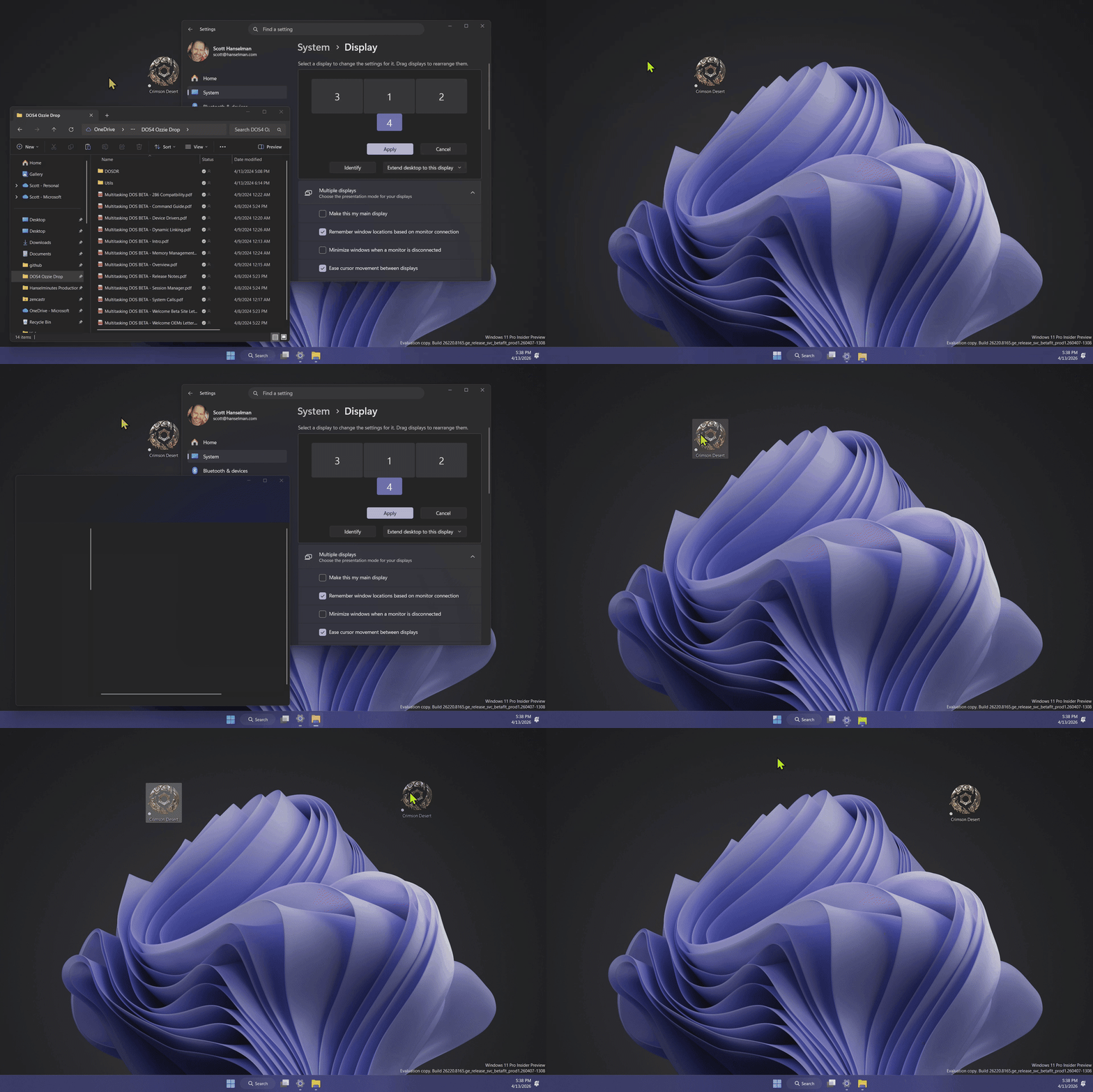
Click empty desktop wallpaper (or empty taskbar area) to reveal your desktop — just like macOS Sonoma.
PeekDesktop brings macOS Sonoma's "click wallpaper to reveal desktop" feature to Windows 10 and 11. By default it uses Explorer's native Show Desktop behavior, and it also includes an optional Fly Away experimental style plus tray toggles for Require Double-Click, Peek on Desktop Click, and Peek on Taskbar Click. Click or drag desktop icons normally without accidentally triggering peek. When you're done, click any window, the taskbar, or the wallpaper again and everything comes right back where it was.
Download
📥 Download the latest release
Install with Winget
PeekDesktop is submitted to the Windows Package Manager community repository as Hanselman.PeekDesktop when tagged releases are published. After the community manifest is accepted, install it with:
winget install Hanselman.PeekDesktop
Download a release
| File | Platform |
|---|
PeekDesktop-vX.Y.Z-win-x64.zip | Intel/AMD (most PCs) |
PeekDesktop-vX.Y.Z-win-arm64.zip | ARM64 (Surface Pro X, Snapdragon, etc.) |
No installer needed. Download the zip, extract it, and run PeekDesktop.exe. Release builds are self-contained, so you do not need to install .NET separately. It lives in your system tray and updates itself automatically — when a new version is available, it downloads, verifies the code signature, and restarts in place.
Documentation
- Engineering Deep Dive - architecture, shell internals, experiments, debugging workflow, undocumented API notes, and release tradeoffs
- Auto-Updater - how the in-place auto-update system works, security model, swap dance, testing
How It Works
- Click empty desktop wallpaper or empty taskbar area (not an icon or taskbar button) -> your desktop is revealed
- Stay on the desktop -> click or drag icons, right-click, and rearrange things while windows stay hidden
- Click any app, the taskbar, or empty wallpaper again -> all windows restore to exactly where they were
That's it. It just works.
Peek Styles
- Show Desktop (Explorer) — the default and recommended mode. Uses Explorer's native Show Desktop behavior.
- Fly Away (Experimental) — animates windows offscreen. Fun but has known quirks with external window management (Win+D, taskbar). Use for the visual flair, but know it can get confused if the shell changes window state behind its back.
Under the Hood
PeekDesktop uses lightweight Windows APIs:
SetWindowsHookEx(WH_MOUSE_LL) — low-level mouse hook to detect desktop clicksWindowFromPoint — identifies the window under your cursor- MSAA hit-testing (
AccessibleObjectFromPoint) — distinguishes empty wallpaper from desktop icons
- UI Automation hit-testing — classifies empty taskbar space without firing on Start, pinned apps, or tray buttons
- Taskbar Show Desktop button click — primary path, immune to keyboard remapping (PowerToys, etc.)
- Win+D
SendInput — fallback if taskbar button is unavailable
EnumWindows + WINDOWPLACEMENT — captures exact position and state (including maximized) of every windowSetWinEventHook(EVENT_SYSTEM_FOREGROUND) — watches for when you switch back to an appSetWindowPlacement — restores windows to their exact previous positions
No admin rights required. Uses < 5 MB RAM idle.
System Tray
Right-click the tray icon for options:
- ✅ Enabled — toggle the peek feature on/off
- 🔁 Start with Windows — launch automatically at login
- 🖱️ Require Double-Click — optionally require a double-click on the desktop to trigger peek
- 🎮 Pause While Gaming / Full-Screen — on by default for exclusive full-screen and known gaming fullscreen apps
- 🖥️ Peek on Desktop Click — on by default; turn it off for taskbar-only activation
- 📌 Peek on Taskbar Click — optionally trigger peek from empty taskbar space
- 🪟 Restore All Windows on App Switch — on by default; in Explorer show desktop mode, taskbar/Alt+Tab app switches restore all hidden windows behind the selected app
- 👀 Peek Style — switch between Explorer and fly-away modes
- ℹ️ About — version info
- ⬇️ Check for Updates — download and install newer versions automatically
- 🔄 Auto-Check for Updates — on by default; silently checks for updates on startup
- ❌ Exit — quit PeekDesktop
When Windows is in dark mode, the tray menu also follows the system theme when supported by the OS.
What's New
- Small Native AOT single-file builds for both x64 and ARM64
- Peek on Taskbar Click — optional trigger from empty taskbar space
- Taskbar-only activation — disable desktop-click peeking while keeping taskbar peeking enabled
- Dark tray menu support — follows Windows dark mode when available
- Taskbar button Show Desktop — bypasses keyboard remappers (PowerToys Keyboard Manager, etc.)
- Pause While Gaming / Full-Screen — avoids interference during gaming sessions
- Require Double-Click — optional double-click trigger for desktop peek
- In-place auto-updater — downloads, verifies Authenticode signature, swaps, and restarts automatically
macOS Sonoma vs PeekDesktop
| Feature | macOS Sonoma | PeekDesktop |
|---|
| Click wallpaper to peek | ✅ | ✅ |
| Restore on app click | ✅ | ✅ |
| Restore on second wallpaper click | ✅ | ✅ |
| Clicking/dragging icons does not trigger peek | ✅ | ✅ |
| Desktop icons accessible | ✅ | ✅ |
| Exact window position restore | ✅ | ✅ |
| System tray control | ❌ | ✅ |
| Multi-monitor support | ✅ | ✅ |
| Start with OS | Login Items | ✅ Registry |
| Smooth animation | ✅ | Fly Away mode |
Build from Source
Requirements: .NET 10 SDK
git clone https://github.com/shanselman/PeekDesktop.git
cd PeekDesktop
dotnet build src/PeekDesktop/PeekDesktop.csproj
Run it
dotnet run --project src/PeekDesktop/PeekDesktop.csproj

# Run the P/Invoke safety harness (invalid handles + stress/leak checks)
dotnet run --project src/PeekDesktop.InteropHarness/PeekDesktop.InteropHarness.csproj -- 10000

# Windows-friendly wrapper script
.\test.ps1 -Iterations 10000

# Verbose mode (prints per-test timing + leak probe diagnostics)
.\test.ps1 -Iterations 10000 -VerboseOutput
Publish a self-contained single-file exe
# For Intel/AMD
dotnet publish src/PeekDesktop/PeekDesktop.csproj -c Release -r win-x64 --self-contained -p:PublishSingleFile=true

# For ARM64
dotnet publish src/PeekDesktop/PeekDesktop.csproj -c Release -r win-arm64 --self-contained -p:PublishSingleFile=true
Release packaging
Release builds use .NET Native AOT — the exe is a fully native binary with no .NET runtime dependency. Current releases ship as self-contained single-file executables for both x64 and ARM64. Earlier experiments also used PublishAotCompressed (LZMA), but current builds favor compatibility and predictable startup behavior.
Architecture
src/PeekDesktop/
├── Program.cs             # Entry point, single-instance mutex
├── DesktopPeek.cs         # Core state machine (Idle ↔ Peeking)
├── MouseHook.cs           # WH_MOUSE_LL global mouse hook
├── FocusWatcher.cs        # EVENT_SYSTEM_FOREGROUND monitor
├── WindowTracker.cs       # Enumerate, minimize, and restore windows
├── DesktopDetector.cs     # Identify desktop windows, icons, taskbar
├── Win32MessageLoop.cs    # Win32 message loop + TaskbarCreated recovery
├── Win32TrayIcon.cs       # Shell_NotifyIcon wrapper
├── Win32Menu.cs           # Win32 popup menu wrapper
├── Win32Icon.cs           # Programmatic icon via CreateIconIndirect
├── WinHttp.cs             # WinHTTP wrapper (replaces HttpClient)
├── TrayIcon.cs            # Tray icon business logic + menu wiring
├── AppUpdater.cs          # In-place auto-updater (download, verify, swap, restart)
├── AppDiagnostics.cs      # Logging via Trace/DebugView
├── Settings.cs            # Hand-written UTF-8 JSON persistence + autostart
└── NativeMethods.cs       # Win32 P/Invoke declarations
Contributing
PRs welcome! Current status and next ideas:
.NET Native AOT — The Size Journey 💾
PeekDesktop is a showcase for how small a .NET Native AOT application can get. Starting from a standard WinForms app, we systematically eliminated every managed framework dependency until the binary was pure Win32 P/Invoke — then compressed it to fit on a floppy disk.
| Version | Binary Size | What Changed |
|---|
| v0.4.5 | ~65 MB | Self-contained .NET (no AOT) |
| v0.5.0 | 17.5 MB | Enabled Native AOT |
| v0.6.0 | 4.2 MB | Dropped WinForms — pure Win32 P/Invoke for tray icon, menus, message loop |
| v0.6.1 | 2.3 MB | Replaced HttpClient with OS-native WinHTTP (winhttp.dll) |
| v0.7.2 | 1.88 MB | Eliminated JSON source generator, System.Reflection, Process.Start |
| v0.7.2 + LZMA | ~564 KB | LZMA compression via PublishAotCompressed |
What's left in the 1.88 MB (pre-compression)?
- ~1.2 MB — .NET Native AOT runtime (GC, threading, exception handling, type system)
- ~0.4 MB —
Utf8JsonReader/Utf8JsonWriter + async task machinery
- ~0.2 MB — App code, P/Invoke stubs, string literals
- ~0.08 MB — PE headers and metadata
Key techniques:
- No WinForms, no System.Drawing —
Shell_NotifyIcon, CreatePopupMenu, TrackPopupMenuEx, MessageBoxW, CreateIconIndirect via P/Invoke
- No HttpClient —
WinHttpOpen/WinHttpSendRequest uses the OS HTTP+TLS stack at zero binary cost
- No JSON source generator — hand-written
Utf8JsonReader/Utf8JsonWriter for the two tiny JSON shapes we need
- No System.Reflection — PE version resources read via
GetFileVersionInfoExW P/Invoke
- No managed delegates for WndProc —
UnmanagedCallersOnly function pointers avoid marshaling overhead
OptimizationPreference=Size + InvariantGlobalization + stripped diagnostics
Special thanks to Michal Strehovský — the architect of .NET Native AOT — whose PR #5 inspired the final round of optimizations that eliminated the JSON source generator, reflection, and managed delegates. When the person who built the AOT compiler optimizes your app, you pay attention. 🙏
License
MIT