VersoCon 変
Convert photos, PDFs and videos — 100% on your own machine.
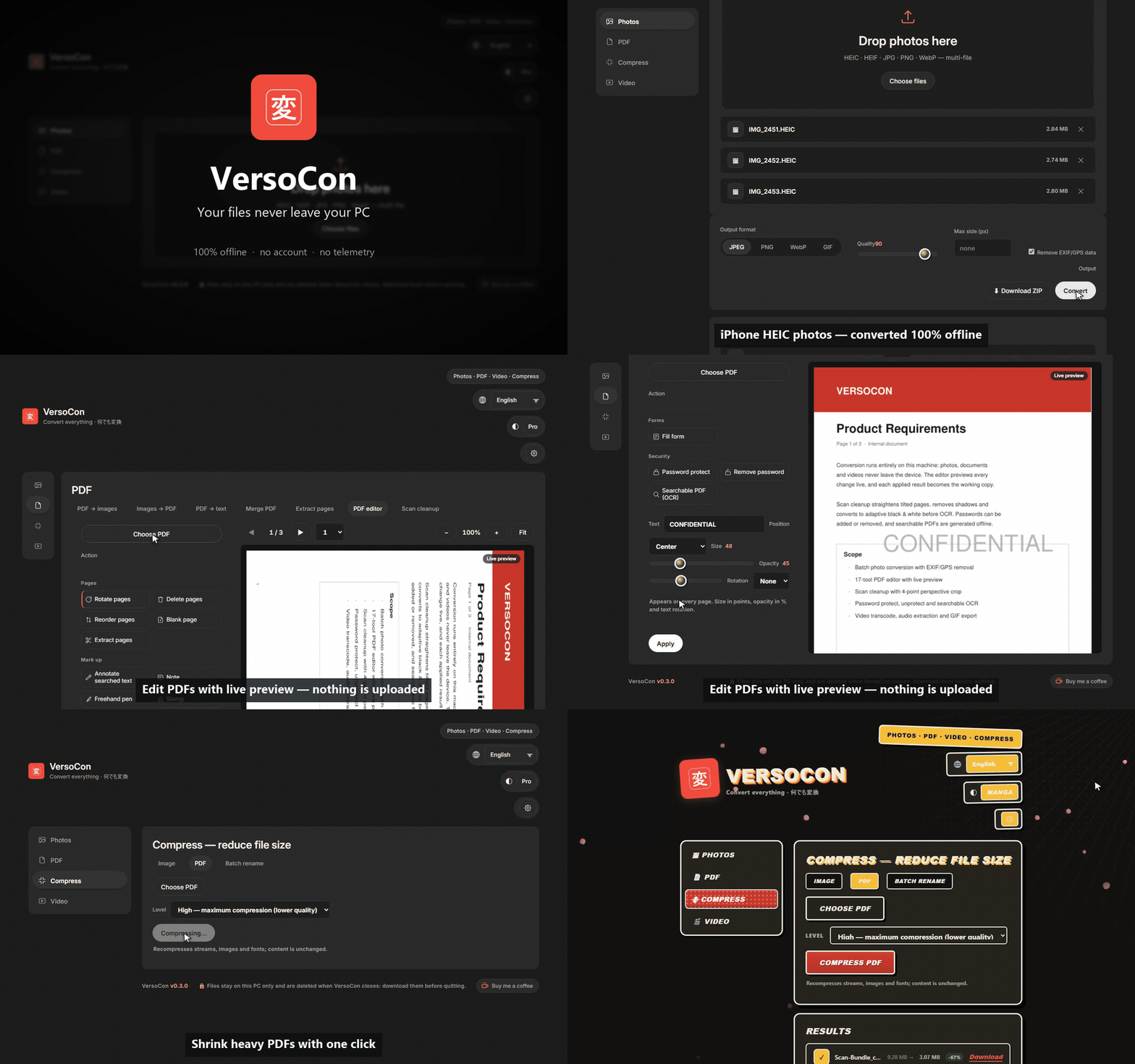
VersoCon is a desktop file converter with a real PDF editor, built for people who
don't want their documents in someone else's cloud: HEIC photos from your iPhone,
PDFs to edit and sign, scans to clean, videos to convert. Everything runs on
127.0.0.1, offline, with no account and no telemetry.





VersoCon is free, with no paid tier. If it saves you time, you can support its development:

Why VersoCon
- Private by design. Files are converted on your machine; nothing is uploaded.
No account, no cloud, no telemetry. The session folder is removed when the app closes.
- One app instead of five. Photos, PDFs and video live in the same window:
convert, edit, compress, OCR, clean scans — no subscription, no watermark, no paywall.
- A PDF editor, not a toy. 20 tools — watermark, redact, sign, forms, passwords,
searchable OCR — with live preview: every change is shown before you apply it,
and each result becomes the next working copy.
- 8 languages, two themes. Switch between the Pro dashboard and the Manga theme,
or between Italian, English, Spanish, French, German, Portuguese, Chinese and Japanese,
without restarting.
What it does
| Area | Highlights |
|---|
| Photos | HEIC / HEIF / JPG / PNG / WebP / BMP / TIFF / GIF → JPEG, PNG, WebP, GIF. Batch up to 500 files, quality slider, max-side resize, animated GIFs preserved. One-click EXIF/GPS removal before saving. Download single files or a ZIP. |
| PDF | PDF → images · images → PDF · merge · split / extract pages · batch rename · compress (Low / Medium / High) · text extraction and OCR. |
| PDF editor | Pages: rotate, delete, reorder, insert blank, extract. Review: highlight, sticky notes, freehand ink, text, stamps. Privacy: redaction, find & replace (background and rotated text preserved). Document: watermark, Bates numbering, header/footer, PDF forms. Sign: 8 styles generated from your name (script fonts or your initials), or draw your own. Security: password protect/unprotect, searchable PDF. |
| Scan cleanup | Straighten tilted scans, remove shadows, adaptive black & white, 4-corner perspective crop — for both photos and scanned PDFs. |
| Video | Transcode to MP4 / WebM, extract audio (MP3 / M4A), export animated GIFs. Long jobs show a real progress bar with a cancel button. |
| Comfort | Drag & drop, keyboard navigation, WCAG-measured contrast, animated Manga theme or sober Pro theme, 8 languages. |
Install
Windows (recommended)
- Download
versocon-setup-X.Y.Z.exe from Releases and run it.
- Or use a package manager:
winget install HikariHasegawa.VersoCon     # official Windows package manager (live)
scoop bucket add HikariHasegawa https://github.com/lupanostefano/bucket
scoop install versocon                      # Scoop, from the author's bucket (live)
Windows shows "Windows protected your PC" — why, and what to check
The installer is not code-signed yet, so SmartScreen warns about any unsigned
open-source build. That is a generic caution, not a malware report.
Before you run it:
- Verify the SHA-256 of the downloaded file against the one on the
Releases page
(v0.3.4:
658C314CC440F1AAC226DA1932EAA7C2BBAA59C8FA51965B017A8C6CECEDC1D2).
- Optional: upload your copy to VirusTotal.
- If everything checks out: More info → Run anyway / Esegui comunque.
The full guide is in docs/security.md (English / Italiano).
- Linux (from source): no ready-made package yet — run
bash install.sh. Native .deb/.AppImage builds are on the roadmap.
- macOS (untested): the same from-source steps should work; VersoCon has not been tested on macOS yet.
From source
git clone https://github.com/lupanostefano/versocon.git
cd versocon
python -m venv .venv
.venv\Scripts\activate        # Windows
# source .venv/bin/activate   # Linux / macOS
pip install --upgrade pip
pip install -r requirements.txt
Setup scripts (Windows / Linux) also install Tesseract for OCR:
powershell -ExecutionPolicy Bypass -File .\install.ps1 # Windows
bash install.sh # Linux / macOS
Running
python run.py              # desktop window (pywebview), or browser if unavailable
python run.py --browser    # force the default browser
# or without pywebview:
python -m uvicorn app.main:app --host 127.0.0.1 --port 8321
# then open http://127.0.0.1:8321
Requirements
- Windows 10/11 for the installer; Python 3.11+ to run from source
(base dependencies in requirements.txt).
- Optional engines, detected automatically in PATH, WinGet, Chocolatey, Scoop and
standard install folders:
ffmpeg — video conversion, audio extraction, GIF export.Tesseract — OCR and searchable PDFs.
Privacy and security
- The app listens only on
127.0.0.1 and validates every request (CSRF / DNS-rebinding
protection, no path traversal); conversion never calls the network.
- The update check is off by default: when enabled it only asks GitHub for the latest
version number and tells you if something newer exists.
- Output files are written to a temporary session folder and deleted when the app closes.
- Details and verification steps: docs/security.md.
Project structure
versocon/
├─ app/            # FastAPI: API endpoints, jobs, security, update check
├─ converters/     # conversion engines (images, documents, video, PDF, signature, scan)
├─ static/         # frontend HTML+CSS+JS (no build step) + vendor (pdf.js)
├─ assets/         # fonts, logo, demo GIF
├─ packaging/      # PyInstaller spec, icons, Inno Setup, MSIX
├─ tests/          # pytest suite + real-browser smoke test
├─ run.py          # desktop/browser launcher
└─ PROGRESS.md     # development state & roadmap
Tests
.venv\Scripts\python -m pytest tests -q   # Windows
python -m pytest tests -q                 # Linux / macOS
Real-browser smoke test (Playwright, pinned; excluded from the normal run):
pip install -r requirements-e2e.txt && python -m playwright install chromium
VERSOCON_E2E=1 python -m pytest tests/test_smoke_e2e.py -q   # Windows: $env:VERSOCON_E2E="1"
Contributing and support
Issues and pull requests are welcome. VersoCon is free, with no paid tier: if it saves
you time, you can buy the developer a coffee — thank you.
License
MIT — free to use, modify and redistribute.