
Hostpad
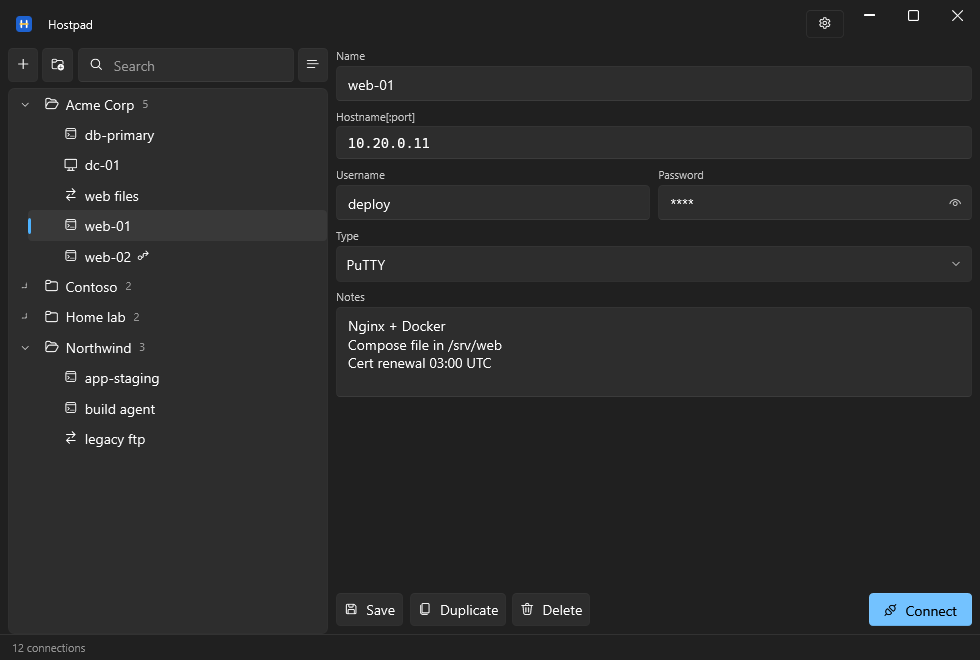
A connection manager for Windows. Keep every remote machine in one place and
open it with a double click — SSH, SFTP, SCP, FTP, Remote Desktop or VNC,
through the client tools you already use.



Download the latest release
·
Website
·
Why this exists
·
Changelog
Why
A good connection manager is an address book, not another terminal. Hostpad
keeps the list, the credentials and the notes; PuTTY, WinSCP, mstsc and your VNC
viewer keep doing what they are good at.
The idea comes from AutoPuTTY, a tool
that did this job well for many years. Hostpad is freely inspired by it — no
fork, no shared code, written from scratch — and brings the idea up to date:
folders, real encryption, a Windows 11 interface, and the fields that used to be
encoded inside other fields turned into fields of their own.
The longer version — seventeen years on one tool, what a flat list does at
twenty clients, and why this is a rewrite rather than a fork — is written up at
hostpad.github.io/why.
Features
Organise
- Folders with nesting, plus connections that belong to no folder at all
- Drag and drop to move connections between folders and to reorganise folders
- Rename in place with F2
- Search across name, hostname, username and notes, which flattens the tree
while you are hunting
- Switch between the folder tree and one flat list
- A notes field per connection, for the things you always forget
Connect
- Six connection types: PuTTY, Remote Desktop, VNC, and WinSCP in its SFTP, SCP
and FTP modes
- Double click connects with the type you chose; the right-click menu opens the
same host with any of the others
- SSH jump hosts as real fields, tunnelled through plink, instead of a proxy
string smuggled into the username
- Private key authentication, post-login commands and X11 forwarding for PuTTY
- Screen size, mounted drives, multiple monitors and admin sessions for Remote
Desktop
- Full screen and view-only for VNC, passive mode for FTP
Protect
- The connection list is encrypted with AES-256-GCM, always
- Without a master password the vault is tied to your Windows account through
DPAPI: no prompt, and useless to anyone who copies the file
- With a master password it also opens on another computer, which is what makes
a backup worth having. Asking for it at startup is a separate choice, so you
can have portability without the interruption
- Passwords are derived with PBKDF2-HMAC-SHA256, and the iteration count lives
in the file so it can be raised later without breaking existing vaults
- Changing the master password rewraps a key rather than re-encrypting
everything, so it is instant at any size
Move data in and out
- Import from AutoPuTTY, including passwords, notes, folders recovered from name
prefixes, jump hosts, and optionally the tool paths
- Export a password-protected copy to share, with a choice of whether to include
the saved credentials — sharing a server list rarely means handing over the
root passwords
- Import merges rather than replaces, and asks what to do about names that
already exist
Everyday details
- Follows the Windows light and dark theme, with Mica and rounded corners
- Offers to save when unsaved edits are about to be lost, including on close
- Remembers window position, size and pane widths, and refuses to restore onto a
monitor that is no longer there
- Saves atomically, keeping a backup, so a crash mid-save cannot truncate your
connection list
- Single instance, so a second launch does not open a second window
Requirements
- Windows 10 or 11
- .NET 10 Desktop Runtime,
unless you take
Hostpad--win-x64.exe, which carries the runtime
inside it and needs nothing installed
- The client tools you intend to use: PuTTY, WinSCP, a VNC viewer. Remote Desktop
ships with Windows
Your data lives in %USERPROFILE%\.hostpad.
Verifying your download
Hostpad is not code-signed, so Windows SmartScreen will warn the first time you
run it: Windows protected your PC. Choose More info → Run anyway. A
certificate that removes the warning costs money the project does not have, and
the free programme for open source asks for a level of public visibility Hostpad
has not reached yet.
What you get instead of a signature is a hash, and a build you can trace. Every
release is produced by
the release workflow on GitHub's runners,
starting from the tagged commit; no file on a release page is uploaded from a
developer machine. That workflow computes the SHA-256 of each file it built and
writes it into the release notes.
So compare what you downloaded against what the workflow published:
Get-FileHash .\Hostpad--win-x64.exe -Algorithm SHA256
If the hash matches the one on the
release page, the file
is the one the workflow built. If it does not, do not run it, wherever you got
it from.
Scoop does this for you: the manifest carries the expected
hash and Scoop refuses a file that does not match.
scoop bucket add hostpad https://github.com/Hostpad/scoop-bucket
scoop install hostpad/hostpad
scoop update hostpad then follows new releases, checking each download the
same way.
winget does the same check, against the hash in the manifest Microsoft
publishes:
winget install Hostpad.Hostpad
Building
Building needs the .NET 10 SDK, which is a different package from the
runtime above. Install it with winget:
winget install Microsoft.DotNet.SDK.10
Open a new terminal afterwards, so the updated PATH is picked up, and check the
SDK is visible:
dotnet --list-sdks
The output must include a 10.x entry. If dotnet is found but no 10.x SDK is
listed, only the runtime is installed and the build will fail on the target
framework.
Then, from the repository root:
dotnet build
dotnet test
dotnet run --project Hostpad.App
Visual Studio 2022 17.14 or later opens Hostpad.sln directly. Set
Hostpad.App as the startup project.
Warnings are errors in this repository, so a build that prints nothing is a
build that passed.
Bug reports, ideas and patches are welcome:
CONTRIBUTING.md covers how the code is arranged, what the
tests expect and how a change gets in.
Migrating from AutoPuTTY
Use Import from AutoPuTTY in the settings menu and point it at an existing
autoputty.xml. The original file is left untouched.
Passwords and comments come across, and two AutoPuTTY conventions become real
structure: a name like Customer: server turns into a folder plus a name, and
the proxyuser@proxyhost:port#user jump syntax becomes a jump host with its own
fields. Tool paths and options can be imported too, if you want them.
If the list was protected by an AutoPuTTY master password, Hostpad asks for it.
Otherwise it opens the file with AutoPuTTY's built-in key.
> An autoputty.xml without a master password is encrypted with a key published
> in AutoPuTTY's own source, so anyone can read it. Treat such files as
> plaintext: they hold hostnames, usernames and passwords.
How it is built
Two projects. Hostpad.Core holds the model, storage, cryptography and the
command building for each tool, with no user interface and no Windows-only API
outside the one class that talks to DPAPI. Hostpad.App is WPF with
WPF-UI.
The launchers produce a command and hand it back rather than starting a process
themselves, which is what lets the argument building be tested without spawning
anything.
Built with
Hostpad stands on a short list of other people's work:
- WPF-UI by Leszek Pomianowski and
contributors — the Windows 11 look, MIT
- .NET Community Toolkit — the MVVM
source generators, MIT
- .NET — the runtime, WPF and the DPAPI
wrapper the vault is built on, MIT
Development also leans on xUnit for the test
suite, which is not part of anything shipped.
Full copyright notices are in
THIRD-PARTY-NOTICES.md, which is also included in
every download.
About this project
Hostpad is freely inspired by AutoPuTTY
by r4dius. It is not a fork and shares no code with it: the application was
written from scratch on .NET 10 and WPF. Thanks to r4dius for the original idea
and for a tool that did the job for many years.
Name and official builds
The source is free software under the GPL — fork it, modify it, redistribute it.
The name "Hostpad" is not covered by that licence: please rename your fork so
users can tell the projects apart.
The only official releases are published at
. Copies distributed elsewhere, in
particular paid ones, are not from us.
Licence
GNU General Public License v3.0 or later — see LICENSE.
The bundled libraries keep their own licences, all MIT and all compatible with
the GPL; their notices are in
THIRD-PARTY-NOTICES.md.