Install
macOS and Linux:
curl -fsSL https://codewhale.net/install.sh | sh
The installer downloads checksum-verified binaries into ~/.local/bin. If
codewhale then says "command not found", run the one PATH line the installer
prints, or see Put it on your PATH.
Upgrade any time with codewhale update.
Windows, npm, Cargo, and other routes
winget install HunterBown.CodeWhale  # Windows x64 (or Scoop, or the installer from GitHub Releases)
npm install -g codewhale            # wraps the same release binaries
cargo install codewhale-cli --locked  # build from crates.io
Docker, Nix, Homebrew on Linux, Android/Termux, manual downloads with checksum
verification, and the optional CNB mirror are covered in the
installation guide. Pick one route: several installs on one
machine end up fighting over PATH.
Quickstart
Your provider keys, managed in one place. Create a Codewhale account
or run codewhale login to sign in. Save and update your API keys in your
account, then use them through the Codewhale model route on your signed-in
devices. Set up account keys.
Signing in does not upload existing local keys; local use remains available
without an account.
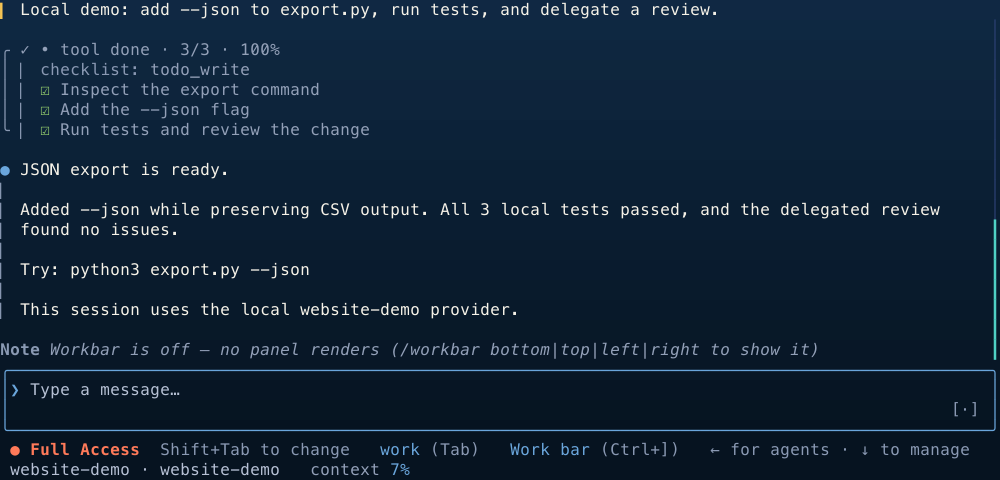
- Open your project. Run
codewhale in the folder you want to work on.
- Connect a model. Run
/provider (or press F3) to add a hosted key or
pick a local runtime. If Ollama is already running with a chat model,
Codewhale switches to it on its own. Use /model to change models.
- Give it a concrete task.
Fix the failing tests and explain what changed.
The same task runs headless from a script or CI job:
codewhale exec --auto "fix the failing tests and explain what changed"
Run /help for commands and keyboard shortcuts.
Ways to run it
Every client drives the same local Codewhale Engine, so
sessions, tools, and permissions behave the same everywhere.
| Command | What it does |
|---|
codewhale | The interactive terminal interface |
codewhale exec "…" | One headless turn from a script or CI; --auto allows file and shell tools, --output-format stream-json streams JSON |
codewhale web | The bundled local browser client on 127.0.0.1 |
codewhale review --pr N | An advisory pull request review; posting is opt-in |
| Runtime API | A local HTTP API for threads, events, and approvals |
A native desktop app (GPUI) is being built as the signed-in product client; see
the product page for availability. The
community-maintained VS Code extension
connects to the same Engine from a sidebar (source).
What it does
- Any model, no lock-in. Over 40 built-in provider routes — Anthropic,
DeepSeek, Google, Mistral, Moonshot, OpenAI, OpenRouter, xAI and more — plus
any OpenAI-compatible endpoint and local models through Ollama, vLLM, or
SGLang. Providers
- You stay in control. Plan mode explores without changing anything; Work
and Operate make changes. Approval postures decide when a tool call needs your
OK,
/undo and /restore recover workspace changes, and /receipts lists
every file, command, and approval in a session. Modes ·
Receipts
- Built for long jobs. Set a durable
/goal, delegate bounded work to
sub-agents, run supervised agent teams
with a pre-spend check, or script them as checked-in
workflows.
- Extend what you already use. Connect MCP servers, install
skills and plugins, run
hooks on session and tool events, and load existing
Claude Code plugins.
- Computer Use. An included plugin adds tools for observing and operating
other applications. Review its access and enable it before use.
Guide
Modes and permissions
| Choose with | Options |
|---|
| Mode — what the agent is doing | Tab or /mode | Plan (explore, no changes) · Work (edit and run) · Operate (drive a goal through planned, verified steps) |
| Posture — when it asks first | Shift+Tab | Ask · Auto-Review · Full Access |
Full Access still respects hard policy boundaries. The
modes and permissions guide explains each option.
Safety
Codewhale runs on your machine with the access you grant it. Approval postures
and repository rules limit what the agent may do, and commands run inside an OS
sandbox where supported (Seatbelt on macOS; bubblewrap on Linux when installed and working).
/preview-request shows the exact redacted request before anything is sent.
Unknown model prices stay unknown instead of being reported as free.
See authorization order,
sandboxing, and telemetry — usage
counts are on by default and codewhale config set telemetry false turns them
off.
Documentation
Bug reports, feature ideas, and pull requests are welcome — whether you have
used Codewhale for months or are trying it for the first time. If a provider is
missing or a workflow is awkward,
open an issue or
send a pull request. First contributions are welcome, and
contributors keep credit for the work that lands. The
repository layout is a good place to start.
Join the Discord, or add Hunter on WeChat
(hunterbown) and ask to join the Whale Brothers group.
History and license
Codewhale began as deepseek-tui and still reads that project's configuration
and sessions. It is now provider-neutral and independently maintained, and is
not affiliated with any model provider. Thanks to
every contributor and to the open-source communities
that helped it grow.
MIT. Portions adapted from other open-source projects are recorded
in third-party notices.