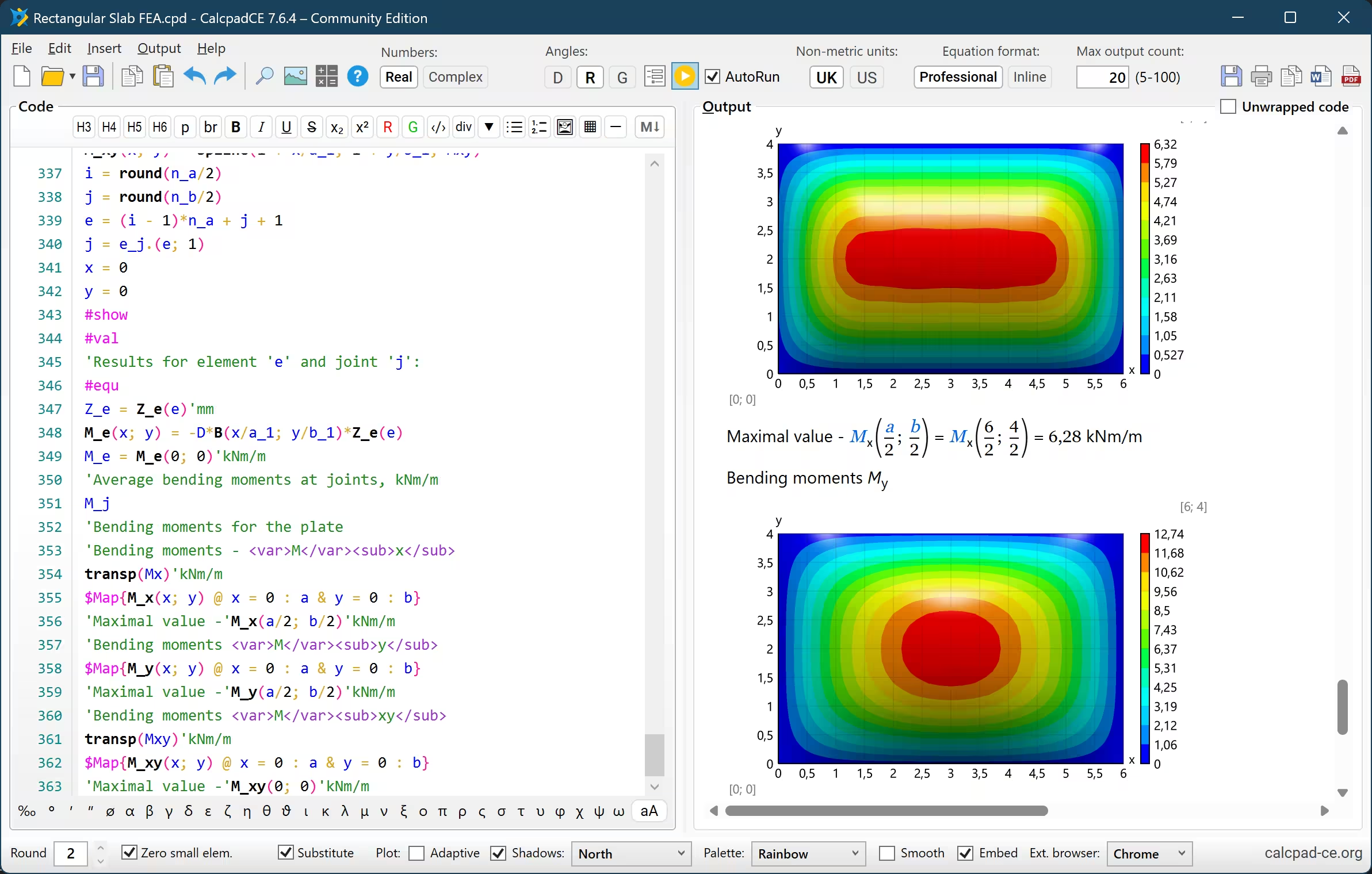
📖 What is CalcpadCE?
CalcpadCE is an open-source tool for mathematical and engineering calculations.
Write your formulas in a simple, readable syntax and get beautifully rendered output with plots, diagrams, and formatted results — all in real time.
For Desktop, Web and Visual Studio Code.
This is a fork of the now closed-source Calcpad 7.6.2 (March 2026).
🡒 View the Documentation
🡒 Browse the 200+ Examples
Core Features:
- Advanced Mathematics: Native support for real and complex numbers, vectors, matrices, and a comprehensive library of numerical methods (integration, differentiation, root finding, FFT).
- Smart Unit Tracking: Built-in support for SI, Imperial, and USCS units, plus the ability to define custom units.
- Programmability: Full control over your calculations using custom functions, macros, conditional logic, loops, and file I/O (CSV / Excel
 ).
).
- Rich Documentation: Seamlessly embed Markdown, HTML, CSS, and parametric SVG drawings directly alongside your code.
- Professional Reporting: Automatically generate interactive HTML input forms and export polished, heavily formatted reports to native Word
 formulas or PDF
  .
.
🚀 Downloads & Installation
You can download the latest version of the CalcpadCE desktop application directly from our GitHub Releases page.
We provide a standard Windows installer, portable executables, and Linux packages.
VS Code Extension:
If you prefer to write your worksheets in an IDE, we maintain a dedicated extension for Visual Studio Code providing syntax highlighting, snippets, and more.
🡒 Downloads
🡒 Try the Online Editor
The easiest way to install CalcpadCE is via winget.
Simply open a Windows terminal and run:
winget install -e --id Imartincei.CalcpadCE
⚡ Quick Start
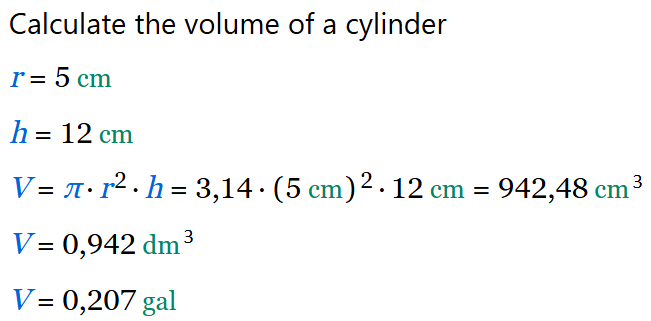
Writing a CalcpadCE worksheet is as simple as typing math and adding comments.
Code
' Calculate the volume of a cylinder
r = 5 cm
h = 12 cm
V = π * r^2 * h
V|dm^3
V|gal
Output
Whether you need help getting started or want to chat with other users, you can find us here:
🏛️ Project Status & History
Following a shift to a closed-source model by its original creator, the public GitHub repository for Calcpad was taken offline.
Our community stepped up to fork the project and continue its open-source development.
We restored the final open-source release to officially launch CalcpadCE as a free, community-driven continuation of the software.
Our goal is to ensure that a free, open-source version of this fantastic tool remains available, maintained, and continuously improved by the community.
🤝 Contributing
CalcpadCE is entirely maintained by volunteers, and we welcome contributions of all sizes!
Whether you want to fix a bug, add a new numerical method, or improve the documentation, we would love your help.
To get started, please check out the repository, build the project locally, and browse our open issues.
If you are planning a major feature, we recommend opening a Discussion first to coordinate with the maintainers.
🡒 Contribution Guidelines
🛠️ Building the Source Code
Download and install the .NET 10 SDK, Node.js 22+ and Rust.
The desktop app is a Tauri shell around the CalcpadCE web frontend, with the calculation server bundled as a sidecar.
Install dependencies in all three frontend projects shown below, stage the sidecar, then start it:
git clone https://github.com/imartincei/CalcpadCE.git
cd CalcpadCE/Calcpad.Web/frontend/calcpad-frontend
npm install
cd ../calcpad-web
npm install
cd ../calcpad-desktop
npm install
./stage-sidecar.sh
npx tauri dev
On Windows use .\stage-sidecar.ps1 instead.
To produce installers for your platform, run ./build-desktop.sh (or .\build-desktop.ps1) from the same directory.
The command line interpreter builds on its own with dotnet build Calcpad.Cli from the repository root.
It is a development tool used to render the documentation's examples and is not part of a release.
VS Code Tasks
The repository ships tasks for the common builds — run them from Terminal → Run Task… (Ctrl+Shift+P → Tasks: Run Task).
They pick the right script for your platform automatically.
| Task | What it does |
|---|
Frontend: Install All Dependencies | npm install across the frontend library, web editor, extension and desktop app |
Desktop: Stage Sidecar | Publishes Calcpad.Server and stages it as the Tauri sidecar (run before tauri dev) |
Desktop: Dev | Starts tauri dev with hot reload, staging the sidecar first |
Desktop: Bundle All | Builds every installer format configured for your platform |
Desktop: Build Portable (Windows) | Builds the Windows portable bundle |
Server: Build (.NET) | Builds the Calcpad.Server backend |
Web: Dev Server | Runs the browser editor against a Vite dev server |
Extension: Compile | Builds the VS Code extension and deploys the server into it |
Tests: Run | Runs Calcpad.Tests |
The Desktop: Dev (Tauri) and Server: Debug (.NET) launch configurations are available under Run and Debug.
📄 License & Credits
CalcpadCE is released under the MIT License.
This project builds upon the tremendous foundational work of the original Calcpad application.
Copyright (c) 2014-2026 Ned Ganchovski.
All subsequent modifications and additions are Copyright (c) 2026 CalcpadCE Contributors.
This project uses some additional third-party components, software and design.
They are re-distributed free of charge, under the license conditions, provided by the respective authors.
- The new and beautiful icons are created using icons8.com.
- Some symbols are displayed, using the Jost* font family by indestructible type*, under the SIL open font license. Square brackets are slightly modified to suit the application needs.
- The web, desktop and VS Code editors use the JuliaMono font by cormullion as their default typeface, under the SIL open font license.
- Calculation output is rendered with the DejaVu Serif Condensed font by the DejaVu fonts team, under the DejaVu Fonts License (a Bitstream Vera derivative).
- Interactive datagrids in the preview are powered by jspreadsheet-ce and jsuites by Paul Hodel, under the MIT license.