Word Hunter
Read real texts. Save words with context. Review them on your terms.
Website ·
Download ·
First 5 minutes ·
Feature tour ·
Exports and backups
Word Hunter is a local-first reader and vocabulary trainer for Windows, macOS,
Linux, and Android. The Android app is called Word Hunter Pocket.
The project is built around one idea: read real texts, click words you want to
learn, keep the context, and review them later without losing control of your
data.
> [!TIP]
> New here? Install the current stable release, open a text, and click an
> unfamiliar word. No account or cloud setup is required.
Download and install
The recommended version for new users is
Word Hunter 1.1.2.
Choose your platform below. All direct downloads come from the official GitHub
Release.
Version 1.1.2 fixes Wikipedia articles in Discover, PDF, EPUB and YouTube
imports, restoring the backup made before clearing data, and moving data
between devices, and keeps French, Italian, Ukrainian and Ancient Greek words
under one entry. It builds on 1.1.0, which imports German quest vocabulary from
World of Warcraft together with its encounter history, lets you edit saved
words, adds shuffled reviews and dyslexia-friendly reader fonts, and starts
noticeably faster on large libraries.
> [!TIP]
> Testing prereleases? There is no release candidate newer than 1.1.2 right
> now. When one exists it is published as a prerelease on the
> releases page, with notes
> under docs/releases/.
> [!NOTE]
> F-Droid: Word Hunter Pocket is not available on F-Droid yet, but a
> source-built packaging request is open at
> fdroid/rfp#4109 (app ID com.wordhunter.pocket) —
> requested 2026-07-12 and still waiting for an F-Droid reviewer. Track the
> request there; the direct APK download above remains the quickest way to
> install meanwhile.
Command-line installation
# Windows — winget
winget install Ironship.WordHunter

# Windows — Scoop
scoop bucket add wordhunter https://github.com/Ironship/scoop-wordhunter
scoop install wordhunter/wordhunter
# Linux x86_64 — project-maintained Homebrew tap
brew install --cask Ironship/wordhunter/wordhunter

# Linux — install a downloaded Flatpak bundle
flatpak install --user ./WordHunter.flatpak

# Linux — run a downloaded AppImage
chmod +x WordHunter-1.1.2-x86_64.AppImage
./WordHunter-1.1.2-x86_64.AppImage

# Debian/Ubuntu — install the downloaded DEB
sudo apt install ./word-hunter_1.1.2_amd64.deb
> Linux system requirement: WebKitGTK 4.1 (≥ 2.40) — e.g. Ubuntu 22.04+, Debian 12+, Fedora 38+. The DEB declares libwebkit2gtk-4.1-0 as a dependency; on older distros the app cannot start. For PDF backgrounds and MOBI/AZW imports also install poppler-utils and (for MOBI/AZW) Calibre.
First launch on macOS
The DMG is signed ad hoc and is not notarized with an Apple Developer ID:
- Open the DMG and drag Word Hunter to Applications.
- Try to open Word Hunter once.
- Open System Settings → Privacy & Security.
- In Security, choose Open Anyway and confirm the launch.
First 5 minutes
- Choose the language you are learning. Each language gets its own library and
vocabulary profile.
- Add something to read: paste text, import a file, open a public-domain book,
or add a supported URL.
- Click or tap an unfamiliar word. Save its status, translation, note, or
example sentence in the word panel.
- Continue reading. Your saved words remain highlighted in context.
- Open Word Base to manage vocabulary or Flashcards to review due words.
You can start locally and move data later with a ZIP transfer package from the
Export view. No account, shared folder, or background service is required.
Why Word Hunter
- Read pasted text, PDFs, EPUB files, subtitles, URLs, and public-domain books
from Project Gutenberg.
- Keep vocabulary status, translation, notes, examples, and source context in
one record.
- Review with spaced repetition, pronunciation, keyboard shortcuts, TTS,
shuffling for today's queue, and reverse cards.
- Choose a comfortable reader font, including dyslexia-friendly bundled options
(Atkinson Hyperlegible, OpenDyslexic).
- Follow read-along narration: the word being spoken stays in view.
- Use OCR and PDF text layers locally in desktop packages.
- Read and review on Android with the Pocket interface.
- Move books, images, vocabulary, settings, and progress with explicit ZIP
export/import packages.
Your data stays yours
- No account is required.
- Books, vocabulary, progress, and settings are stored locally.
- Transfers happen only when you explicitly export or import a package.
- Online requests happen only when you use an online feature such as catalog
discovery, dictionary links, translation, or online speech.
Release status
- Stable: 1.1.2
- Prerelease: none newer than the stable release
Upgrading an older installation
- Versions older than
1.0.0 predate the current storage compatibility
baseline. Export a backup before upgrading.
- Older installations no longer read or write legacy Syncthing folders. To move
data, export a ZIP transfer package on the source device and import it on
the target.
Android: "App not installed"
When installing an APK over an existing Word Hunter Pocket fails with
"App not installed", it is almost always one of two things:
- Signature mismatch. The new APK was signed with a different key than the
installed one (for example a CI/debug build over an official release or the
other way around). Android refuses cross-signature updates. Export a backup,
uninstall, then install the new APK; importing the backup restores your data.
Official release APKs are signed with one protected keystore and stay
update-compatible with each other.
- Version downgrade. The downloaded build has a lower
versionCode than
the installed one — for example installing an old 1.0.x APK over a newer
prerelease. Install a build that is at least as new as the installed one
(release candidates of the same version always sort above it).
Supported learning languages
Word Hunter keeps a separate library and vocabulary profile for each learning
language:
<img src="src/web/flags/en.svg" width="24" alt="English flag" /> English
<img src="src/web/flags/de.svg" width="24" alt="German flag" /> German
<img src="src/web/flags/es.svg" width="24" alt="Spanish flag" /> Spanish


<img src="src/web/flags/it.svg" width="24" alt="Italian flag" /> Italian
<img src="src/web/flags/fr.svg" width="24" alt="French flag" /> French
<img src="src/web/flags/pl.svg" width="24" alt="Polish flag" /> Polish


<img src="src/web/flags/uk.svg" width="24" alt="Ukrainian flag" /> Ukrainian
<img src="src/web/flags/ru.svg" width="24" alt="Russian flag" /> Russian
<img src="src/web/flags/ja.svg" width="24" alt="Japanese flag" /> Japanese


<img src="src/web/flags/zh.svg" width="24" alt="Chinese flag" /> Chinese (Simplified)
<img src="src/web/flags/la.svg" width="24" alt="Latin flag artwork" /> Latin
<img src="src/web/flags/grc.svg" width="24" alt="Ancient Greek flag artwork" /> Ancient Greek


<img src="src/web/flags/other.svg" width="24" alt="Neutral globe icon" /> Other
A custom-language profile with configurable source and target translation codes.
Translation, TTS, catalog, and offline-model availability can vary by language
and provider. The named languages include built-in original stories and A1-B2
course books; the Other profile has none. Set its source and target language
codes under Translator & Dictionary settings before using automatic translation.
Feature tour
Themes
Settings offers Familiar, Alternative familiar, and Word Hunter Classic themes.
Familiar is the default and uses a cool blue palette. Alternative familiar uses
aubergine and orange. Both follow the system light/dark preference; Classic
preserves the previous Word Hunter appearance and also provides explicit light
and dark variants. Existing theme preferences are migrated without changing
books, vocabulary, or reading progress.
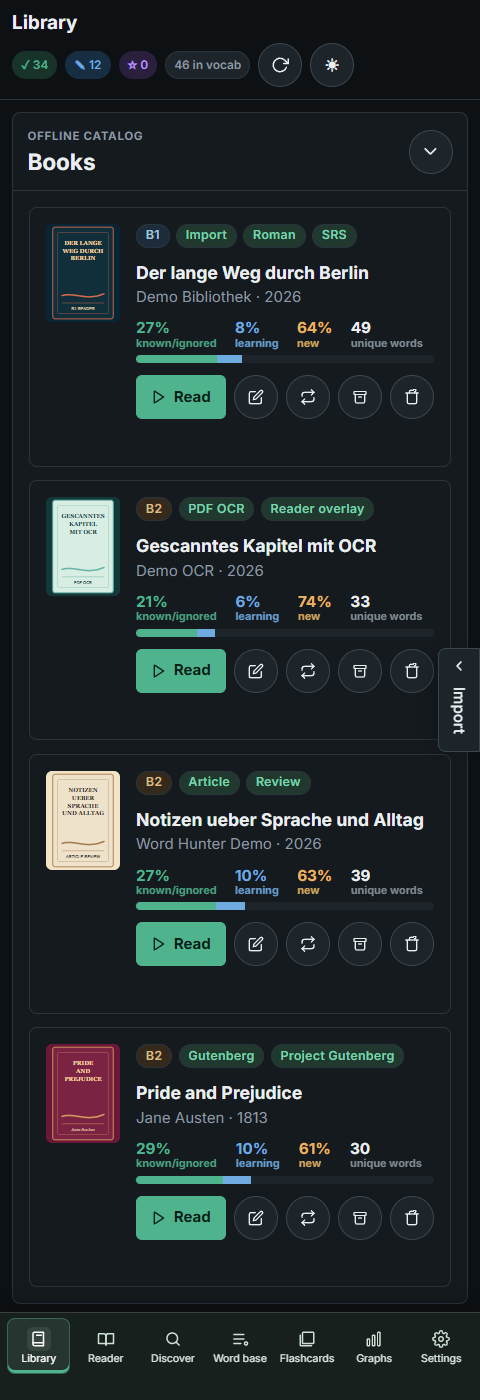
Library, Import, and OCR
The library collects imported texts, public-domain books, OCR/PDF entries, and
reading progress in one place. Desktop keeps the full import workflow visible,
including pasted text, ebooks, subtitles, and scanned PDF/OCR imports.
Desktop packages use the bundled local OCR runtime and models; users do not need
to install an OCR engine or language pack. Pocket uses Android's application and
PDF capabilities locally. Documents are not sent to a new remote OCR service.
OCR can be cancelled, and recognized page text can be corrected while reading
without replacing the original PDF or page overlay.
Encrypted, corrupt, unsupported, or empty PDFs can still be rejected. A damaged
desktop package with a missing OCR runner or model reports that packaging/runtime
problem instead of silently returning an incomplete OCR result.
YouTube captions (optional). The desktop import panel can load subtitles
from a YouTube video URL. This uses the open-source yt-dlp tool as an
optional external dependency — Word Hunter does not bundle it. Install Python 3
with yt-dlp on your PATH, or drop a standalone yt-dlp binary (yt-dlp.exe
on Windows) next to the app executable or in its bin/ subdirectory. The
WORDHUNTER_YTDLP environment variable overrides the yt-dlp binary to use.
On Flatpak and Snap, the host's yt-dlp is found automatically under
/run/host and /var/lib/snapd/hostfs. Caption downloads time out after 120
seconds, and failures report the yt-dlp exit status.
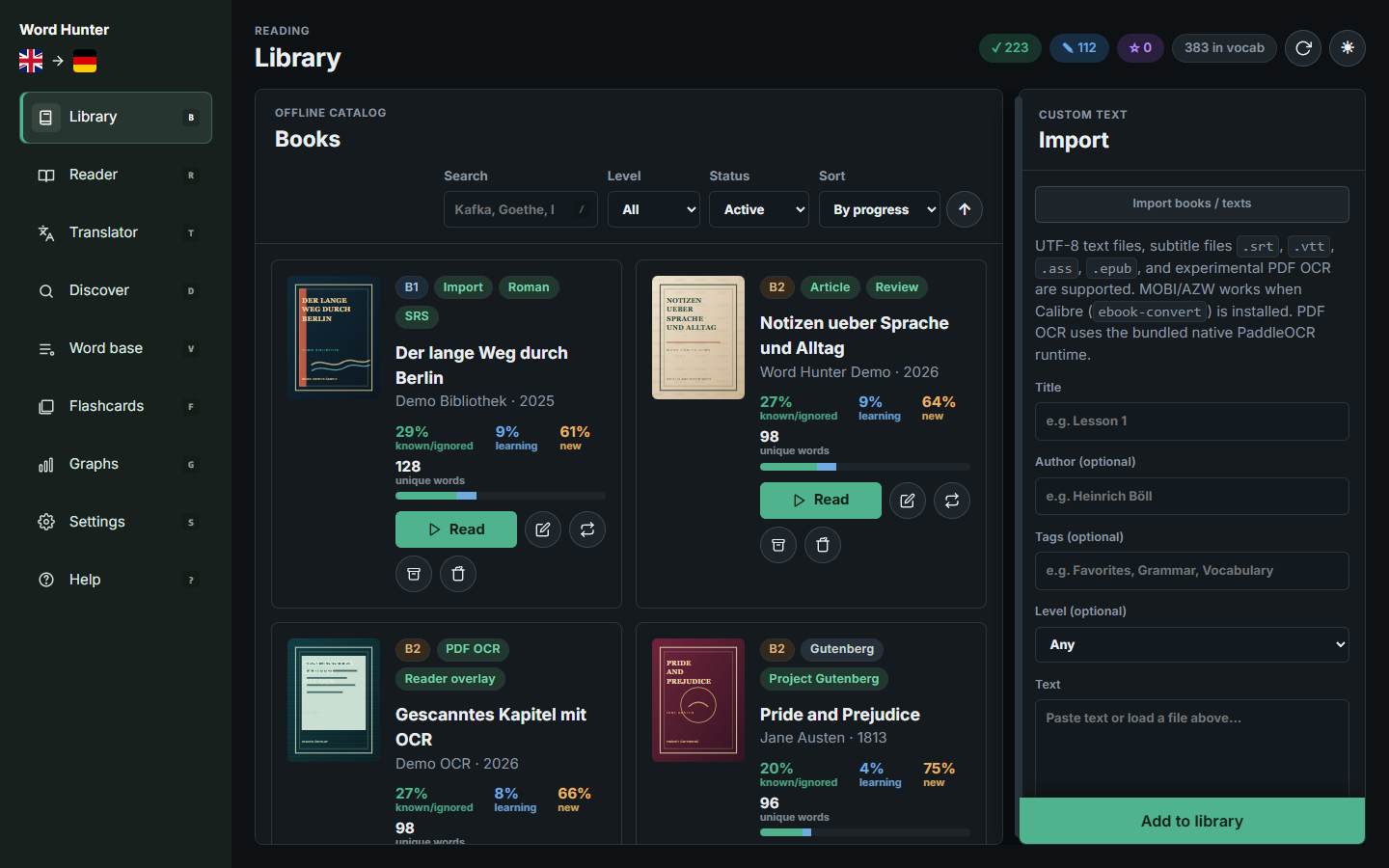
Word Hunter Pocket shows the same kind of library in a phone layout. Pocket is
optimized for reading and review on Android, with a compact card list, large
touch targets, collapsible search filters, and a side import drawer for lighter
mobile imports. OCR for scanned/image-only PDFs is not available in Pocket —
import them through the desktop version (local OCR runtime).
"
Reader, Highlighting, and Word Panel
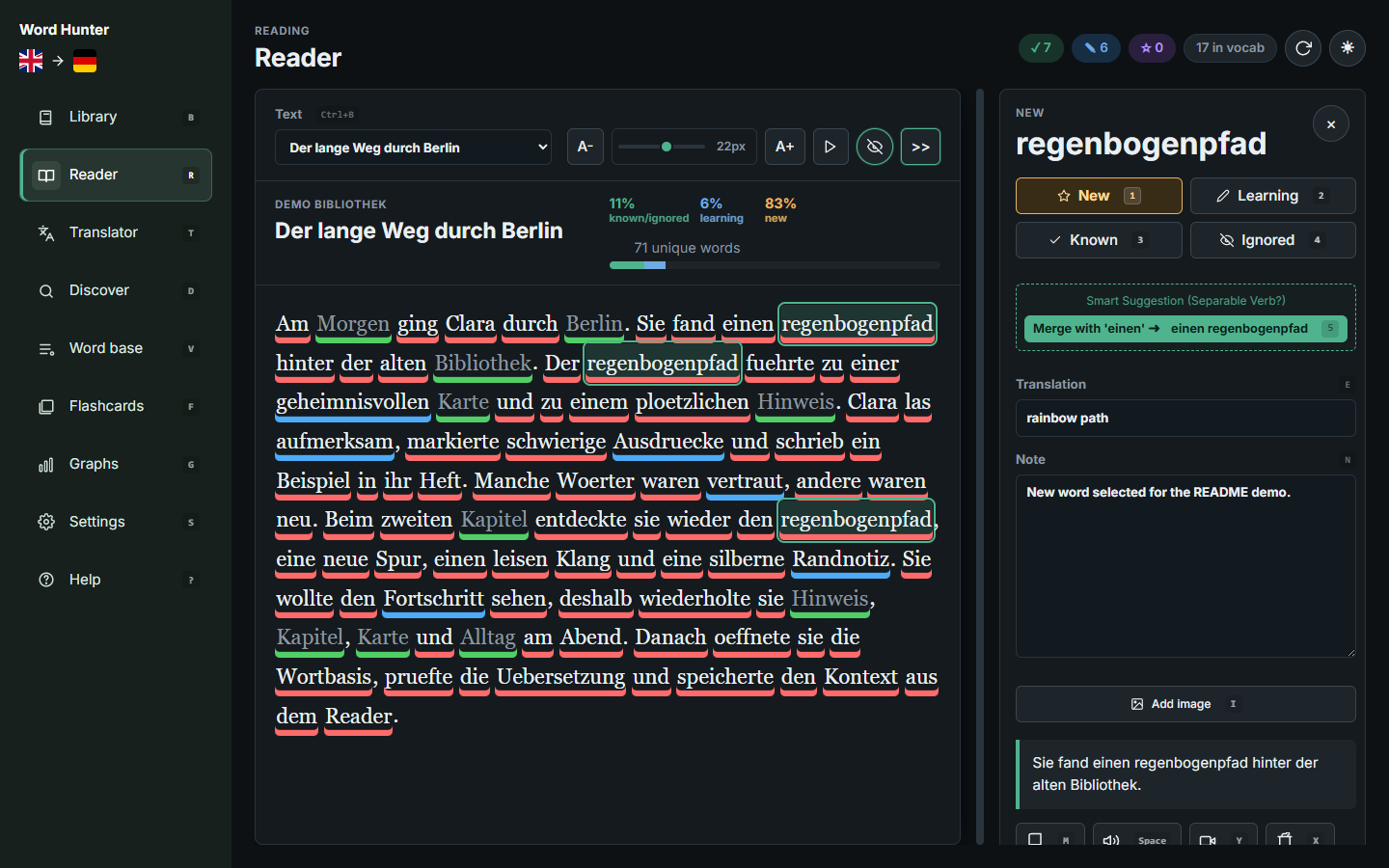
The reader highlights vocabulary by status directly in the text. Clicking a word
opens the word panel with status buttons, translation, notes, context, dictionary
actions, TTS, image hints, and in-text review controls. During read-aloud
playback, the highlighted word is kept inside the viewport so you always see
what is being spoken. Reader font and size are adjustable; both bundled
dyslexia-friendly fonts ship with the app and work offline.
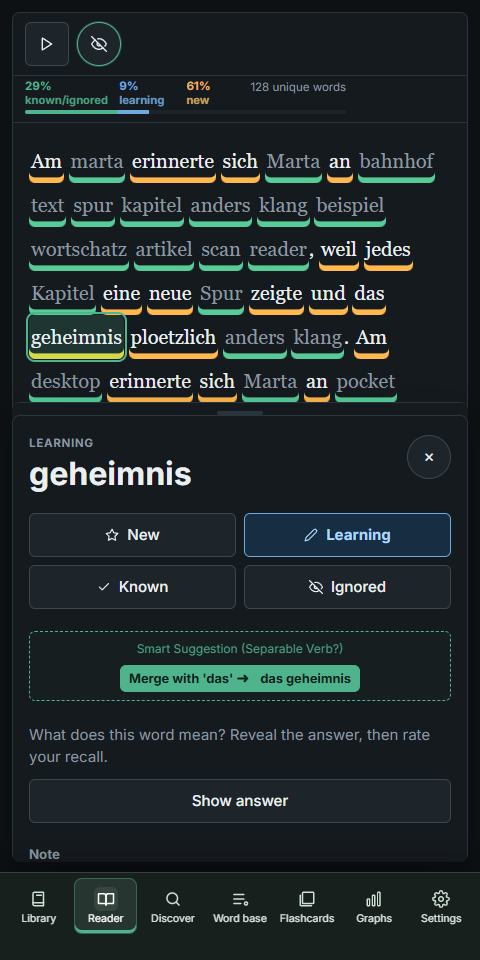
Pocket keeps the same reading model, but changes the shape for mobile: bottom
navigation, touch selection, a compact toolbar, and a bottom sheet-style word
panel.
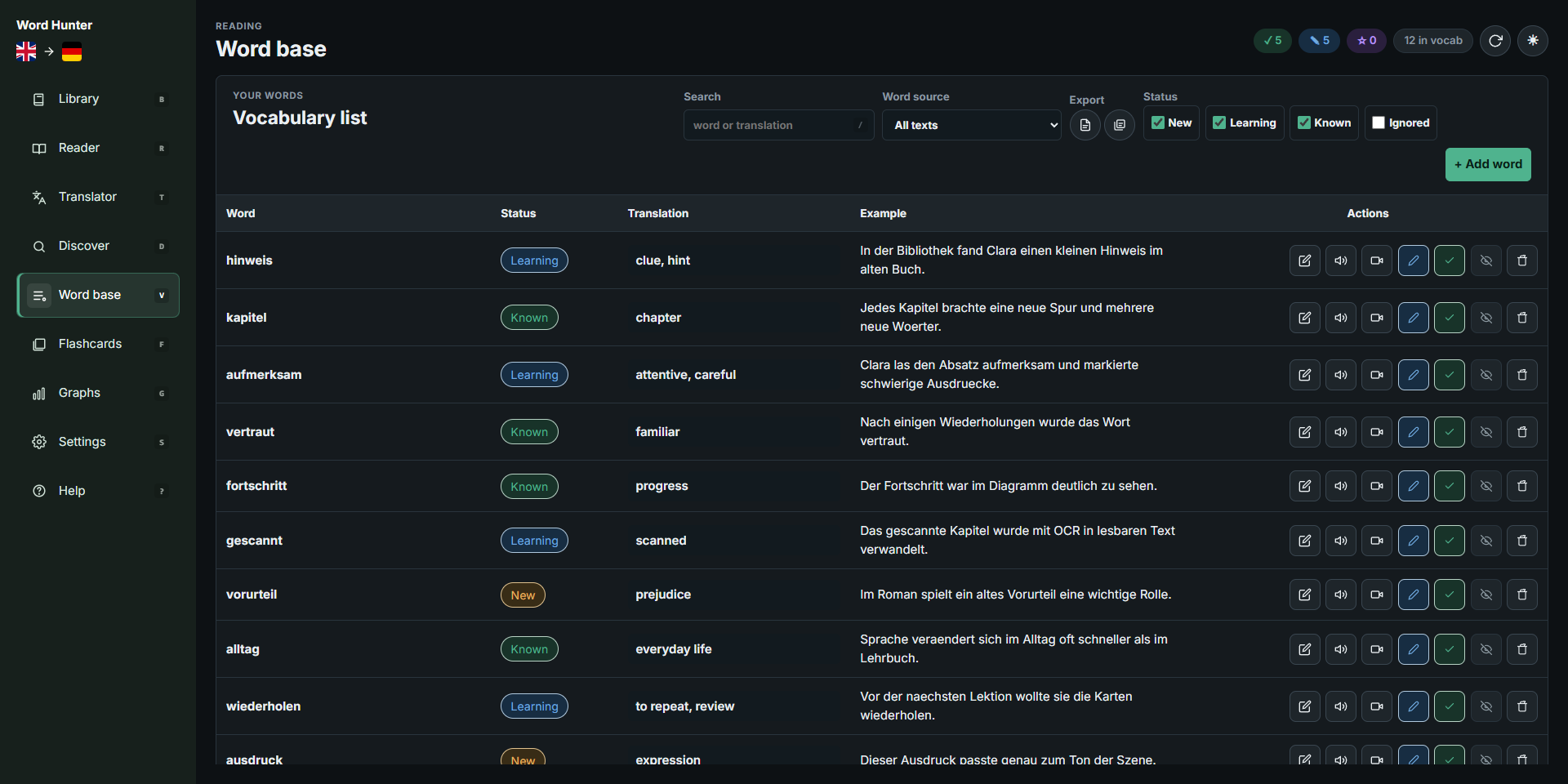
Word Base
Every saved word keeps its status, translation, example sentence, review data,
and source context. The word base is the maintenance view for searching,
filtering, editing, exporting, and cleaning vocabulary.
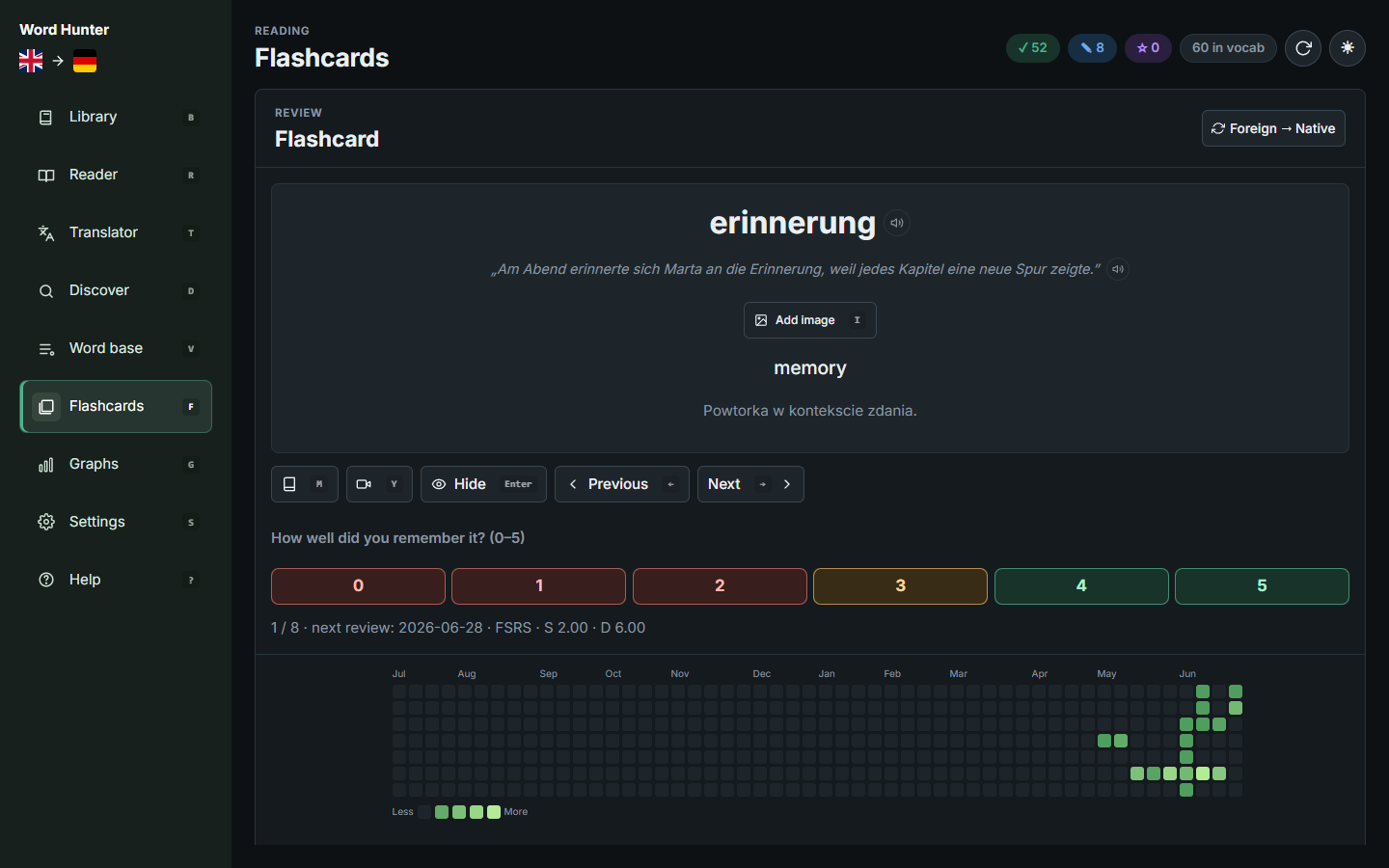
Flashcards and SRS
Flashcards use the same vocabulary records as the reader. Word Hunter supports
spaced repetition, due queues, review history, pronunciation, dictionary
actions, reverse cards, rating buttons, and one-tap shuffling of today's queue.
On reverse cards the headword — including German separable verbs such as
"rief … an" — is masked inside the example sentence so the context stays
usable without giving the answer away.
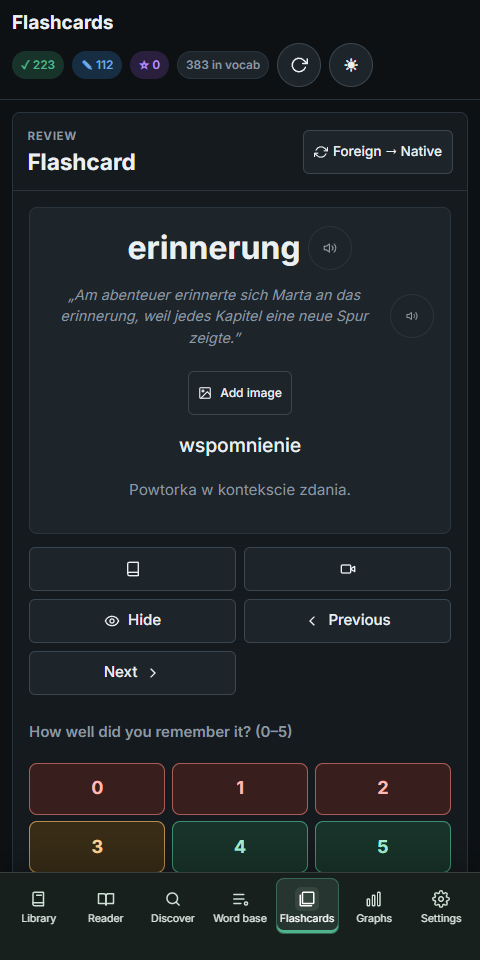
Pocket keeps flashcard review usable on a phone, with the card, answer controls,
review heatmap, and queue adapted to the narrow screen.
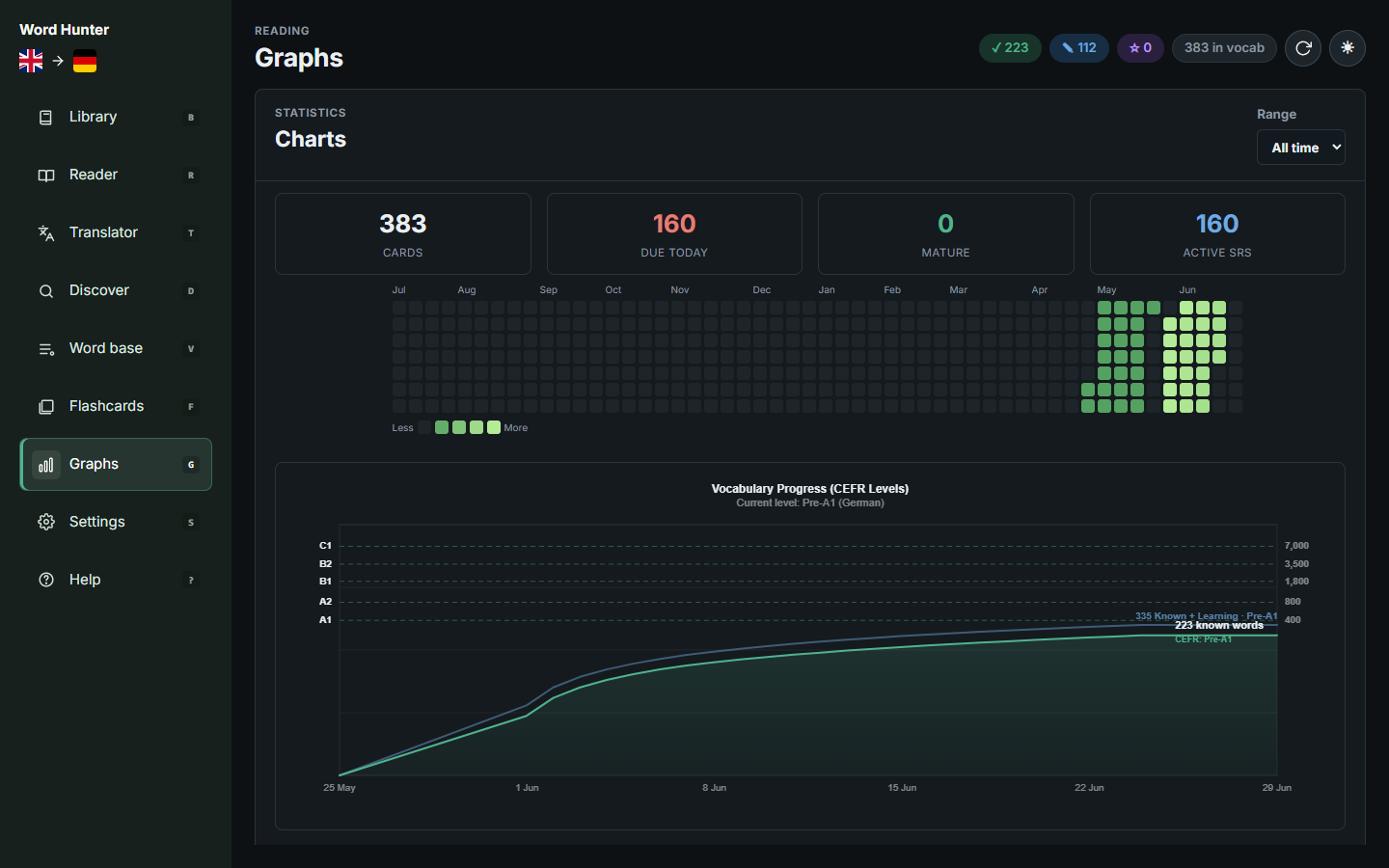
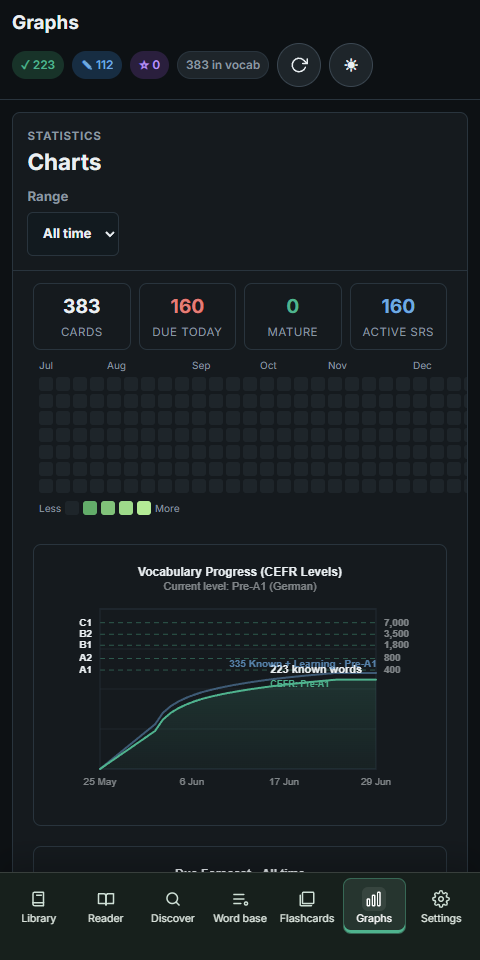
Graphs and Progress
The graphs view turns vocabulary history into visible progress: total cards, due
reviews, mature cards, active review cards, heatmap activity, and vocabulary
growth levels.
The same progress view is available in Pocket, so review activity and vocabulary
growth remain visible away from the desktop.
Desktop and Pocket transfers
Word Hunter is local-first. Desktop and Android can move custom texts, user
books, vocabulary, settings, progress, and imported reading materials through a
ZIP transfer package. The package includes book images, including rendered PDF
pages, so imported books remain usable in Pocket.
| Desktop | Pocket |
|---|
|  |
Pocket intentionally keeps heavy import work lighter than desktop. Larger
conversion and OCR work is best done on desktop, then moved to Pocket with a
full transfer package.
Exports, imports, and backups
Word Hunter does not require an account or a central server. The app stores data
locally and creates portable ZIP packages only when requested.
- Export everything includes books, rendered PDF images, vocabulary,
settings, and progress.
- Export words creates a smaller package containing vocabulary only.
- Export to Anki remains available for flashcard workflows.
- Import merges records using the
updatedAt value stored inside each YAML
record; filesystem modification times are ignored.
- A newer incoming word or book replaces an older local record. The local record
wins when timestamps are equal.
- Every word is stored as its own YAML record, and every transferred book has a
book.yaml plus its image folder.
- Android uses the system file picker for both saving and opening packages, so
Word Hunter never needs broad storage access.
- Clearing local data first requires a successfully saved full transfer package.
For contributors
End users do not need any of the tools below. This section is for contributors
who want to validate or package the application from source.
Requirements
- Rust
1.88 or newer with Cargo.
- Node.js
22 or newer for frontend and packaging validation tests.
- npm dependencies installed with
npm ci for CSS checks and the TypeScript build.
- Tauri 2 native prerequisites for the desktop platform being built.
- PowerShell when using the bundled
scripts\build.bat helper on Windows.
- Android SDK, NDK, and JDK for Android Pocket builds.
- Apple Silicon macOS for the DMG build.
- Python 3 and
curl when refreshing or checking Flatpak Cargo sources.
- OCR runtime/model assets only when preparing desktop OCR support.
Common commands
Install the pinned validation dependencies after checkout:
npm ci --ignore-scripts --no-audit --no-fund
Then run the full repository gate:
./scripts/validate.sh
It runs git diff --check, JSON/i18n parsing, Stylelint, a deterministic
TypeScript frontend build and type check, frontend tests against dist/web, Flatpak
cargo-sources.json drift detection, Rust formatting, Rust tests for the main
Tauri crate and OCR runner, and blocking cargo clippy checks by default.
Continuous integration
Three GitHub Actions pipelines cover the repository:
| Pipeline | Trigger | Purpose |
|---|
validate.yml | every PR, pushes to main / feat/** / release/**, manual | the core gate (same checks as scripts/validate.sh) |
packaging-validation.yml | PRs, pushes to main, manual — path-scoped per job | builds and smoke-tests each store recipe: Snap, Flatpak, AUR, Nix, Scoop, Chocolatey |
artifact-validation.yml | manual (Actions → Release artifact validation → Run workflow) | full release pipeline: signs and validates APK/AAB, Windows installer + portable, macOS DMG, Flatpak, AppImage, DEB, then attaches them to a draft release |
To cut a release: create the release as a draft on the target tag, run
artifact-validation.yml with release_tag= (optionally tick
Skip the Flatpak build during Flathub outages). Every platform builds in
parallel; a single failed platform no longer blocks the others' assets. The
draft publishes automatically only when all platforms succeed.
.\scripts\build.bat test         # run shared, desktop, and Android frontend tests
.\scripts\build.bat installer    # build outputs\Word.Hunter.Setup.exe
.\scripts\build.bat portable     # build outputs\Word.Hunter.portable.zip
.\scripts\build.bat apk          # build APK; WH_ANDROID_* signs an update-compatible package
.\scripts\build.bat aab          # build outputs\Word.Hunter.Pocket.release.aab
.\scripts\build.bat play         # build signed Google Play AAB
.\scripts\build.bat ocr-runtime  # prepare bundled native PaddleOCR runtime
On Apple Silicon macOS, build and validate the DMG with:
./scripts/build-macos.sh
It writes outputs/WordHunter--aarch64.dmg. The current recipe
uses an ad-hoc signature, so macOS may require approval in Privacy & Security
after download. A Developer ID certificate and notarization are still required
for a warning-free public install.
Rust backend tests can also be run directly:
npm run build:frontend
cargo test --manifest-path src-tauri\Cargo.toml
Android Pocket release builds derive versionName and monotonic versionCode
from stable or -rc.N SemVer values in src-tauri/tauri.conf.json. Stable
builds sort after every release candidate for the same version; see
docs/release-validation.md before changing the release version scheme.
The Android project under src-tauri/gen/android/ is committed in a
version-neutral form: app/build.gradle.kts reads versionCode/versionName
from app/tauri.properties, which the Tauri CLI regenerates on every build
from src-tauri/tauri.conf.json and the pinned bundle.android.versionCode
in src-tauri/tauri.android.conf.json (scripts/android-version.mjs --check
verifies the identity and the neutral gradle form). The
.template-version marker pins the Tauri CLI used to generate the committed
project; scripts/build.bat re-initializes gen/android when it drifts.
scripts/prepare-android.mjs applies the same overlay as the Windows recipe
(custom MainActivity.kt, manifest, network security config, file paths,
day/night themes) on Linux/macOS without PowerShell or the Tauri CLI.
F-Droid-style recipe (after npm ci && npm run build:frontend and a cargo
build of the Android Rust lib):
node scripts/prepare-android.mjs
cd src-tauri/gen/android && ./gradlew assembleRelease -PabiList=arm64-v8a
Flatpak
Linux Flatpak packaging is available through flatpak-builder:
./scripts/build-flatpak.sh
./scripts/install-flatpak-local.sh
The script installs missing Flatpak SDK dependencies from Flathub when needed,
builds the manifest in com.wordhunter.app.yml, and writes
outputs/WordHunter.flatpak. Install from the generated local repo for desktop
testing so software stores can read the local AppStream metadata and icons.
Word Hunter uses the GNOME Flatpak runtime because Tauri depends on
GTK/WebKitGTK; on KDE Plasma the script also installs the Breeze GTK theme
extension when needed so the GTK/WebKit window follows KDE
styling. The Flatpak disables WebKitGTK's DMABUF renderer to avoid known
Wayland renderer crashes on some KDE/Mesa setups while still keeping Wayland
enabled. After changing src-tauri/Cargo.lock, refresh the vendored Cargo source
list with:
./scripts/update-flatpak-cargo-sources.sh
To check for drift without rewriting the file, run:
./scripts/update-flatpak-cargo-sources.sh --check
The build script writes distributable files to outputs/. That directory is
generated output, not source.
Repository layout
src/web/ - shared frontend application code.dist/web/ - generated, untracked browser JavaScript and copied web assets.src/web/js/reader/ - focused reader session, rendering, word navigation, PDF
page text, and OCR correction modules.src/web/platforms/ - platform-specific frontend styling and behavior.src-tauri/ - Tauri 2 Rust backend, commands, OCR/import logic, and platform
config.src-tauri/platforms/android/ - Android-specific backend boundary.frontend-tests/ - Node-based frontend and platform tests.docs/ - public documentation and screenshots..cargo/ - Cargo configuration used by the workspace.scripts/build.bat - Windows convenience entrypoint for tests and release artifacts.
Technology and third-party licenses
Word Hunter uses a Rust backend and a shared HTML/CSS/TypeScript interface in a
Tauri 2 shell. Windows uses WebView2, Linux uses WebKitGTK/GTK, and Pocket uses
Android System WebView. Desktop translation and OCR can use CTranslate2,
SentencePiece, PaddleOCR through ONNX Runtime, PDFium, and platform execution
providers. OCR uses DirectML on Windows and WebGPU/Vulkan on Linux, with a safe
CPU fallback. The Flatpak routes file dialogs through XDG Desktop Portal and can
use the active GTK theme extension, so KDE sessions receive
their portal dialogs and the matching Breeze GTK styling when that extension
is installed.
Word Hunter data is stored as individual YAML record files; small internal UI
state and recovery journals remain JSON. The application does not use SQLite.
The built-in scheduler is Word Hunter's own
implementation inspired by published SM-2 and FSRS concepts, not the official
FSRS library or the proprietary SuperMemo application.
The shared WebView UI is an explicit architecture choice for feature and
accessibility parity across desktop and Pocket. TypeScript owns DOM rendering and
latency-sensitive interaction state. Rust owns storage merge/recovery, parsing,
local HTTP validation, and desktop OCR, while the Android adapter owns SAF and
platform PDF boundaries. CPU-heavy frontend statistics use workers and explicit
caches instead of moving DOM work across the bridge.
The project license is in LICENSE. Principal native components, model sources,
service integrations, exact source links, and redistribution terms are listed in
THIRD-PARTY-NOTICES.md. Full license texts for the locked Rust dependency
graphs are generated into THIRD-PARTY-LICENSES.html and
OCR-THIRD-PARTY-LICENSES.html; all four files are included in release packages.
After changing either Rust lockfile, install cargo-about and refresh the
reports with ./scripts/update-third-party-licenses.sh.
License
Word Hunter is licensed under AGPL-3.0-or-later.
Closed-source commercial derivative use requires a separate written commercial
license. See COMMERCIAL-LICENSE.md for details.
Development note
Much of the frontend was developed with AI assistance. I am not a frontend
developer; Word Hunter grew from scripts I had used for years into an app I use
every day. The goal is to keep it free, useful, and independent of mandatory
cloud accounts or paid services. Feedback, bug reports, and contributions are
welcome.