CodexWinBar 🎚️ — May your tokens never run out. Now on Windows.
> Supported AI coding limits, on your Windows 11 taskbar.
Website: codexwinbar.webivize.com
CodexWinBar is a native Windows 11 rebuild of steipete/CodexBar
(the macOS menu-bar app, MIT). It puts your AI coding-provider usage limits directly on the taskbar —
positioned next to the system tray so it looks like it was always part of Windows — with per-provider session
and weekly windows, reset countdowns, credits, and live provider-status incidents.

What it does
- Taskbar overlay widget — a compact, non-activating layered window positioned over the taskbar on the
side opposite the clock, showing tiny session/weekly gauges and percent text per provider. It sizes itself
to the free space beside your taskbar apps,
collapsing from full gauges → single gauge → compact icons as you add providers (never a scrollbar), and
gently bounces the provider you're on pace to run out of first. A widget is tracked per taskbar, recreated
after Explorer restarts, and hidden when that taskbar retracts or a fullscreen app occupies its monitor.
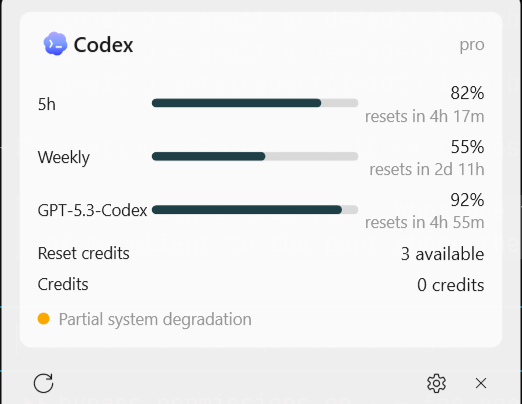
- Fluent flyout — click the widget for provider cards: usage bars, "resets in 2h 13m" countdowns,
model-specific windows, reset credits, credit balances, plan/account identity, and live status incidents
(Statuspage/Google Workspace feeds). Optional pace indicator projects whether you're on track to run
out early, and clicking a provider opens its web dashboard. Acrylic backdrop, rounded corners, light/dark aware.
- Native engine — zero-dependency .NET 9: OAuth token refresh, per-provider fetch pipelines with
fallback strategies, single-flight coalescing, reset-boundary refresh (re-poll ~30s after a window
resets), quota threshold notifications.
- Config-compatible with CodexBar — reads/writes the same
~/.config/codexbar/config.json
(CODEXBAR_CONFIG and legacy ~/.codexbar honored; unknown fields and providers round-trip untouched),
so a dotfile-synced setup works across macOS and Windows.
Providers (v1)
| Provider | Source | Auth |
|---|
| Codex | ChatGPT backend usage + reset credits | Browser OAuth built into CodexWinBar (auto-refresh) |
| Claude | api.anthropic.com OAuth usage | Browser OAuth built into CodexWinBar (auto-refresh) |
| Copilot | copilot_internal/user quota snapshots | GitHub device flow (built into Settings) |
| Gemini | Pro/Flash model quota (registered, off until connected) | Browser OAuth built into CodexWinBar; Gemini CLI required |
| OpenRouter | credits + key limits | API key |
| OpenAI Admin | organization spend for the trailing 30 days + today | Admin API key |
| z.ai | coding-plan quota | API key |
| Cursor (experimental) | best-effort plan + Auto/Composer + on-demand usage | Browser session cookie |
CodexWinBar does not require Codex CLI, Claude Code, or Codex Desktop to be installed. Connect Codex,
Claude, Gemini, and Copilot from Settings → Providers using their built-in sign-in flows. Gemini setup
requires Gemini CLI because CodexWinBar reads its OAuth client configuration. The rest are enabled there
with the credential type shown above. Every provider, including Gemini, starts disabled until you connect it.
Cursor uses undocumented dashboard endpoints whose response shape can change, so its integration is
experimental and intentionally best-effort. Upstream's 50+ provider catalog is on the roadmap — the remaining
browser-cookie and WebView2 seams (Windsurf, Ollama quota, …) are deferred to a later release.
Install
Winget (recommended)
Paste this into PowerShell or Windows Terminal:
winget install CodexWinBar --interactive
Winget downloads and verifies the published package, installs it per-user without administrator access,
and --interactive lets the one-click installer launch CodexWinBar when installation finishes.
Direct PowerShell installer
If you cannot use Winget, paste this alternative into PowerShell:
irm https://codexwinbar.webivize.com | iex
This downloads the latest release, verifies its SHA-256 against the checksum GitHub publishes for the
asset, installs it per-user, and launches CodexWinBar. The script is readable and only
downloads from this repository's own GitHub releases.
Updating
From version 1.1.8 onward, open Settings → General → App updates to check, download, and restart into
the latest release. If the taskbar widget is inaccessible, Settings can also be opened directly:
& "$env:LOCALAPPDATA\CodexWinBar\current\CodexWinBar.exe" --settings
Older installs can update in place through the app or by running either installation command again. There
is no need to uninstall or delete anything; provider sign-ins and settings are preserved.
Both installation methods add Start Menu and desktop shortcuts and launch CodexWinBar after installation.
After installing, connect the providers you use in Settings → Providers — Codex,
Claude and Gemini sign in through your browser, Copilot uses GitHub's device flow, and OpenRouter, OpenAI
Admin, z.ai and Cursor take an API key or cookie. Nothing is connected until you sign in.
Direct download / build from source
Direct download: grab CodexWinBar-win-Setup.exe from the
Releases page and run it. Because it isn't
code-signed yet, Windows SmartScreen shows an "Unknown publisher" prompt — click More info → Run anyway
(one-time). The Winget and PowerShell options above are recommended for the simplest installation.
Build from source: requires Windows 11 and the .NET 9 SDK.
git clone https://github.com/ItayCohen-Prog/CodexWinBar.git
cd CodexWinBar
dotnet publish src/CodexWinBar.App/CodexWinBar.App.csproj -c Release -r win-x64 --self-contained -p:PublishSingleFile=true -p:PublishReadyToRun=true -o artifacts/publish
artifacts\publish\CodexWinBar.exe
To produce a full installer locally: ./build/pack-windows.ps1 (needs dotnet tool install -g vpk --version 1.2.0).
Right-click the widget (or the tray icon) for Refresh / Settings / Quit. "Launch at login" lives in
Settings → General. Logs: %LOCALAPPDATA%\CodexWinBar\logs\app.log.
Privacy
CodexWinBar keeps your credentials on your machine. Its built-in provider sign-ins store OAuth sessions
encrypted for your Windows user under %LOCALAPPDATA%\CodexWinBarData\credentials, and it talks only
to each provider's own API to fetch your usage — there is no CodexWinBar server, account, or telemetry,
and nothing about your usage leaves your computer.
Architecture
C# / .NET 9, one runtime dependency — Velopack for the installer and
auto-update; the app itself otherwise has zero external NuGet dependencies (test projects excepted):
CodexWinBar.Core — provider abstraction (descriptor + ordered fetch strategies), CodexBar-compatible
config store, refresh scheduler, status poller.CodexWinBar.Providers — one folder per provider; contributions need only a descriptor + strategy + parser.CodexWinBar.Widget — pure Win32: per-taskbar overlay lifecycle and positioning on dedicated STA
threads, with a GDI+ → UpdateLayeredWindow renderer.CodexWinBar.App — WPF shell: flyout, settings, tray icon, quota notifications, single instance.
Design docs and the upstream protocol research live in docs/windows-port/.
Credits & license
This is a fork/rebuild of CodexBar by
Peter Steinberger — all product concepts, provider protocol research,
and the original macOS implementation are his. The Windows port reuses upstream's provider documentation
(docs/) as its protocol source of truth.
MIT — same as upstream.