Simple Account Balancer
A checkbook register app: you log every debit and credit the moment it
happens, so the register is ahead of the bank and is the real answer to "how
much money do I actually have." For anyone who kept a check register or a
balance spreadsheet.
Built by JDE-Projects, home of the Simple X Tools suite.
If you enjoyed this project and would like to buy me a coffee, check out my Ko-fi.
Preview
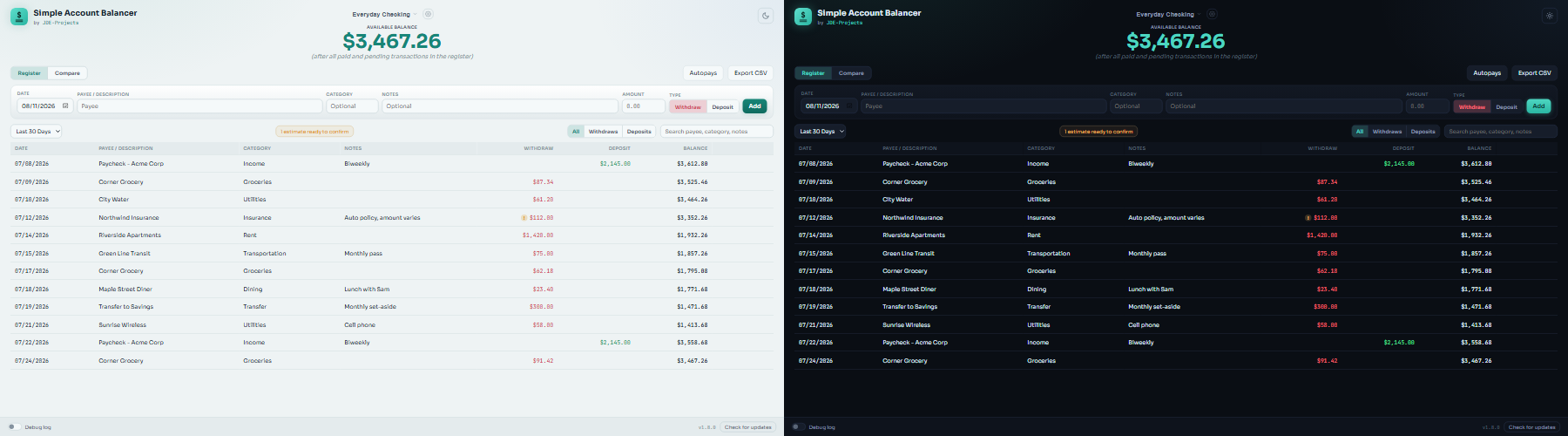 Dark and light themes
Highlights
- Available balance in the header reflects every transaction in the register,
including pending future-dated entries, and recalculates automatically for
out-of-order or backdated entries.
- Quick entry with payee autocomplete and freely editable categories.
- Same-day entries can be reordered: transactions sharing a date get a
reorder button, so a forgotten entry can be slotted into place. Within-day
order never changes the day's ending balance.
- Autopays: catalog a recurring bill or deposit once and the app posts it
automatically each month. Bills that change month to month can be marked
"variable" so each posting arrives as an estimate you confirm.
- Search, filtering, and shared date-range views (Last 7/14/30/90 days, or a
custom range), plus an All | Withdraws | Deposits toggle for viewing one
side of the register. Filters only change what's shown: balances always
reflect the full register.
- Compare view for matching a selected range against an optional bank posted
balance. Found marks are session-only, and the discrepancy finder helps
track down any unexplained difference.
- Multiple accounts with a simple switcher.
- CSV export for any date range. Each file is self-identifying: the first
row names the account, the range, and the export date.
- Automatic rolling backups on launch and exit; backups live next to the
app by default, or in any folder you choose.
- Save a backup copy anywhere you pick, such as a USB drive, and restore it
later, including on a new computer straight from the first-launch screen.
- Local only - your data never leaves the machine.
- Checks GitHub Releases for a newer version (silent at startup; on demand it explains why a check failed).
How it works
- Storage: a single SQLite database (
simple_account_balancer.db) next to
the exe, via the Python standard library. Money is stored as integer
cents, never floats.
- Window: pywebview on the Qt backend (PySide6), UI in
simple_account_balancer-UI.html.
Download and run
Two ways to get it from the Releases page - pick one:
- Installer (recommended): download
SimpleAccountBalancer-vX.Y.Z-setup.exe and
run it. Installs the app, adds a Start menu shortcut, and can be removed later
from Add or Remove Programs. Installs just for you, no admin needed.
- Portable .zip: download
SimpleAccountBalancer-vX.Y.Z.zip, extract it, and run
Simple Account Balancer.exe from inside the extracted folder. No install - good for
a locked-down PC or a USB stick. Keep the folder together.
Or install the same installer from the command line with WinGet:
winget install --exact --id JDE-Projects.SimpleAccountBalancer
Windows only, no Python or setup required. Unsigned, so SmartScreen may warn the
first time: More info > Run anyway.
Updating
Simple Account Balancer doesn't update itself. The bottom bar has a Check for updates button that tells you when a newer release is out; when it does, get the new version from the Releases page the same way you first installed it.
- Installer: download the new
SimpleAccountBalancer-vX.Y.Z-setup.exe and run it. It installs over your current copy and keeps your database, backups, and settings.
- Portable .zip: download and extract the new
SimpleAccountBalancer-vX.Y.Z.zip. Copy simple_account_balancer.db, the backups folder, and simple_account_balancer.pref from the old folder into the new one to keep your data and settings.
- WinGet: run
winget upgrade --exact --id JDE-Projects.SimpleAccountBalancer. It runs the installer over your current copy, same as above. The WinGet listing can trail a new release by a few days while Microsoft reviews it.
There are no stored secrets, so that's all you need to carry over.
Verify this download (optional)
This release was built on GitHub from this public source, not on a personal
machine, and is signed with a build-provenance attestation. To confirm your
download is genuine, install the GitHub CLI and run:
gh attestation verify SimpleAccountBalancer-vX.Y.Z.zip --repo JDE-Projects/Simple-Account-Balancer --signer-repo JDE-Projects/Build-Tools
A Verification succeeded! line means the file was built by the published
pipeline from this repo. You can also check the file against the published
.sha256.
Build from source (optional)
- 64-bit Python 3.14 on PATH.
requirements.in lists the direct packages (pywebview, PySide6, qtpy,
pyinstaller, truststore). requirements.txt is the full locked list
generated from it by uv 0.12.17, with a checksum for every package; it is
never edited by hand.- Keep
simple_account_balancer.py, the app/ folder,
simple_account_balancer-UI.html, the fonts/ folder, the .ico, and
.png together.
- Run from source:
pip install --require-hashes -r requirements.txt, then
python simple_account_balancer.py
- Build the .exe:
Build_Simple_Account_Balancer.bat -> dist\Simple Account Balancer\Simple Account Balancer.exe.
The script builds inside a fresh build\venv each run and never changes the
PC's own Python.
Using it
- On first launch, enter an account name and your starting balance as of a
given date.
- Log each debit or credit as it happens: date, payee, an optional category
and notes, and the amount.
- The header always shows your real, up-to-date balance.
- For recurring bills and deposits, open Autopays in the register view
and add each one once: what it pays, the day it should appear in the
register, and the day it pays. The app enters them for you from then on.
For a bill whose amount changes each month, tick "Variable amount": each
posting shows an estimate marker until you confirm the real figure.
- Use the Compare tab with your bank's posted balance. Mark entries Found as
you match them. Marks are temporary and never change the register. If the
unexplained difference is nonzero, the finder uses it automatically unless
you enter a different amount.
- Export any date range to CSV from the Export CSV button in the register view.
Backups and restore
- The app backs up every account automatically when it opens and closes,
keeping the newest few (set the count and the folder in account
settings). No backup is taken while there are no accounts yet.
- Save backup... in account settings writes a copy of all your data to
any place you pick, such as a USB drive or a cloud folder.
- Restore from backup in account settings lists the automatic backups.
Restore from a file... on that list takes a backup
.db file from
anywhere. Before replacing anything, the app checks the file, shows how
its accounts compare with yours, and saves a safety backup of your current
data.
- A backup made by an older version is brought up to date as it is
restored. A backup made by a newer version is refused: update the app
first, then restore it.
- Backups hold your accounts and transactions only. App settings, such as
the backup folder and the window size and position, stay with each
computer.
Moving to a new computer or reinstalling
- On the old computer, open account settings and use Save backup... to
save a copy somewhere you can reach from the new one.
- Install the app on the new computer and open it.
- On the first-launch screen, choose Restore from a backup... and pick
the saved file. A backup with no accounts in it is refused here, since
there would be nothing to restore.
Security and privacy
- Everything stays in the SQLite file next to the exe.
- No accounts, cloud, telemetry, or bank connections, ever.
- Optional debug log, off by default. When on, it writes
Debug_Log_MMDDYYYY_HHMMSS.txt next to the app. Each file stops at 5 MiB
and logging carries on in a new one. The app keeps the current file plus
the three newest older ones (20 MiB at most) and deletes the rest. If the
log can't be written, logging turns off and the app says so. It records
actions and errors with record numbers, dates, and counts. It never records payees,
categories, notes, amounts, balances, or account names, and any file path
or quoted value inside an error message is replaced with or. It does show when you used the app and the dates of transactions
you added or changed, so read it before attaching it to a bug report.
- Network use. Other than the job you ask of it, this app makes one automatic network call: a check to GitHub for a newer release (at startup and when you press Check for updates), which sends only a version request. It collects and sends no personal data, usage data, or analytics.
- Privacy policy. The full privacy policy for this app and the other JDE-Projects tools is at https://jde-projects.com/privacy.
A note on how this was built
This project was built with AI assistance. The design decisions, feature
direction, and real-world testing were directed by me. The code was written
and revised with an AI assistant against that direction. Treat it like any
community tool: review and test it before relying on it.
License
Released under the PolyForm Noncommercial License 1.0.0 (see LICENSE).
Personal and noncommercial use, modification, and noncommercial redistribution
are permitted; commercial use is not. Keep the copyright notice; no warranty.
This tool bundles third-party code; see
THIRD-PARTY-LICENSES.txt.
For commercial licensing, see the JDE-Projects support page.