Simple Project Manager
A standalone desktop tool to plan, track, and manage IT projects as a nested checklist: Phases hold Steps, Steps hold Actions and Contacts. Every item carries an owner and co-owner, a deadline, a status, a priority, tags, and notes, with progress rolling up automatically. Projects are saved as ordinary Excel .xlsx files. The interface is a clean web-style window.
Built by JDE-Projects, home of the Simple X Tools suite.
If you enjoyed this project and would like to buy me a coffee, check out my Ko-fi.
Preview
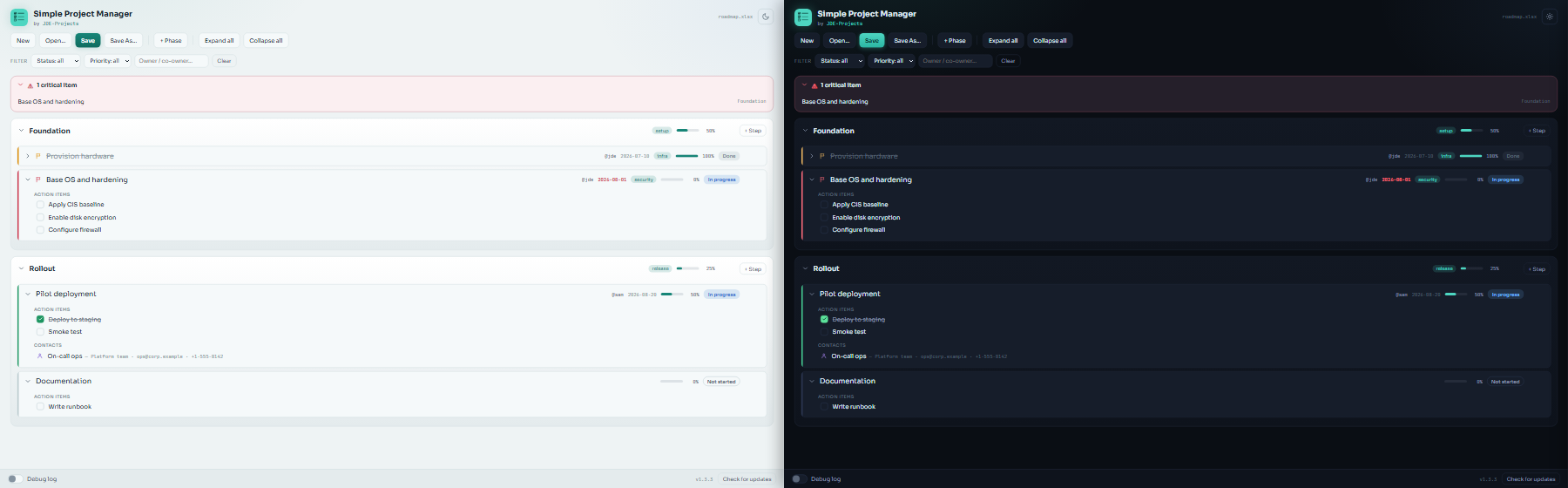 Dark and light themes
Highlights
- Four-level tree. Phases -> Steps -> Actions (checklist items), with Contacts attached to a step. Each item nests under the nearest parent above it.
- Excel is the save format. New / Open / Save / Save As work on
.xlsx files directly - no separate database. The workbook is human-readable, with the tree indented and Excel row grouping so phases fold up. A silent recovery copy guards unsaved work and offers to restore it on the next launch.
- Rich per-item detail. Owner and co-owner, deadline, status (Not started / In progress / Done / Blocked), priority (Low / Normal / High / Critical), colored tags, and notes, edited in a slide-in panel.
- Automatic progress roll-up. A step shows the percentage of its ticked actions; a phase averages its steps.
- At-a-glance signals. Overdue deadlines turn red and those due within a week turn amber; High and Critical priorities show a colored left bar and flag; a "Critical items" summary sits at the top of the project.
- Filtering and reordering. Filter by status, priority, or owner; reorder phases, steps, actions, and contacts with up/down controls. Completed steps gray out and collapse.
- Dark and light teal themes. A sun/moon toggle in the header switches between them; your choice is remembered locally.
- Update check. Checks the GitHub Releases page and points you to a newer version when one is published.
How it works
- The backend is a small Python application; project files are read and written with openpyxl.
- The window is a pywebview host on the Qt backend (PySide6), with the UI in
simple_project_manager-UI.html. Fonts (Sora, JetBrains Mono) are bundled locally in fonts/, so the look holds with no internet.
- A
.xlsx you save IS the project file - open it in Excel directly if you like. A hidden _spm sheet stores an app marker, schema version, and tag colors; the app only reads the columns it owns and confirms anything unexpected on import.
Download and run
Two ways to get it from the Releases page - pick one:
- Installer (recommended): download
SimpleProjectManager-vX.Y.Z-setup.exe and run it. It installs the app, adds a Start menu shortcut, and can be removed later from Add or Remove Programs. Installs just for you by default (no admin needed); you can choose all users during setup.
- Portable .zip: download
SimpleProjectManager-vX.Y.Z.zip, extract it, and run Simple Project Manager.exe from inside the extracted folder. No install - good for a locked-down PC or a USB stick. Keep the folder together (the app ships as a folder, not a single loose .exe).
Windows only; no Python or setup required. Because it is unsigned, Windows SmartScreen may warn about an unknown publisher the first time. Click More info > Run anyway.
Updating
Simple Project Manager doesn't update itself. The bottom bar has a Check for updates button that tells you when a newer release is out; when it does, get the new version from the Releases page the same way you first installed it.
- Installer: download the new
SimpleProjectManager-vX.Y.Z-setup.exe and run it. It installs over your current copy and keeps your theme choice.
- Portable .zip: download and extract the new
SimpleProjectManager-vX.Y.Z.zip. To keep your theme choice, copy simple_project_manager.pref from the old folder into the new one.
Your project .xlsx files live wherever you saved them and are untouched by an update. The silent recovery copy (.spm_recovery.xlsx) is transient and does not need to be carried over. No secrets are stored, so there's nothing else to carry over.
Verify this download (optional)
This release was built on GitHub from this public source, not on a personal
machine, and is signed with a build-provenance attestation. To confirm your
download is genuine, install the GitHub CLI and run:
gh attestation verify SimpleProjectManager-vX.Y.Z.zip \
  --repo JDE-Projects/Simple-Project-Manager \
  --signer-repo JDE-Projects/Build-Tools
A Verification succeeded! line means the file was built by the published
pipeline from this repo. You can also check the file against the published
.sha256.
Build from source (optional)
If you would rather run or build it yourself, you need:
- Python 3 on the machine's PATH.
pip install -r requirements.txt (pinned versions; includes pywebview, PySide6, qtpy, openpyxl, and pyinstaller). Keep PyQt6 uninstalled so PySide6 is the bundled binding.
Keep simple_project_manager.py, simple_project_manager-UI.html, the fonts/ folder, simple_project_manager.ico and simple_project_manager.png together. Then either:
- Run from source:
python simple_project_manager.py
- Build the .exe: double-click
Build_Simple_Project_Manager.bat, which uses PyInstaller to produce dist\Simple Project Manager\Simple Project Manager.exe. Distribute the whole Simple Project Manager folder.
Using it
- Click + Phase to add a phase, then use the + Step button in a phase header to add steps.
- Click any item to open its edit panel. Inside a step you manage its action items and contacts, set owners, deadlines, status, priority, tags, and notes.
- Tick actions as you finish them - progress rolls up to the step and phase automatically.
- Use the filter bar to focus on a status, priority, or owner, and the up/down controls to reorder.
- Save writes an
.xlsx you can reopen here or in Excel. Open loads one back.
Security and privacy
- Project
.xlsx files are ordinary Excel workbooks saved wherever you choose. They may list internal hosts, vendors, and contact details, so treat them as sensitive and don't share them publicly (in a bug report, forum post, or public repo).
- Your theme choice is stored in a small local preference file next to the app; it is not part of any project file.
- The debug log is off by default. When you turn it on, it writes one
Debug_Log_*.txt next to the app for that run.
- Network use. Other than the job you ask of it, this app makes one automatic network call: a check to GitHub for a newer release (at startup and when you press Check for updates), which sends only a version request. It collects and sends no personal data, usage data, or analytics.
A note on how this was built
This project was built with AI assistance. The design decisions, feature direction, and real-world testing were directed by me. The code was written and revised with an AI assistant against that direction. Treat it like any community tool: review and test it before relying on it.
License
Released under the PolyForm Noncommercial License 1.0.0. Personal and any noncommercial use, modification, and noncommercial redistribution are allowed; commercial use is not. Keep the copyright notice; no warranty.
This build bundles third-party code (Qt via PySide6, pywebview, openpyxl, and the Sora and JetBrains Mono fonts). Their notices are in THIRD-PARTY-LICENSES.txt.
For commercial licensing, open a GitHub issue with the title "Commercial License Inquiry".