Simple UNA Log Viewer
View, filter, and export connection and event logs from a UniFi Network
Application controller, with filters the UNA web UI doesn't offer. For network
admins who need quick, focused log access across a site.
Built by JDE-Projects, home of the Simple X Tools suite.
If you enjoyed this project and would like to buy me a coffee, check out my Ko-fi.
Preview
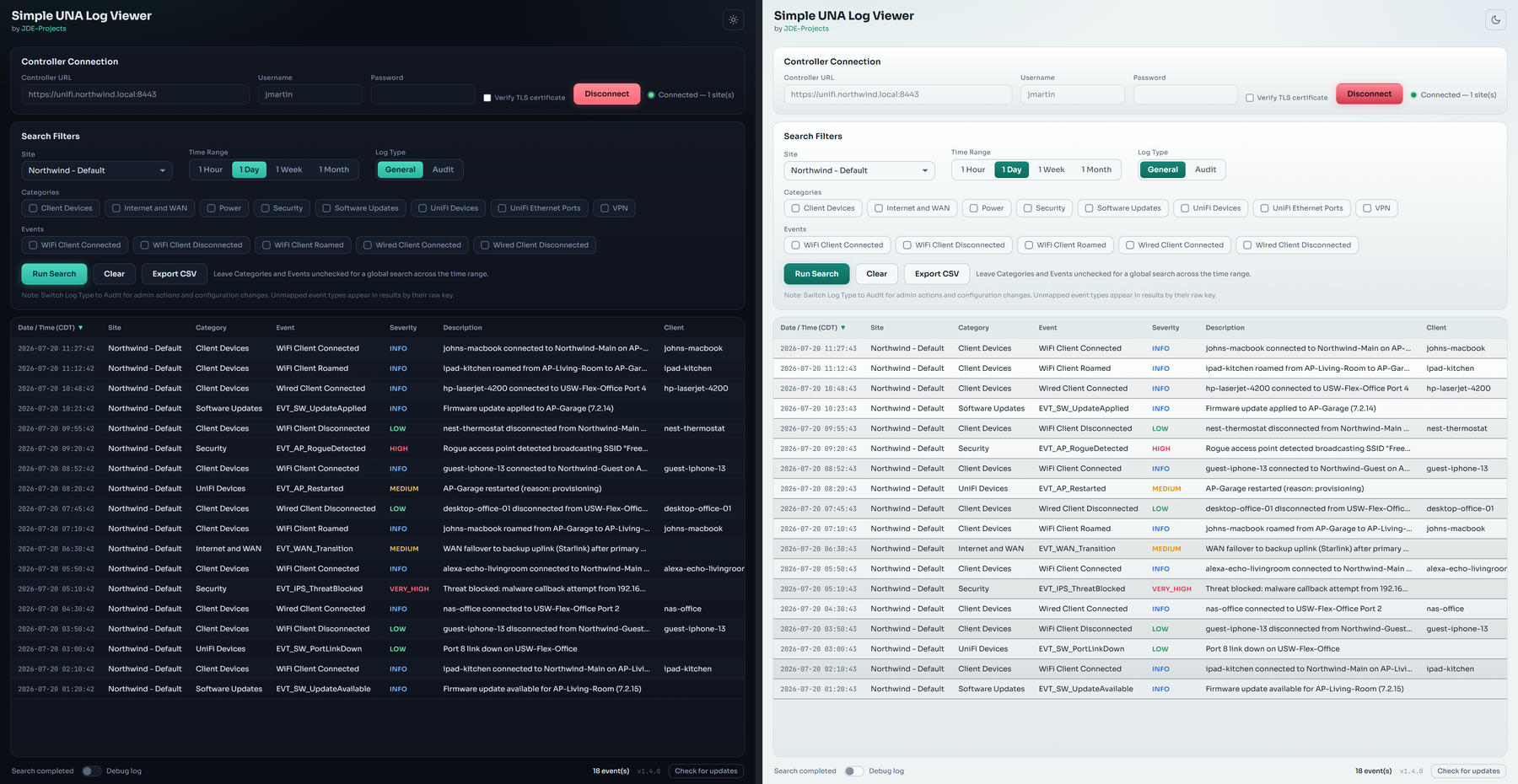 Dark and light themes
Highlights
- Filter by site, time range, log type (General or Audit), category, and event.
- Sortable results table; export everything to CSV (timezone-stamped column).
- Read-only: makes no changes to the controller, sites, or device state.
- Optional debug log, off by default, with credentials redacted.
- Secrets are never saved (memory only, wiped on disconnect).
- Checks GitHub Releases for a newer version at startup and on demand. Startup
failures stay quiet; an on-demand failure explains what went wrong.
How it works
- Backend: Python standard library (urllib) against the controller's v2
system-log API.
- Window: pywebview on the Qt backend (PySide6), UI in
simple_una_log_viewer-UI.html.
Download and run
Install through WinGet:
winget install --exact --id JDE-Projects.SimpleUNALogViewer
Or pick one of the downloads from the Releases page:
- Installer (recommended): download
SimpleUNALogViewer-vX.Y.Z-setup.exe and
run it. Installs the app, adds a Start menu shortcut, and can be removed later
from Add or Remove Programs. Installs just for you by default (no admin); you can
choose all users during setup.
- Portable .zip: download
SimpleUNALogViewer-vX.Y.Z.zip, extract it, and run
Simple UNA Log Viewer.exe from inside the extracted folder. No install - good for
a locked-down PC or a USB stick. Keep the folder together.
Windows only, no Python or setup required. Unsigned, so SmartScreen may warn the
first time: More info > Run anyway.
Updating
Simple UNA Log Viewer doesn't update itself. The status bar has a Check for updates button that tells you when a newer release is out; when it does, get the new version from the Releases page the same way you first installed it.
- WinGet: run
winget upgrade --exact --id JDE-Projects.SimpleUNALogViewer.
- Installer: download the new
SimpleUNALogViewer-vX.Y.Z-setup.exe and run it. It installs over your current copy.
- Portable .zip: download and extract the new
SimpleUNALogViewer-vX.Y.Z.zip. If you want to keep your light/dark theme choice and window size and position, copy simple_una_log_viewer.pref from the old folder into the new one (otherwise those just reset to default).
Your controller password is never stored, so there's nothing else to carry over.
Verify this download (optional)
This release was built on GitHub from this public source, not on a personal
machine, and is signed with a build-provenance attestation. To confirm your
download is genuine, install the GitHub CLI and run:
gh attestation verify SimpleUNALogViewer-vX.Y.Z.zip \
  --repo JDE-Projects/Simple-UNA-Log-Viewer \
  --signer-repo JDE-Projects/Build-Tools
A Verification succeeded! line means the file was built by the published
pipeline from this repo. You can also check the file against the published
.sha256.
Build from source (optional)
- Python 3 on PATH.
pip install -r requirements.txt (pinned pywebview, PySide6, qtpy,
pyinstaller, and truststore; keep PyQt6 uninstalled so the LGPL binding
is the one bundled).- Keep
simple_una_log_viewer.py, simple_una_log_viewer-UI.html, the
fonts/ folder, the .ico, and .png together.
- Run from source:
python simple_una_log_viewer.py
- Build the .exe:
Build_Simple_UNA_Log_Viewer.bat -> dist\Simple UNA Log Viewer\Simple UNA Log Viewer.exe
Using it
- Enter the controller URL, username, and password (a local admin account,
not SSO), then Connect.
- Pick a site, a time range, and the log type.
- Optionally check categories and/or events to narrow results. Leave both
unchecked for a global search across the time range.
- Run Search. Click any column header to sort.
- Export CSV to save the current results.
Security and privacy
- The password is never written to disk; it lives in memory only and is
cleared on disconnect.
- The optional debug log is off by default. When on, it writes
Debug_Log_MMDDYYYY_HHMMSS.txt next to the app with credentials redacted.
- Network use. Other than the job you ask of it, this app makes one automatic network call: a check to GitHub for a newer release (at startup and when you press Check for updates), which sends only a version request. It collects and sends no personal data, usage data, or analytics.
A note on how this was built
This project was built with AI assistance. The design decisions, feature
direction, and real-world testing were directed by me. The code was written
and revised with an AI assistant against that direction. Treat it like any
community tool: review and test it before relying on it.
License
Released under the PolyForm Noncommercial License 1.0.0 (see LICENSE).
Personal and noncommercial use, modification, and noncommercial redistribution
are permitted; commercial use is not. Keep the copyright notice; no warranty.
This tool bundles third-party code; see
THIRD-PARTY-LICENSES.txt.
For commercial licensing, open a GitHub issue with the title "Commercial License Inquiry".