Simple Firearm Logbook
A private, offline logbook for your personal firearm collection: records, photos, documents, dispositions, imports, and exports.
Built by JDE-Projects, home of the Simple X Tools suite.
If you enjoyed this project and would like to buy me a coffee, check out my Ko-fi.
Preview
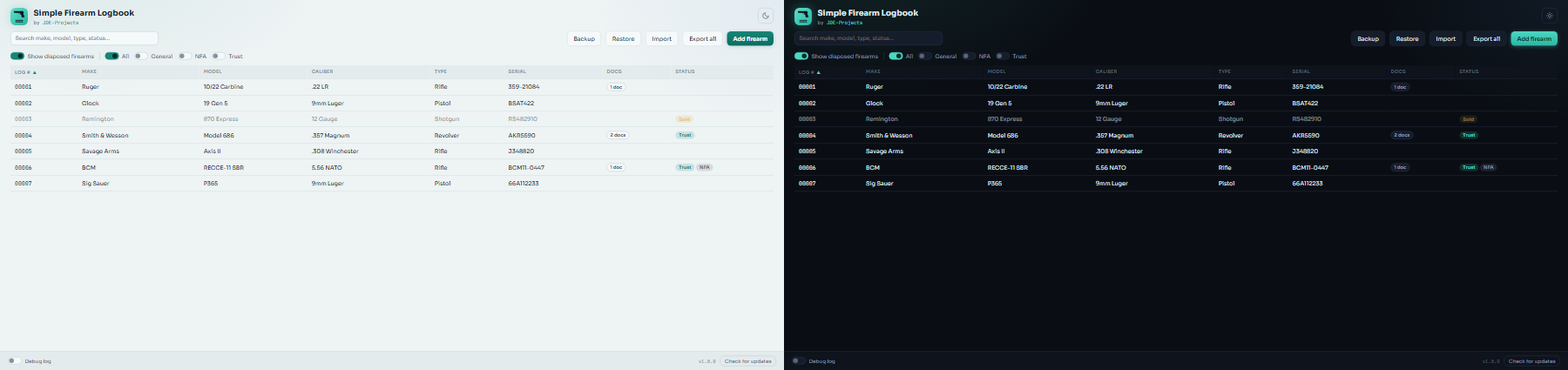 Dark and light themes
Highlights
- Sequential 5-digit log numbers, assigned automatically to each firearm.
- Photo attachments for each firearm: drag image files onto the add-photo window or browse for them, with a starred primary photo used in lists and exports.
- Document attachments for each firearm (receipts, permits, paperwork), with a count shown in the list.
- NFA and trust tracking: flag NFA items (form type and stamp date) and firearms held in a trust, each shown as a badge in the list.
- Search the list by make, model, type, status, and more, and filter it by group (General, NFA, Trust; tick several to see any of them) or show disposed firearms.
- Disposition tracking (sold, traded, lost, stolen) that keeps the record instead of deleting it.
- CSV import to bring in an existing collection, with a preview and per-row checks before anything is saved.
- Single-firearm HTML export with embedded photos, ready to share or archive standalone.
- Full-collection zip export: an HTML report, a CSV of every field, and the original photos.
- Backup and restore: save a single zip holding your whole logbook (database, photos, and documents), then restore it later with a preview and a safe swap that keeps your current data until the restore succeeds.
- Print-friendly export layout, independent of the app's own theme.
- Fully offline: your collection data never leaves the machine.
How it works
- Backend: Python with SQLite (standard library). Data is stored in
simple_firearm_logbook.db next to the exe, with photos copied into a photos\ folder and documents into an attachments\ folder alongside it.
- Window: pywebview on the Qt backend, UI in sfl/resources/simple_firearm_logbook-UI.html.
Download and run
Two ways to get it from the Releases page, pick one:
- Installer (recommended): download
SimpleFirearmLogbook-vX.Y.Z-setup.exe and
run it. Installs the app, adds a Start menu shortcut, and can be removed later
from Add or Remove Programs. Installs just for you by default (no admin); you can
choose all users during setup.
- Portable .zip: download
SimpleFirearmLogbook-vX.Y.Z.zip, extract it, and run
Simple Firearm Logbook.exe from inside the extracted folder. No install, good for
a locked-down PC or a USB stick. Keep the folder together.
Or install the same installer from the command line with WinGet:
winget install --exact --id JDEProjects.SimpleFirearmLogbook
Windows only, no Python or setup required. Unsigned, so SmartScreen may warn the
first time: More info > Run anyway.
Updating
Simple Firearm Logbook doesn't update itself. The bottom bar has a Check for updates button that tells you when a newer release is out; when it does, get the new version from the Releases page the same way you first installed it.
- Installer: download the new
SimpleFirearmLogbook-vX.Y.Z-setup.exe and run it. It installs over your current copy and keeps your logbook database, photos, and documents.
- Portable .zip: download and extract the new
SimpleFirearmLogbook-vX.Y.Z.zip. To keep your logbook database, photos, and documents, copy simple_firearm_logbook.db, the photos\ folder, the attachments\ folder, and the .pref file from the old folder into the new one.
- WinGet: run
winget upgrade --exact --id JDEProjects.SimpleFirearmLogbook. It runs the installer over your current copy, same as above. The WinGet listing can trail a new release by a few days while Microsoft reviews it.
Everything the app stores lives in the database, the photos folder, and the attachments folder next to the exe, so there's nothing else to carry over.
Verify this download (optional)
This release was built on GitHub from this public source, not on a personal
machine, and is signed with a build-provenance attestation. To confirm your
download is genuine, install the GitHub CLI and run:
gh attestation verify SimpleFirearmLogbook-vX.Y.Z.zip \
  --repo JDE-Projects/Simple-Firearm-Logbook \
  --signer-repo JDE-Projects/Build-Tools
A Verification succeeded! line means the file was built by the published
pipeline from this repo. You can also check the file against the published
.sha256.
Build from source (optional)
- Python 3 on PATH.
pip install -r requirements.txt (pinned versions; includes PySide6 and pywebview)
Keep simple_firearm_logbook.py, the sfl/ folder, and the .ico together.- Run from source:
python simple_firearm_logbook.py
- Build the .exe:
Build_Simple_Firearm_Logbook.bat -> dist\Simple Firearm Logbook\
Using it
- Add a firearm with its make, model, type, and whatever other details you know, including NFA or trust status.
- Add photos to it and star one as the primary photo, and attach documents like receipts or permits.
- Already have a collection in a spreadsheet? Import it from a CSV, review the preview, then save.
- Search or filter the list to find a firearm fast.
- When a firearm leaves your collection, record a disposition (sold, traded, lost, or stolen) instead of deleting it.
- Export a single firearm to HTML, or export the full collection to a zip with a report, CSV, and photos, for your own records.
Backup and restore
The toolbar has Backup and Restore buttons for keeping a complete, restorable copy of your logbook.
- Backup saves one
.zip file (default name like SFL_Backup_09012026_1430.zip) holding a safe copy of your database, every photo, and every document, plus a small inventory list. Put it somewhere off the machine (a USB stick or another drive) so a lost or dead PC doesn't take your records with it. If a photo or document the logbook expects is missing from disk, the backup records that rather than failing quietly.
- Restore reads a backup
.zip back in. You first see a preview of what it contains (how many firearms, photos, and documents, plus any warnings) before anything changes. On confirming, your current logbook is moved aside, not deleted, and only removed once the restore succeeds, so a problem partway through leaves your existing data intact. The database has to be complete and readable for a restore to go ahead; a few missing photos or documents are only a warning, not a stop.
Restore replaces your whole logbook with the backup's contents, so use it to move your collection to another machine or to recover, not to merge two logbooks.
Security and privacy
- Everything is stored locally next to the exe: the database, the photos folder, and the attachments folder.
- Network use. Other than the job you ask of it, this app makes one automatic network call: a check to GitHub for a newer release (at startup and when you press Check for updates), which sends only a version request. It collects and sends no personal data, usage data, or analytics.
- Privacy policy. The full privacy policy for this app and the other JDE-Projects tools is at https://jde-projects.com/privacy.
A note on how this was built
This project was built with AI assistance. The design decisions, feature
direction, and real-world testing were directed by me. The code was written
and revised with an AI assistant against that direction. Treat it like any
community tool: review and test it before relying on it.
License
Released under the PolyForm Noncommercial 1.0.0 license. See LICENSE. If the tool bundles
third-party code, see THIRD-PARTY-LICENSES.txt.
For commercial licensing, see the JDE-Projects support page.