yolomover


Move the Windows Recovery partition to the end of the disk so you can extend the boot volume (C:).
On Windows 10/11, Extend Volume is often greyed out because the WinRE recovery partition sits between C: and unallocated space. yolomover relocates that partition to the disk tail and then grows the OS volume — without manually chaining reagentc /disable, a partition GUI, reagentc /enable, and extend every time.
Download the latest Windows binary · Releases
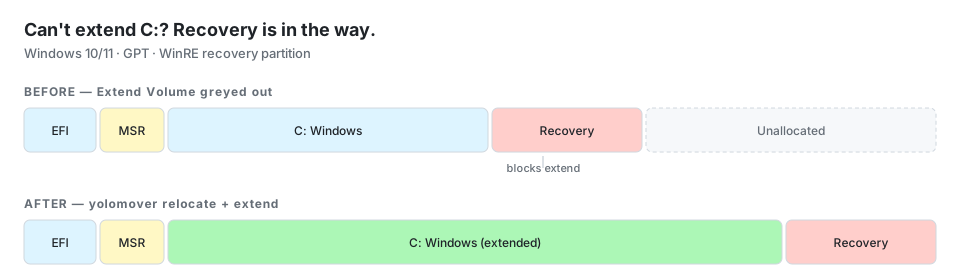
> The name is intentional. Repartitioning the system disk is high-risk. yolomover checks aggressively, warns loudly, and defaults to dry-run / confirmation.
Requirements
- Windows 10/11, 64-bit
- GPT system disk (MBR is detected and rejected)
- Administrator elevation
- Recovery partition type
{DE94BBA4-06D1-4D40-A16A-BFD50179D6AC} (Windows RE)
reagentc.exe (ships with Windows)
Build on any host; run only on Windows.
Quick start
# Inspect layout, recovery files, WinRE (safe, read-only)
yolomover inspect

# Show planned moves without writing
yolomover plan

# Step 1: move recovery to disk tail (disable WinRE → relocate → re-enable)
yolomover relocate --yes

# Step 2: grow the boot volume into freed space (after relocate succeeds)
yolomover extend --yes
What it does
- Detect physical system disk, GPT layout, recovery partition, and
reagentc /info.
- Validate preconditions (GPT, recovery GUID, alignment, free space at end).
relocate — disable WinRE, move recovery data to the tail, update GPT, re-enable WinRE.extend — grow the boot partition in GPT and extend NTFS on %SystemDrive% into contiguous free space.
Relocation and extend are separate commands on purpose: confirm recovery/WinRE before growing the OS volume.
Verification
| Step | Check |
|---|
inspect / plan | winre.wim and boot.sdi on the recovery partition |
relocate | winre.wim on the recovery partition after re-enable (≥ 1 MiB) |
extend | Boot partition grows in GPT; NTFS extended; before/after size summary |
reagentc /enable can take a few minutes; the tool prints a hint before it runs.
Safety model
- Subcommands:
inspect (read-only), plan (dry-run), relocate (mutating), extend (mutating).
relocate and extend require --yes plus typing YES at the confirmation prompt.- Refuses MBR, missing recovery partition, overlapping targets, and non-512-byte sectors.
- Uses sector-granular copy with overlap checks; updates primary and backup GPT entry arrays.
Known limitations
- Boot volume extend uses
IOCTL_DISK_GROW_PARTITION + FSCTL_EXTEND_VOLUME on %SystemDrive% (NTFS).
- Buffered overlap copies are capped at 2 GiB (typical recovery partitions are smaller).
- Must be tested on real hardware/VMs before production use.
Development
cargo build
cargo test
CI binary (GitHub Actions)
Every push to master builds on windows-2025 and uploads a workflow artifact.
Tagged releases (v*) attach the Windows binary to the GitHub Release automatically, e.g. yolomover-v1.0.0-x86_64-pc-windows-msvc.exe.
For untagged builds: repo → Actions → latest run → artifact yolomover-windows-x86_64.
Cross-compile locally:
rustup target add x86_64-pc-windows-msvc
cargo build --release --target x86_64-pc-windows-msvc
License
MIT